ShopMe WordPress Theme
by Monkeysan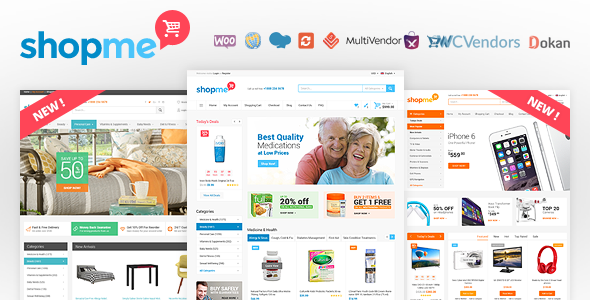
Stuck on your ShopMe WordPress theme? Let's fix it.
No endless back-and-forth. Just send us the details and we'll get it done.
No obligation · Replies within 1 hour · Quote within 1 day
Setup · Customization · Bug fixes · WooCommerce integration
About ShopMe WP Theme
ShopMe is a WooCommerce theme built by Monkeysan, designed specifically for online stores that need a clean, product-focused layout without a lot of visual noise. It ships with multiple homepage demos, a sticky header, and a mobile-friendly structure that works out of the box for most shop types.
The theme supports WooCommerce natively, with dedicated templates for product pages, category archives, and the checkout flow. Monkeysan has built in compatibility with popular plugins like YITH Wishlist and WooCommerce Quick View, which saves setup time compared to generic themes.
ShopMe suits store owners who want a polished storefront without hiring a designer to build one from scratch. It is well-suited to fashion, accessories, electronics, and lifestyle product stores. The codebase is relatively lean, which helps with page speed when configured correctly.
Get matched with a ShopMe developer in under one day
Tell us about your ShopMe project. Small fixes, ShopMe theme customization, or a full website build, whatever you need, we've got it covered.
We'll connect you to the right ShopMe developers, define the scope, and get everything 100% clear.
You'll get one estimate, hire your preferred developer, and start collaborating.
ShopMe is not a difficult theme, but WooCommerce customization has a lot of moving parts. Template hierarchy, plugin conflicts, checkout styling, and mobile layout issues are easy to get wrong without experience. FoxyConcept works with vetted WordPress developers through Codeable, matching you with someone who has hands-on WooCommerce and ShopMe experience. You get a real estimate before committing to anything, and no guesswork on whether the developer actually knows what they are doing.
Pros
- Native WooCommerce support with dedicated product, category, and checkout templates
- Multiple homepage demo layouts that import in one click
- Built-in compatibility with YITH Wishlist and WooCommerce Quick View
- Sticky header and mobile menu included without extra plugins
- Relatively lean codebase compared to bloated multipurpose themes
Cons
- Customizer options are limited for stores with specific branding requirements
- Mega menu setup can be confusing without documentation support
- Some Elementor widgets require extra CSS to match ShopMe's native styling
- Plugin update pace is slower than themes from larger development studios
- Support response times from Monkeysan can be inconsistent during busy periods
Who is ShopMe for?
Fashion and Apparel Stores
ShopMe’s clean grid layouts and lookbook-style product displays suit fashion stores well. The variation swatches integration makes it easy for customers to browse colour and size options without leaving the category page. Add a size guide popup and a wishlist, and the store feels close to a custom build without the cost.
Electronics and Gadget Shops
Electronics stores need clear product specs and quick comparison features. ShopMe handles product pages with multiple attributes well, and the quick view modal lets customers check key details without extra navigation. Pair it with a product comparison plugin for a more complete buying experience on higher-ticket items.
Home Decor and Furniture Retailers
Home decor stores benefit from ShopMe’s large image support and flexible homepage sections. Room-scene images display well in the full-width sliders. Category pages can be arranged to highlight collections by style or material, which suits stores with a curated product range rather than a high-volume SKU list.
Beauty and Skincare Brands
Skincare and beauty brands often need ingredient lists, how-to sections, and trust signals built into product pages. ShopMe’s product template supports tab sections for this kind of content. Custom typography choices through the theme customizer also help smaller brands establish a visual identity without starting from a blank page.
Accessories and Jewellery Boutiques
Jewellery and accessories stores need sharp product photography to convert visitors. ShopMe’s zoom and gallery features on product pages support high-resolution images without additional plugins. The wishlist integration also helps with this category, since many customers browse multiple times before purchasing jewellery items.

Customizing ShopMe
ShopMe gives you a solid starting point, but most stores need adjustments before going live. The theme customizer covers fonts, colors, header layout, and basic homepage sections. Beyond those controls, you will likely need custom CSS or template overrides to match your exact brand requirements.
Common customization requests include modifying the product card layout, adjusting the mega menu structure, and reworking the mobile navigation. A ShopMe expert can also help you set up homepage sections that use Elementor or the native page builder without breaking the theme’s built-in styling.
If your store has specific filtering, product comparison, or promotional banner needs, those usually require code-level changes. Working with a developer who knows the ShopMe theme structure will save you from the trial-and-error that comes with modifying unfamiliar template files.
Recommended plugins for ShopMe
ShopMe works well with a focused set of plugins. WooCommerce extensions like YITH Quick View, WooCommerce Wishlist, and Variation Swatches integrate cleanly. For page building, Elementor works with ShopMe though some widget styling will need adjustment.
For store performance, caching plugins like WP Rocket and image optimization tools are worth adding early. If your store grows, consider pairing ShopMe with a proper WordPress performance setup to handle traffic spikes without slowdowns.
For search visibility, connecting ShopMe to a solid WordPress SEO strategy matters more than most store owners expect at launch.
Not sure which plugins to use? This WordPress plugins directory covers the most popular options with reviews and setup guides.
ShopMe common issues
ShopMe theme header not showing on mobile
Mobile header issues in ShopMe usually come from a CSS conflict with a caching plugin or a third-party menu plugin. Start by clearing all caches, then check whether the issue persists without caching. If it does, deactivate plugins one at a time to isolate the conflict. If the mobile header disappears after a theme update, the child theme CSS may need to be updated to match the new header markup. If you cannot isolate the cause, a WordPress bug fixing service can diagnose it quickly.
WooCommerce checkout page broken after ShopMe update
Checkout page breaks after a theme update usually point to a template override in the child theme that is now out of date. ShopMe includes WooCommerce template files, and if you have copied any of those into a child theme, they need to be updated to match the new WooCommerce version. Check the WooCommerce status page under Tools for outdated templates. Replace the old template files with current versions and re-apply any custom changes carefully to avoid losing modifications.
ShopMe homepage demo not importing correctly
Failed demo imports in ShopMe are usually caused by server memory limits or a timeout during the import process. Set WP_MEMORY_LIMIT to at least 256MB and increase the PHP max execution time before retrying. Some hosting environments also block the external requests the importer needs. Try running the import again after checking these settings. If dummy content imports but images do not appear, the importer likely hit a timeout before fetching remote media files.
ShopMe product page layout not matching demo
If your ShopMe product page does not match the demo, the most common cause is missing plugins. ShopMe demos often rely on YITH Wishlist, Variation Swatches, or Quick View being active. Check the required and recommended plugins list in the theme setup wizard. Also confirm the WooCommerce product type is set correctly. Some demo layouts also depend on specific product data, like gallery images or custom tab content, that does not carry over with a standard product setup.
ShopMe FAQ
ShopMe is built for WooCommerce and generally keeps pace with major WooCommerce releases. That said, it is worth checking the Monkeysan changelog before updating WooCommerce on a live store. Theme updates sometimes lag a release cycle behind. Testing on a staging environment before updating production is strongly recommended, particularly for checkout and product page templates that ShopMe overrides.
ShopMe is compatible with Elementor for building and editing page content. The main limitation is that some ShopMe-specific sections and header styles are not editable through Elementor’s interface. You can use Elementor for inner pages, about pages, and custom landing pages without issues. For the homepage, mixing ShopMe’s native sections with Elementor widgets sometimes requires extra CSS to keep styling consistent across the layout.
Yes. You do not need to import demo content to use ShopMe. The theme customizer lets you configure colours, fonts, and layout options independently. Most store owners skip the demo import and configure the homepage manually using the available page builder or widget areas. Demo content is mainly useful for reference when trying to recreate a specific layout seen in the preview.
ShopMe includes a mega menu option accessible through the WordPress menu editor. To enable it, go to Appearance, then Menus, and look for the ShopMe mega menu settings on each top-level menu item. You can add columns, feature images, and sub-items. The setup is done through the menu panel rather than a visual drag-and-drop interface, so it takes a few minutes to get used to the structure before it behaves as expected.
ShopMe can work with WPML for multilingual WooCommerce stores, but full compatibility depends on which version of WPML you are using and how ShopMe templates are structured. String translation for theme-specific text usually requires registering strings with WPML manually or through the WPML String Translation module. Test the checkout flow carefully in each language, as translated checkout pages sometimes lose ShopMe’s custom styling on string-heavy elements.
Hire a ShopMe Developer
Need changes to your ShopMe store that go beyond the customizer? Whether it is a layout fix, a new feature, or a full store build, FoxyConcept connects you with a vetted ShopMe developer through Codeable. Post your project and get a free estimate within 24 hours, with no obligation to proceed. Get your free estimate here and describe what you need in plain language.
You'll need a free Codeable account so developers can ask questions and send their quotes.