Tokoo WordPress Theme
by MadrasThemes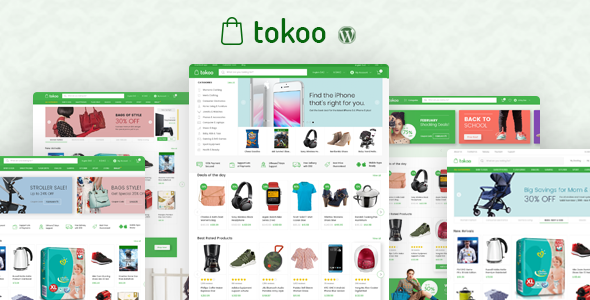
Stuck on your Tokoo WordPress theme? Let's fix it.
No endless back-and-forth. Just send us the details and we'll get it done.
No obligation · Replies within 1 hour · Quote within 1 day
Setup · Customization · Bug fixes · WooCommerce integration
About Tokoo WP Theme
Tokoo is a WooCommerce theme built by MadrasThemes, designed specifically for electronics and gadget stores. It takes visual cues from major retail sites like Amazon and Flipkart, giving shoppers a familiar browsing experience without the need for heavy customization out of the box.
The theme ships with multiple homepage layouts, a sticky comparison bar, quick view modals, and an AJAX-powered product filter. It works with popular plugins including YITH WooCommerce Wishlist, WooCommerce Brands, and WooCommerce Product Filter. Tokoo is built on a custom framework by MadrasThemes and is not based on a third-party starter theme, which keeps the codebase relatively focused. It suits stores selling consumer electronics, accessories, computers, or mobile devices at any scale.
Get matched with a Tokoo developer in under one day
Tell us about your Tokoo project. Small fixes, Tokoo theme customization, or a full website build, whatever you need, we've got it covered.
We'll connect you to the right Tokoo developers, define the scope, and get everything 100% clear.
You'll get one estimate, hire your preferred developer, and start collaborating.
Tokoo has a lot of moving parts. The Electro Extensions plugin, multiple layout modes, and WooCommerce integration points mean small configuration mistakes can break the storefront. A Tokoo expert on Codeable has worked with the theme before and knows where the edge cases are. Whether you need a full store build, a layout fix, or a custom feature added on top of Tokoo’s framework, you get a developer who understands the theme at a code level, not just the customizer.
Pros
- Purpose-built for electronics stores with product comparison and spec tables included
- Multiple homepage demos closely modeled on major retail layouts
- AJAX product filtering works without additional paid plugins
- Sticky add-to-cart bar improves conversion on long product pages
- Regular updates from MadrasThemes with ongoing WooCommerce compatibility
Cons
- Relies heavily on the companion Electro Extensions plugin, creating a tight dependency
- Not built on a standard framework like Underscores, so child theming follows non-standard patterns
- Demo import can fail or produce incomplete results on shared hosting environments
- Performance requires tuning out of the box due to heavy use of scripts and styles
- Limited community resources compared to themes like Flatsome or Astra
Who is Tokoo for?
Consumer Electronics Store
Tokoo suits stores selling laptops, TVs, cameras, and audio equipment. The built-in comparison table lets customers evaluate specs side by side, which reduces pre-purchase questions. Category mega menus handle deep product trees without cluttering the navigation.
Mobile Phone and Accessories Shop
Phone accessory stores benefit from Tokoo’s quick view and wishlist support. Shoppers can browse cases, chargers, and screen protectors quickly without leaving category pages. The theme’s brand filtering helps when inventory is organized around manufacturers.
Computer Hardware Retailer
CPU, GPU, and peripheral retailers can use Tokoo’s spec-heavy product layouts to display technical details clearly. The sticky comparison bar is particularly useful when customers are deciding between two versions of the same component.
Gadget Subscription Box
Subscription-based gadget retailers can adapt Tokoo’s homepage sections to highlight featured products and upcoming drops. With some customization, the layout supports membership-gated pricing and recurring order flows through WooCommerce Subscriptions.
Multi-Vendor Electronics Marketplace
Tokoo can work with Dokan or WCFM Marketplace plugins to support multiple vendors selling electronics. The brand and category structure maps well to a marketplace model. A developer will need to handle vendor-specific layout adjustments.

Customizing Tokoo
Tokoo includes a live customizer with controls for colors, typography, header layouts, and sidebar positions. You can switch between three distinct homepage demos, adjust product card styles, and configure the mega menu without touching code. That said, getting beyond the defaults takes real effort.
Custom widget areas, conditional sidebars, and non-standard category layouts often require PHP template overrides or custom CSS. A Tokoo expert can wire up features like brand-filtered landing pages, custom checkout flows, or a product comparison page that matches your branding. If you need Tokoo to behave differently from its demos, working with a developer saves significant trial and error.
Recommended plugins for Tokoo
Tokoo is built to work closely with the MadrasThemes plugin ecosystem. The companion plugin Electro Extensions adds shortcodes, widgets, and section builders that are specific to Tokoo’s layout system. Beyond that, the theme integrates well with WooCommerce Brands, YITH Wishlist, and WOOF Product Filter.
For site speed, pairing Tokoo with a caching layer and image optimization plugin makes a noticeable difference. Check out WordPress performance optimization and WordPress SEO if you want to get more out of the theme after setup.
Not sure which plugins to use? This WordPress plugins directory covers the most popular options with reviews and setup guides.
Tokoo common issues
Tokoo demo import not working
Demo import failures in Tokoo are usually caused by PHP memory limits, execution time caps, or missing required plugins. Make sure both Tokoo and Electro Extensions are active before importing. Set memory_limit to at least 256MB and max_execution_time to 300 in your php.ini. If the importer still stalls, try importing XML content manually through WordPress. For persistent issues, our WordPress bug fixing service can resolve it directly.
Tokoo product filter not showing results
If the AJAX filter returns no results or doesn’t update the product grid, the issue is often a conflict with a caching plugin or a JavaScript error from another script. Disable page caching temporarily and check the browser console for errors. Ensure the filter plugin Tokoo supports (WOOF or similar) is configured to use AJAX mode. Also confirm that your WooCommerce product attributes are set up correctly for filtering.
Tokoo homepage sections not displaying after update
After updating Tokoo or Electro Extensions, homepage sections built with the theme’s shortcodes can disappear or lose styling. This typically happens when the plugin version and theme version fall out of sync. Update both together, then clear your site cache and any server-level cache. If sections are still missing, check the page builder content for deprecated shortcode syntax that may need to be replaced.
Tokoo slow page load speed
Tokoo loads multiple stylesheets and scripts by default, which adds page weight. Start by enabling a caching plugin and a CDN. Minify and combine CSS and JS where possible. Lazy load images across product grids. Disable unused Electro Extensions widgets. Review WordPress performance optimization for a full checklist. On shared hosting, moving to a VPS or managed host makes a bigger difference than most plugin-level fixes.
Tokoo FAQ
MadrasThemes updates Tokoo regularly to maintain WooCommerce compatibility. Check the changelog on ThemeForest before updating to confirm both the theme and Electro Extensions plugin have been tested with your current WooCommerce version. Running major WooCommerce updates on a staging site first is always the safer approach.
Yes, in practice. Tokoo’s homepage sections, shortcodes, and several widget areas depend on Electro Extensions. Without it, most homepage demos will not render correctly and key features like brand sections and product carousels will not function. Treat the plugin as a required component, not optional.
Tokoo is not built around Elementor or WPBakery. It uses its own shortcode system through Electro Extensions. You can add Elementor to the site, but mixing it with Tokoo’s layout system on the same pages tends to create conflicts. Most developers stick with the native Tokoo approach for store pages.
Create a child theme using the standard WordPress method: a new folder with a style.css referencing Tokoo as the template and a functions.php that enqueues the parent styles. MadrasThemes includes documentation on this. Template overrides go in the child theme folder following WooCommerce’s standard override structure.
Tokoo is technically a WooCommerce theme that can run any product type, but its design language is built around electronics retail. Using it for fashion, food, or furniture would feel visually off without significant CSS work. For non-electronics stores, a more flexible theme would be a better starting point.
Hire a Tokoo Expert Developer
FoxyConcept connects you with vetted Tokoo developers through Codeable. Post your project and get a free estimate within 24 hours. No commitment required. Whether you need a full store build, a layout change, or help fixing a broken feature, you work with a developer who knows Tokoo. Get your free estimate today and see exactly what your project will cost before you hire.
You'll need a free Codeable account so developers can ask questions and send their quotes.