Dani WordPress Theme
by SpabRice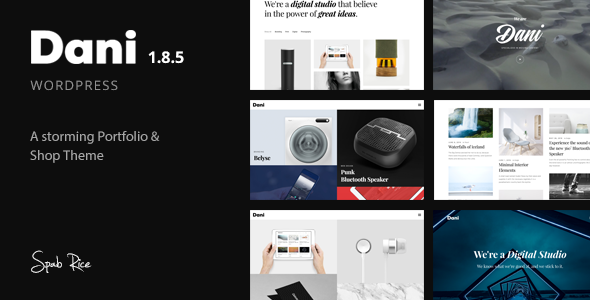
Stuck on your Dani WordPress theme? Let's fix it.
No endless back-and-forth. Just send us the details and we'll get it done.
No obligation · Replies within 1 hour · Quote within 1 day
Setup · Customization · Bug fixes · WooCommerce integration
About Dani WP Theme
Dani is a clean, minimal WordPress theme built by SpabRice. It’s designed for personal blogs, lifestyle writers, and creatives who want their content to lead. The layout is simple by design: wide typography, generous whitespace, and a restrained color palette that keeps focus on what’s written.
Dani works with the WordPress block editor and supports popular plugins without needing heavy configuration. It loads fast on shared hosting, which makes it a practical choice for solo bloggers who don’t want to manage performance separately.
The theme is responsive across devices and follows current WordPress coding standards. If you write regularly and want a site that looks polished without a lot of setup, Dani is worth considering. It won’t do everything, but what it does, it does well.
Get matched with a Dani developer in under one day
Tell us about your Dani project. Small fixes, Dani theme customization, or a full website build, whatever you need, we've got it covered.
We'll connect you to the right Dani developers, define the scope, and get everything 100% clear.
You'll get one estimate, hire your preferred developer, and start collaborating.
Dani looks simple, but getting it to do exactly what you want takes real WordPress knowledge. Whether you’re dealing with a layout issue, building out functionality the theme doesn’t include, or migrating an existing blog onto Dani, guessing costs time.
FoxyConcept works through Codeable, a vetted network of WordPress developers. You post your project, get a free estimate within 24 hours, and only move forward if you want to. No pressure, no risk.
Pros
- Minimal design keeps focus on written content without visual distraction
- Fast load times out of the box — no bloated scripts or unused assets
- Compatible with the WordPress block editor without requiring page builder plugins
- Clean, standards-compliant code that plays well with most plugins
- Easy to set up for bloggers who don't want a complex configuration process
Cons
- Limited built-in layout options — not suited for portfolio or multi-column sites
- WooCommerce product pages require custom styling to match the theme design
- Header customization options are minimal compared to more flexible themes
- No built-in mega menu or advanced navigation — standard menu only
- SpabRice's support and update frequency can be inconsistent compared to larger theme developers
Who is Dani for?
Personal Blog
Dani’s typography-first layout is a natural fit for personal blogs. Posts are readable, the archive is clean, and nothing competes with the writing. If your goal is a site where content drives everything and design stays out of the way, Dani’s defaults get you close without much adjustment.
Lifestyle and Travel Writing
Lifestyle and travel writers need strong image presentation alongside readable text. Dani handles featured images well and keeps article pages uncluttered. You’ll want a developer to refine the gallery handling and potentially build out a custom category page if you’re covering multiple destinations or topics.
Food and Recipe Blog
Food blogs depend on clean post layouts and fast load times for recipe content. Dani works here, especially if you pair it with a recipe plugin like WP Recipe Maker. The default styling may need adjustment to match recipe card blocks, but the underlying structure supports this use case well.
Freelance Writer Portfolio
A freelance writer needs a site that looks professional without overshadowing the work samples. Dani’s minimal aesthetic does that. You’ll likely want a custom clips or portfolio page added, since the theme doesn’t include one by default, but the visual tone is right for this audience.
Niche Newsletter Site
If you run a content-focused newsletter and want a matching site where readers can browse archives and subscribe, Dani fits well. It’s clean enough to feel like a publication. Connecting it to Mailchimp or ConvertKit via a form plugin is straightforward and doesn’t require custom development.

Customizing Dani
Dani gives you a working site out of the box, but most users want to push it further. That might mean adjusting typography, reworking the header layout, adding a custom color scheme, or modifying how post archives display.
Some of that is possible through the WordPress Customizer. Anything more specific — like changing sidebar behavior, altering the footer structure, or adapting the theme for a use case SpabRice didn’t design for — typically needs custom code.
A Dani expert can handle those changes cleanly, without breaking updates or creating technical debt. At FoxyConcept, we work with Dani regularly and know where its defaults end and where custom development starts. We build child themes, write targeted CSS, and modify templates to match what you actually need rather than what the theme ships with.
Recommended plugins for Dani
Dani pairs well with WooCommerce if you want to add a small shop, though the default product templates will need styling to match the theme’s aesthetic. WPForms and Gravity Forms integrate without issues for contact and newsletter capture.
For SEO, Dani’s clean markup works well alongside a proper SEO setup. For speed, the theme is already lean, but adding caching and image optimization through WordPress performance work will push scores higher. Yoast, Rank Math, and standard analytics plugins all work as expected.
Not sure which plugins to use? This WordPress plugins directory covers the most popular options with reviews and setup guides.
Dani common issues
Dani theme header not showing logo correctly
Logo display problems in Dani are usually caused by an image dimension mismatch or a CSS conflict introduced by another plugin. First, check the recommended logo size in the Customizer — Dani has a specific max-width set in its stylesheet. If the logo is cropped or misaligned, a small CSS override targeting .site-logo img usually resolves it. If a plugin is injecting conflicting styles, disable plugins one at a time to isolate the source. Still stuck? Our bug fixing service can diagnose it quickly.
Dani WordPress theme fonts not loading on mobile
If fonts aren’t loading on mobile, the most common cause is a caching plugin serving a stale version of the stylesheet, or a performance plugin deferring the font CSS incorrectly. Check your caching settings first and purge all caches. If you’re using a plugin that inlines or defers CSS, whitelist the font files. Google Fonts loaded via Dani’s wp_enqueue_style calls can also be blocked by some privacy plugins — check your cookie or GDPR plugin settings if that’s relevant.
Dani theme sidebar disappearing on single posts
Dani’s sidebar visibility on single posts is controlled by a template condition in the theme files. By default, some versions of the theme hide the sidebar on single post views to keep the reading experience clean. If you want the sidebar to appear consistently, you’ll need to edit the single.php template or create a child theme override. Avoid editing the parent theme directly — updates will overwrite changes. A child theme is the right approach here and takes less than an hour to set up correctly.
Dani theme not compatible with WooCommerce product pages
WooCommerce uses its own template files that Dani doesn’t override by default. This means product pages, cart, and checkout will inherit WooCommerce’s base styles rather than Dani’s design. The fix is to copy WooCommerce template files into a /woocommerce/ folder inside a Dani child theme and restyle them to match. It’s not complicated work, but it does require knowing which templates to copy and how WooCommerce’s template hierarchy functions. Our WordPress development team handles this regularly.
Dani FAQ
Dani is available as a free theme through the WordPress theme directory. SpabRice does not currently offer a separate premium or pro version of Dani. What you download from WordPress.org is the full theme. If you need features beyond what Dani includes, those need to be built through custom development rather than unlocked through an upgrade.
Dani is not built for page builders. It works with the native WordPress block editor, and that’s where it performs best. You can technically install Elementor alongside it, but Dani’s styling will conflict with Elementor’s output in ways that need manual fixing. If you rely heavily on a drag-and-drop builder, a theme built specifically for that builder will give you fewer headaches than forcing Dani to work with one.
The most reliable way to add a custom font to Dani is through a child theme. Enqueue the font in your child theme’s functions.php using wp_enqueue_style, then apply it in your child theme’s style.css by targeting the relevant elements. Plugins like Custom Fonts or Typekit can also work, but a child theme approach keeps things cleaner and doesn’t depend on a third-party plugin staying maintained.
SpabRice has released updates for Dani, but the update cadence is not as consistent as themes backed by larger development teams. Before relying on Dani for a production site, check the theme’s changelog on WordPress.org and look at the last updated date. If active development is a concern for your project, factor in the possibility of needing custom maintenance support. Our WordPress maintenance service covers themes like Dani.
Switching themes does not affect your WordPress content — posts, pages, and media stay intact. What changes is how that content is displayed. After activating Dani, you’ll likely need to adjust menus, widgets, and homepage settings. If your previous theme used shortcodes or custom post types, those may not render correctly under Dani. A proper migration process checks for these issues before you go live rather than after.
Hire a Dani WordPress Developer
If you need help customizing Dani, fixing a layout problem, or extending it with functionality SpabRice didn’t build in, we can help. FoxyConcept delivers WordPress development through Codeable, which means you get a vetted developer and a clear scope before any work starts.
Get a free estimate — describe what you need, and we’ll come back to you within 24 hours. No obligation to hire.
You'll need a free Codeable account so developers can ask questions and send their quotes.