NeoBeat WordPress Theme
by Elated-Themes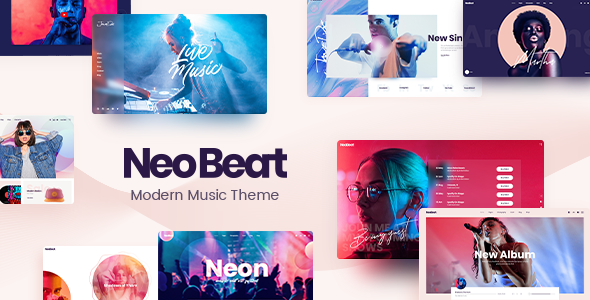
Stuck on your NeoBeat WordPress theme? Let's fix it.
No endless back-and-forth. Just send us the details and we'll get it done.
No obligation · Replies within 1 hour · Quote within 1 day
Setup · Customization · Bug fixes · WooCommerce integration
About NeoBeat WP Theme
NeoBeat is a WordPress theme by Elated Themes built for music artists, bands, DJs, and music-related businesses. It ships with a stack of pre-built demo sites covering different music genres and event styles, so you get a working starting point rather than a blank canvas.
The theme integrates with WooCommerce for selling merch or tickets, supports audio and video players natively, and includes event management features out of the box. Elated Themes built it on their own Elated Core plugin framework, which handles most of the custom post types and shortcodes.
It works with Elementor, which gives you visual control over layouts without touching code. For musicians who want a professional site without hiring a developer, NeoBeat covers the basics well. For more complex builds, you will likely need someone with hands-on experience with the theme.
Get matched with a NeoBeat developer in under one day
Tell us about your NeoBeat project. Small fixes, NeoBeat theme customization, or a full website build, whatever you need, we've got it covered.
We'll connect you to the right NeoBeat developers, define the scope, and get everything 100% clear.
You'll get one estimate, hire your preferred developer, and start collaborating.
NeoBeat has enough moving parts that small configuration mistakes can break layouts or slow your site down. An experienced developer who knows Elated Themes’ framework will set things up correctly the first time. Through Codeable, you get access to vetted WordPress professionals who have worked with themes like NeoBeat before. No junior freelancers, no guesswork. Post your project, get matched within 24 hours, and receive a free estimate before you commit to anything.
Pros
- Multiple pre-built music demo sites included, covering bands, DJs, and record labels
- Native audio and video player support without needing a separate plugin
- WooCommerce integration works well for selling music, merch, and event tickets
- Event and album custom post types are built in through the Elated Core plugin
- Elementor compatibility gives you visual layout control across all pages
Cons
- Requires the Elated Core plugin, creating a dependency that complicates switching themes later
- The options panel is large and poorly organized, making it hard to find specific settings
- Demo content import can be slow and sometimes fails on lower-tier hosting
- Out-of-the-box performance scores are mediocre due to heavy scripts and unoptimized assets
- Support from Elated Themes is limited to their forum, with response times that vary widely
Who is NeoBeat for?
Bands and Music Artists
NeoBeat’s band member profiles, album archive, and tour date features make it a practical choice for groups releasing music and booking shows. You can display discography, embed tracks, and link ticket sales through WooCommerce without piecing together multiple plugins to get there.
DJs and Electronic Music Producers
The theme’s dark visual style and audio player options suit DJ portfolios well. Mix uploads, booking inquiry forms, and event archives can all be configured from the included demo templates. The Elementor integration makes it straightforward to rearrange sections to match a DJ’s specific brand layout.
Music Labels and Agencies
Labels managing multiple artists can use NeoBeat’s roster pages and custom post types to organize releases and artist profiles. WooCommerce handles digital downloads and physical sales. The multi-demo library means you can pick a starting point that fits the label’s visual direction without heavy customization work upfront.
Live Event Promoters
Event promoters benefit from NeoBeat’s built-in event post type, which supports dates, venues, and ticket links. You can build event archive pages and single event layouts using the included templates. For high-volume event listings, pairing with a dedicated event plugin gives you more filtering and ticketing control.
Podcast and Internet Radio Shows
Podcast sites and internet radio stations can use NeoBeat’s audio player and episode archive layouts as a foundation. The theme does not include a native podcast feed builder, so you will need a plugin like Seriously Simple Podcasting alongside it. The visual style works well for audio-first content brands.

Customizing NeoBeat
NeoBeat gives you a large number of options through the Elated Options panel, covering typography, colors, header styles, and footer layouts. Combined with Elementor, you can adjust most visual elements without writing CSS. That said, the sheer volume of settings can be confusing, and some options interact with each other in ways that are not immediately obvious.
Custom post types for albums, events, and band members are handled through Elated Core, so customizing those areas often requires template edits or child theme work. If you want a layout that falls outside the included demos, a NeoBeat expert can save you hours of trial and error.
Building a child theme from the start is strongly recommended if you plan to modify any template files, since theme updates will overwrite direct edits without warning.
Recommended plugins for NeoBeat
NeoBeat works with WooCommerce for online merch stores and ticket sales. The Elated Core plugin is required and handles albums, events, and band member post types. Elementor Pro unlocks additional widgets that pair well with the theme’s design style.
For sites that need strong search visibility, pairing NeoBeat with a solid SEO setup matters. See our WordPress SEO service for help there. If your site carries a lot of audio or video content, page speed needs attention early. Our WordPress performance service covers caching, image optimization, and media delivery for music-heavy sites.
Not sure which plugins to use? This WordPress plugins directory covers the most popular options with reviews and setup guides.
NeoBeat common issues
NeoBeat demo import not working
Demo import failures in NeoBeat usually come down to server memory limits or PHP execution timeouts. Set max_execution_time to at least 300 and memory_limit to 256M in your php.ini or wp-config.php. If the import stalls mid-way, clear the database and retry. Some hosts block the XML import file size. If issues continue, a developer can import demo content manually using WP-CLI. See our bug fixing service if you need hands-on help.
NeoBeat audio player not showing on mobile
The NeoBeat audio player occasionally fails to render on mobile due to JavaScript conflicts with other plugins or caching plugins serving stale assets. Start by disabling caching and testing. Then deactivate plugins one by one to isolate a conflict. If you are using a minification plugin, exclude the Elated Core scripts from minification. Clearing the browser cache on the device is also worth doing before deeper investigation.
NeoBeat slow loading speed after setup
NeoBeat loads several scripts and stylesheets from the Elated Core plugin that are not always needed on every page. Start by enabling caching through a plugin like WP Rocket or LiteSpeed Cache. Defer non-critical JavaScript and optimize images before upload. If you imported a demo, check for unused shortcodes and widgets still rendering hidden content. Our WordPress performance service can audit and fix this properly.
NeoBeat layout broken after update
Layout breaks after a NeoBeat update usually happen when you edited theme files directly instead of using a child theme. The update overwrites your changes. If you have a child theme set up, check whether the parent template structure changed and update your overrides to match. If you were editing the parent theme directly, you will need to re-apply your changes to the updated files. Going forward, always use a child theme for any file-level customization.
NeoBeat FAQ
Yes, NeoBeat is one of the more practical choices for band sites. It includes album archives, band member profiles, tour date displays, and audio player support without requiring additional plugins for those features. The included demos give you a working structure to build from rather than starting from scratch.
Yes, NeoBeat supports Elementor. Most page layouts can be edited visually using Elementor’s drag-and-drop builder. The theme’s custom post types for albums and events use their own templates, so those areas have less Elementor flexibility and may need developer work for significant changes.
Yes. NeoBeat integrates with WooCommerce for selling physical merchandise, digital downloads, and linking to external ticket platforms. Setup requires configuring WooCommerce separately. For digital music sales with licensing controls, you may need an additional plugin on top of the standard WooCommerce setup.
Yes, Elated Core is required for NeoBeat to function properly. It powers the custom post types, shortcodes, and many of the theme’s built-in features. This creates a dependency on the plugin, which is worth considering if you ever want to switch themes, since your album and event content is tied to that plugin’s data structure.
Migrating an existing site to NeoBeat is possible but requires careful planning. Content migrates cleanly through standard WordPress tools, but your existing layout will not carry over automatically. You will need to rebuild pages using NeoBeat’s templates or Elementor. Our WordPress migration service can handle the technical side of moving your site safely.
Hire a NeoBeat Expert Developer
Whether you need a full NeoBeat site built from a demo, a custom layout that goes beyond the included templates, or fixes for something that stopped working after an update, we can help. Work is handled through Codeable’s vetted developer network. Get a free estimate and describe your project. No obligation, no upfront payment, and you only proceed if the quote works for you.
You'll need a free Codeable account so developers can ask questions and send their quotes.