Groci WordPress Theme
by KlbTheme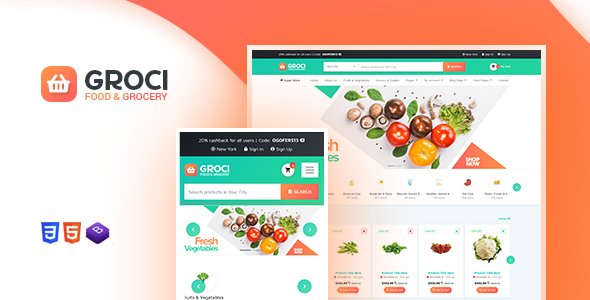
Stuck on your Groci WordPress theme? Let's fix it.
No endless back-and-forth. Just send us the details and we'll get it done.
No obligation · Replies within 1 hour · Quote within 1 day
Setup · Customization · Bug fixes · WooCommerce integration
About Groci WP Theme
Groci is a grocery store WordPress theme built by KlbTheme. It ships with WooCommerce support out of the box and is aimed at online supermarkets, organic food stores, and fresh produce shops. The theme includes a pre-built homepage with product category grids, a promotional banner system, and a sticky header with cart integration.
KlbTheme built Groci around a clean, food-retail layout. You get multiple homepage demos, AJAX-powered product filtering, and a quick-view product modal. It also includes a multi-column mega menu suited to stores with large category trees. The design skews toward greens and fresh tones, which suits the grocery niche well without heavy customization. Page speed depends on how many plugins and demo content blocks you keep active after setup.
Get matched with a Groci developer in under one day
Tell us about your Groci project. Small fixes, Groci theme customization, or a full website build, whatever you need, we've got it covered.
We'll connect you to the right Groci developers, define the scope, and get everything 100% clear.
You'll get one estimate, hire your preferred developer, and start collaborating.
Groci has enough moving parts that most store owners hit a wall at some point. WooCommerce configuration, delivery zone setup, custom product attributes, or a broken layout after an update are all common friction points. Rather than spending days in support forums, working with a developer who has handled Groci and KlbTheme builds before saves real time. Through Codeable, you get matched with vetted WordPress developers who know WooCommerce inside out. Post your project, get an estimate free, and only move forward if it makes sense.
Pros
- Pre-built grocery store layout means minimal design work before launch
- Elementor integration makes homepage sections editable without touching code
- AJAX product filtering keeps the shopping experience fast on category pages
- Mega menu handles large product category trees cleanly
- Quick-view product modal reduces page loads during browsing
Cons
- Demo import brings in a large amount of content that must be cleaned up manually
- Theme updates from KlbTheme can be infrequent, leaving compatibility gaps with newer WooCommerce versions
- Heavy reliance on Elementor means slower page loads if too many widgets are stacked
- Support from KlbTheme is limited to comments on ThemeForest, response times vary
- Custom checkout modifications require WooCommerce PHP knowledge not covered in theme documentation
Who is Groci for?
Online Grocery Supermarket
Groci was built for this exact use case. The multi-column mega menu handles hundreds of SKUs across produce, dairy, frozen, and household categories. Combine it with a product filter plugin and customers can narrow down by brand, dietary label, or price without leaving the category page.
Organic and Health Food Store
The clean, green-toned design translates naturally to organic and health food branding. You can highlight certifications, source information, and ingredient lists using Elementor sections. Pair with a WooCommerce subscription plugin to offer weekly organic boxes with minimal extra development work.
Farm Box and Subscription Delivery
Farm box businesses work well with Groci when combined with WooCommerce Subscriptions. Customers can choose a box size, set delivery frequency, and manage their plan from the account dashboard. A developer can add a delivery date picker and cutoff logic tied to your fulfilment schedule.
Butcher or Specialty Meat Shop
Groci’s product grid and quick-view modal work for specialty food retail beyond just produce. A butcher shop can use custom attributes for cut type, weight, and sourcing. The theme handles variable products cleanly, which is important when pricing depends on weight or portion size.
Local Ethnic or International Grocery
International grocery stores often carry products with non-English names and complex category structures. Groci supports WPML for multilingual setups and the mega menu can reflect a store organized by cuisine or country of origin. Custom banners can highlight seasonal or cultural promotions without touching code.

Customizing Groci
Groci connects to the WordPress Customizer for basic changes like colors, fonts, and header layout. Beyond that, it uses Elementor as the primary page builder, so most visual editing happens in a drag-and-drop environment. KlbTheme provides pre-built Elementor sections for product sliders, deal countdowns, and category showcases.
Custom work gets more technical quickly. Adjusting the WooCommerce cart behavior, adding a custom delivery date picker, or restructuring the checkout flow typically requires PHP and WooCommerce hooks. A Groci expert can also help you set up multi-vendor support via Dokan or WCFM, connect a POS plugin, or build out a subscription box feature. These go well beyond what the Customizer handles on its own.
Recommended plugins for Groci
Groci works with the standard WooCommerce extension library. Common additions include WooCommerce Subscriptions for recurring grocery boxes, YITH WooCommerce Wishlist, and a product filter plugin like FiboFilters or AJAX Product Filters. For delivery logistics, many store owners add Delivery Date for WooCommerce or Orderable.
If performance becomes an issue after adding plugins, a full audit can help. Check our WordPress performance service for caching, image optimization, and database cleanup. For organic traffic, pairing Groci with a solid SEO setup via our WordPress SEO service gives grocery stores a real edge in local search.
Not sure which plugins to use? This WordPress plugins directory covers the most popular options with reviews and setup guides.
Groci common issues
Groci theme homepage not loading correctly after update
Homepage layout breaks after an update usually point to an Elementor version conflict or a missing KlbTheme plugin like KlbCore or KlbProduct. First, check if all required plugins bundled with the theme are active and up to date. If the layout still breaks, regenerate Elementor CSS by going to Elementor > Tools > Regenerate Files. If that does not fix it, a developer can review the error log and restore the template. Our WordPress bug fixing service covers this type of issue.
WooCommerce cart not working in Groci theme
Cart issues in Groci are often caused by caching plugins storing a version of the page with an empty cart state. Start by purging all caches and testing in a private browser window. If the problem persists, check for JavaScript conflicts using the browser console. WooCommerce AJAX cart calls can break when another plugin enqueues a conflicting jQuery version. Disabling plugins one at a time helps isolate the cause. A developer can trace the broken AJAX request directly in the network tab.
Groci Elementor sections showing blank or broken layout
Blank Elementor sections after a Groci update typically mean a widget registered by a KlbTheme plugin is no longer available. This happens when the KlbCore or KlbElement plugin gets deactivated or its version falls behind the theme. Reactivating required plugins usually restores the widgets. If templates show a missing widget error, the widget may have been renamed in a newer version and the saved template needs to be rebuilt or remapped by a developer.
Groci theme slow loading time on product pages
Groci product pages can get heavy when you load multiple image galleries, related product sliders, and review sections together. Start by measuring with GTmetrix to see which elements are slowing the load. Common fixes include converting images to WebP, enabling lazy loading, and reducing the number of related products shown. Removing unused Elementor widget libraries also helps. For a full audit and fix, see our WordPress performance service.
Groci FAQ
Groci is built for WooCommerce but KlbTheme does not always release updates immediately after major WooCommerce versions ship. Check the ThemeForest changelog before updating WooCommerce on a live site. It is safer to test updates on a staging environment first. Known compatibility issues after updates are usually fixed within a few weeks by KlbTheme, or can be patched by a developer sooner if your store cannot wait.
Groci’s pre-built demo templates are designed to work with Elementor free. However, some advanced layout features and popup builders used in certain demo sections require Elementor Pro. If you are building from scratch rather than editing the demo, the free version of Elementor covers most needs. Check which widgets your imported template uses before deciding whether Pro is necessary for your specific build.
Yes, you can set up Groci without importing demo content. You will need to manually create pages, assign the correct Elementor templates, and configure WooCommerce shop pages. It takes more initial setup time but avoids the cleanup work of removing demo posts, images, and placeholder products. Starting clean is often preferable if you already have your product catalog ready to import.
Groci stores customizations in the WordPress Customizer settings and in your Elementor page templates, not in the theme files directly. As long as you have not edited theme files directly, updating the theme through ThemeForest or via the Envato Market plugin should not overwrite your design. Always back up the site before updating. If you have made any child theme edits, those are safe regardless of parent theme updates.
Groci supports WPML for multilingual grocery stores. You can translate product names, category labels, page content, and navigation. RTL language support is also included in the theme. For stores targeting multiple regions, pairing WPML with WooCommerce Multilingual handles currency switching and translated checkout flows. Some configuration is needed to make the mega menu behave correctly across language versions.
Hire a Groci Developer
Need a Groci expert to set up your store, fix a bug, or build a custom feature? FoxyConcept works through Codeable, connecting you with developers who have hands-on WooCommerce and KlbTheme experience. There is no obligation after getting an estimate. Get a free estimate and describe your project. You will hear back within 24 hours with a clear scope and price.
You'll need a free Codeable account so developers can ask questions and send their quotes.