Gilda WordPress Theme
by kayapati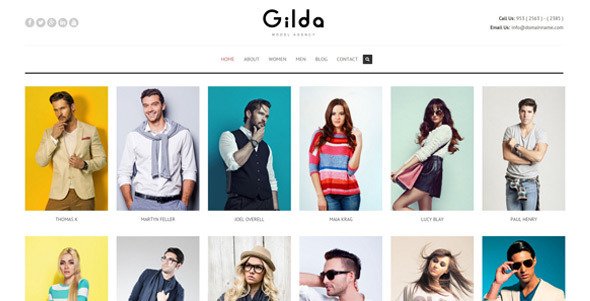
Stuck on your Gilda WordPress theme? Let's fix it.
No endless back-and-forth. Just send us the details and we'll get it done.
No obligation · Replies within 1 hour · Quote within 1 day
Setup · Customization · Bug fixes · WooCommerce integration
About Gilda WP Theme
Gilda is a WordPress theme developed by kayapati, built for creative professionals who want a clean, editorial aesthetic without unnecessary complexity. It suits photographers, bloggers, and portfolio sites that prioritize typography and whitespace over feature overload.
The theme ships with a minimal setup: a handful of page templates, basic widget areas, and a layout system that keeps content front and center. It is lightweight by design, which means faster load times out of the box compared to multipurpose themes loaded with shortcodes and page builders.
Gilda works well with the WordPress block editor, though some styling customizations still require manual CSS. If you need a focused, content-driven site without the bloat of larger theme frameworks, Gilda is a solid starting point worth considering.
Get matched with a Gilda developer in under one day
Tell us about your Gilda project. Small fixes, Gilda theme customization, or a full website build, whatever you need, we've got it covered.
We'll connect you to the right Gilda developers, define the scope, and get everything 100% clear.
You'll get one estimate, hire your preferred developer, and start collaborating.
Most Gilda issues come down to one thing: customizations that go beyond what the Customizer can handle. A developer who knows the theme’s template hierarchy and CSS structure can make those changes without hacks.
FoxyConcept works through Codeable, a vetted network of WordPress developers. You post your project, get a clear estimate, and only move forward if it makes sense. No guesswork, no hourly billing surprises.
Pros
- Lightweight codebase with no unnecessary scripts or styles loaded by default
- Clean typographic hierarchy that works well for editorial and portfolio content
- Compatible with the WordPress block editor without major layout breakage
- Minimal template structure makes it easier to customize without unintended side effects
- Fast initial load times compared to multipurpose themes with heavy framework dependencies
Cons
- Limited Customizer options mean most visual changes require custom CSS or child theme work
- WooCommerce styling is not included and requires additional CSS to look consistent
- Documentation from kayapati is sparse, which makes troubleshooting harder for non-developers
- No built-in mega menu or advanced navigation options for larger, content-heavy sites
- Update frequency has been inconsistent, which can create compatibility concerns over time
Who is Gilda for?
Photography Portfolio
Gilda’s whitespace-heavy layouts and minimal chrome make it a strong fit for photographers. Images stay prominent without competing with interface elements. The portfolio grid works well for galleries, and the clean typography keeps captions and project descriptions readable without distracting from the work itself.
Personal Blog
For writers who want their content to do the talking, Gilda’s editorial typography and simple post layouts work well. There are no sidebars fighting for attention. The reading experience stays focused. It works best for bloggers who publish long-form content and want a site that feels intentional rather than template-generic.
Creative Agency
Small creative agencies can use Gilda as a base for a services and portfolio site. The clean layout communicates professionalism without looking like every other agency site built on a page builder. Custom work is needed to add team pages or case study layouts, but the foundation is solid and easy to build on.
Lifestyle Brand
Lifestyle brands selling a look or a point of view fit Gilda well. The theme’s visual restraint lets photography and brand voice carry the page. It is a better fit for brands that rely on content marketing and storytelling than those needing heavy product catalog functionality out of the box.
Freelance Designer Portfolio
Freelance designers often want a site that shows craft without being loud about it. Gilda’s minimal structure gives you a canvas rather than a rigid template. You control what gets emphasized. With some custom CSS or child theme work, it can look distinctly yours rather than like a stock theme install.

Customizing Gilda
Out of the box, Gilda gives you basic Customizer controls: fonts, colors, header layout, and a few template options. That covers maybe 60% of what most clients actually need. The remaining 40% typically requires custom CSS, child theme work, or direct template edits.
Common customization requests include adjusting the typography scale, adding custom post layouts, modifying the portfolio grid spacing, or integrating WooCommerce with consistent styling. These are doable but not trivial if you are not comfortable with PHP and CSS.
A Gilda expert can handle these changes cleanly, without breaking updates or creating technical debt. Whether you need a minor layout tweak or a full custom child theme built on top of Gilda, working with someone who knows the theme’s structure saves time and avoids the usual trial-and-error.
Recommended plugins for Gilda
Gilda pairs well with a focused plugin stack. For contact forms, WPForms or Gravity Forms integrate without styling conflicts. WooCommerce works, but expect to write some CSS to match Gilda’s aesthetic.
For SEO, Rank Math or Yoast slot in cleanly. If site speed is a priority, pairing Gilda with a caching plugin and a CDN makes a noticeable difference. See our WordPress performance service for specifics.
Need better search visibility? Our WordPress SEO service works alongside any theme, including Gilda, to improve rankings without touching your design.
Not sure which plugins to use? This WordPress plugins directory covers the most popular options with reviews and setup guides.
Gilda common issues
Gilda theme fonts not loading correctly in WordPress
Font loading issues in Gilda usually come from a plugin conflict with scripts that defer or block resource loading, or from a caching layer serving stale CSS. Start by clearing all caches and temporarily disabling optimization plugins like Autoptimize or LiteSpeed Cache. If fonts still fail, check the browser console for 403 or 404 errors pointing to the font files. Our WordPress bug fixing service can diagnose and resolve font conflicts quickly.
Gilda portfolio grid not displaying properly after WordPress update
Portfolio grid issues after a WordPress update often trace back to a JavaScript conflict or a change in how the block editor handles gallery markup. Check whether the issue appeared immediately after updating WordPress core or a plugin. Deactivate plugins one at a time to isolate the conflict. If the grid uses Masonry or a similar script, a jQuery version mismatch could be the cause. A developer can identify and patch the root issue without guessing.
Gilda theme header layout broken on mobile
Mobile header breakage in Gilda typically comes from a CSS specificity conflict introduced by a plugin adding its own styles, or from a custom CSS snippet that was not written with responsive breakpoints in mind. Open Chrome DevTools on a mobile viewport and inspect which styles are overriding the header layout. The fix is usually a targeted CSS rule in your child theme. If you do not have a child theme set up, changes made to the parent theme will be lost on the next update.
WooCommerce not styled correctly with Gilda theme
WooCommerce does not include Gilda-specific styles, so shop pages, cart, and checkout often inherit mismatched fonts, button sizes, and spacing. The fix requires writing a custom stylesheet that targets WooCommerce classes and aligns them with Gilda’s design tokens. This is best done inside a child theme so updates do not wipe your changes. Our bug fixing service handles WooCommerce styling conflicts across any theme, including Gilda.
Gilda FAQ
Gilda is generally compatible with WordPress 6, but kayapati’s update cadence has been inconsistent. Some users report minor block editor styling issues on newer WordPress versions. It is worth testing on a staging site before updating a live install. If you encounter compatibility problems, a developer can patch them without requiring a full theme switch.
Yes, WooCommerce works with Gilda, but do not expect polished shop pages out of the box. Gilda does not include WooCommerce-specific styles, so product pages, cart, and checkout will need custom CSS to match the rest of your site. It is manageable with development work, but not a plug-and-play setup for store owners without technical experience.
Creating a child theme for Gilda involves making a new folder in your themes directory with a style.css file that references Gilda as the parent template and a functions.php that enqueues the parent stylesheet. WordPress Codex documents the full process. A child theme is essential before making any customizations, so your changes survive theme updates.
Gilda was not designed with page builders in mind. Elementor will technically work, but you may see layout conflicts between Elementor’s container styles and Gilda’s native CSS. The theme works better with the native WordPress block editor. If you need heavy drag-and-drop functionality, a purpose-built page builder theme might be a more practical choice.
Migrating an existing site to Gilda means rebuilding your content templates to match the new theme’s structure. Posts and pages migrate cleanly, but custom layouts, widget areas, and plugin-dependent page designs will need to be rebuilt. Our WordPress migration service can handle the transition and rebuild affected pages to match Gilda’s layout system.
Hire a Gilda WordPress Developer
If your Gilda site needs custom layouts, plugin integration, speed improvements, or anything the Customizer cannot handle, we can help. FoxyConcept delivers WordPress work through Codeable, so you get a free estimate before any commitment.
Tell us what you need and we will scope it out. Get a free estimate and have a developer matched to your project within 24 hours, no obligation to hire.
You'll need a free Codeable account so developers can ask questions and send their quotes.