ProDent WordPress Theme
by AncoraThemes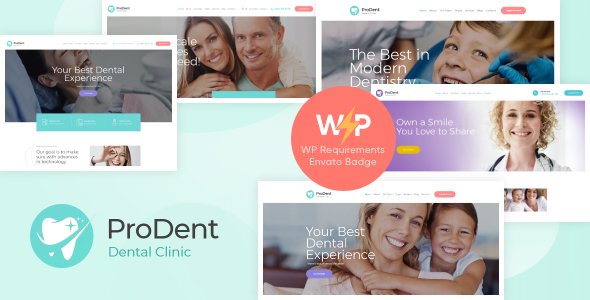
Stuck on your ProDent WordPress theme? Let's fix it.
No endless back-and-forth. Just send us the details and we'll get it done.
No obligation · Replies within 1 hour · Quote within 1 day
Setup · Customization · Bug fixes · WooCommerce integration
About ProDent WP Theme
ProDent is a WordPress theme built by AncoraThemes specifically for dental clinics, orthodontists, and oral health practices. It ships with a clean, clinical layout designed to build patient trust from the first visit.
The theme includes pre-built pages for services, team members, appointment booking, and before/after galleries. It works with Elementor, making page edits straightforward without touching code.
AncoraThemes maintains the theme actively, with updates covering compatibility with the latest WordPress versions and WooCommerce if you sell products online. ProDent also includes a built-in appointment request form, contact map integration, and opening hours widget — practical features that dental practices actually need without installing a dozen extra plugins.
Get matched with a ProDent developer in under one day
Tell us about your ProDent project. Small fixes, ProDent theme customization, or a full website build, whatever you need, we've got it covered.
We'll connect you to the right ProDent developers, define the scope, and get everything 100% clear.
You'll get one estimate, hire your preferred developer, and start collaborating.
ProDent looks professional out of the box, but most dental practices need more than a default install. Custom appointment workflows, third-party booking system integration, speed optimization, and accessibility compliance all require real development work.
Through Codeable, you get matched with a vetted WordPress developer who has worked with medical and dental themes before. No job boards, no guesswork — just a free estimate and a developer who knows what they’re doing. That’s the difference between a site that looks good and one that actually works for your practice.
Pros
- Purpose-built for dental practices with relevant pre-built sections like services, team bios, and patient testimonials
- Elementor compatibility makes visual editing accessible without coding knowledge
- Built-in appointment request form and opening hours widget reduce plugin dependencies
- AncoraThemes provides regular updates keeping the theme compatible with current WordPress versions
- Before/after image gallery feature is practical for showcasing cosmetic dental work
Cons
- Limited to dental and medical niches — not a flexible multipurpose theme
- Deep customization beyond Customizer options requires Elementor knowledge or a developer
- No native integration with popular dental booking platforms like Dentrix or Carestream
- The default typography and layout can look similar to other AncoraThemes products without custom styling
- Support is ticket-based and response times vary depending on AncoraThemes workload
Who is ProDent for?
General Dental Clinic
ProDent covers everything a general dental clinic needs online — service pages for checkups, fillings, and extractions, a team section, opening hours, and an appointment request form. The clean layout keeps the focus on patient trust. A developer can connect it to your existing practice management software if needed.
Orthodontic Practice
Orthodontists benefit from ProDent’s before/after gallery and treatment pages that can highlight braces, aligners, and retainer services. The theme structure supports long-form service descriptions, which helps with local SEO. Custom filtering for case studies can be added by a developer familiar with the theme.
Cosmetic Dentistry Studio
Cosmetic dental studios need strong visual presentation. ProDent’s gallery sections and clean white-space layout support high-quality photography well. A developer can extend the default layouts with custom Elementor sections to build a premium brand feel that stands out from typical dental site templates.
Pediatric Dentist
Pediatric dental practices can adapt ProDent’s color scheme and typography to feel more welcoming for children and parents. The appointment form and FAQ sections work well for addressing common parent concerns. Custom page layouts for kids’ dental tips or patient preparation guides are easy to add.
Dental Surgery Specialist
Oral surgeons and dental specialists need to communicate credentials and procedures clearly. ProDent’s team and service sections provide a solid foundation. A developer can build out detailed procedure pages, add schema markup for medical specialties, and integrate pre-operative patient forms for a complete specialist site.

Customizing ProDent
ProDent gives you control over colors, fonts, header layouts, and section ordering through the WordPress Customizer and Elementor. You can swap the default blue palette for your clinic’s brand colors, update the logo and favicon, and rearrange homepage sections without writing a single line of code.
That said, deeper changes — custom booking flows, multi-location setups, WooCommerce integration for dental products, or HIPAA-adjacent form handling — often require a developer who knows the theme well.
A ProDent expert can modify the theme safely using a child theme, so your customizations survive every AncoraThemes update. If you want changes done right the first time, working with someone who has hands-on ProDent experience saves hours of trial and error.
Recommended plugins for ProDent
ProDent works well with several plugins that expand its core functionality. WPForms or Gravity Forms can replace the default contact form with more advanced patient intake fields. WPML adds multilingual support for clinics serving diverse communities.
For performance, pairing ProDent with a caching plugin and optimized hosting stack keeps load times low — critical for mobile users booking appointments. See our WordPress performance service for details.
If patient acquisition through search matters to you, a structured SEO setup alongside ProDent is worth the investment. Our WordPress SEO service covers the technical and on-page side.
Not sure which plugins to use? This WordPress plugins directory covers the most popular options with reviews and setup guides.
ProDent common issues
ProDent appointment form not sending emails
This is almost always a WordPress email delivery issue rather than a ProDent bug. WordPress uses PHP mail by default, which many hosts block. Install an SMTP plugin like WP Mail SMTP and connect it to a mail service like SendGrid, Mailgun, or even Gmail. Set up the credentials, run a test email, and verify your form submission emails reach the inbox. Check spam folders first before assuming the form is broken.
ProDent theme not loading correctly after WordPress update
After a WordPress core update, theme display issues usually come from a JavaScript or CSS conflict. Start by clearing your cache plugin and any server-side cache. Then deactivate plugins one by one to isolate a conflict. If the issue appeared specifically after a WordPress update, check the AncoraThemes changelog — an updated version of ProDent may already address it. If you’re stuck, a WordPress bug fix can resolve it quickly.
How to add custom fonts to ProDent theme
ProDent respects WordPress Customizer font settings and Elementor’s global font controls. For Google Fonts, Elementor’s Site Settings panel lets you assign custom font families to headings and body text globally. If you need a self-hosted or premium font not available in Elementor’s library, you’ll need to enqueue it via your child theme’s functions.php file and reference it in the CSS. Using a child theme keeps these changes safe across updates.
ProDent Elementor sections broken on mobile
Elementor mobile layout issues in ProDent are usually caused by column widths or padding values set for desktop that don’t adapt well to smaller screens. Open the affected section in Elementor, switch to mobile view using the responsive controls at the bottom, and adjust padding, font sizes, and column stacking manually. Elementor applies these changes only to mobile without affecting desktop. If multiple sections are broken, a developer can audit and fix the responsive settings in bulk.
ProDent FAQ
Yes. ProDent is built specifically for dental practices and includes pre-built sections for services, team pages, patient testimonials, and appointment requests. It covers the standard needs of a clinic site without requiring extensive plugin installations. For more advanced functionality like booking system integration, a developer will save you significant time.
Yes, ProDent includes Elementor support and ships with Elementor-compatible templates. You can edit page layouts visually using Elementor’s drag-and-drop interface. The free version of Elementor is sufficient for most edits, though Elementor Pro unlocks additional widgets like forms, popups, and dynamic content that pair well with ProDent.
Technically you can, but it’s not ideal. ProDent’s design language and section structure is tailored to dental and oral health contexts. Using it for physiotherapy, veterinary, or general medical sites would require significant restyling. A more flexible medical theme would be a better starting point for non-dental health practices.
Always use a child theme for any customizations. When you update ProDent, the parent theme files update while your child theme files stay intact. If you’ve made changes directly to ProDent’s files without a child theme, those changes will be overwritten. Before updating, back up your site. Our WordPress maintenance service handles safe updates as part of ongoing site care.
ProDent includes a basic appointment request form, but it’s a contact form — not a real-time booking calendar. For full online scheduling with time slots, availability management, and confirmations, you’ll need a third-party booking plugin like Amelia, Simply Schedule Appointments, or BookingPress. A developer can integrate your preferred booking system cleanly into the ProDent layout.
Hire a ProDent Developer for Your Dental Practice
Whether you need a full ProDent setup, custom page layouts, booking system integration, or ongoing fixes, a dedicated developer makes the process faster and less stressful. FoxyConcept connects you with experienced WordPress professionals through Codeable’s vetted network.
You describe your project, get a free estimate, and only proceed if the scope and price work for you. No commitment required. Get your free estimate today and have a ProDent developer ready within 24 hours.
You'll need a free Codeable account so developers can ask questions and send their quotes.