Divergent WordPress Theme
by egemenerd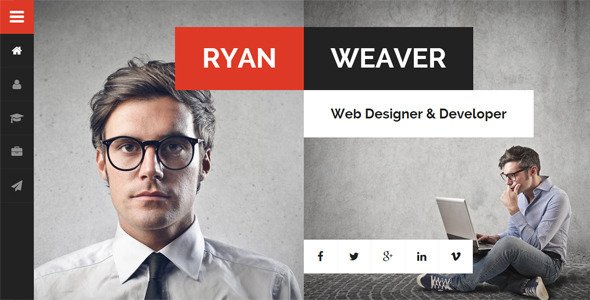
Stuck on your Divergent WordPress theme? Let's fix it.
No endless back-and-forth. Just send us the details and we'll get it done.
No obligation · Replies within 1 hour · Quote within 1 day
Setup · Customization · Bug fixes · WooCommerce integration
About Divergent WP Theme
Divergent is a multipurpose WordPress theme developed by egemenerd. It ships with a visual drag-and-drop page builder, multiple pre-built demo layouts, and a clean, minimal design foundation that works across industries. The theme is built with performance in mind, using lightweight assets and structured HTML output.
Divergent supports WooCommerce out of the box, making it a solid choice for shops and service-based businesses alike. The customizer gives you control over typography, colors, header layouts, and widget areas without touching code. It also integrates well with popular plugins like Yoast SEO, Contact Form 7, and WPML for multilingual sites.
Whether you are building a portfolio, a business site, or a simple blog, Divergent provides the structural flexibility to get there without forcing you into a rigid layout system.
Get matched with a Divergent developer in under one day
Tell us about your Divergent project. Small fixes, Divergent theme customization, or a full website build, whatever you need, we've got it covered.
We'll connect you to the right Divergent developers, define the scope, and get everything 100% clear.
You'll get one estimate, hire your preferred developer, and start collaborating.
Most Divergent issues come down to customization limits, plugin conflicts, or layout problems that the theme options panel cannot fix cleanly. A developer who knows the theme’s template structure can solve these faster than hours of forum searching.
FoxyConcept connects you with vetted Divergent specialists through Codeable, the professional WordPress developer network. Every developer is screened and rated. You get an estimate before committing to anything, and the work is guaranteed. No agencies, no junior developers, no guesswork.
Pros
- Built-in page builder reduces reliance on heavy third-party builders like Elementor
- WooCommerce integration is included and works without additional compatibility plugins
- Header and footer builder allows structural layout changes without code
- Multiple demo imports let you start from a finished layout instead of a blank canvas
- Clean HTML output and minimal default CSS make performance tuning easier than bloated themes
Cons
- The bundled page builder is less feature-rich than Elementor or Beaver Builder for complex layouts
- Documentation is limited, which makes advanced customization harder to self-serve
- Some design options in the customizer lack live preview, requiring repeated save-and-refresh cycles
- Demo content import can conflict with existing media or custom post types on non-fresh installs
- Theme updates have been infrequent, which raises longer-term compatibility concerns with WordPress core
Who is Divergent for?
Freelancer Portfolio
Divergent’s minimal layout and portfolio-ready demo make it a practical starting point for designers, photographers, and developers. You can showcase project work in grid or masonry layouts. The customizer controls typography and color without requiring CSS edits, keeping setup time low for freelancers who want to focus on client work rather than their own site.
Small Business Website
Service businesses benefit from Divergent’s flexible section layouts and contact form compatibility. You can structure pages around service offerings, team members, testimonials, and calls to action. The header builder supports phone numbers, CTAs, and navigation in custom arrangements, which matters for local businesses where first impressions and quick contact access are priorities.
WooCommerce Store
Divergent’s native WooCommerce support means your shop, cart, and checkout pages inherit consistent styling from the start. Product grids, category pages, and single product layouts all respect the theme’s design system. For stores that need custom product templates or a modified checkout flow, a developer can extend these templates without breaking theme updates.
Agency or Creative Studio
Agencies need sites that look sharp and load fast. Divergent’s demo layouts include agency-style hero sections, service grids, and case study structures. The page builder handles multi-column layouts and custom spacing. For studios managing client sites at scale, building a child theme on top of Divergent provides a repeatable starting point across projects.
Blog or Content Publication
Divergent supports standard WordPress blog post formats and category archives with clean, readable layouts. Sidebar configurations, featured image sizing, and post meta display are all controllable through the customizer. For publishers who also sell products or offer services alongside content, the WooCommerce integration means you do not need a separate theme for the shop section.

Customizing Divergent
Customizing Divergent goes beyond swapping colors and fonts. The theme’s header builder lets you rearrange elements like navigation, logo, search, and cart into custom rows. Footer columns are independently configurable. The included page builder handles section-level layout control, giving you real flexibility over content structure.
For more advanced work, a Divergent expert can help you build custom post type templates, modify the WooCommerce product pages, or integrate third-party APIs into existing page structures. Custom child themes are the right approach when you need changes that survive updates.
If your project involves complex conditional layouts, custom taxonomy archives, or unique checkout flows, hiring a Divergent WordPress developer saves significant time over trial and error in the theme options panel.
Recommended plugins for Divergent
Divergent works well with a standard WordPress plugin stack. For ecommerce, WooCommerce handles everything from simple products to variable pricing. For forms, Contact Form 7 and WPForms both integrate cleanly.
If site speed is a priority, pairing Divergent with a caching plugin and a CDN is straightforward. Our WordPress performance optimization service covers image compression, script deferral, and server-level caching configurations specific to your hosting setup.
For search visibility, Divergent’s clean markup supports schema plugins and sitemap tools without conflicts. Our WordPress SEO service can handle technical on-page work alongside your theme setup.
Not sure which plugins to use? This WordPress plugins directory covers the most popular options with reviews and setup guides.
Divergent common issues
Divergent theme header not displaying correctly after update
Header display issues after a Divergent update are usually caused by cached CSS or a conflict between the updated theme files and a child theme override. Start by clearing your caching plugin and server-side cache. If you are using a child theme, check whether the header template file in the child theme is outdated. Disabling the child theme temporarily confirms whether that is the source. For persistent issues, our WordPress bug fixing service can diagnose and resolve the conflict cleanly.
Divergent page builder elements not loading or showing blank sections
Blank or broken page builder sections in Divergent typically point to a JavaScript conflict with another plugin. Open your browser console and look for JS errors on the affected page. Deactivating plugins one at a time while reloading the editor will identify the conflicting plugin. jQuery version mismatches between Divergent and newer plugins are a common cause. Updating both the theme and conflicting plugin often resolves it. If not, a developer can patch the conflict without removing functionality you need.
WooCommerce product page layout broken with Divergent theme
WooCommerce layout breaks in Divergent usually happen when WooCommerce releases a template update that the theme has not caught up with. Check the WooCommerce system status for outdated template warnings. You can copy the updated WooCommerce template files into your child theme’s woocommerce folder and apply your customizations there. This keeps your changes intact through future updates. If the layout is significantly broken, our bug fixing service handles WooCommerce template conflicts regularly.
Divergent theme demo import failing or not importing correctly
Failed demo imports in Divergent are most often caused by PHP memory limits, upload size restrictions, or execution timeouts on the server. Check your wp-config.php for memory settings and your php.ini or hosting control panel for upload and execution limits. Increasing max_execution_time and memory_limit to 256MB usually resolves import failures. On shared hosting, you may need to contact your host to raise these limits. Importing on a fresh WordPress install with no other plugins active also reduces the chance of conflicts during the process.
Divergent FAQ
Divergent was built around its own page builder and the classic editor. It does not have native full-site editing support. You can use the block editor for basic content, but the theme’s layout system operates outside Gutenberg. For block-based editing across your entire site, you would need a theme designed specifically for full-site editing, or a developer to bridge the gap.
Yes, Elementor works with Divergent. You can disable the theme’s built-in builder and use Elementor instead for page-level design. Some styling conflicts may appear between Elementor’s wrapper elements and the theme’s default CSS. These are usually fixable with targeted CSS rules or by switching Elementor to full-width template mode on affected pages.
Divergent is listed as WPML-compatible. The theme’s text strings can be registered and translated through WPML’s theme localization tools. For sites needing full multilingual support, including translated menus, custom fields, and WooCommerce product variations, a developer familiar with both Divergent and WPML will save you significant setup time.
Always use a child theme before making code-level customizations to Divergent. Changes made directly to the parent theme files are overwritten on update. Customizer settings are stored in the database and are safe through updates. If you have not been using a child theme, back up your current theme files before updating and reapply any direct edits to the child theme afterward.
Update frequency for Divergent has slowed compared to more actively maintained themes. This is worth considering for long-term projects, particularly around WordPress core compatibility. The theme functions correctly on current WordPress versions, but less frequent updates mean you should monitor for compatibility issues after major WordPress releases and test updates in a staging environment first.
Hire a Divergent WordPress Developer
Need help with your Divergent site? Whether it is a layout tweak, a custom template, a plugin conflict, or a full site build, we match you with a developer who knows this theme. Submit your project through our free estimate form and get matched within 24 hours. No commitment required. You only proceed if you are happy with the estimate and the developer fit.
You'll need a free Codeable account so developers can ask questions and send their quotes.