Kids Club WordPress Theme
by BoldThemes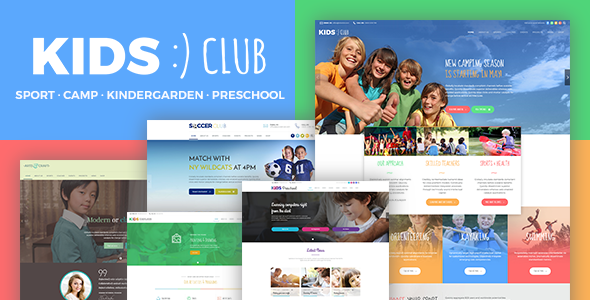
Stuck on your Kids Club WordPress theme? Let's fix it.
No endless back-and-forth. Just send us the details and we'll get it done.
No obligation · Replies within 1 hour · Quote within 1 day
Setup · Customization · Bug fixes · WooCommerce integration
About Kids Club WP Theme
Kids Club is a WordPress theme built by BoldThemes, designed specifically for children’s activity centers, after-school programs, kindergartens, and youth organizations. It ships with a bright, playful visual style and a set of demo layouts that cover everything from class schedules to staff profiles and event listings.
The theme is built on BoldThemes’ own framework, which includes a drag-and-drop page builder, multiple header styles, and a library of pre-built shortcodes. It supports WooCommerce for selling memberships or activity kits, and includes built-in event management that suits seasonal programs and recurring weekly classes. Out of the box, Kids Club gives you enough structure to launch a professional-looking site without custom development, though most serious setups will need at least some configuration work to match a specific brand.
Get matched with a Kids Club developer in under one day
Tell us about your Kids Club project. Small fixes, Kids Club theme customization, or a full website build, whatever you need, we've got it covered.
We'll connect you to the right Kids Club developers, define the scope, and get everything 100% clear.
You'll get one estimate, hire your preferred developer, and start collaborating.
BoldThemes builds solid foundations, but every kids’ club has different needs. A developer who knows the Kids Club theme and the BoldThemes framework can configure it correctly the first time, build features the theme doesn’t include natively, and make sure your site holds up as enrollment grows.
Through Codeable, you get access to vetted WordPress specialists. Post your project, get a free estimate within 24 hours, and only move forward if it makes sense. No pressure, no risk.
Pros
- Bright, child-friendly design that works well for activity centers and kindergartens without heavy customization
- Comes with multiple pre-built demo layouts covering classes, events, staff, and gallery pages
- Built-in shortcode library speeds up page building for non-technical site owners
- WooCommerce compatibility allows paid class enrollments and product sales out of the box
- Regular updates from BoldThemes maintain compatibility with current WordPress versions
Cons
- BoldThemes' proprietary framework creates dependency, making it harder to switch themes later without rebuilding
- Page builder shortcodes produce bloated HTML that can hurt page speed scores if not optimized
- Design options feel dated compared to block-based themes built for the Full Site Editor
- Limited documentation for advanced customizations, so edge cases require developer knowledge
- The bundled event management tools lack the depth of dedicated plugins like The Events Calendar
Who is Kids Club for?
After-School Activity Centers
Kids Club suits after-school centers well. The class schedule layout, staff profiles, and contact forms cover the core pages these sites need. Add WooCommerce and you can sell after-school program spots directly. A developer can wire up a real enrollment flow if the default forms aren’t enough for your intake process.
Kindergartens and Preschools
Preschools and kindergartens benefit from Kids Club’s age-appropriate visual style and the ability to showcase curriculum, teachers, and gallery photos. The theme’s event section handles open days and parent evenings cleanly. Custom work is usually needed for things like parent login portals or digital newsletters.
Youth Sports Clubs
Youth sports clubs can use Kids Club to list training schedules, team rosters, and match results. The theme doesn’t include sports-specific features natively, but the flexible page builder lets a developer build those layouts. WooCommerce handles kit sales or annual membership fees without needing a separate plugin stack.
Children's Art and Music Studios
Art and music studios for children need a site that feels creative. Kids Club’s colorful design fits that brief. Gallery and portfolio layouts show student work well. The booking and payment side usually needs extra plugin support, but the visual foundation means less time spent on design and more on functionality.
Summer Camp Programs
Summer camps need to communicate programs, dates, age groups, and fees clearly. Kids Club’s event and schedule features provide a starting point. Pair it with a proper registration form plugin and WooCommerce for deposits, and you have most of what a summer camp site needs. A developer can handle the trickier booking logic.

Customizing Kids Club
Kids Club offers a reasonable set of customization options through the WordPress Customizer and its built-in theme options panel. You can switch color schemes, upload a logo, adjust typography, and rearrange homepage sections without touching code. The included page builder lets you build custom layouts using pre-made content blocks.
That said, going beyond the out-of-the-box look takes more effort. Custom booking flows, branded animations, unique class schedule layouts, or integration with third-party registration tools typically require developer involvement. A Kids Club expert who knows the BoldThemes framework can save you hours of trial and error, especially when the theme’s shortcode system doesn’t quite match what you need. Custom child themes are also the right call if you plan to update regularly without losing changes.
Recommended plugins for Kids Club
Kids Club works with WooCommerce for paid enrollments and merchandise. It also integrates with popular form plugins like Gravity Forms and Contact Form 7 for registration and inquiry forms. For event management, The Events Calendar pairs well with the theme’s existing schedule features.
If site speed is a concern, caching and image optimization plugins are worth adding early. You can read more about that on our WordPress performance page. For schools or clubs trying to rank locally, structured SEO work matters too. See our WordPress SEO service for what that involves.
Not sure which plugins to use? This WordPress plugins directory covers the most popular options with reviews and setup guides.
Kids Club common issues
Kids Club theme demo content not importing correctly
Demo import failures on Kids Club usually come down to server limits. The XML file and media assets require enough PHP memory and execution time to complete. Check your php.ini settings and increase max_execution_time and memory_limit. Import the demo content first without media, then handle images separately. If the issue persists, a developer can run the import via WP-CLI to bypass server timeout restrictions. See our WordPress bug fixing service if you need hands-on help.
Kids Club page builder layouts breaking on mobile
Kids Club’s shortcode-based layouts sometimes produce fixed widths or absolute positioning that breaks on smaller screens. Open Chrome DevTools, inspect the broken element, and look for inline styles added by the shortcode output. The fix is usually a targeted CSS rule in your child theme’s stylesheet. If you’re seeing widespread layout issues across multiple sections, the problem may be a missing or overridden responsive CSS file. A developer can audit and patch this cleanly without breaking the desktop layout.
Kids Club theme slow loading after setup
Slow load times after setting up Kids Club are commonly caused by unoptimized images from the demo content, multiple render-blocking scripts from bundled plugins, and unminified CSS. Start by running the site through PageSpeed Insights to identify the biggest offenders. Add a caching plugin, compress images, and defer non-critical scripts. Kids Club’s shortcodes can also generate heavy HTML, so a developer review of the output is worthwhile if scores remain low. More detail on this at our performance service page.
WooCommerce not displaying correctly with Kids Club theme
WooCommerce display issues with Kids Club usually occur when the theme’s stylesheet doesn’t fully cover WooCommerce template markup, especially after a WooCommerce update changes template structure. Check whether your Kids Club version is current and whether BoldThemes has released a patch for the WooCommerce version you’re running. If not, a developer can add targeted CSS overrides or copy the affected WooCommerce templates into a child theme for direct modification. Avoid editing core theme files directly.
Kids Club FAQ
Kids Club has partial Gutenberg support, but it was built around BoldThemes’ own shortcode-based builder. Most of the pre-built layouts rely on that system. You can use the block editor for basic content pages, but replicating the demo layouts in Gutenberg requires rebuilding them from scratch using blocks or a compatible block plugin. For full block editor workflows, a more modern theme may suit better.
Technically yes, but the theme’s demo layouts and most of its visual features are tied to the BoldThemes shortcode system. Without it, you lose access to the prebuilt sections. You can use Gutenberg or a third-party builder like Elementor for new pages, but you’d essentially be building your own layouts rather than using what the theme ships with. A developer can help map out the best approach for your setup.
Yes, Kids Club includes WooCommerce support. You can sell class memberships, activity kits, or booking deposits through a standard WooCommerce shop. The theme styles basic WooCommerce pages, though complex setups like subscription-based enrollments or multi-date booking will need additional plugins and possibly developer configuration to work correctly.
Kids Club includes a schedule or timetable shortcode as part of the BoldThemes framework. You add it to a page through the page builder interface and fill in time slots, class names, and instructor details. For recurring weekly schedules with automatic updates or integration with a booking system, you’ll need a dedicated scheduling plugin. A developer can connect that to the theme cleanly.
Migrating content from an existing site to Kids Club is straightforward using WordPress export and import tools. The harder part is rebuilding your layouts inside the BoldThemes page builder if you’re coming from a different theme. Design elements rarely transfer directly. Our WordPress migration service covers content moves, and a Kids Club developer can handle the layout rebuild alongside it.
Hire a Kids Club WordPress Developer
Whether you need a full site build, a specific feature added, or something on your current Kids Club site fixed, working with a specialist makes the difference. Our developers know the BoldThemes framework and can scope your project accurately from day one.
Get a free estimate with no obligation. Matched within 24 hours through Codeable’s vetted developer network. Your project is in safe hands.
You'll need a free Codeable account so developers can ask questions and send their quotes.