OM WordPress Theme
by Codestag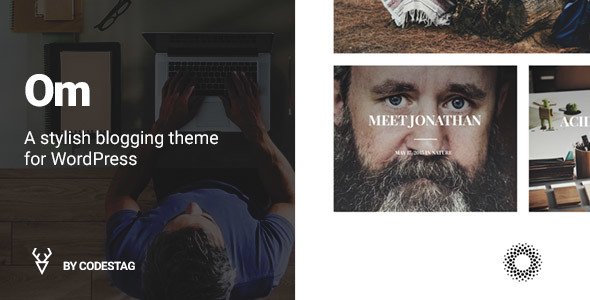
Stuck on your OM WordPress theme? Let's fix it.
No endless back-and-forth. Just send us the details and we'll get it done.
No obligation · Replies within 1 hour · Quote within 1 day
Setup · Customization · Bug fixes · WooCommerce integration
About OM WP Theme
OM is a minimal WordPress theme built by Codestag, designed for portfolios, agencies, and creative professionals who want clean presentation without visual clutter. It ships with a page builder-friendly structure, smooth scroll effects, and a full-screen layout approach that lets the work speak for itself.
Codestag built OM with performance in mind. The codebase is lean, the default styles are lightweight, and the theme avoids loading unnecessary scripts. It supports the WordPress Customizer for basic branding changes and works well with popular plugins out of the box. If you need a one-page or multi-section portfolio site that loads fast and looks sharp, OM is a solid starting point worth serious consideration.
Get matched with a OM developer in under one day
Tell us about your OM project. Small fixes, OM theme customization, or a full website build, whatever you need, we've got it covered.
We'll connect you to the right OM developers, define the scope, and get everything 100% clear.
You'll get one estimate, hire your preferred developer, and start collaborating.
OM looks simple on the surface, but custom work requires understanding how Codestag structures its templates and hooks. Guessing at modifications risks breaking layouts or losing changes on the next theme update. Developers on Codeable are vetted specifically for WordPress expertise. You get an accurate estimate before any work starts, and you only pay if you choose to proceed. For OM customization, that means no wasted time and no surprise invoices.
Pros
- Lightweight codebase with minimal render-blocking scripts
- Full-screen section layouts suit portfolio and agency presentations
- Clean Codestag code structure makes child theme development straightforward
- Smooth scroll and transition effects built in without plugin dependency
- Works reliably with WordPress Customizer and standard plugin stack
Cons
- Limited built-in Customizer options mean more custom CSS needed for layout changes
- Not designed for complex eCommerce or membership site requirements
- Portfolio post type is custom to OM, which can complicate theme switching later
- Documentation is minimal compared to commercial theme marketplaces
- No built-in mega menu or advanced header builder included
Who is OM for?
Freelance Designer Portfolio
OM suits freelance designers who want their work front and center. The full-screen section layout and minimal typography give projects room to breathe. A developer can add a custom filterable portfolio grid, a contact section with conditional logic, and case study post types tailored to how a designer presents their process.
Creative Agency Website
Small creative agencies use OM as a base for team pages, service breakdowns, and client work displays. The clean structure means a developer can extend it with custom post types for services and team members without fighting the theme’s defaults. Multi-section one-page layouts work particularly well for agency pitches.
Photographer Showcase
Photographers need large images, fast load times, and simple navigation. OM’s full-screen aesthetic handles all three well. A developer can integrate a gallery plugin, set up category-based portfolio filtering, and configure lazy loading to keep performance strong even with high-resolution images in the grid.
Web Development Studio
A web development studio can use OM to showcase past builds with custom case study layouts and client testimonials. A developer familiar with OM can add structured data markup for services, integrate a project inquiry form, and build out a blog section that matches the overall design without friction.
Branding Consultant Site
Branding consultants need a site that reflects their own visual standards. OM’s restrained aesthetic is a strong canvas. With custom font pairing, a tailored color palette, and a structured services section built by a developer, the result is a site that positions the consultant clearly and converts well.

Customizing OM
OM keeps its Customizer options focused: logo, colors, typography, and section visibility. That restraint is intentional, but it also means any layout changes beyond the defaults require custom CSS or PHP work.
Adding a custom header layout, modifying the portfolio grid columns, or integrating a contact form with conditional logic all require hands-on development. An OM expert can handle these changes cleanly without breaking the theme’s update compatibility. Working with a developer who knows Codestag’s code structure means faster turnarounds and fewer side effects. Child theme setup, hook-based modifications, and plugin integration are all common requests that a skilled OM developer can resolve in hours rather than days.
Recommended plugins for OM
OM works cleanly with WooCommerce for simple product showcases, though it was not built as an eCommerce theme. Contact Form 7 and WPForms integrate without styling conflicts. For galleries, Envira Gallery and FooGallery both slot in reliably.
If site speed is a priority, pairing OM with a caching plugin like WP Rocket and optimizing images through ShortPixel makes a measurable difference. You can read more about improving results on our WordPress performance page. For organic traffic, OM pairs well with Yoast or Rank Math. See our WordPress SEO service for more.
Not sure which plugins to use? This WordPress plugins directory covers the most popular options with reviews and setup guides.
OM common issues
OM theme portfolio not displaying correctly after WordPress update
WordPress core updates occasionally shift how themes handle custom post types or template hierarchy. If OM’s portfolio grid stops displaying correctly, check whether the portfolio post type is still registered properly and whether the page template assigned to the portfolio page is intact. Clearing any caching plugin is the first step. If the issue persists, a developer can audit the template files and restore correct output. Visit our WordPress bug fixing service for faster resolution.
OM theme custom CSS not loading on mobile
Custom CSS added through the Customizer or a CSS plugin can sometimes fail to apply correctly on mobile if specificity conflicts exist with the theme’s responsive stylesheet. Open browser DevTools on a mobile viewport, inspect the element, and identify which rule is overriding yours. Increasing specificity in your custom CSS usually resolves it. If you are using a caching plugin, purge mobile-specific cached files. A developer can audit the stylesheet load order and fix it permanently.
OM theme contact section not scrolling to anchor link
Anchor link scrolling in OM depends on the smooth scroll script loading correctly. If a section link stops working, the most common causes are a JavaScript conflict from another plugin, a missing section ID, or a caching plugin serving a stale script. Check the browser console for JS errors first. Deactivating plugins one by one confirms whether a conflict is the source. A developer can isolate and fix the conflict without affecting other site functionality.
OM theme page builder layout broken after plugin conflict
If a page builder layout breaks after a plugin update, the issue is usually a CSS or JavaScript conflict between the builder’s output and OM’s stylesheet. Clear cache first. Then deactivate the page builder, reactivate it, and check whether the layout regenerates correctly. If the layout file was stored in the plugin rather than the theme, it may need to be rebuilt. Our bug fixing service covers exactly this kind of conflict.
OM FAQ
Yes. OM was built with one-page layouts in mind. Its full-screen sections and anchor-based navigation make it a practical choice for portfolio, agency, and consultant sites that present everything on a single scrollable page. It handles this use case better than most general-purpose themes and does not require a separate plugin to manage sections.
OM is compatible with both Elementor and WPBakery, though it was not built specifically around either. Some styling adjustments may be needed to match the page builder output to OM’s default look. A developer familiar with the theme can handle those conflicts quickly. For complex builds, using a child theme alongside the page builder is the safest approach.
Creating a child theme for OM follows the standard WordPress process: create a new folder in wp-content/themes, add a style.css with the correct Template header pointing to OM, and add a functions.php that enqueues the parent stylesheet. Any custom CSS or template overrides go in the child theme. This protects your changes from being lost when OM updates.
OM does not include WooCommerce-specific templates, so basic product pages will use WooCommerce defaults with some styling gaps. For a simple shop attached to a portfolio site, this is usually workable with some custom CSS. For a serious eCommerce build, OM is not the right base theme. A developer can add WooCommerce template overrides to close the styling gap if needed.
Migrating content to OM is straightforward for pages and posts. If your current site uses a different portfolio post type or custom fields, those will need remapping to OM’s structure. A developer handles this without losing content. For full site migrations including hosting moves, our WordPress migration service covers the entire process safely.
Hire an OM WordPress Expert
Whether you need a child theme built, a custom portfolio layout, or a full site set up on OM, a vetted WordPress developer can get it done right. Projects are matched within 24 hours and come with a free estimate before you commit. Get your free estimate and describe what you need. No obligation, no risk.
You'll need a free Codeable account so developers can ask questions and send their quotes.