Revision WordPress Theme
by codesupplyco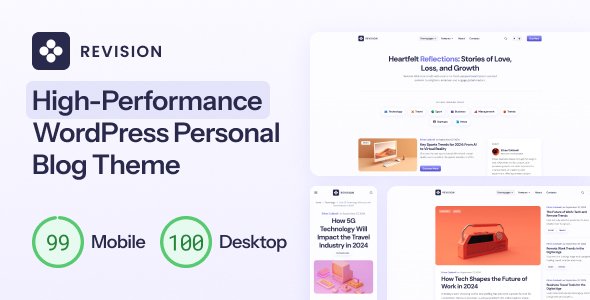
Stuck on your Revision WordPress theme? Let's fix it.
No endless back-and-forth. Just send us the details and we'll get it done.
No obligation · Replies within 1 hour · Quote within 1 day
Setup · Customization · Bug fixes · WooCommerce integration
About Revision WP Theme
Revision is a WordPress theme built by CodeSupplyCo, designed primarily for blogs and online magazines. It puts content front and centre with a clean typographic layout, well-structured post grids, and a minimal sidebar approach that keeps readers focused on the writing.
The theme ships with a customizer-driven settings panel, making it straightforward to adjust colours, fonts, and layout options without touching code. It supports the WordPress block editor and works well with standard plugins right out of the box.
Revision suits writers, journalists, and content-led brands who want a professional look without over-engineering the design. It loads fast on a clean install and uses standard WordPress template hierarchy, which means developers can extend or child-theme it without dealing with proprietary frameworks or unusual build systems.
Get matched with a Revision developer in under one day
Tell us about your Revision project. Small fixes, Revision theme customization, or a full website build, whatever you need, we've got it covered.
We'll connect you to the right Revision developers, define the scope, and get everything 100% clear.
You'll get one estimate, hire your preferred developer, and start collaborating.
Most Revision customization requests fall outside what the theme documentation covers. A developer who knows the theme’s template structure can make targeted changes faster and without introducing technical debt. Through Codeable, you get access to vetted WordPress specialists who can scope your project, give you a clear estimate, and deliver clean work. No guesswork, no offshore lottery. If you need specific changes to Revision, working with an expert is the most direct path to a result that actually holds up.
Pros
- Clean typographic layout that suits long-form editorial content without distractions
- Customizer-based settings panel covers most visual adjustments without code
- Standard WordPress template hierarchy makes it predictable for developers to extend
- Lightweight on a clean install with no heavy front-end framework slowing things down
- Full block editor compatibility with no conflicts reported with common Gutenberg blocks
Cons
- Limited built-in layout variations make it harder to differentiate from other Revision sites
- Homepage customization beyond the default grid requires child theme work or custom PHP
- Minimal documentation for advanced use cases like custom post types or taxonomy archives
- No built-in mega menu or sticky header option without adding CSS or a plugin
- Category and tag archive pages have limited design control through the Customizer alone
Who is Revision for?
Personal Blog
Revision works well for personal bloggers who want a clean, readable site without spending hours on configuration. The default layout handles text-heavy posts well, and the Customizer lets you set up branding quickly. For bloggers who want a unique look, a developer can build a tailored child theme on top of the existing structure.
Online Magazine
Online magazines need organised category sections, featured post areas, and flexible archive pages. Revision’s grid layout covers the basics, but a publication with multiple verticals will likely need custom template work to separate sections clearly. A developer can build category-specific templates that keep the editorial structure intact.
Niche News Site
For sites covering a specific topic area, Revision’s minimal design keeps focus on content rather than chrome. News sites benefit from the theme’s fast base load and standard plugin compatibility. Adding breaking news bars, custom taxonomy archives, or author profile pages usually requires targeted development work beyond the default setup.
Author Portfolio
Writers and journalists use Revision to present their work cleanly. The theme’s typography and post layout make articles easy to read. An author portfolio setup typically adds a custom bio section, a filterable work archive, and a contact form. These are straightforward additions for a developer working within the theme’s template structure.
Content Marketing Hub
Brands using content marketing need a blog that connects to their main site without looking like an afterthought. Revision provides a professional editorial base that a developer can style to match an existing brand identity. Adding CTAs within post templates, email capture integrations, or gated content sections are common requests for this use case.

Customizing Revision
Revision gives you a solid base through the WordPress Customizer, covering site identity, colour schemes, typography, header layout, and widget areas. Most visual changes are point-and-click, which works for straightforward setups.
Beyond that, customization gets more technical. Adjusting the post grid columns, modifying category page templates, or building a custom homepage layout requires either a child theme or direct PHP and CSS work. If you want the theme to match a specific brand identity or editorial structure, generic tutorials will only get you so far.
A Revision expert can build a child theme, create custom post templates, wire up Advanced Custom Fields for editorial metadata, or restructure the layout without breaking future updates. This kind of targeted work is faster and cleaner than patching things together with page builder workarounds.
Recommended plugins for Revision
Revision pairs well with WooCommerce if you want to add a shop section alongside editorial content. Popular SEO plugins like Yoast and Rank Math integrate without conflicts. For performance, the theme works with caching plugins and image optimisation tools, though you may want professional performance tuning to get Core Web Vitals where they need to be.
If organic traffic matters, structured WordPress SEO work on top of the theme setup makes a measurable difference. Newsletter and membership plugins like MailPoet or MemberPress also slot in cleanly given the theme’s content-first structure.
Not sure which plugins to use? This WordPress plugins directory covers the most popular options with reviews and setup guides.
Revision common issues
Revision theme header not displaying correctly after update
Header display issues after a theme update usually point to a CSS conflict or a cached stylesheet. Start by clearing your caching plugin and browser cache. If you are running a child theme, check whether the parent theme update changed any header template files your child theme overrides. If the issue persists, inspect the header template in the browser developer tools to identify which CSS rule is overriding the layout. For persistent problems, our WordPress bug fixing service can diagnose and resolve it quickly.
Revision WordPress theme footer widgets not showing
If footer widgets are not showing in Revision, check that the correct widget areas are active under Appearance > Widgets and that widgets have been assigned to the footer region. Some caching setups serve a version of the page without the updated widget content. Clear all caches and check again. If you switched themes recently or imported content, the widget configuration may have reset. A developer can inspect the theme’s registered sidebars and restore the correct setup without disrupting live content.
Revision theme blog page showing wrong post order
Incorrect post order on the Revision blog page is usually controlled by the WordPress Reading Settings or a custom query set elsewhere. Check Settings > Reading to confirm the static page and posts page assignments are correct. If a plugin is modifying the main query, use Query Monitor to identify which hook is altering the order. Revision does not override the default post query by default, so the issue is almost always plugin or settings related rather than a theme bug.
Revision theme mobile menu not working on iOS
Mobile menu failures on iOS are often caused by JavaScript conflicts with other plugins or a touch event not firing correctly on Safari. Open the browser console on an iOS device using Safari’s remote debugger to see if a JS error is thrown when the menu icon is tapped. The fix is usually a small JavaScript patch or a conflict resolution with another script loading on the page. If the menu worked before a plugin update, disable recent additions one by one to isolate the conflict.
Revision FAQ
Revision has a clean HTML structure and fast base load time, which gives it a reasonable SEO starting point. It does not output structured data automatically, so you will want a plugin like Yoast or Rank Math to handle schema markup and meta tags. For a content-heavy site where organic traffic matters, pairing Revision with dedicated WordPress SEO work will produce better results than relying on the theme alone.
Revision does not ship with built-in WooCommerce templates, but WooCommerce will fall back to its own default templates when no theme overrides exist. This means a basic shop will function, but it may not match your editorial design closely. A developer can create custom WooCommerce template overrides within a child theme to make the shop look consistent with the rest of the Revision-based site.
Revision works with Elementor on page-level content, but the theme’s header, footer, and archive layouts are controlled by its own templates rather than the page builder. You can use Elementor to build individual pages, but integrating it deeply into the theme’s structure requires a child theme approach. Mixing page builder output with the theme’s editorial templates can cause styling inconsistencies if not handled carefully.
Creating a child theme for Revision follows the standard WordPress method. You create a new folder in wp-content/themes, add a style.css file with a Template header pointing to the Revision parent, and enqueue the parent stylesheet in a functions.php file. From there, any template file you copy into the child theme folder will override the parent. This protects your customizations when the parent theme receives updates.
Your WordPress content, posts, pages, and media stay in the database regardless of which theme is active, so switching to Revision does not delete anything. What changes is how that content is displayed. You may need to reassign menus, reconfigure widgets, and check that custom post types or shortcodes from your previous setup still render correctly. For complex migrations, a WordPress migration service ensures nothing breaks during the switch.
Hire a Revision WordPress Expert
Whether you need a child theme built, a custom layout created, or specific features added to Revision, a specialist developer will get it done without the workarounds. Our work is delivered through Codeable, where every developer is vetted and reviewed. Get a free estimate for your Revision project. No obligation, no upfront payment, and you only hire if the scope and price work for you.
You'll need a free Codeable account so developers can ask questions and send their quotes.