Salon WordPress Theme
by axiomthemes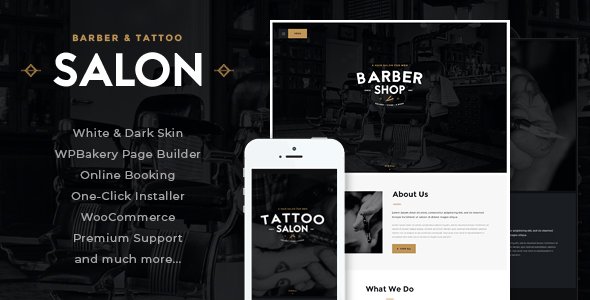
Stuck on your Salon WordPress theme? Let's fix it.
No endless back-and-forth. Just send us the details and we'll get it done.
No obligation · Replies within 1 hour · Quote within 1 day
Setup · Customization · Bug fixes · WooCommerce integration
About Salon WP Theme
Salon is a WordPress theme built by Axiom Themes for beauty businesses — hair salons, barbershops, spas, nail studios, and similar service-based brands. It ships with a visual drag-and-drop page builder, pre-built demo content, and purpose-built sections like service menus, staff profiles, pricing tables, and appointment booking integration.
The theme supports WooCommerce for selling products directly from your salon site, and it includes multiple homepage layouts to suit different aesthetics. Built on a clean codebase, Salon handles retina displays and mobile screens without extra configuration. It also integrates with popular booking plugins, which matters most for salons that need online scheduling. If you want a polished, industry-specific theme without starting from scratch, Salon covers the core requirements well.
Get matched with a Salon developer in under one day
Tell us about your Salon project. Small fixes, Salon theme customization, or a full website build, whatever you need, we've got it covered.
We'll connect you to the right Salon developers, define the scope, and get everything 100% clear.
You'll get one estimate, hire your preferred developer, and start collaborating.
Axiom Themes builds solid foundations, but every salon is different. A Codeable-vetted WordPress developer who knows the Salon theme will customise it accurately, avoid the trial-and-error that wastes time, and deliver something that works on day one. Codeable only works with screened developers, so you skip the risk of hiring someone who learns on your project. Whether you need a full setup or targeted changes to an existing Salon site, the right expert makes the difference between a template and a real business website.
Pros
- Purpose-built for beauty and salon businesses with relevant demo sections out of the box
- Multiple homepage layouts included, so you can pick one that matches your brand aesthetic
- WooCommerce compatible for selling hair products, gift cards, or retail items directly
- Staff profile and service menu post types are built in, no extra plugins needed for those
- Retina-ready and mobile-responsive without manual configuration
Cons
- WPBakery Page Builder creates shortcode-heavy content that is hard to migrate or edit outside the builder
- Demo import can overwrite existing settings, so it is risky to run on an established site
- Limited block editor support — Gutenberg users will find the experience inconsistent
- Some design elements feel dated compared to more recent salon-focused themes
- Customisation beyond the theme options often requires PHP or child theme work
Who is Salon for?
Hair Salons
Hair salons need service menus, stylist profiles, and online booking in one place. Salon’s pre-built layouts handle all three. You can list cut and colour services with prices, showcase your team with photos and bios, and connect a booking plugin so clients schedule directly from the site.
Barbershops
Barbershops benefit from the theme’s clean, masculine layout options and the built-in staff profile system. Add a booking plugin for chair reservations, display your service menu with pricing, and use the gallery sections to show off the shop interior and recent cuts.
Nail Studios
Nail studios need strong visual presentation. Salon’s gallery and portfolio sections display nail art effectively. The service menu sections handle treatment categories like gel, acrylics, and nail art, and WooCommerce integration allows selling nail care products alongside bookings.
Spas and Wellness Centres
Spas and wellness centres often have longer service lists and multiple therapists. The theme handles both. You can organise services by category, assign treatments to specific staff, and display pricing packages. The clean layout works for both clinical and luxury spa aesthetics.
Beauty Schools and Training Academies
Beauty schools need to present courses, instructors, and certification information clearly. Salon can be adapted for this with custom page layouts, course listing sections, and an enquiry or enrolment form. A developer can adjust the theme structure to suit an education-focused site rather than a service-booking one.

Customizing Salon
Salon gives you a solid starting point, but most salon owners need changes that go beyond what the built-in options handle. That might mean custom booking flows, brand-specific typography, a unique service menu layout, or an Instagram feed integrated into the homepage.
The theme uses WPBakery Page Builder, which works fine for basic edits but gets complex fast once you move outside the demo structure. A Salon expert can rework the layout cleanly, add custom post types for stylists, connect third-party scheduling tools, and make sure the final result matches your branding rather than a template.
Working with a developer who knows the Salon theme means fewer compatibility issues and faster delivery. You get a site that actually fits your business rather than one that looks like every other salon on the block.
Recommended plugins for Salon
Salon pairs well with several plugins that expand what the theme does out of the box. For appointments, Bookly and Simply Schedule Appointments both integrate cleanly. WooCommerce handles retail product sales. For SEO, a dedicated setup helps the site rank for local searches — see our WordPress SEO service for that.
Page speed matters especially for mobile users searching on their phones. Image optimisation, caching, and a proper hosting stack make a real difference — our WordPress performance service covers this. WPML handles multilingual sites if you serve a diverse local market.
Not sure which plugins to use? This WordPress plugins directory covers the most popular options with reviews and setup guides.
Salon common issues
Salon theme booking plugin not working properly
Booking issues with the Salon theme usually come down to plugin conflicts, incorrect configuration, or a mismatch between the booking plugin version and the theme. First, check if the booking plugin requires a specific WordPress or PHP version. Deactivate other plugins one at a time to identify conflicts. If the issue persists, a developer can audit the integration and fix it properly. Our WordPress bug fixing service handles exactly this type of issue.
Salon theme demo import failed or missing content
Demo import failures in Salon typically happen due to server timeout limits, missing required plugins, or insufficient PHP memory. Increase your PHP memory limit in wp-config.php, install all required plugins before importing, and try the import again. If content imports but images are missing, run the media import separately. For persistent failures, a developer can import the demo manually and configure it correctly.
Salon theme slow loading on mobile
Slow mobile performance on Salon sites is usually caused by unoptimised images, WPBakery-generated scripts loading on every page, or no caching in place. Start by compressing images and enabling a caching plugin. For deeper speed work, a developer can defer non-critical scripts, clean up unused CSS, and configure a CDN. See our WordPress performance service for full site optimisation.
Salon theme layout broken after WordPress update
Layout breaks after a WordPress update usually mean a JavaScript conflict or a deprecated function in the theme or a plugin. Check the browser console for JS errors and the PHP error log for warnings. A child theme helps protect your customisations from update issues. If the layout is broken on a live site, a developer can diagnose and fix it quickly through our WordPress bug fixing service.
Salon FAQ
Salon by Axiom Themes is a premium theme available on ThemeForest. It is sold as a single-site or multi-site licence. There is no free version. The purchase includes future updates and six months of support from Axiom Themes, extendable for an additional fee.
Salon is built around WPBakery Page Builder, not Elementor. You can technically install Elementor alongside it, but the two builders are not designed to work together and conflicts are common. If you prefer Elementor, a different theme built for it would be a more reliable choice than forcing compatibility with Salon.
Yes. While Salon includes sections beyond booking, you can build a stripped-down site focused on appointments. The theme integrates with booking plugins like Bookly. A developer can configure the layout so the booking form is the main focus and remove or hide sections that are not relevant to your business.
Always use a child theme for any customisations. Direct edits to the parent theme files are overwritten when you update. If you have not used a child theme, back up your site before updating. A developer can create a child theme and migrate your existing changes before the update runs. See our WordPress maintenance service for ongoing update management.
Salon is not an SEO-optimised theme by default. It generates reasonably clean HTML but relies on WPBakery shortcodes that add bloat to page content. For local SEO, which matters most for salons, you will need a dedicated SEO plugin and proper on-page setup. Our WordPress SEO service can handle this.
Hire a Salon WordPress Expert
Need help setting up, customising, or fixing a site built on the Salon theme? Our vetted WordPress developers have hands-on experience with Axiom Themes builds and know what common issues to avoid. You get a free estimate with no obligation to proceed. Post your project and get matched within 24 hours — 100% risk-free.
You'll need a free Codeable account so developers can ask questions and send their quotes.