Ottar WordPress Theme
by Edge-Themes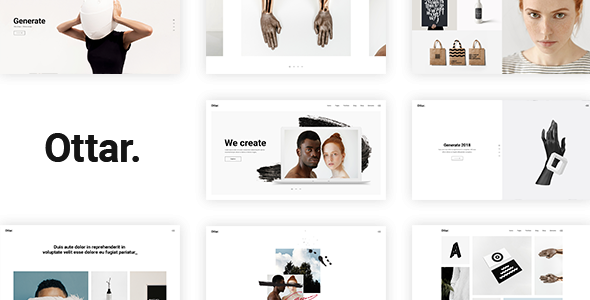
Stuck on your Ottar WordPress theme? Let's fix it.
No endless back-and-forth. Just send us the details and we'll get it done.
No obligation · Replies within 1 hour · Quote within 1 day
Setup · Customization · Bug fixes · WooCommerce integration
About Ottar WP Theme
Ottar is a WordPress theme built by Edge-Themes, designed for creative agencies, portfolios, and businesses that want strong visual impact without sacrificing performance. It ships with a large collection of pre-built demo sites, a drag-and-drop page builder, and deep customization options through its dedicated options panel.
The theme supports WooCommerce, making it suitable for shops as well as service-based sites. Typography controls, header layouts, and footer builders are all handled within the theme itself, so you spend less time installing third-party plugins. Ottar is built on Edge-Themes’ framework, which is well-maintained and regularly updated for WordPress compatibility. It suits designers and developers who want a polished starting point without building everything from scratch.
Get matched with a Ottar developer in under one day
Tell us about your Ottar project. Small fixes, Ottar theme customization, or a full website build, whatever you need, we've got it covered.
We'll connect you to the right Ottar developers, define the scope, and get everything 100% clear.
You'll get one estimate, hire your preferred developer, and start collaborating.
Ottar has a wide feature set, and that complexity can slow you down if you’re not familiar with the Edge-Themes framework. Small mistakes in the options panel can break layouts across multiple pages. A vetted Ottar developer on Codeable knows the theme inside out. They can build custom templates, fix layout conflicts, and configure the theme correctly from the start, so you don’t spend weeks troubleshooting settings that should take hours to set up.
Pros
- Large library of pre-built demo sites covering agency, portfolio, shop, and blog layouts
- Built-in header and footer builder reduces reliance on third-party plugins
- WooCommerce integration is included and tested, not an afterthought
- Edge-Themes maintains regular updates, keeping Ottar compatible with current WordPress versions
- Detailed theme options panel gives control over typography, spacing, and color without code
Cons
- The options panel is large and can overwhelm users who are new to WordPress themes
- Bundled plugins like the Edge slider are proprietary and not portable if you switch themes
- Some demo content requires Elementor, which adds another layer of complexity
- Page load times can suffer on shared hosting if the bundled scripts are not optimised
- Documentation is adequate but lacks depth on advanced customization scenarios
Who is Ottar for?
Creative Agency
Ottar’s agency demo layouts include multi-column service sections, team member grids, and case study post types. These give agencies a structured way to present work and services without building everything from scratch. The header builder supports mega menus, which works well for agencies with broad service offerings.
Freelance Portfolio
Freelancers benefit from Ottar’s portfolio post type and filterable grid layouts. You can showcase projects by category, add custom detail pages, and link directly to client sites. The minimal demo options let your work take center stage rather than competing with heavy design elements around it.
WooCommerce Shop
Ottar includes WooCommerce-ready templates covering product listings, cart, checkout, and account pages. The shop demos are styled to match the theme’s aesthetic, so you don’t need to restyle core WooCommerce elements manually. Product quick-view and wishlist features are available through compatible plugins.
Architecture or Interior Design Studio
Architecture and interior design studios get the most from Ottar’s full-width image layouts and project detail templates. Large hero sections, parallax backgrounds, and clean typography suit visual-heavy industries where the work needs space to breathe without cluttered sidebars or busy design patterns.
Corporate Business Site
Corporate sites benefit from Ottar’s structured page layouts, including pricing tables, team sections, and testimonial blocks. The theme supports multiple header configurations, making it straightforward to build a site that looks professional and works across different departments or service lines.

Customizing Ottar
Ottar gives you a lot of control out of the box. The theme options panel covers header styles, color schemes, font pairings, sidebar layouts, and blog templates. You can switch between demo layouts, adjust spacing, and configure sticky headers without touching code.
That said, more specific changes, like custom post type displays, unique landing page structures, or WooCommerce template overrides, often require PHP and CSS knowledge. An Ottar expert can handle these modifications correctly without breaking your existing setup. Whether you need a custom header built from scratch or a child theme to future-proof your changes, working with someone who knows the Edge-Themes framework saves time and avoids costly mistakes.
Recommended plugins for Ottar
Ottar works well with a focused set of plugins. WooCommerce handles shop functionality. Contact Form 7 or WPForms covers lead capture. For SEO, the theme is compatible with Yoast and Rank Math. You can also connect caching plugins like WP Rocket to improve load times.
Edge-Themes bundles several premium plugins with Ottar, including their own shortcode library and slider. These are maintained alongside the theme, which keeps conflicts low. If you want to push further, explore our WordPress performance and SEO optimisation services to get more from your Ottar site.
Not sure which plugins to use? This WordPress plugins directory covers the most popular options with reviews and setup guides.
Ottar common issues
Ottar theme demo import not working
Demo import failures in Ottar are usually caused by low PHP memory limits, upload size restrictions, or a timeout during the import process. Start by setting memory_limit to at least 256MB in your php.ini or wp-config.php. Also increase max_execution_time to 300. If the import still stalls, try importing XML content manually through the WordPress importer tool rather than the one-click method. If issues persist, our WordPress bug fixing service can resolve this quickly.
Ottar header layout broken after update
Header breakage after an Ottar update is often caused by a conflict between the theme’s built-in header builder and a caching plugin serving an outdated version of your CSS. Clear all caches first, including server-side cache if you use one. Check whether the header options in the theme panel have reset to defaults, which occasionally happens after major updates. If you’ve made changes in a parent theme file rather than a child theme, those changes will have been overwritten. Going forward, use a child theme for any custom header modifications.
Ottar theme slow loading on mobile
Ottar loads several scripts and stylesheets that can add significant weight on mobile. Start by running the site through PageSpeed Insights to identify the largest offenders. Defer non-critical JavaScript, enable lazy loading for images, and consider disabling Edge-Themes’ bundled slider if you’re not using it, it loads assets regardless. A caching plugin with minification helps. For a full audit, see our WordPress performance service to get specific recommendations for your Ottar setup.
Ottar WooCommerce pages not styled correctly
WooCommerce styling issues in Ottar usually appear when the WooCommerce plugin is updated before the theme catches up, or when a child theme is missing the correct template files. Check the Edge-Themes changelog to confirm your theme version supports the installed WooCommerce version. If you’re using a child theme, make sure WooCommerce template overrides are placed in the correct directory structure. Clearing the CSS cache and regenerating stylesheets through the theme panel often resolves minor visual inconsistencies without deeper intervention.
Ottar FAQ
Ottar is compatible with Elementor, and some of its demo layouts are built using the plugin. However, the theme also ships with its own shortcode and page builder elements through the Edge-Themes framework. You don’t need Elementor to use Ottar, but if your chosen demo relies on it, you’ll need the plugin installed to replicate the layout accurately.
Yes. Ottar includes WooCommerce support with styled templates for product pages, shop archives, cart, and checkout. The theme’s shop demos are designed to work out of the box. Some advanced WooCommerce features, like custom product builders or subscription integrations, may require additional plugins or developer configuration beyond the default setup.
Ottar includes a one-click demo importer available through the theme panel after installation. You’ll need to install the required plugins first, which the importer will prompt you to do. Server resource limits can cause the import to time out on low-cost hosting. If that happens, increase PHP memory and execution time limits before retrying, or import content manually using the WordPress importer tool.
You can do a lot with Ottar using only the theme options panel and the visual page builder. Demo setup, color changes, font selection, and basic layout adjustments are all manageable without code. More specific changes, like custom templates, unique header structures, or modified WooCommerce pages, will require CSS or PHP knowledge, or help from a developer.
Migrating an existing site to Ottar means rebuilding your pages in the new theme’s structure, since design and layout are tied to the theme. Content like posts, pages, and media transfers without issues. If you’re on a different theme framework, your existing page builder content may not carry over cleanly. Our WordPress migration service can handle the transition and rebuild your layouts correctly in Ottar.
Hire an Ottar WordPress Developer
Need help setting up Ottar, customising a demo, or fixing something that’s broken? Our vetted WordPress developers know the Edge-Themes framework and can handle everything from design tweaks to full custom builds. You’ll get a free estimate within 24 hours and no obligation to hire. Get your free estimate today and tell us exactly what you need.
You'll need a free Codeable account so developers can ask questions and send their quotes.