Blackdsn WordPress Theme
by design_grid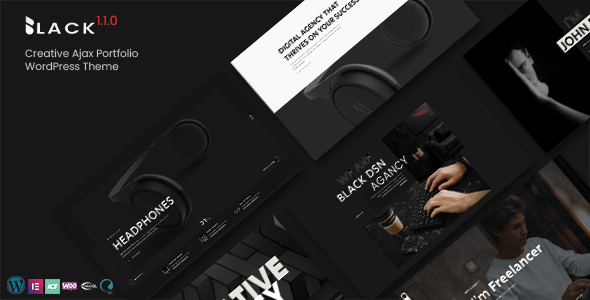
Stuck on your Blackdsn WordPress theme? Let's fix it.
No endless back-and-forth. Just send us the details and we'll get it done.
No obligation · Replies within 1 hour · Quote within 1 day
Setup · Customization · Bug fixes · WooCommerce integration
About Blackdsn WP Theme
Blackdsn is a dark, design-forward WordPress theme built by design_grid. It targets creative agencies, freelance designers, and portfolio-driven businesses that want a strong visual identity without writing custom CSS from scratch.
The theme ships with a bold typographic system, full-width layout options, and a clean grid structure that keeps project showcases looking sharp on any screen size. It works with the WordPress block editor and pairs well with popular page builders.
If you run a studio, shoot commercial photography, or sell design services, Blackdsn gives you a polished starting point. The dark aesthetic is intentional and consistent, not just a color swap on a generic template. Setup is straightforward, but getting the most out of it usually takes some configuration time.
Get matched with a Blackdsn developer in under one day
Tell us about your Blackdsn project. Small fixes, Blackdsn theme customization, or a full website build, whatever you need, we've got it covered.
We'll connect you to the right Blackdsn developers, define the scope, and get everything 100% clear.
You'll get one estimate, hire your preferred developer, and start collaborating.
Getting a theme running is one thing. Getting it to perform well, look exactly right, and hold up under client scrutiny is another. The developers on Codeable are vetted specifically for WordPress work, which means you are not rolling the dice on someone learning your project as they go.
FoxyConcept connects you with Blackdsn-experienced developers through Codeable. You get a free estimate, no obligation, and a developer matched to your specific requirements within 24 hours. That is a faster start than most agency onboarding processes.
Pros
- Strong dark aesthetic that works out of the box without heavy customization
- Clean grid system makes portfolio and case study layouts easy to structure
- Compatible with the WordPress block editor for content management
- Responsive design handles full-width images and video headers well
- Built for creative niches, so the default styling suits agencies and studios immediately
Cons
- Dark color scheme requires careful contrast testing for accessibility compliance
- Limited built-in demo content, so initial setup takes more manual configuration than some competitors
- WooCommerce styling needs additional work to look consistent with the rest of the theme
- Documentation is sparse in places, which slows down developers unfamiliar with design_grid themes
- Update frequency from design_grid is inconsistent, which can create compatibility gaps with newer WordPress versions
Who is Blackdsn for?
Creative Agency Portfolio
Blackdsn’s grid-based layout handles multi-project portfolios cleanly. Agencies can organize work by category, display case studies with full-width imagery, and keep the navigation minimal so clients stay focused on the work itself. The dark backdrop makes bright creative work pop without extra styling effort.
Freelance Graphic Designer Website
Freelancers need a site that looks professional without a development budget. Blackdsn gives a designer a credible online presence quickly. The typography is strong, the layout is structured, and the theme handles the visual presentation so the designer can focus on the work samples rather than fighting with CSS.
Commercial Photography Studio
Photography needs a theme that gets out of the way of the images. Blackdsn’s dark background and full-width image support do that well. Whether you shoot product, editorial, or architecture, the theme’s layout lets images carry the page. Gallery and single-image templates both hold up on large screens.
Motion Design or Video Production Company
Video and motion studios need embedded video to look intentional, not like an afterthought. Blackdsn handles video hero sections and embedded reels cleanly. The dark surrounding keeps viewer focus on the footage. Adding a Vimeo or YouTube embed into the layout does not require custom styling to look right.
Digital Product or Asset Shop
With WooCommerce installed and properly styled, Blackdsn can support a shop selling design templates, fonts, presets, or prints. The aesthetic aligns well with premium creative products. A developer will need to adjust the WooCommerce templates to match the theme’s dark styling on product and cart pages.

Customizing Blackdsn
Out of the box, Blackdsn handles the visual heavy lifting. But matching it precisely to your brand, fixing layout quirks, or building custom post types on top of it is a different task entirely.
A Blackdsn expert can rework the header, adjust grid spacing, add custom fonts, and wire up contact forms or portfolio filters without breaking the theme’s existing structure. That matters because dark themes are unforgiving when spacing or contrast goes wrong.
Common customization requests include custom project archive pages, client testimonial sections, and integration with booking or enquiry plugins. A developer who knows Blackdsn’s file structure will move faster and avoid overrides that snap back after a theme update.
Recommended plugins for Blackdsn
Blackdsn works well with WooCommerce if you sell design assets, prints, or services directly. Adding WooCommerce requires careful styling to keep the dark aesthetic consistent across product and checkout pages.
For SEO, pairing the theme with a solid plugin setup and proper schema markup is worth the effort. See our WordPress SEO service for details. If page speed is a concern, a developer can audit and improve load times through proper asset handling. Our WordPress performance service covers that specifically.
Contact form plugins, portfolio filters using Isotope, and GSAP animations are popular additions for agencies using Blackdsn.
Not sure which plugins to use? This WordPress plugins directory covers the most popular options with reviews and setup guides.
Blackdsn common issues
Blackdsn theme not showing custom fonts correctly
Custom font issues in Blackdsn usually come down to one of two things: the font files are not loading from the correct path, or a caching plugin is serving a stale stylesheet. Start by clearing your cache and checking the browser console for 404 errors on font files. If you have added fonts via the Customizer or a plugin, confirm there is no conflict with design_grid’s enqueued styles. A developer can trace the load order and fix it without touching your content. See our WordPress bug fixing service if you need hands-on help.
Blackdsn portfolio grid broken after WordPress update
Portfolio grid breakage after a WordPress update usually points to a JavaScript conflict or a CSS class that changed between theme versions. Check your browser console for JS errors first. If Blackdsn has not been updated recently, it may be using a deprecated function. Rolling back the update temporarily can confirm the cause. Long term, the fix involves updating the theme and patching any customizations that were overriding core files directly rather than using a child theme. Our bug fixing service handles this type of regression issue.
Blackdsn header menu not displaying on mobile
Mobile menu problems in Blackdsn are often caused by a JavaScript file failing to load or a z-index conflict with another plugin adding scripts to the header. Open your site on mobile with browser developer tools and check whether the hamburger icon is present in the DOM but hidden, or missing entirely. A missing icon points to a script load failure. A hidden icon points to a CSS conflict. Both are fixable without theme edits if you use a child theme to isolate the override correctly.
Blackdsn theme slow to load on image-heavy pages
Blackdsn relies heavily on large images, and without proper optimization those pages load slowly. The most common causes are uncompressed images uploaded directly from a camera or design application, no lazy loading configured, and large hero images served at full resolution on mobile. Start with an image optimization plugin and enable lazy loading. For deeper performance work including caching, CDN setup, and asset minification, our WordPress performance service covers the full stack.
Blackdsn FAQ
Yes, Blackdsn supports the WordPress block editor. You can use standard blocks for text, images, and galleries. However, some of the theme’s more specific layout features, like the portfolio grid and custom section backgrounds, are controlled through theme-specific templates rather than blocks. A developer can extend block editor support if you need tighter integration.
Blackdsn can run alongside WooCommerce, but the default WooCommerce templates will not match the theme’s dark styling automatically. Product pages, the cart, and checkout will need additional CSS or template overrides to look consistent. This is standard work for any dark-first theme. A developer familiar with both Blackdsn and WooCommerce can handle it cleanly.
Blackdsn is primarily designed to work without a page builder, using its own templates and the block editor. Elementor can be installed alongside it, but you may encounter styling conflicts, particularly with full-width sections and background colors. Some users run Elementor on specific pages only. Testing in a staging environment before going live is strongly recommended.
Create a child theme by making a new folder in your themes directory, adding a style.css file with the correct Template header pointing to Blackdsn, and a functions.php file that enqueues the parent stylesheet. Activate the child theme from the WordPress dashboard. Any edits go into the child theme so they survive parent theme updates. A developer can set this up in under an hour.
Your content, posts, and pages stay in the database when you switch themes, so nothing gets deleted. What changes is how that content is displayed. Custom page templates, widget areas, and theme-specific settings will not carry over. You will need to rebuild layouts using Blackdsn’s templates. For a smoother transition, see our WordPress migration service for professional help.
Hire a Blackdsn Expert Developer
Whether you need a Blackdsn setup done properly, a custom layout built out, or a specific feature added, working with an experienced developer saves time and avoids the trial-and-error that slows solo projects down.
Post your project through FoxyConcept and get matched with a vetted Blackdsn developer on Codeable. Free estimate, no commitment required. Get your free estimate here and have a developer reviewing your project within 24 hours.
You'll need a free Codeable account so developers can ask questions and send their quotes.