Organio WordPress Theme
by Case-Themes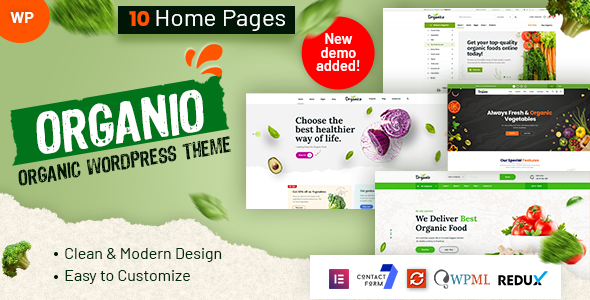
Stuck on your Organio WordPress theme? Let's fix it.
No endless back-and-forth. Just send us the details and we'll get it done.
No obligation · Replies within 1 hour · Quote within 1 day
Setup · Customization · Bug fixes · WooCommerce integration
About Organio WP Theme
Organio is a WordPress theme built by Case-Themes, designed specifically for organic food stores, eco-friendly shops, and natural product businesses. It ships with WooCommerce support out of the box, making it a practical starting point for anyone selling health or wellness products online.
The theme includes pre-built page layouts, a clean green-toned design, and product-focused sections that work well for farm shops, herbal brands, and organic grocery stores. It supports Elementor, which gives you drag-and-drop control over most page elements without writing code.
Organio is relatively lightweight compared to multipurpose themes, which helps with initial load times. If you need something tailored beyond what the demo provides, a WordPress developer can extend it significantly without touching core theme files.
Get matched with a Organio developer in under one day
Tell us about your Organio project. Small fixes, Organio theme customization, or a full website build, whatever you need, we've got it covered.
We'll connect you to the right Organio developers, define the scope, and get everything 100% clear.
You'll get one estimate, hire your preferred developer, and start collaborating.
Organio is a solid foundation, but most store owners hit a wall when their needs go beyond what the theme settings offer. A vetted WordPress developer on Codeable can handle custom layouts, WooCommerce tweaks, plugin conflicts, and performance fixes without guesswork. Work is scoped clearly, priced fairly, and backed by Codeable’s satisfaction guarantee. You get an expert who has worked with food and ecommerce themes specifically, not a generalist figuring it out as they go.
Pros
- Purpose-built for organic and natural food stores with relevant demo content included
- WooCommerce ready from install with product pages and cart styling included
- Elementor compatibility gives non-developers real layout control
- Lighter codebase than multipurpose themes, better baseline performance
- Clean visual design that fits health, wellness, and eco-brand aesthetics well
Cons
- Limited layout variety beyond the demo, feels samey without customisation
- Support from Case-Themes can be slow, especially for complex technical issues
- No built-in subscription or recurring order functionality without extra plugins
- Mobile menu behaviour can need CSS fixes on certain device sizes
- Documentation is thin, which makes advanced modifications harder without developer help
Who is Organio for?
Organic Grocery Store
Organio’s product grid layouts and category styling are a natural fit for grocery stores selling packaged organic goods. You can organise products by category, display featured items on the homepage, and use WooCommerce filters to help shoppers find what they need. A developer can add custom sorting and stock badge features to make it more functional.
Farm Box Subscription Service
Farm box and CSA businesses need subscription functionality that Organio does not include natively. With WooCommerce Subscriptions installed and a developer setting up the logic, the theme handles the front-end presentation well. Box contents, delivery schedules, and account management can all be built on top of the existing design.
Herbal Supplement Brand
Herbal and supplement brands benefit from Organio’s clean layout and product-focused design. The theme supports product description sections, ingredient lists, and trust badges without looking cluttered. For brands that need custom product tabs or dosage information fields, a developer can extend the WooCommerce product template cleanly.
Zero Waste Product Shop
Zero waste and eco product shops suit Organio’s natural colour palette and imagery-first design. You can highlight product materials, certifications, and brand values using the built-in content blocks. Adding a custom sustainability badge or impact counter would need developer work but fits the theme structure well.
Health Food Blog with Shop
If you run a health food blog that also sells products or digital downloads, Organio handles both reasonably well. The blog layout is clean and readable, and WooCommerce sits alongside it without major conflicts. A developer can help integrate email opt-ins, recipe post types, or affiliate product sections into the existing design.

Customizing Organio
Out of the box, Organio gives you control over colors, typography, header layout, and homepage sections through the WordPress Customizer. For most small stores, that is enough to get started.
Where things get more involved is when you need custom functionality: modified checkout flows, subscription product support, custom category filters, or a bespoke homepage layout that does not match any demo. That is where working with an Organio expert makes the difference.
An experienced developer can build child theme modifications, create custom Elementor widgets, and integrate third-party plugins without breaking the base theme on updates. They can also strip out unused scripts and styles to improve performance, which matters a lot for WooCommerce stores competing on page speed.
Recommended plugins for Organio
Organio pairs well with several plugins that extend its core functionality. WooCommerce Subscriptions works for recurring box deliveries or weekly farm shares. YITH WooCommerce Wishlist adds a save-for-later feature popular with food shoppers. Advanced Coupons handles complex discount rules well.
For search visibility, combining Organio with proper on-page SEO work helps organic and local product pages rank. You can also look at WordPress performance optimisation and SEO services to get more out of the theme once it is live.
Not sure which plugins to use? This WordPress plugins directory covers the most popular options with reviews and setup guides.
Organio common issues
Organio theme WooCommerce checkout page not styled correctly
Checkout styling issues in Organio usually come from a plugin conflict or a missing stylesheet. Check whether a page builder plugin or a WooCommerce extension is overriding the theme’s checkout CSS. Disable plugins one by one to isolate the conflict. If you have a child theme, check whether custom styles are loading correctly. For persistent issues, a developer can audit the stylesheet load order and fix it cleanly. See our WordPress bug fixing service for help.
Organio homepage sections not showing after update
After a theme update, Organio homepage sections can disappear if the demo data or widget areas are reset. First, check the Customizer to see if sections are toggled off. If you are using Elementor, make sure the homepage template is still assigned correctly under Pages. If the update overwrote your child theme changes, those will need to be reapplied. Always back up before updating. A developer can restore the layout and set up a safer update process going forward.
Organio theme slow loading on mobile
Organio’s mobile performance issues typically come from unoptimised images, render-blocking scripts, or large hero sections not adapted for smaller screens. Start by running a PageSpeed test to identify the specific bottlenecks. Use a caching plugin and enable lazy loading for images. If the theme is loading unnecessary scripts on mobile, a developer can conditionally dequeue them. Full performance work is covered in our WordPress performance service.
Organio menu not working on mobile devices
Mobile menu problems in Organio are often CSS or JavaScript conflicts. A third-party plugin may be loading a script that interferes with the menu toggle. Try disabling plugins and switching briefly to a default theme to test. Custom CSS overrides can also break mobile breakpoints. Check the browser console for JS errors that point to the source. If the issue started after an update, compare your child theme CSS with the current theme version and remove any conflicting rules.
Organio FAQ
Yes, Organio is built with WooCommerce in mind. It includes styled product pages, cart, and checkout layouts. You can add products and start selling without additional styling work. For more advanced WooCommerce features like variable subscriptions or custom checkout fields, you will likely need plugin support and potentially developer configuration.
Organio is compatible with Elementor, and the demo content is built using it. This means you can edit homepage sections, product features, and inner pages using the Elementor drag-and-drop interface. That said, not every theme section is an Elementor block, so some areas still need Customizer edits or developer work to modify fully.
Organio does not include subscription functionality natively. To run a subscription box service, you would need WooCommerce Subscriptions or a similar plugin. The theme can handle the front-end design, but the logic for recurring billing, delivery scheduling, and customer account management needs to be set up separately, usually with developer assistance.
After installing the Organio theme, you can import demo content using a one-click demo importer if Case-Themes provides one, or manually via the WordPress import tool using the demo XML file. You will also need to install the required plugins listed in the theme documentation. Demo images may not import due to licensing restrictions and will need to be replaced.
Case-Themes does provide updates for Organio, but the frequency varies. Check the ThemeForest changelog to see the last update date before purchasing. If the theme has not been updated recently, test it for compatibility with the current WordPress and WooCommerce versions. For ongoing maintenance and updates managed by a professional, see our WordPress maintenance service.
Hire an Organio WordPress Developer
Need help customising Organio, fixing a bug, or building out your WooCommerce store properly? FoxyConcept connects you with vetted WordPress developers through Codeable. Post your project and get a clear estimate within 24 hours, no obligation to hire. Whether it is a quick fix or a full store build, you only pay when you are confident in who you are working with. Get a free estimate today.
You'll need a free Codeable account so developers can ask questions and send their quotes.