Littledino WordPress Theme
by WebGeniusLab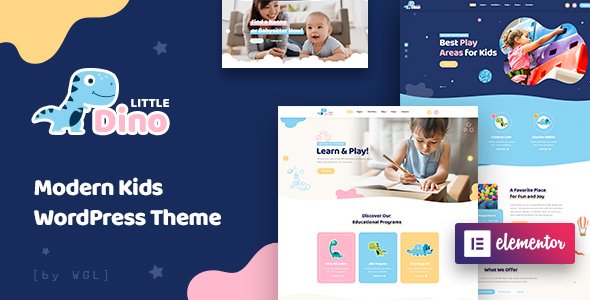
Stuck on your Littledino WordPress theme? Let's fix it.
No endless back-and-forth. Just send us the details and we'll get it done.
No obligation · Replies within 1 hour · Quote within 1 day
Setup · Customization · Bug fixes · WooCommerce integration
About Littledino WP Theme
Littledino is a WordPress theme built by WebGeniusLab, designed for children’s businesses, kindergartens, daycare centers, and family-oriented brands. It ships with a playful visual style, bright color palettes, and child-friendly typography that communicates warmth and fun without requiring a designer.
The theme is built on a page builder-compatible foundation, making layout work accessible to non-technical users. It includes pre-built demo content for quick setup, WooCommerce support for selling products or services, and multiple header and footer layouts. Event management integration and contact form compatibility are also baked in.
WebGeniusLab has focused Littledino on a specific audience, which means the design decisions are consistent and purposeful. If you run a children’s brand or educational service, this theme gets you closer to a finished site faster than a general-purpose theme would.
Get matched with a Littledino developer in under one day
Tell us about your Littledino project. Small fixes, Littledino theme customization, or a full website build, whatever you need, we've got it covered.
We'll connect you to the right Littledino developers, define the scope, and get everything 100% clear.
You'll get one estimate, hire your preferred developer, and start collaborating.
Most Littledino sites start from a demo and need real customization to stand out. Fonts, layouts, and colors are easy. WooCommerce configuration, custom post types, mobile polish, and third-party integrations take more skill.
A vetted Littledino developer on Codeable has done this before. They know the theme’s quirks, which plugins work without conflict, and how to get your site finished without the back-and-forth that slows most projects down. You get a working site, not a demo with your logo dropped in.
Pros
- Purpose-built for children's and family businesses with consistent visual design throughout
- Includes demo content for kindergartens, daycares, and schools that can be imported in one click
- WooCommerce compatible for selling classes, merchandise, or booking services
- Elementor support makes layout editing visual and accessible without coding
- WPML compatible for multilingual children's education or international school sites
Cons
- Niche design makes it unsuitable for general-purpose or non-children's-related websites
- Heavy demo imports can slow down the site if images and assets are not optimized after setup
- Customizing outside the provided demo sections requires Elementor knowledge or developer help
- Plugin dependency is high, meaning some features only work fully with specific third-party plugins
- Limited community and documentation compared to more popular multipurpose themes
Who is Littledino for?
Kindergarten and Preschool Websites
Littledino was designed with kindergartens in mind. The pre-built demo includes sections for staff profiles, schedules, gallery pages, and enrollment contact forms. Parents get a clear, friendly first impression. The color scheme and typography communicate safety and care, which is exactly what preschool marketing needs to do.
Children's Activity and Play Centers
Play centers and activity businesses benefit from the event-ready sections and bold visual layout. You can showcase upcoming activities, display pricing, and capture inquiries through integrated forms. The bright, energetic design matches the tone these businesses need to attract families and convert visitors into bookings.
Daycare and Childminding Services
Daycare providers need a site that communicates trust quickly. Littledino’s homepage sections for team introductions, testimonials, and service descriptions do that without requiring design work from scratch. Add a booking or inquiry form and you have a working lead-generation site that fits the childcare audience.
Kids' Online Shops
The WooCommerce integration makes Littledino usable for selling children’s products. Whether you sell toys, books, educational kits, or branded merchandise, the shop pages carry the same playful visual style. Setup is straightforward, though product-heavy stores will benefit from performance optimization to keep page speeds acceptable.
Children's Education and Tutoring Services
Tutoring services, after-school programs, and children’s learning platforms fit well within Littledino’s structure. You can present programs, list age groups, share tutor profiles, and accept inquiries. The theme’s event sections work for class schedules, and the clean layout keeps parents focused on the information they need.

Customizing Littledino
Littledino gives you control over colors, fonts, layouts, and section visibility through the WordPress Customizer and Elementor. You can swap out the demo content, adjust the header style, and change the color scheme to match your brand without touching code.
That said, deeper changes take more effort. Customizing WooCommerce templates, modifying the event layouts, or building pages outside the provided demo structure can get complicated. A Littledino expert knows which parts of the theme are flexible and which require careful handling to avoid breaking responsiveness or visual consistency.
If you want a site that goes beyond the demo while still feeling cohesive, working with someone who has hands-on Littledino experience saves significant time and prevents common mistakes.
Recommended plugins for Littledino
Littledino works well with several plugins that extend its functionality. WooCommerce adds a shop for toys, merchandise, or class bookings. The Events Calendar or similar plugins integrate naturally with the theme’s event-ready sections.
For contact and enrollment forms, WPForms or Gravity Forms slot in without issues. WPML support makes the theme viable for multilingual kindergarten or school sites.
To get more from your investment, pairing Littledino with a solid WordPress performance setup keeps load times fast for parents browsing on mobile. Adding proper WordPress SEO helps local businesses rank for searches in their area.
Not sure which plugins to use? This WordPress plugins directory covers the most popular options with reviews and setup guides.
Littledino common issues
Littledino theme not displaying correctly after update
Theme update issues in Littledino usually happen when a plugin dependency changes or the Customizer settings conflict with new template files. Start by clearing your cache and checking for plugin updates, especially Elementor and any WebGeniusLab companion plugins. If the layout is broken, deactivating recently updated plugins one at a time helps isolate the cause. If you cannot find it, a WordPress bug fixing service can resolve this quickly.
Littledino Elementor sections broken or missing
Missing or broken Elementor sections in Littledino are often caused by a version mismatch between Elementor and the theme, or a missing required plugin like WebGeniusLab’s companion plugin. Check that all recommended plugins are active and updated. Re-importing the demo template for the specific page sometimes restores missing sections. Avoid using the free version of Elementor if the demo requires Elementor Pro widgets.
Littledino WooCommerce pages not styled properly
Unstyled WooCommerce pages in Littledino usually mean the theme’s WooCommerce template files have not loaded properly, or a plugin conflict is overriding styles. Check that WooCommerce is active and up to date. Disable any third-party WooCommerce plugins temporarily to identify conflicts. If your shop pages looked fine before an update, restoring from a backup and updating plugins carefully is the safest path.
Littledino theme slow loading on mobile
Slow mobile load times with Littledino typically come from large unoptimized images in the demo content, multiple render-blocking scripts, or loading all Elementor assets site-wide. Start by compressing images using a tool like ShortPixel, then add a caching plugin. Limiting Elementor to pages that use it also reduces overhead. For a full fix, a dedicated WordPress performance service covers all these areas systematically.
Littledino FAQ
Yes, Littledino is built with Elementor compatibility in mind. Most of the demo page layouts are constructed using Elementor, so you can edit them visually. Some demo templates may require Elementor Pro for specific widgets. Make sure both Elementor and any WebGeniusLab companion plugins are installed and updated to avoid layout issues.
Littledino includes WooCommerce support, which makes it suitable for selling products, class bookings, or memberships. The theme applies its visual style to standard WooCommerce pages. For heavily customized shop setups or subscription-based services, you may need developer help to configure everything correctly without visual inconsistencies.
Littledino is a strong fit for primary schools, kindergartens, and early education centers. It includes sections for staff profiles, timetables, galleries, and program descriptions. The design language is appropriate for educational institutions targeting families with young children. For larger schools needing complex functionality, additional plugins or custom development may be required.
Littledino supports WPML, making it possible to run a multilingual site for international schools or bilingual education services. You will need the WPML plugin installed separately. Testing all template sections in both languages before launch is recommended, as some custom sections may need manual translation setup within the WPML string translation tool.
Littledino includes a one-click demo importer, usually available through a companion plugin provided by WebGeniusLab. After installing and activating the theme and required plugins, go to the theme’s import panel and select your preferred demo. The process imports pages, images, menus, and widgets. Always do this on a fresh WordPress install to avoid conflicts with existing content.
Hire a Littledino Expert Developer
Need a Littledino developer who knows the theme inside out? FoxyConcept matches you with vetted WordPress specialists through Codeable. Whether you need a full site build, custom modifications, or help fixing something broken, you can get a free estimate with no obligation to hire. Projects are matched within 24 hours. No risk, no pressure.
You'll need a free Codeable account so developers can ask questions and send their quotes.