Hervin WordPress Theme
by ClaPat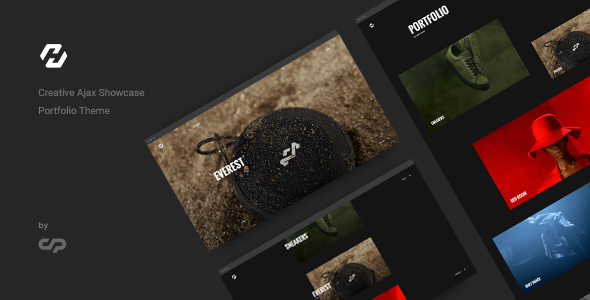
Stuck on your Hervin WordPress theme? Let's fix it.
No endless back-and-forth. Just send us the details and we'll get it done.
No obligation · Replies within 1 hour · Quote within 1 day
Setup · Customization · Bug fixes · WooCommerce integration
About Hervin WP Theme
Hervin is a WordPress theme built by ClaPat, designed with a clean, minimal aesthetic that suits creative professionals and portfolio-focused websites. It ships with a straightforward layout system, customizable homepage sections, and full compatibility with the WordPress block editor.
The theme targets designers, photographers, and small agencies who want a polished site without heavy page builder dependencies. Hervin keeps things lean: fast-loading templates, readable typography, and a visual style that stays out of the way of your content.
ClaPat has built Hervin to work well out of the box, but like most themes, realizing its full potential usually requires some configuration. Whether you need to match your brand exactly or extend functionality beyond the defaults, knowing what Hervin supports before you start saves time and prevents headaches later.
Get matched with a Hervin developer in under one day
Tell us about your Hervin project. Small fixes, Hervin theme customization, or a full website build, whatever you need, we've got it covered.
We'll connect you to the right Hervin developers, define the scope, and get everything 100% clear.
You'll get one estimate, hire your preferred developer, and start collaborating.
Most Hervin issues come down to customization that outgrows what the Customizer offers, or plugin conflicts that need a developer to trace and fix. FoxyConcept works through Codeable, a vetted network of WordPress specialists, so you get a developer who has been reviewed and tested before taking on your project. No generalist freelancers, no guesswork. Just someone who knows WordPress themes well and can get Hervin working exactly how you need it.
Pros
- Clean, minimal design that loads fast and avoids unnecessary visual clutter
- Full block editor compatibility makes content editing straightforward for non-technical users
- Lightweight codebase with no heavy page builder dependency bundled in
- Responsive layout that holds up well across mobile, tablet, and desktop screen sizes
- Developed by ClaPat with consistent update history and documented theme options
Cons
- Limited built-in layout variety means complex page structures require custom development
- No dedicated WooCommerce styling included, so shop pages need manual CSS work
- Customizer options cover basics only, advanced users will hit the ceiling quickly
- No bundled demo content importer, so setup from scratch takes more initial time
- Smaller support community compared to major marketplace themes like Astra or GeneratePress
Who is Hervin for?
Photography Portfolio
Hervin’s clean layout and minimal chrome let photography take center stage. Full-width image sections and readable typography make gallery pages work without visual competition. A developer can configure custom portfolio post types and lightbox integration to give clients a professional browsing experience without overloading the page with scripts.
Freelance Designer Website
Freelancers need a site that communicates credibility fast. Hervin’s restrained design does that. Case study pages, a services section, and a contact form can be structured cleanly within the theme. A Hervin developer can adjust spacing, typography scale, and color to match a designer’s existing brand identity precisely.
Small Creative Agency
Small agencies often need a homepage that covers services, team, and contact without feeling cluttered. Hervin’s section-based layout supports this structure. With custom development, you can add client logo strips, testimonial sections, and a project archive that pulls from a custom post type rather than standard posts.
Personal Blog
Writers and content creators benefit from Hervin’s readable single post layout and distraction-free design. Category archives and author pages are clean by default. A developer can extend the theme with a custom reading time display, related posts section, and newsletter signup block integrated directly into article templates.
Boutique Product Shop
With WooCommerce installed and some CSS adjustments, Hervin becomes a workable base for a small product shop. The minimal aesthetic suits boutique or lifestyle products well. A developer will handle WooCommerce template overrides within a child theme to make product, cart, and checkout pages consistent with the rest of the site’s design.

Customizing Hervin
Hervin gives you access to the standard WordPress Customizer, where you can adjust colors, fonts, header layout, and footer content. The theme supports custom logos, site identity settings, and basic widget areas without requiring any third-party plugins.
Beyond the defaults, a Hervin expert can help you restructure page templates, modify the theme’s CSS to match a specific brand guide, or integrate WooCommerce cleanly into the existing layout. Custom post types, advanced typography control, and homepage section reordering are all achievable with targeted development work.
If you need changes that go deeper than the Customizer allows, editing Hervin directly without a child theme will cause those changes to be lost on updates. A developer will set up a child theme first, keeping your customizations safe long-term.
Recommended plugins for Hervin
Hervin works with most popular WordPress plugins without conflict. For ecommerce, WooCommerce integrates with some styling adjustments. Contact Form 7 and WPForms both work cleanly in content areas.
If site speed is a priority, pairing Hervin with a caching plugin and a CDN makes a measurable difference. You can read more about that on our WordPress performance page. For organic traffic, the theme is compatible with Yoast SEO and Rank Math. Our WordPress SEO service covers technical optimisation that goes beyond what any plugin handles automatically.
Not sure which plugins to use? This WordPress plugins directory covers the most popular options with reviews and setup guides.
Hervin common issues
Hervin theme header not displaying correctly after update
Header display issues after a Hervin update usually mean a template file was overwritten. If you edited theme files directly without a child theme, those changes are gone. Check your header.php against the updated version and identify what changed. If you have a child theme in place, the conflict is likely a CSS specificity issue between the parent update and your overrides. Clear any caching plugins and test in an incognito window first before editing anything.
Hervin custom CSS changes disappearing on theme update
If CSS changes are disappearing, you are almost certainly editing the parent theme directly instead of using a child theme. Hervin updates replace all theme files, including style.css. The fix is to create a child theme, move your custom CSS there, and never edit the parent again. Going forward, updates to Hervin will not touch your child theme files. Our WordPress bug fixing service can set this up correctly if you are unsure how to proceed.
Hervin theme fonts not loading on mobile devices
Font loading failures on mobile are often tied to a Content Security Policy blocking external font sources, or a caching plugin serving a desktop-cached version to mobile users. Check your browser console on mobile for blocked requests. If you are loading Google Fonts through Hervin’s theme options, verify the URL is HTTPS. Some caching configurations also need separate mobile cache settings enabled to serve the correct font CSS to smaller devices.
Hervin WooCommerce shop page layout broken
Hervin does not include WooCommerce-specific template files by default, so the plugin falls back to its own unstyled templates. The result is a shop page that looks inconsistent with the rest of your site. The correct fix is to copy the relevant WooCommerce template files into your child theme’s woocommerce directory and style them to match Hervin’s existing CSS variables and layout patterns. This is a standard development task but requires care to avoid breaking checkout flows.
Hervin FAQ
Hervin is available through the WordPress theme ecosystem via ClaPat. Availability and pricing depend on the current distribution model, so check the official ClaPat or WordPress.org listing for the most accurate information. Free themes from the WordPress.org repository are reviewed for basic coding standards, which is a useful baseline for security and compatibility.
Hervin is compatible with WooCommerce at a functional level, but it does not include dedicated WooCommerce template styling. Shop, product, cart, and checkout pages will work, but they may look inconsistent with the rest of your site. A developer can create styled WooCommerce template overrides inside a child theme to fix this. It is a common task and not a major project for an experienced WordPress developer.
Hervin is built around the native WordPress block editor. You can use Elementor with it, but conflicts between a page builder and the theme’s own templates are common, especially on archive and single post layouts. If you need a heavy page builder workflow, a theme built specifically for that purpose may be a better starting point. A Hervin developer can advise based on your specific build requirements.
To create a child theme for Hervin, you need a new folder in wp-content/themes containing a style.css with the correct Template header pointing to Hervin, and a functions.php that enqueues the parent theme stylesheet. You then activate the child theme from the WordPress dashboard. Any edits go into the child theme only. Plugins like Child Theme Configurator can automate this process if you prefer a no-code approach.
Update frequency depends on ClaPat’s current development activity. Check the theme’s changelog on its distribution page for the most recent update date. A theme that has not been updated in over a year may have compatibility issues with newer versions of WordPress or WooCommerce. Our WordPress maintenance service includes monitoring theme compatibility as part of ongoing site upkeep.
Hire a Hervin Developer
Need Hervin set up correctly, customized to your brand, or fixed after something broke? FoxyConcept connects you with a vetted WordPress developer through Codeable. You get a free estimate within 24 hours, no obligation to proceed. Work is scoped clearly before anything starts, so there are no surprises.
Get your free estimate here and describe what you need. A Hervin developer will review your project and come back with a clear plan.
You'll need a free Codeable account so developers can ask questions and send their quotes.