Auto Stars WordPress Theme
by imithemes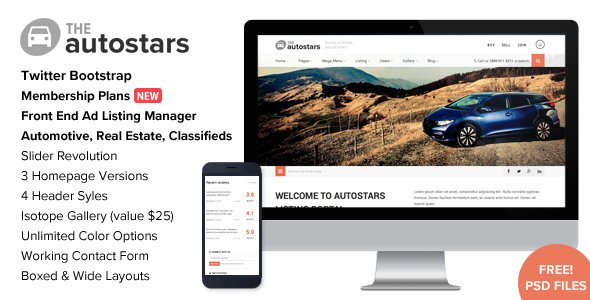
Stuck on your Auto Stars WordPress theme? Let's fix it.
No endless back-and-forth. Just send us the details and we'll get it done.
No obligation · Replies within 1 hour · Quote within 1 day
Setup · Customization · Bug fixes · WooCommerce integration
About Auto Stars WP Theme
Auto Stars is a WordPress theme by imithemes built specifically for car dealerships, auto repair shops, and automotive businesses. It ships with a vehicle inventory system, search filters by make, model, year, and price, and a layout designed to showcase listings clearly. The theme integrates with imithemes’ own Car Listings plugin, giving dealerships a structured way to manage stock without custom development. Pages for vehicle detail, comparison, and financing requests are included out of the box. The design is clean and conversion-focused, with prominent call-to-action placement for test drive bookings and enquiry forms. Auto Stars works well for both single-location dealers and multi-brand showrooms. If you are running an automotive site and want a purpose-built solution rather than a generic theme with patches, Auto Stars covers the core requirements from day one.
Get matched with a Auto Stars developer in under one day
Tell us about your Auto Stars project. Small fixes, Auto Stars theme customization, or a full website build, whatever you need, we've got it covered.
We'll connect you to the right Auto Stars developers, define the scope, and get everything 100% clear.
You'll get one estimate, hire your preferred developer, and start collaborating.
Auto Stars is a specialised theme and general WordPress developers often miss the details that matter for automotive sites: inventory filters, vehicle schema markup, CRM connections, and finance form flows. Codeable connects you with vetted developers who have hands-on experience with imithemes products and automotive WordPress builds. Every project on Codeable starts with a free estimate and no obligation to proceed. If you need specific customisations done properly the first time, working with a specialist through Codeable is the practical choice. See our full WordPress development services for what we cover.
Pros
- Purpose-built vehicle inventory system with filtering by make, model, year, mileage, and price
- Includes dedicated vehicle detail pages, comparison pages, and finance enquiry templates
- Clean, dealership-focused layout with strong call-to-action placement for test drives and enquiries
- Integrates directly with imithemes' Car Listings plugin for structured inventory management
- Covers single-location and multi-brand dealership structures without major restructuring
Cons
- Tightly coupled to imithemes' own plugin ecosystem, making third-party plugin swaps complicated
- Theme updates can lag behind WordPress core releases, occasionally causing compatibility warnings
- Default styling is fairly generic and requires CSS work to stand out from other Auto Stars sites
- No built-in live inventory feed integration with major automotive data providers like Autotrader or Cars.com
- Documentation from imithemes is sparse, which slows down developers unfamiliar with the theme structure
Who is Auto Stars for?
Independent Car Dealerships
Independent dealers need a site that lists stock clearly and converts browsers into enquiries. Auto Stars provides the inventory structure, filter search, and vehicle detail pages that make listings easy to navigate. Custom development can connect the site to a dealer’s existing CRM or stock management system, reducing double-entry and keeping listings current without manual updates.
Auto Repair and Service Centres
Auto repair shops use Auto Stars less for listings and more for service presentation. The theme’s layout adapts for service menus, booking forms, and customer testimonials. A developer can strip out the inventory components and replace them with a service booking workflow, quote request forms, and integration with appointment scheduling tools like Bookly or Simply Schedule Appointments.
Motorcycle and Powersports Dealers
Motorcycle and powersports dealers have similar needs to car dealerships: filterable inventory, spec-heavy product pages, and finance enquiry forms. Auto Stars handles this well with minor template adjustments to rename vehicle fields. Custom taxonomy work allows filtering by engine size, category type, or brand alongside the standard year and price filters already built into the theme.
Car Rental Companies
Car rental businesses need availability calendars, pricing tables, and booking flows rather than a traditional inventory list. Auto Stars provides the vehicle showcase layer, and a developer can integrate a booking plugin like Reservit or a custom calendar solution on top. The result is a rental site that presents the fleet professionally and handles booking requests without a separate platform.
Classic and Specialist Vehicle Traders
Classic car traders and specialist vehicle dealers need high-quality image galleries, detailed specification fields, and enquiry forms that capture serious buyer intent. Auto Stars supports extensive vehicle detail pages, and custom development can add provenance fields, service history uploads, and private sale enquiry workflows. The theme handles premium presentation when the photography and content are given proper attention.

Customizing Auto Stars
Auto Stars gives you a starting point, but most dealerships need adjustments before the site matches their brand and workflow. Colour schemes, typography, and header layouts can be changed through the WordPress Customizer, but anything beyond surface-level styling requires editing templates or writing custom CSS. Vehicle search filters, comparison pages, and enquiry forms often need reworking to match specific inventory structures or CRM integrations. An Auto Stars expert can also set up custom post types for accessories or services, add WooCommerce for parts sales, or connect the theme to third-party inventory feeds. If you need financing calculators, trade-in request flows, or location-based dealer finders, those require custom development work. FoxyConcept works with automotive businesses that need more than default settings and delivers changes through Codeable for a fully managed, accountable process.
Recommended plugins for Auto Stars
Auto Stars pairs well with several plugins that extend what the theme does by default. WooCommerce handles parts and accessories sales directly from the same site. Gravity Forms or WPForms cover enquiry, test drive booking, and finance request workflows. For inventory feeds, the theme can connect to third-party CSV or API sources with custom work. Adding a live chat tool like Tidio improves lead capture on vehicle detail pages. If your site handles significant traffic or you run paid search campaigns, investing in WordPress performance optimisation keeps page load times competitive. Automotive sites also benefit from structured data and local SEO work, covered through WordPress SEO optimisation to improve visibility in local vehicle searches.
Not sure which plugins to use? This WordPress plugins directory covers the most popular options with reviews and setup guides.
Auto Stars common issues
Auto Stars vehicle search filter not working after update
Filter breakage after a theme or plugin update is usually caused by a JavaScript conflict or a database query change in the Car Listings plugin. First, check the browser console for JS errors and deactivate recently updated plugins one at a time to isolate the conflict. If the filters worked before the update, rolling back the Car Listings plugin version often restores them while you identify the root cause. For persistent issues, our WordPress bug fixing service can diagnose and resolve the problem cleanly.
Auto Stars theme conflict with WooCommerce on shop pages
Auto Stars and WooCommerce can conflict on archive and shop pages because the theme registers its own query filters that interfere with WooCommerce’s product loops. The fix usually involves adding conditional checks in the theme’s functions.php to exclude WooCommerce pages from Auto Stars’ custom queries. Template overrides for WooCommerce pages can also resolve layout issues. This is worth handling carefully because a bad fix can break both the inventory and shop simultaneously.
Auto Stars Car Listings plugin showing blank vehicle pages
Blank vehicle pages are almost always caused by a permalink flush issue or a missing template file. Go to Settings, then Permalinks, and save without changing anything to force a flush. If that does not fix it, check whether the car-single.php template exists in the active theme folder. A parent theme update can overwrite child theme templates, so verify your child theme is still properly inheriting the correct files for vehicle detail pages.
Auto Stars contact form not sending emails on enquiry submissions
If Auto Stars enquiry forms are not delivering emails, the issue is almost always server-level email delivery rather than the form plugin itself. WordPress uses PHP mail by default, which most hosting providers block or throttle. Install WP Mail SMTP and connect it to a transactional email service like Mailgun, Postmark, or SendGrid. This applies to all forms on the site including test drive requests and finance enquiries. Check spam folders first before assuming emails are not sending at all.
Auto Stars FAQ
imithemes updates Auto Stars periodically, but compatibility with the latest WordPress core is not always immediate. Before updating WordPress on a live site, check the imithemes changelog or support forums for confirmation. Running a staging site before applying major WordPress updates is strongly recommended. If your current version is lagging significantly behind, an ongoing maintenance plan helps keep everything aligned and tested.
Auto Stars is not built around Elementor or WPBakery. It uses its own page structure and the imithemes plugin layer. You can install Elementor alongside it, but vehicle listing pages and inventory templates are controlled by the theme and Car Listings plugin, not by the page builder. Attempting to rebuild inventory pages in Elementor usually causes conflicts. Page builder use is better limited to static content pages like About or Contact.
Auto Stars includes a demo importer, but the process is not always smooth. Large demo imports can time out on shared hosting due to memory or execution time limits. If the one-click import fails, you may need to import XML content manually and then reassign menus and widgets. Increasing PHP memory limit and max execution time before importing reduces the chance of a failed or partial import.
New vehicle fields are added through the Car Listings plugin’s custom fields settings or via code using WordPress custom meta boxes. The theme pulls these fields into vehicle detail page templates. Adding a field through the plugin settings is straightforward, but displaying it on the front end requires editing the vehicle detail template file. A developer familiar with Auto Stars can handle this without breaking existing listings or search filter functionality.
Yes, but the process depends on where your current site lives and how your inventory is structured. Migrating content, images, and vehicle data to Auto Stars requires mapping existing fields to the Car Listings plugin structure. If your current site uses a different inventory plugin, some data transformation is needed. We cover this through our WordPress migration service and can handle the data mapping as part of the project.
Hire an Auto Stars Developer
If your Auto Stars site needs customisation, new features, or fixes, FoxyConcept delivers the work through Codeable using vetted WordPress developers with automotive theme experience. Whether you need inventory filter changes, a financing calculator, CRM integration, or a full site build from scratch, we scope the project clearly before any work begins. Get a free estimate with no obligation to hire. The process is straightforward and the result is a site that actually fits your dealership.
You'll need a free Codeable account so developers can ask questions and send their quotes.