Aveo Resume Theme WordPress Theme
by LMPixels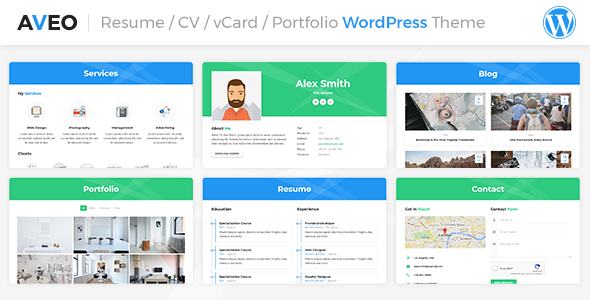
Stuck on your Aveo Resume Theme WordPress theme? Let's fix it.
No endless back-and-forth. Just send us the details and we'll get it done.
No obligation · Replies within 1 hour · Quote within 1 day
Setup · Customization · Bug fixes · WooCommerce integration
About Aveo Resume Theme WP Theme
Aveo is a resume and personal portfolio WordPress theme built by LMPixels. It’s designed for professionals who want a clean, single-page site to showcase their CV, skills, work history, and portfolio in one place. The layout is minimal and focused, which suits freelancers, designers, developers, and job seekers who want a personal brand site without a lot of overhead.
The theme includes sections for an about page, resume timeline, skills bars, portfolio grid, testimonials, and a contact form. It ships with the Elementor page builder, making the layout editable without touching code. Demo content can be imported in one click, which speeds up the initial setup considerably. It’s a niche theme with a specific job to do, and it does that job well out of the box.
Get matched with a Aveo Resume Theme developer in under one day
Tell us about your Aveo Resume Theme project. Small fixes, Aveo Resume Theme theme customization, or a full website build, whatever you need, we've got it covered.
We'll connect you to the right Aveo Resume Theme developers, define the scope, and get everything 100% clear.
You'll get one estimate, hire your preferred developer, and start collaborating.
Most issues with Aveo come down to customization limits hitting a wall, plugin conflicts, or layout problems on mobile. These aren’t complicated problems, but they take time to diagnose if you don’t know the theme’s structure. A vetted WordPress developer on Codeable can look at exactly what you need and give you a straight answer on what’s involved. No guessing, no generic advice.
Whether it’s a small CSS fix or a larger layout overhaul, working with someone who knows personal portfolio themes means faster results and fewer problems down the line.
Pros
- Clean, single-page resume layout that loads fast and looks professional without extra configuration
- One-click demo import gets you a working site in minutes, including all sections and placeholder content
- Built-in resume timeline, skills bars, and portfolio grid cover what most job seekers and freelancers need
- Elementor integration means you can edit layout and content visually without writing code
- Focused design with minimal distractions keeps visitor attention on your work and contact details
Cons
- Limited to personal resume and portfolio use — not suitable as a business or multi-author site
- Skills bar percentages are purely visual and have no accessibility labeling by default
- Adding a blog or secondary page structure requires custom templates and additional development work
- Mobile styling on the timeline and portfolio sections sometimes needs manual CSS adjustments
- Plugin compatibility is not always tested against the latest WordPress core updates, which can cause unexpected issues
Who is Aveo Resume Theme for?
Freelance Designer Portfolio
Aveo’s portfolio grid and clean layout make it a natural fit for freelance designers. You can organize work samples by category, display client testimonials in a dedicated section, and direct visitors straight to a contact form. The minimal aesthetic keeps the focus on the work rather than the website itself.
Developer Personal Site
Developers often want a personal site that looks polished without spending days building one. Aveo’s one-click setup and Elementor editing means you can get a live site quickly, then add GitHub links, project case studies, and a skills section that reflects your actual stack. It reads like a professional profile.
Job Seeker Resume Site
For someone actively job hunting, having a personal domain that mirrors your CV adds credibility. Aveo’s resume timeline format is easy for recruiters to scan. You can list education, work experience, and achievements in a structured way, then share the URL on LinkedIn or in email applications instead of attaching a PDF.
Creative Professional Showcase
Photographers, illustrators, and copywriters all benefit from a site that leads with visual work. Aveo’s portfolio section supports image galleries with category filtering. Combined with a strong hero section and brief bio, it gives creative professionals a complete first impression without needing a complex multi-page site.
Consultant Personal Brand
Consultants and coaches often need a personal site that establishes authority quickly. Aveo lets you lead with a strong headline, list your areas of expertise, include client quotes, and end with a clear call to action. It functions as a digital business card that’s more convincing than a LinkedIn profile alone.

Customizing Aveo Resume Theme
Aveo’s customization options cover the basics: fonts, colors, section order, and content within each block. You can adjust skill percentages, swap portfolio items, reorder the resume timeline, and update the hero section with your own photo and headline. Elementor handles most of the layout editing visually.
Beyond the surface level, customization gets more technical. Custom CSS is often needed to override default spacing, adjust mobile breakpoints, or change the color logic for specific elements. If you want to add a blog, integrate a booking form, or restructure the layout significantly, that requires real development work. An Aveo Resume Theme expert can handle those modifications cleanly without creating conflicts that break across updates. It saves time and avoids the frustration of half-working workarounds.
Recommended plugins for Aveo Resume Theme
Aveo works well as a standalone site, but there are common additions worth considering. Contact Form 7 or WPForms can replace or improve the default contact section. Adding a blog requires setting up a separate page template. If you’re targeting local or niche job searches, structured data markup helps search engines read your resume content properly.
For speed improvements, combining a caching plugin with image optimization will noticeably reduce load times on mobile. Learn more about WordPress performance optimization. If you want your personal site to rank for your name or specialty, a proper on-page setup matters. See our WordPress SEO service for that.
Not sure which plugins to use? This WordPress plugins directory covers the most popular options with reviews and setup guides.
Aveo Resume Theme common issues
Aveo Resume Theme portfolio section not showing images
This usually happens when the portfolio post type isn’t set up correctly, or when image sizes haven’t been regenerated after switching themes. Go to the portfolio settings in the theme options and confirm the post type is active. Then run a regenerate thumbnails plugin to rebuild image sizes for your uploaded files. If images are still missing, check whether a caching plugin is serving stale pages. Our WordPress bug fixing service can trace the exact cause if the above steps don’t resolve it.
Aveo theme contact form not sending emails
Aveo uses a standard PHP mail function through the contact form, which many shared hosts block by default. Install the WP Mail SMTP plugin and connect it to an SMTP provider like Gmail, Mailgun, or Brevo. Enter the credentials, send a test email through the plugin’s diagnostic tool, and confirm delivery. This fixes the issue in most cases. If the form itself is broken visually, check for JavaScript errors in the browser console that may point to a plugin conflict.
Aveo Resume Theme mobile layout broken after update
After a theme or Elementor update, cached CSS sometimes doesn’t clear properly, which causes layout shifts on mobile. Start by clearing all caches, including your hosting cache, any caching plugin, and Elementor’s own regenerated files under Elementor > Tools > Regenerate CSS. If the issue persists, open browser dev tools and identify which element is overflowing its container. A small amount of targeted CSS usually corrects it. Check our bug fixing service if you need a developer to handle it.
How to add a blog to Aveo Resume Theme
Aveo doesn’t include a blog template out of the box. To add one, you need to create a new WordPress page, assign it as the Posts page under Settings > Reading, then build a custom template or use a plugin like Elementor’s loop builder. Styling the blog to match the rest of the Aveo design takes some CSS work. If you want the blog to integrate cleanly without looking like an afterthought, a developer familiar with the theme structure will get it done faster and cleaner.
Aveo Resume Theme FAQ
LMPixels has updated Aveo over time, but compatibility with the very latest WordPress releases is not always immediate. Before updating WordPress core, check the theme’s changelog on ThemeForest for any noted compatibility updates. Running a staging environment before applying updates to your live site is good practice. If you need help managing updates safely, our WordPress maintenance service covers that.
Yes. Aveo ships with Elementor as its page builder, and most of the theme sections are built using Elementor widgets. This means you can edit content, rearrange sections, and adjust styling through Elementor’s visual editor. The free version of Elementor is sufficient for the core layout. Some advanced customizations may benefit from Elementor Pro, but it’s not required to run the theme.
Aveo is designed as a single-page resume theme. You can technically create additional pages, but the theme doesn’t include page templates for a standard multi-page structure. Building out a blog, services pages, or a contact page that fits the Aveo design requires custom templates and additional development. It’s possible but goes beyond what the theme provides natively.
After activating Aveo, you should see a prompt to install required plugins including the demo importer. Once those are active, go to Appearance > Import Demo Data and select the demo you want. The importer will pull in all sample content, images, and settings. The process takes a few minutes. After import, replace the placeholder content with your own text, images, and portfolio items.
Aveo is a lightweight theme, which helps with page speed, and fast-loading sites rank better. However, the theme doesn’t include built-in SEO features beyond basic meta support. You’ll want to install a plugin like Yoast SEO or Rank Math to manage titles, descriptions, and schema markup. For a personal site targeting searches for your name or profession, proper on-page setup matters. See our WordPress SEO service for details.
Hire an Aveo Resume Theme Developer
If your Aveo site isn’t looking the way you want, or you need features the theme doesn’t handle out of the box, we can help. FoxyConcept works through Codeable to match you with a vetted WordPress developer who can handle the work properly. Get a free estimate with no obligation to hire. Tell us what you need and we’ll come back with a clear plan and cost.
You'll need a free Codeable account so developers can ask questions and send their quotes.