Malmö WordPress Theme
by Elated-Themes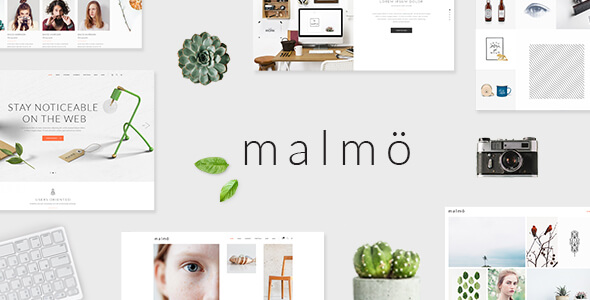
Stuck on your Malmö WordPress theme? Let's fix it.
No endless back-and-forth. Just send us the details and we'll get it done.
No obligation · Replies within 1 hour · Quote within 1 day
Setup · Customization · Bug fixes · WooCommerce integration
About Malmö WP Theme
Malmö is a multipurpose WordPress theme by Elated-Themes, built for creative professionals and agencies who want a polished portfolio or business site without hiring a developer for every tweak. It ships with a drag-and-drop page builder, a large library of pre-built demo sites, and tight WooCommerce support out of the box.
The theme leans heavily on visual presentation. Full-width sections, parallax backgrounds, and smooth scroll animations are all standard. Elated-Themes maintains regular updates, so compatibility with current WordPress and PHP versions is generally reliable.
Where Malmö stands out is the sheer number of included shortcodes and widget areas. You get genuine layout flexibility without touching code. That said, unlocking the full potential of those options does take time, and some configurations require a developer who knows the theme’s structure well.
Get matched with a Malmö developer in under one day
Tell us about your Malmö project. Small fixes, Malmö theme customization, or a full website build, whatever you need, we've got it covered.
We'll connect you to the right Malmö developers, define the scope, and get everything 100% clear.
You'll get one estimate, hire your preferred developer, and start collaborating.
Malmö has genuine depth, but that depth means more places for things to go wrong. Misconfigured WPBakery rows, conflicting shortcode output, or a child theme set up incorrectly can cost you days of debugging. Working with a vetted Malmö developer through Codeable means you get someone who has handled these exact issues before. No learning curve billed to you, no guesswork. Just clean, documented work on a theme they actually know.
Pros
- Large library of pre-built demo sites speeds up initial setup significantly
- WPBakery Page Builder, Revolution Slider, and Essential Grid included at no extra cost
- Detailed theme panel gives non-developers real control over fonts, colours, and layouts
- WooCommerce support is built in with styled product and shop templates
- Elated-Themes maintains regular updates with good WordPress version compatibility
Cons
- WPBakery dependency makes switching page builders later a major undertaking
- Theme panel sits outside the standard WordPress Customizer, creating a steeper learning curve
- Bundled sliders and scripts add noticeable page weight that requires active optimisation
- Heavy shortcode use makes content difficult to migrate if you ever change themes
- Support response times from Elated-Themes can be slow during high-volume periods
Who is Malmö for?
Creative Agency Website
Malmö suits agency sites well. The multi-page demo layouts cover services, case studies, team, and contact sections. WPBakery makes it straightforward to rearrange sections for different service offerings. The built-in portfolio post type handles case study presentation cleanly without needing a plugin.
Photographer or Visual Portfolio
Full-width image layouts, gallery grids via Essential Grid, and minimal typography options make Malmö a solid choice for photographers. The theme handles large images well structurally, though a performance pass is recommended before launch to keep load times acceptable for image-heavy galleries.
WooCommerce Fashion or Lifestyle Store
The WooCommerce integration is styled to match Malmö’s design, not just patched in. Product pages, category grids, and cart pages all respect the theme’s visual language. It works best for smaller catalogue stores where visual presentation matters more than complex filtering or inventory logic.
Architecture or Interior Design Firm
Architecture firms need clean grid layouts and strong full-screen imagery. Malmö handles both. The portfolio custom post type maps naturally to project showcases, and the parallax section options add visual depth without requiring custom development. A minimal header configuration suits this niche well.
Freelance Designer or Illustrator Portfolio
Freelancers get a professional-looking portfolio site without a large budget. The single-page demo layouts work for presenting work, rates, and contact in one scrollable experience. The theme’s shortcode library covers testimonials, skill bars, and pricing tables that a freelancer site typically needs.

Customizing Malmö
Malmö gives you a lot of controls inside its own theme panel, separate from the standard WordPress Customizer. Font pairs, colour schemes, header styles, and footer layouts all live there. The options are detailed enough that non-developers can handle basic branding, but complex changes quickly hit a wall.
Custom post types for portfolios and team members work well as long as you follow the theme’s intended structure. Deviating from that structure, say adding custom fields or rerouting template hierarchy, is where a Malmö expert saves you hours of trial and error.
WPBakery Page Builder is bundled, which adds another layer of customization. Mixing WPBakery elements with Malmö’s own shortcodes can create conflicts if you don’t know which takes priority. A developer familiar with the theme can map that out cleanly from the start.
Recommended plugins for Malmö
Malmö integrates with WooCommerce for product pages and shop layouts styled to match the theme’s design language. Revolution Slider is included, which handles hero sections and full-screen carousels. Essential Grid is also bundled for portfolio and blog grids.
For SEO, Malmö works with Yoast and Rank Math without structural issues, though schema output from the theme itself is minimal. A dedicated WordPress SEO setup is worth adding separately.
Performance-wise, the bundled sliders and heavy scripts add load time. Pairing Malmö with a proper WordPress performance optimisation pass makes a real difference on Core Web Vitals scores.
Not sure which plugins to use? This WordPress plugins directory covers the most popular options with reviews and setup guides.
Malmö common issues
Malmö theme WPBakery page builder not loading in WordPress
This usually comes down to a plugin conflict or a failed bundled plugin activation. Go to Appearance > Install Plugins and confirm WPBakery shows as active. If it does but the editor still won’t load, deactivate all other plugins one by one to isolate the conflict. A PHP memory limit below 256MB can also cause the builder to silently fail. Check your wp-config.php or contact your host. If the issue persists, a WordPress bug fix is the fastest path forward.
Malmö WordPress theme slow loading speed fix
Malmö loads Revolution Slider, Essential Grid, and WPBakery scripts site-wide by default, even on pages that don’t use them. Start by disabling those scripts on pages where they aren’t needed. Next, minify and combine CSS and JS using a caching plugin like WP Rocket. Large full-width images also need compression before upload. A full WordPress performance optimisation covers all of these systematically and will improve your Core Web Vitals scores measurably.
Malmö theme header not displaying correctly after update
Header display issues after a Malmö update are almost always caused by cached CSS conflicting with new theme styles. Clear your caching plugin’s files first, then clear your CDN cache if you use one. If you’re using a child theme, check whether any header template files in the child theme are overriding the updated parent files. If you haven’t got a child theme and were editing the parent directly, the update will have overwritten your changes. Check the theme changelog on ThemeForest for any header-specific structural changes.
Malmö portfolio page showing wrong layout or missing items
Malmö’s portfolio relies on the correct custom post type and taxonomy setup. If items are missing, check that the portfolio post type is enabled in the theme panel under Elated Options > Portfolio. If the layout looks wrong, confirm the page template is set to the correct portfolio template in the page attributes panel. WPBakery row settings can also override the theme’s portfolio grid styles. A WordPress bug fixing service can trace exactly where the layout is breaking.
Malmö FAQ
Malmö is manageable for beginners who are comfortable following documentation, but the learning curve is steeper than simpler themes. The separate Elated Options panel, WPBakery integration, and large number of settings can be confusing at first. If you want a specific result quickly, working with a Malmö developer from the start is more cost-effective than spending weeks in trial and error.
Malmö was built around WPBakery, not Elementor. You can technically use Elementor on a Malmö site, but the theme’s shortcodes, portfolio post type, and custom widgets are all designed to work with WPBakery. Mixing the two editors creates maintenance headaches. If Elementor is a requirement, a different base theme is the more practical choice.
Go to Elated Options > Import in your WordPress dashboard. From there you can choose a demo and run a one-click import that pulls in pages, settings, widgets, and media. Make sure you are importing to a fresh installation or the demo content will mix with your existing posts. Required plugins must be installed and activated before the import starts or it will fail silently.
Yes. Malmö includes WooCommerce-compatible templates styled to match the theme. Product pages, the cart, and the checkout all inherit the theme’s design. It works best for smaller stores focused on visual presentation. For larger stores needing advanced filtering, subscriptions, or complex shipping rules, additional plugins are needed and a developer should configure them to avoid styling conflicts.
Elated-Themes continues to release updates for Malmö on ThemeForest. Updates generally address WordPress and WooCommerce version compatibility. The frequency is reasonable but not rapid. Before updating, always test on a staging site first, especially if you have a child theme or custom code, since Elated-Themes sometimes restructures template files between versions.
Hire a Malmö WordPress Expert
Whether you need a full Malmö build from scratch, help customizing an existing site, or a specific fix that has been blocking you for weeks, a specialist gets it done faster and cleaner than general-purpose freelancers. Post your project and get matched with a vetted Malmö developer within 24 hours. Get a free estimate with no obligation to hire.
You'll need a free Codeable account so developers can ask questions and send their quotes.