Dentalux WordPress Theme
by AncoraThemes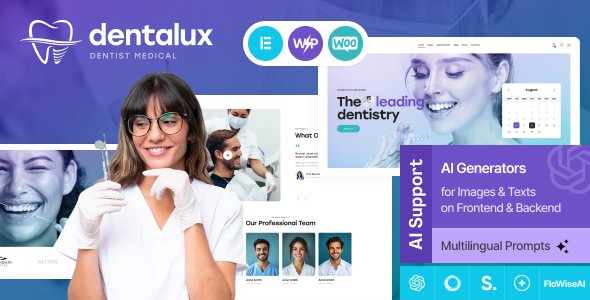
Stuck on your Dentalux WordPress theme? Let's fix it.
No endless back-and-forth. Just send us the details and we'll get it done.
No obligation · Replies within 1 hour · Quote within 1 day
Setup · Customization · Bug fixes · WooCommerce integration
About Dentalux WP Theme
Dentalux is a WordPress theme built by AncoraThemes specifically for dental clinics, orthodontists, and oral health practices. It ships with pre-built page templates covering services, appointment booking, team profiles, and patient testimonials — everything a dental website typically needs out of the box.
The theme is built on a clean, medical-style design with a white-and-blue aesthetic that patients associate with professional healthcare. It integrates with popular booking plugins and supports WooCommerce for selling dental products or treatment packages online.
AncoraThemes maintains the theme actively, with updates that keep compatibility with the latest WordPress core releases. If you need a polished dental website without starting from scratch, Dentalux gives you a solid foundation.
Get matched with a Dentalux developer in under one day
Tell us about your Dentalux project. Small fixes, Dentalux theme customization, or a full website build, whatever you need, we've got it covered.
We'll connect you to the right Dentalux developers, define the scope, and get everything 100% clear.
You'll get one estimate, hire your preferred developer, and start collaborating.
Most Dentalux issues — broken layouts after updates, booking plugin conflicts, custom page builds — are straightforward for a developer who knows the theme. The problem is finding one quickly.
Through Codeable, you post your project and get matched with a vetted WordPress developer within 24 hours. No marketplace bidding, no unverified freelancers. Just a free estimate and a developer who can actually fix the problem. See how WordPress development works through FoxyConcept.
Pros
- Pre-built dental clinic templates save significant setup time compared to a generic theme
- Elementor compatibility means most visual edits don't need a developer
- Appointment booking widget built into the design from the start
- AncoraThemes provides regular updates and WordPress core compatibility patches
- Clean medical aesthetic that works well for patient-facing trust signals
Cons
- Design is dental-specific — repurposing it for other healthcare niches requires noticeable rework
- Heavy reliance on Elementor can create page builder lock-in if you want to switch later
- Advanced booking customisation requires plugin purchases or custom development
- Limited layout variety compared to multipurpose themes — fewer starting point options
- Customer support response times from AncoraThemes can be slow during peak periods
Who is Dentalux for?
General Dental Practice
Dentalux’s core templates are built around the general dentistry workflow — service listings, a team page, appointment forms, and patient testimonials. A general practice can launch a professional site using the demo content with minimal changes to structure. The booking widget and contact forms handle the most common patient actions from day one.
Orthodontic Clinic
Orthodontic clinics need to explain treatment timelines and show before-and-after results clearly. Dentalux’s gallery sections and service detail templates handle this well. A developer can extend the booking form to capture specific patient data like age range or treatment stage, which is useful for orthodontic intake workflows.
Cosmetic Dentistry Studio
Cosmetic dental studios live on visual trust. Dentalux supports full-width image sections and portfolio-style layouts that show smile transformations effectively. The white clinical aesthetic reinforces premium positioning. With some colour and typography customisation, it reads more like a high-end studio than a standard dental office site.
Paediatric Dentistry
Paediatric practices need a warmer tone and parent-focused content structure. Dentalux’s layout flexibility through Elementor lets a developer swap the default colour scheme and restructure service pages to speak to parents booking on behalf of their children. Custom intake forms for first-visit information are a common add-on here.
Multi-Location Dental Group
Groups running multiple clinic locations need location-specific pages, separate booking flows per branch, and consistent branding across all of them. Dentalux can support this with multisite or carefully structured location pages. A developer familiar with the theme can set this up cleanly without duplicating templates or creating maintenance headaches.

Customizing Dentalux
Dentalux works with the WordPress Customizer and supports Elementor, so most layout and style changes don’t require touching code. You can update colours, fonts, header layouts, and section visibility directly from the admin panel.
That said, deeper changes — custom appointment flows, modified service page structures, or integrations with practice management software — need hands-on development work. A Dentalux expert can handle those without breaking the theme’s existing structure or creating update conflicts down the line.
Common customisation requests include adding multilingual support for multi-location practices, building custom patient intake forms, and adjusting the booking widget to match specific scheduling rules. These jobs are faster and cleaner when handled by someone who already knows the theme’s template hierarchy.
Recommended plugins for Dentalux
Dentalux pairs well with several plugins that extend its core functionality. For appointment booking, WP Amelia and Simply Schedule Appointments both integrate cleanly. For SEO, the theme’s structured markup gives you a good starting point — pairing it with a proper WordPress SEO strategy gets you further.
If your clinic site is getting slow, image-heavy service pages and unoptimised scripts are usually the cause. A dedicated WordPress performance audit can cut load times significantly. WooCommerce works for selling treatment plans or dental hygiene products through the same site.
Not sure which plugins to use? This WordPress plugins directory covers the most popular options with reviews and setup guides.
Dentalux common issues
Dentalux booking form not sending emails
Email delivery failures on the Dentalux booking form are almost always a server configuration issue, not a theme bug. WordPress uses the PHP mail function by default, which many hosts block. Install an SMTP plugin like WP Mail SMTP and connect it to a transactional email service such as SendGrid or Mailgun. Test the form after setup. If it still fails, check the contact form plugin logs for error codes. A WordPress bug fixing service can diagnose and resolve this quickly.
Dentalux layout broken after WordPress update
Broken layouts after a WordPress update usually point to a plugin conflict rather than a core theme problem. Start by deactivating all plugins and reactivating them one at a time to isolate the cause. Elementor and its add-ons are common culprits after major WordPress releases. Check that both Elementor and Dentalux are on their latest versions. If the layout is still broken, a developer can inspect the template files directly and patch the conflict without a full rebuild.
Dentalux Elementor sections not displaying correctly on mobile
Mobile display issues in Elementor-built Dentalux pages usually come from fixed-width containers or desktop-only padding settings. Open the affected section in Elementor, switch the preview to mobile view, and check each section’s responsive settings individually. Column widths set in pixels instead of percentages are a frequent cause. If the issue spans multiple pages, it may be a global section or a custom CSS rule overriding responsive styles at a breakpoint.
Dentalux theme slow to load on mobile devices
Dentalux loads several assets by default — slider scripts, icon fonts, and large hero images — that slow mobile performance significantly. Start by running a WordPress performance audit to identify the heaviest requests. Compress images using a tool like ShortPixel, enable lazy loading, and consider a caching plugin. Disabling unused Elementor widgets through the Elementor settings panel also reduces JavaScript payload on every page load.
Dentalux FAQ
AncoraThemes updates Dentalux regularly to maintain compatibility with current WordPress releases. That said, major WordPress updates occasionally break specific features — particularly Elementor-dependent layouts or booking form integrations. Always test updates on a staging site first. If something breaks after an update, it’s usually a plugin conflict rather than a core theme issue and can be fixed without reverting WordPress.
Technically yes, but it takes work. Dentalux is designed around dental clinic conventions — the colour palette, iconography, and template labels all reflect that. Using it for a physio clinic or GP surgery is possible with customisation, but you’d be fighting the defaults throughout. A theme built generically for healthcare would be a faster starting point for non-dental practices.
Dentalux is compatible with WooCommerce, which makes it possible to sell dental products, whitening kits, or prepaid treatment packages directly through the site. The theme doesn’t include a custom WooCommerce layout, so shop and product pages will use WooCommerce’s default templates. A developer can style those pages to match the rest of the Dentalux design if consistency matters.
The easiest method is to duplicate an existing service page using a plugin like Yoast Duplicate Post or directly within Elementor. Open the duplicate, replace the content, update the slug, and publish. Alternatively, create a new page and assign the Dentalux service template from the page attributes panel, then build the layout in Elementor from scratch using the existing pages as reference.
Yes, migrating an existing dental site to Dentalux is straightforward if your content is well-organised. The main work involves rebuilding page layouts using Dentalux templates and Elementor, then importing your existing text and images. Redirects need to be set up if URLs are changing. A WordPress migration service handles the technical side and reduces the risk of losing content or breaking existing search rankings during the move.
Hire a Dentalux Expert Developer
Need help with your Dentalux site? Whether it’s a layout fix, a custom booking integration, or a full page build from one of the theme’s templates, a specialist can get it done without guesswork.
Post your project and get a free estimate within 24 hours — no obligation to hire. Work is delivered through Codeable, so every developer is vetted before they touch your site. Get your free estimate now.
You'll need a free Codeable account so developers can ask questions and send their quotes.