Mojuri – Jewelry Store WooCommerce WordPress Theme WordPress Theme
by wpbingo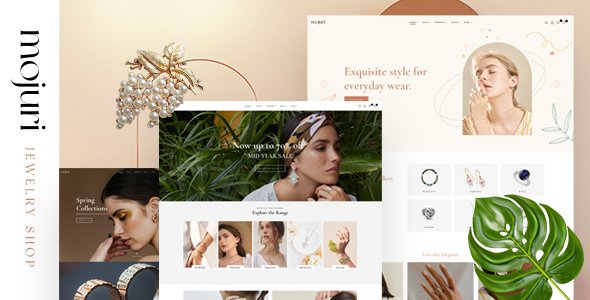
Stuck on your Mojuri – Jewelry Store WooCommerce WordPress Theme WordPress theme? Let's fix it.
No endless back-and-forth. Just send us the details and we'll get it done.
No obligation · Replies within 1 hour · Quote within 1 day
Setup · Customization · Bug fixes · WooCommerce integration
About Mojuri – Jewelry Store WooCommerce WordPress Theme WP Theme
Mojuri is a WooCommerce WordPress theme built by wpbingo specifically for jewelry and luxury accessory stores. It ships with multiple homepage demos, product quick-view, wishlist functionality, and a refined visual style that suits rings, necklaces, watches, and fine accessories.
The theme uses Elementor for page building, giving store owners visual control without touching code. WooCommerce integration covers product galleries, variation swatches, and Ajax cart. Performance is reasonable out of the box, and the demo content imports quickly, so you can have a working storefront in an afternoon. It suits independent jewelers and boutique brands looking for a polished starting point without a custom build budget.
Get matched with a Mojuri – Jewelry Store WooCommerce WordPress Theme developer in under one day
Tell us about your Mojuri – Jewelry Store WooCommerce WordPress Theme project. Small fixes, Mojuri – Jewelry Store WooCommerce WordPress Theme theme customization, or a full website build, whatever you need, we've got it covered.
We'll connect you to the right Mojuri – Jewelry Store WooCommerce WordPress Theme developers, define the scope, and get everything 100% clear.
You'll get one estimate, hire your preferred developer, and start collaborating.
Mojuri looks polished in demos but customizing it for a real jewelry business takes more than drag-and-drop. Checkout flow, product options, and mobile layout details all need attention. On Codeable, every developer is vetted and reviewed. You get matched with someone who knows WooCommerce and Mojuri specifically, not a generalist. Work is scoped before any money changes hands, so there are no surprises.
Pros
- Multiple pre-built homepage demos tailored to different jewelry store styles
- Built-in Ajax cart, quick view, and wishlist cover most jewelry store UX requirements
- Elementor compatibility gives non-technical users real layout control
- Product variation swatches work well for metal type and stone color options
- Demo content imports cleanly, making initial setup faster than many competitors
Cons
- Mobile product gallery performance can lag with high-resolution jewelry images
- Theme updates from wpbingo are infrequent, which can create compatibility gaps with WooCommerce
- Child theme is not included, so direct customization risks being overwritten on update
- Support from wpbingo is limited to ThemeForest comments with slow response times
- Some demo sections rely on bundled plugins that are not regularly maintained
Who is Mojuri – Jewelry Store WooCommerce WordPress Theme for?
Independent Jewelry Designer
Independent designers selling original pieces benefit from Mojuri’s clean product showcase layouts. The large gallery format and zoom functionality let customers inspect craftsmanship closely. Adding a custom order or commission request form is straightforward with an expert’s help, giving designers a way to capture bespoke inquiries directly from the product page.
Fine Jewelry Retail Store
Retail stores with broad catalogs need solid filtering and category navigation. Mojuri’s WooCommerce base supports layered nav well when configured correctly. A developer can build out metal type, stone, price range, and collection filters that help customers find products without scrolling through hundreds of listings.
Handmade and Artisan Jewelry Shop
Artisan shops often need to communicate the story behind each piece. Mojuri’s flexible Elementor sections let you build brand narrative into product and category pages. Pairing this with custom product tabs for materials, care instructions, and maker notes gives handmade shops a more personal feel than generic WooCommerce themes.
Watch and Accessories Boutique
Watch and accessory boutiques carry products with detailed specifications. Mojuri handles comparison tables and specification layouts cleanly. Adding a dedicated comparison plugin and structured data markup for product specs improves both the shopping experience and search visibility for model-specific queries.
Engagement and Bridal Ring Store
Bridal stores have specific needs: ring size guides, metal comparison tools, diamond filters, and appointment booking. Mojuri provides the visual foundation. A WooCommerce developer can layer these features on top using plugins and custom template work, creating a buying experience appropriate for high-consideration purchases.

Customizing Mojuri – Jewelry Store WooCommerce WordPress Theme
Mojuri ships with solid defaults, but most jewelry stores need adjustments before going live. Font pairings rarely match your brand out of the box. Product card layouts may need restructuring. Homepage sections often require reordering to fit your actual catalog and storytelling flow.
A Mojuri – Jewelry Store WooCommerce WordPress Theme expert can handle these faster than trial and error in Elementor. That includes custom product filtering, size guide popups, engraving option fields, and gift packaging upsells at checkout. If you want changes that go beyond what the theme panel offers, such as custom loop templates or a modified single product layout, you need PHP and WooCommerce template knowledge to do it properly without breaking future updates.
Recommended plugins for Mojuri – Jewelry Store WooCommerce WordPress Theme
Mojuri pairs well with several WooCommerce extensions. YITH Wishlist and Compare are already integrated in the theme’s design. Adding a product customizer plugin works well for engravable jewelry. For stores with large catalogs, a dedicated filtering plugin improves the browsing experience significantly.
If speed is a concern, pairing Mojuri with a caching layer and an image optimization plugin makes a real difference on product pages loaded with high-resolution jewelry photography. See our WordPress performance service for specifics. For organic traffic, structured product schema and proper category architecture matter. Our WordPress SEO service covers both.
Not sure which plugins to use? This WordPress plugins directory covers the most popular options with reviews and setup guides.
Mojuri – Jewelry Store WooCommerce WordPress Theme common issues
Mojuri theme product images not displaying correctly on mobile
This usually comes down to image size settings in WordPress or incorrect srcset output from the theme. Check your Settings > Media sizes and regenerate thumbnails using a plugin like Regenerate Thumbnails. If the gallery script is also misbehaving, there may be a JavaScript conflict with another plugin. Disable plugins one by one to isolate it. If the issue persists, a WordPress bug fix will identify and resolve the conflict properly.
Mojuri WooCommerce add to cart button not working
Ajax cart failures in Mojuri are often caused by a JavaScript error triggered by a plugin conflict or an outdated jQuery version. Open your browser console and check for errors when clicking the button. Also verify that WooCommerce is fully up to date and that Mojuri’s bundled plugins are active. If you’ve customized the theme directly without a child theme, a recent update may have overwritten template files. A developer can audit and restore functionality quickly.
Mojuri theme slow loading on product pages
Jewelry stores rely on large images, and Mojuri does not aggressively optimize asset loading by default. Start by enabling lazy loading for product images and compressing files using a tool like ShortPixel. Check whether bundled plugin scripts are loading on every page unnecessarily. A caching plugin configured correctly will also reduce load times. For deeper performance gains, see our WordPress performance service for a full audit approach.
Mojuri theme broken after WooCommerce update
WooCommerce template files change between major versions, and themes that override those templates break when the theme’s copy falls out of sync. In WooCommerce > Status > Tools, check for outdated template warnings. You’ll need to manually update any overridden files to match the current WooCommerce versions. This requires PHP knowledge. If you’re seeing broken layouts or missing checkout fields after an update, get professional help rather than reverting WooCommerce.
Mojuri – Jewelry Store WooCommerce WordPress Theme FAQ
Yes, for small jewelry businesses it’s a practical choice. You get a professional storefront without a custom build cost. The demo designs suit independent designers and boutique retailers well. That said, you’ll likely need some configuration help to tailor the checkout flow, product options, and mobile experience to your specific catalog and brand. Out-of-the-box results rarely match demo previews without adjustment.
Compatibility depends on the version of Mojuri you have installed and the current WooCommerce release. wpbingo updates the theme periodically, but gaps appear between WooCommerce major versions. Always check the ThemeForest changelog before updating WooCommerce on a live store. Running updates on a staging environment first is strongly recommended. If you’re unsure, a maintenance plan that includes update management is worth considering.
Most layout changes are possible through Elementor without code. You can adjust colors, fonts, section order, and content blocks visually. However, WooCommerce-specific templates like the cart, checkout, and single product page require PHP edits for structural changes. Styling those areas via CSS is doable without code. Anything functional, such as adding custom product fields or modifying the checkout steps, needs developer involvement.
Mojuri does not include a ring size guide feature natively. You can add one using a popup plugin linked from the product page, or by adding a custom product tab with a size chart image. A cleaner solution is a dedicated WooCommerce size guide plugin that attaches guides to specific product categories. A developer can wire this into Mojuri’s single product template so it appears consistently across your ring listings.
Mojuri is built on WooCommerce and doesn’t block extensions from running, but it’s not specifically tested with WooCommerce Subscriptions. Visual compatibility, particularly around the subscription product page and account dashboard styling, may need CSS work. Functional compatibility is generally fine, but you should test on a staging site before launching subscriptions. Complex recurring billing setups may also need custom template adjustments to display correctly within Mojuri’s design.
Hire a Mojuri – Jewelry Store WooCommerce WordPress Theme Developer
Whether you need a quick layout fix or a full store setup, working with a specialist saves time and avoids costly mistakes. Our developers know Mojuri’s structure, WooCommerce hooks, and Elementor’s limitations. From product page redesigns to custom checkout fields, we scope the work clearly upfront. Get a free estimate with no obligation to hire. You’ll have a response within 24 hours.
You'll need a free Codeable account so developers can ask questions and send their quotes.