Gerow WordPress Theme
by ThemeDox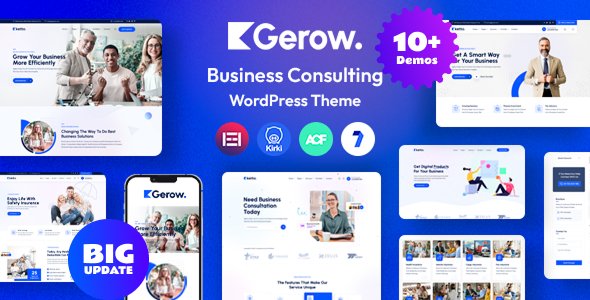
Stuck on your Gerow WordPress theme? Let's fix it.
No endless back-and-forth. Just send us the details and we'll get it done.
No obligation · Replies within 1 hour · Quote within 1 day
Setup · Customization · Bug fixes · WooCommerce integration
About Gerow WP Theme
Gerow is a WordPress theme built by ThemeDox, designed for creative agencies, freelancers, and portfolio-focused businesses. It ships with a clean grid layout, bold typography, and a minimal aesthetic that keeps the focus on your work rather than the design itself.
The theme is built on Elementor, meaning most of the layout control happens visually without touching code. It includes multiple homepage demos, project case study templates, and a blog layout. Gerow is translation-ready and supports WooCommerce, which gives it some flexibility beyond pure portfolio use.
It works well for studios or independents who want a polished online presence without hiring a developer to build from scratch. That said, deeper customisation beyond what Elementor exposes will require code-level work.
Get matched with a Gerow developer in under one day
Tell us about your Gerow project. Small fixes, Gerow theme customization, or a full website build, whatever you need, we've got it covered.
We'll connect you to the right Gerow developers, define the scope, and get everything 100% clear.
You'll get one estimate, hire your preferred developer, and start collaborating.
Most Gerow issues come down to one thing: Elementor and theme settings overlapping in unexpected ways. A developer who knows the theme structure can fix layout breaks, build out custom templates, and wire up third-party integrations correctly.
Through Codeable, you get access to vetted WordPress developers who have worked with portfolio and agency themes like Gerow. No junior freelancers, no guesswork. You post your project, get an estimate within 24 hours, and only pay if you decide to move forward.
Pros
- Clean minimal design that works well for portfolio and agency sites without heavy visual clutter
- Elementor-based, so layout editing is visual and accessible to non-developers
- Includes multiple pre-built demo templates covering different creative niches
- WooCommerce compatible, allowing product or service selling alongside portfolio content
- Translation-ready with WPML support, useful for multilingual creative businesses
Cons
- Heavy Elementor dependency means page speed can suffer without performance optimisation
- Limited header and footer layout options compared to more flexible multipurpose themes
- ThemeDox support documentation is less detailed than larger theme marketplaces
- Child theme setup is not guided in the documentation, which causes update-related overwrites
- Demo import can bring in unwanted media and placeholder content that takes time to clean up
Who is Gerow for?
Creative Agency Website
Gerow suits small-to-mid agencies that need a professional presence without a custom build. The case study templates let you present client work clearly, and the Elementor foundation means your team can update content without developer support. Adding a contact form and service page structure takes minimal setup time.
Freelance Designer Portfolio
Freelance designers get a lot from Gerow’s grid layouts and project showcase templates. You can present work samples with full-width imagery, add a short bio section, and link to a contact page. The minimal style keeps the focus on your work rather than the site design itself.
Photography Studio
Photography studios benefit from Gerow’s full-width image support and clean gallery templates. You can build category-specific portfolio sections for weddings, commercial, or events work. WooCommerce can be added for print sales or booking packages without switching themes.
Branding and Identity Studio
Branding studios need a site that reflects visual taste. Gerow’s typography controls and bold grid layouts give enough creative room to build a site that feels intentional. Case study pages work well for showing brand transformation work from brief through to final output.
Digital Marketing Consultant
Digital marketing consultants can use Gerow to present services, case studies, and results clearly. The blog layout supports content marketing, and the Elementor templates mean you can build landing pages for specific campaigns without needing a separate page builder tool.

Customizing Gerow
Out of the box, Gerow gives you colour controls, font settings via the WordPress Customizer, and full layout editing through Elementor. You can swap demo sections, rearrange blocks, and adjust spacing without writing a line of code.
Where things get trickier is custom post types, header behaviour, conditional layouts per page type, or integrating third-party tools like CRMs and booking systems. That is where a Gerow expert becomes useful.
A developer familiar with the theme knows which parts are controlled by the theme options panel, which are Elementor-specific, and where a child theme is the right approach. This avoids breaking changes when ThemeDox pushes updates and keeps your customisations intact long-term.
Recommended plugins for Gerow
Gerow integrates cleanly with WooCommerce for product showcasing or simple shop setups. It works with popular SEO plugins, and if you want to push further, pairing it with a WordPress SEO service will help your portfolio pages rank properly.
For speed, Gerow can get heavy with Elementor on the page. A WordPress performance service can offset that with caching, asset optimisation, and server-level configuration. Contact form plugins, WPML for multilingual builds, and advanced analytics tools all work without conflicts reported.
Not sure which plugins to use? This WordPress plugins directory covers the most popular options with reviews and setup guides.
Gerow common issues
Gerow theme layout broken after update
Layout breaks after a Gerow update almost always happen when customisations were made directly in the theme files rather than through a child theme. When ThemeDox pushes an update, those file changes get overwritten. The fix involves rebuilding customisations inside a child theme so they survive future updates. If you are seeing broken sections, check your Elementor page templates first, then review any functions.php edits. A WordPress bug fixing service can trace the source and restore the layout without data loss.
Gerow portfolio grid not displaying correctly
Portfolio grid issues in Gerow usually come down to one of three things: a category filter conflict, a CSS specificity problem from a plugin, or an Elementor widget cache that has not refreshed. Start by clearing all caches, then deactivate plugins one at a time to isolate a conflict. If the grid still misbehaves, inspect the element in your browser’s dev tools to find which stylesheet is overriding the layout. Most cases are fixable without touching the theme core files.
Gerow theme slow loading with Elementor
Gerow with Elementor can generate significant page weight, especially when demo content is imported. Each Elementor section loads its own assets, and without optimisation that adds up fast. Start with a caching plugin and enable CSS file combination. Remove unused Elementor widgets by disabling them in Elementor settings. For more significant gains, look at server-side caching and a CDN. A dedicated WordPress performance service can handle the full stack of optimisations.
Gerow custom fonts not applying on frontend
Custom fonts failing to apply in Gerow is usually a conflict between the theme’s font settings and Elementor’s typography controls. Both have their own font loading systems and they can override each other. Check your Elementor global font settings first. If fonts are set there but not showing, check for a caching issue or a Content Security Policy header blocking external font sources. Fonts loaded via Google Fonts or Adobe Fonts need the correct domain permissions to render on the frontend.
Gerow FAQ
Yes, Gerow is well-suited for portfolio websites. It includes grid-based project layouts, case study page templates, and full-width image support. It works for freelancers, agencies, and studios. The visual editing through Elementor makes it straightforward to present and update work samples without developer involvement for day-to-day content changes.
Gerow is designed to work with Elementor Free for basic layout editing. However, certain demo templates and more advanced layout features may use Elementor Pro widgets. If you import a full demo and see missing sections or unstyled blocks, Elementor Pro is likely required. Check the ThemeDox demo page notes before purchasing to confirm what version is needed.
Gerow supports WooCommerce and the default shop, product, and cart pages will inherit the theme’s styling. It is not a dedicated WooCommerce theme, so deep shop customisation will need additional CSS or a developer. For simple product listings alongside a portfolio or services site, it works without major issues.
Before importing Gerow demo content, install all required plugins the theme lists, including Elementor and any ThemeDox companion plugins. Run the import on a staging site first if possible. The demo importer can bring in large media files, so ensure your hosting has adequate memory limits. Set WP_MEMORY_LIMIT to at least 256M in wp-config.php before starting the import.
ThemeDox does release updates for Gerow, but the update frequency is slower than themes from larger marketplaces. It is worth checking the ThemeDox changelog before updating and always backing up your site first. If you have made direct theme file edits without a child theme, updates will overwrite them. Using a WordPress maintenance service keeps updates managed safely.
Hire a Gerow WordPress Developer
Need a Gerow developer to build, customise, or fix something specific? Post your project and get a free estimate from a vetted WordPress developer within 24 hours. No obligation to hire. Whether it is a layout issue, a new feature, or a full site build using Gerow, get your free estimate here and see exactly what the work will cost before committing.
You'll need a free Codeable account so developers can ask questions and send their quotes.