Hiroshi WordPress Theme
by Select-Themes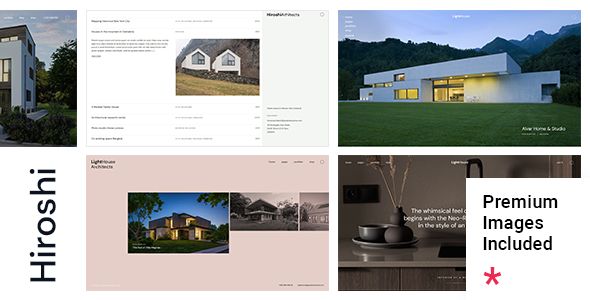
Stuck on your Hiroshi WordPress theme? Let's fix it.
No endless back-and-forth. Just send us the details and we'll get it done.
No obligation · Replies within 1 hour · Quote within 1 day
Setup · Customization · Bug fixes · WooCommerce integration
About Hiroshi WP Theme
Hiroshi is a minimalist WordPress theme from Select-Themes, built for photographers, artists, and creatives who want their work to take centre stage. The design strips back everything unnecessary, leaving a clean grid-based layout that puts images first.
It supports full-screen galleries, multiple portfolio layouts, and smooth AJAX transitions between pages. The typography is deliberate and restrained, with Google Fonts integration built in. Hiroshi works well with WooCommerce if you need to sell prints or digital downloads.
The theme is translation-ready and includes RTL support. Built on a solid codebase, it loads fast out of the box and plays nicely with most popular plugins. It suits anyone who wants a portfolio that looks polished without needing a designer on retainer.
Get matched with a Hiroshi developer in under one day
Tell us about your Hiroshi project. Small fixes, Hiroshi theme customization, or a full website build, whatever you need, we've got it covered.
We'll connect you to the right Hiroshi developers, define the scope, and get everything 100% clear.
You'll get one estimate, hire your preferred developer, and start collaborating.
Hiroshi looks simple, but customising it properly takes real WordPress knowledge. Most requests involve template overrides, custom CSS, or plugin integration that the Customizer can’t handle alone.
Through Codeable, you get matched with a vetted WordPress developer who knows themes like Hiroshi inside out. No agencies, no junior developers learning on your project. Post your project, get an estimate within 24 hours, and only hire if you’re happy with the scope and price.
Pros
- Clean, minimal design that keeps the focus entirely on images and portfolio work
- AJAX page transitions create a smooth browsing experience without full page reloads
- Multiple portfolio grid layouts available, including masonry, fixed grid, and full-width options
- WooCommerce compatible, making it practical for selling prints or digital files directly
- Translation-ready with RTL support, suitable for international creative businesses
Cons
- Customizer options are limited compared to page-builder themes, requiring CSS or PHP for deeper changes
- No drag-and-drop builder included, so non-technical users may find layout edits difficult
- Demo content import can be inconsistent, sometimes requiring manual cleanup after setup
- Limited built-in blog styling, making it less suitable for content-heavy sites
- Documentation from Select-Themes is sparse, which makes troubleshooting harder without developer support
Who is Hiroshi for?
Photography Portfolio
Hiroshi was built with photographers in mind. Full-screen image display, gallery grid options, and clean whitespace let photos breathe. AJAX transitions keep visitors engaged without distracting navigation. It handles large image libraries well and looks equally strong on mobile.
Graphic Design Studio
Design studios need a portfolio that doesn’t overshadow the work. Hiroshi’s restrained aesthetic does exactly that. Project pages are clean, typography is precise, and the grid layout adapts to mixed content including logos, branding, and print work without looking cluttered.
Fine Art Gallery
Artists selling or showing original work benefit from Hiroshi’s gallery-first layout. Images display at high resolution without interference from busy UI elements. The theme’s structure suits both ongoing series and individual pieces, and WooCommerce integration means you can sell directly from the same site.
Print Shop
With WooCommerce active, Hiroshi becomes a functional print shop. Product pages stay visually consistent with the portfolio aesthetic. You can sell physical prints, digital downloads, or limited editions. The checkout flow is standard WooCommerce, which customers already recognise and trust.
Freelance Illustrator
Illustrators working across editorial, publishing, and commercial projects need a portfolio that organises work by category without making navigation complicated. Hiroshi’s filtering and grid options handle this well. The minimal design also means client attention stays on the illustrations, not the site itself.

Customizing Hiroshi
Hiroshi gives you a reasonable set of customisation options through the WordPress Customizer. You can adjust colours, typography, logo placement, and layout settings without touching code. Portfolio grid columns, image hover effects, and sidebar visibility are all configurable.
Beyond the Customizer, making deeper changes requires knowledge of PHP templates and CSS. If you want a custom project filtering system, a unique homepage layout, or specific WooCommerce modifications, that work sits outside what the built-in options cover.
A Hiroshi expert can handle these changes cleanly, without breaking the theme’s visual consistency. Whether it’s custom post types, modified gallery behaviour, or a bespoke header, getting a developer familiar with Hiroshi’s structure saves time and avoids messy workarounds.
Recommended plugins for Hiroshi
Hiroshi pairs well with several plugins that extend its core functionality. WPML or Polylang adds multilingual support for international portfolios. WooCommerce turns it into a print or digital shop. Contact Form 7 or Gravity Forms handles client enquiries.
For SEO, a proper setup matters as much as design. Yoast or Rank Math works alongside Hiroshi without conflicts. If page speed is a concern, image optimisation and caching plugins make a real difference. See our WordPress performance service and SEO optimisation service for more on that.
Not sure which plugins to use? This WordPress plugins directory covers the most popular options with reviews and setup guides.
Hiroshi common issues
Hiroshi theme portfolio images not loading correctly
Image display issues in Hiroshi are usually caused by incorrect thumbnail sizes or missing image regeneration after theme activation. Go to Settings and confirm your media sizes match what the theme expects. If images were uploaded before theme activation, use the Regenerate Thumbnails plugin to rebuild them. Persistent issues may point to a CDN or caching conflict stripping srcset attributes. If the problem continues, our WordPress bug fixing service can diagnose it directly.
Hiroshi WordPress theme AJAX navigation broken after plugin update
Hiroshi’s AJAX transitions depend on specific JavaScript hooks. If a plugin outputs scripts incorrectly or conflicts with how Hiroshi initialises page loads, navigation can break or pages may load twice. Start by deactivating plugins one at a time to isolate the conflict. Check the browser console for JavaScript errors. Scripts loaded outside wp_enqueue_scripts are common culprits. A developer can resolve the conflict without disabling the affected plugin entirely.
Hiroshi theme WooCommerce product pages not matching portfolio style
WooCommerce overrides some template files that Hiroshi customises. When styling breaks on product pages, it usually means the theme’s WooCommerce template folder is outdated relative to the installed WooCommerce version. Check for outdated templates under WooCommerce > Status > Tools. Updating them often resolves visual inconsistencies. If the shop layout still diverges from the portfolio style, custom CSS or template modifications are needed to bring them back into line.
Hiroshi theme menu not showing on mobile
Mobile menu failures in Hiroshi typically come from JavaScript errors or CSS z-index conflicts introduced by other plugins or a child theme. Open the browser’s developer tools on a mobile viewport and check the console for errors on page load. Also confirm that the mobile menu toggle is assigned in Appearance > Menus. If a caching plugin is serving a stale version of your scripts, clear all caches and test again before assuming a code conflict.
Hiroshi FAQ
Yes. Hiroshi is one of the cleaner options for photography portfolios. It prioritises image display with full-screen support, grid layouts, and AJAX transitions. It won’t add clutter around your photos. The main limitation is that deeper customisation needs developer input, but for a clean photography showcase it works very well out of the box.
Hiroshi supports WooCommerce. You can sell prints, digital downloads, or other products while keeping the portfolio aesthetic. Some WooCommerce template files may need updating to stay visually consistent with newer WooCommerce versions. A developer can ensure the shop pages match your portfolio style precisely rather than defaulting to generic WooCommerce layouts.
Basic setup is manageable without coding skills. The Customizer handles colours, fonts, and layout options. However, anything beyond those settings requires CSS or PHP knowledge. If you want a custom homepage, modified grid behaviour, or specific plugin integrations, you’ll need a developer. The theme is not drag-and-drop friendly.
Hiroshi integrates with Google Fonts through the Customizer, where you can select from the available font library. For fonts outside Google Fonts, you’ll need to enqueue them manually via your child theme’s functions.php file and apply them with CSS. If you’re not comfortable editing theme files, a developer can add any typeface cleanly without affecting theme updates.
Select-Themes continues to sell and update Hiroshi, but update frequency is slower than larger theme shops. Before purchasing or building a client site on it, check the changelog on ThemeForest for recent activity. If active development is a concern, pairing it with a maintenance plan ensures your site stays secure regardless of how often the theme itself is patched. See our WordPress maintenance service for details.
Hire a Hiroshi WordPress Developer
Need help setting up Hiroshi, customising layouts, or fixing something that isn’t working as expected? A developer who knows this theme can get it done without the guesswork.
Post your project through FoxyConcept and get matched with a vetted Hiroshi expert via Codeable. You’ll receive a free estimate with no obligation to proceed. Get your free estimate today and see exactly what your project would cost.
You'll need a free Codeable account so developers can ask questions and send their quotes.