Biolife WordPress Theme
by kutethemes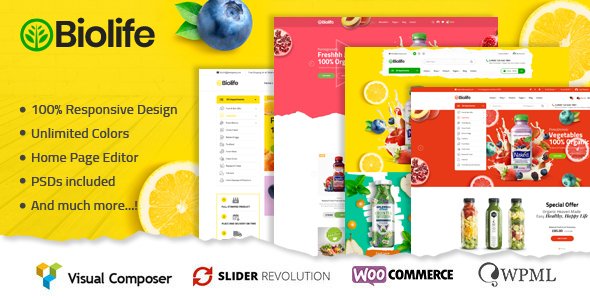
Stuck on your Biolife WordPress theme? Let's fix it.
No endless back-and-forth. Just send us the details and we'll get it done.
No obligation · Replies within 1 hour · Quote within 1 day
Setup · Customization · Bug fixes · WooCommerce integration
About Biolife WP Theme
Biolife is a WordPress theme by KuteThemes built specifically for organic stores, health food shops, and natural product businesses. It ships with WooCommerce support out of the box, making it a practical starting point for anyone selling wellness or eco-friendly products online.
The theme includes multiple homepage layouts, product page templates, and a mega menu system. It uses the WPBakery page builder, giving you drag-and-drop control over layouts without writing code.
Biolife targets a clear niche. The design aesthetic leans toward earthy tones, clean typography, and product-forward layouts that suit organic and natural brands. It supports AJAX cart, product filtering, and quick view, which are standard expectations for any functional WooCommerce store in this space.
Get matched with a Biolife developer in under one day
Tell us about your Biolife project. Small fixes, Biolife theme customization, or a full website build, whatever you need, we've got it covered.
We'll connect you to the right Biolife developers, define the scope, and get everything 100% clear.
You'll get one estimate, hire your preferred developer, and start collaborating.
Biolife has its own logic. The combination of KuteThemes’ custom options panel, WPBakery, and WooCommerce means three systems interacting at once. Small changes can have unintended effects on layout or checkout behavior.
FoxyConcept works with WordPress developers through Codeable, a vetted network of WordPress specialists. Every developer there has passed a strict vetting process. You get a free estimate within 24 hours and no obligation to proceed. That’s the right way to handle Biolife work that matters.
Pros
- Purpose-built for organic and health product stores with WooCommerce baked in from the start
- Multiple homepage demos give you a real starting point rather than a blank canvas
- Mega menu support handles large product category structures cleanly
- AJAX cart, quick view, and product filtering included without needing extra plugins
- Active KuteThemes support and regular theme updates on ThemeForest
Cons
- WPBakery dependency adds page weight and creates vendor lock-in on layouts
- Theme options panel can feel cluttered and settings are not always logically grouped
- Deep customization requires touching PHP templates, which needs developer involvement
- Some bundled plugins are older versions that require manual updates after purchase
- Mobile performance needs attention out of the box, particularly on product archive pages
Who is Biolife for?
Organic Food & Grocery Stores
Biolife’s product-first layouts and earthy aesthetic match organic grocery and food stores well. Category pages support large product volumes, and the mega menu handles complex taxonomy structures. AJAX filtering helps customers find products by diet type, certification, or brand without full page reloads.
Health Supplement Shops
Health supplement stores benefit from Biolife’s quick view and upsell-friendly product page templates. You can structure supplement categories clearly, highlight ingredients or certifications visually, and pair the theme with a product bundles plugin for common supplement stacks.
Natural Skincare & Beauty
Natural skincare brands need clean visuals and clear product storytelling. Biolife’s homepage sections support ingredient highlights and brand story blocks. Product galleries handle multiple image angles, and the theme’s typography works well for brands that lead with premium or handcrafted positioning.
Eco-Friendly Product Retailers
Eco-product retailers often have diverse catalogs spanning home, personal care, and food. Biolife’s multi-column category layouts and filtering system handle broad catalogs. The theme’s visual tone aligns with sustainability-focused branding without needing heavy restyling.
Herbal & Wellness Brands
Herbal and wellness brands benefit from Biolife’s content-friendly layout options. You can build out educational sections alongside product pages, which matters for brands where trust and ingredient knowledge drive purchase decisions. Blog and shop integrate within the same visual system.

Customizing Biolife
Customizing Biolife goes beyond swapping colors and fonts. The theme ships with a theme options panel that controls header styles, footer layouts, typography, and WooCommerce display settings. Most visual changes can be handled here or inside WPBakery.
Where it gets more technical is custom product page layouts, category page restructuring, or integrating third-party plugins that weren’t part of the original build. A Biolife expert knows which settings interact with each other and where the theme’s structure can cause conflicts during customization.
If you need to modify Biolife beyond its default options, whether that’s a custom checkout flow, unique homepage section, or brand-specific styling, working with someone who knows the theme’s codebase will save you a lot of trial and error.
Recommended plugins for Biolife
Biolife pairs well with a focused set of plugins. WooCommerce extensions like YITH Wishlist, product bundles, and subscription plugins integrate without major issues. For search, adding a dedicated WooCommerce product search plugin improves the default experience significantly.
On the performance side, the theme’s reliance on WPBakery adds page weight, so pairing it with a caching plugin and image optimization tool is worthwhile. Check our WordPress performance service if load times are a concern.
For organic stores targeting local or national search, structured data and on-page SEO matter. Our WordPress SEO service covers that layer specifically.
Not sure which plugins to use? This WordPress plugins directory covers the most popular options with reviews and setup guides.
Biolife common issues
Biolife theme not displaying products correctly on mobile
Mobile display issues in Biolife usually come from custom WPBakery column configurations or theme option overrides on breakpoints. Start by checking the theme’s responsive settings in the options panel. If product grids are misaligned, inspect the WPBakery row settings for custom padding or width values that don’t scale correctly. If the problem persists, a WordPress bug fixing service can isolate the conflict quickly.
WPBakery conflicts breaking Biolife homepage layout
WPBakery conflicts in Biolife often happen after a plugin or theme update where the bundled WPBakery version falls out of sync. First, deactivate recently updated plugins to isolate the source. If the bundled version is outdated, updating via the Envato dashboard usually helps. Avoid running two copies of WPBakery simultaneously. Persistent layout breaks typically need a developer to review template files directly.
Biolife WooCommerce checkout not working after update
Checkout failures after a WooCommerce update in Biolife are usually template compatibility issues. Biolife overrides several WooCommerce core templates, and major WooCommerce version bumps can break those overrides. Check WooCommerce’s system status for outdated templates. Updating those templates to match the current WooCommerce version resolves most cases. A WordPress maintenance plan helps prevent these from occurring undetected.
Biolife theme slow loading on product category pages
Slow category pages in Biolife are often caused by unoptimized images, WPBakery frontend scripts loading on every page, or insufficient server caching. Start by enabling a page caching plugin and running images through a compression tool. Disabling WPBakery’s frontend editor on production also reduces script load. For deeper optimization, our WordPress performance service addresses these at the server and theme level.
Biolife FAQ
KuteThemes updates Biolife periodically to maintain WooCommerce compatibility, but there’s often a lag after major WooCommerce releases. Before updating WooCommerce on a live store, check the Biolife changelog on ThemeForest and test on a staging environment first. Outdated template files are the most common source of post-update issues.
Biolife is built around WPBakery. Removing it means rebuilding every page layout from scratch using another editor like Elementor or the block editor. Technically possible, but it’s a significant rebuild rather than a simple swap. If you want to move away from WPBakery, factor in development time for the migration.
Biolife lists WPML compatibility, and most store owners running multilingual setups with it report it works. String translation and WooCommerce product translation function as expected. That said, complex multilingual configurations with currency switching or regional pricing may need additional configuration and testing.
Always use a child theme for Biolife customizations. If your changes live in the parent theme files, updates will overwrite them. With a child theme in place, you can update the parent safely. Theme options panel settings are stored in the database and are not affected by theme file updates.
Yes, migrating an existing WooCommerce store to Biolife is doable. Products, orders, and customer data stay intact since they live in the database. The work involved is rebuilding your page layouts in Biolife’s structure and reconfiguring WooCommerce display settings. Our WordPress migration service handles this end to end.
Hire a Biolife WordPress Developer
Whether you need a new feature built, a layout fixed, or a full store setup using Biolife, the right developer makes the difference between a store that works and one that converts. FoxyConcept connects you with experienced WordPress developers through our development services. Post your project and get a free estimate with no commitment. Get your free estimate here and hear back within 24 hours.
You'll need a free Codeable account so developers can ask questions and send their quotes.