Lawsight WordPress Theme
by Case-Themes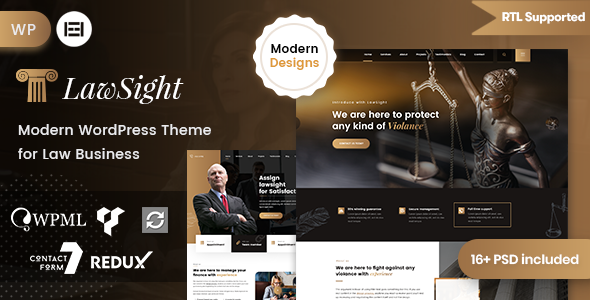
Stuck on your Lawsight WordPress theme? Let's fix it.
No endless back-and-forth. Just send us the details and we'll get it done.
No obligation · Replies within 1 hour · Quote within 1 day
Setup · Customization · Bug fixes · WooCommerce integration
About Lawsight WP Theme
Lawsight is a WordPress theme built by Case-Themes specifically for law firms, attorneys, and legal professionals. It ships with a clean, authoritative design that communicates trust from the first page load. Practice area pages, attorney profile layouts, and case result sections are all baked in from the start.
The theme is built on a page builder-friendly foundation, so arranging content blocks does not require touching code. It includes pre-built demo content that covers the most common law firm website structures: homepage, about, services, blog, and contact. For solo practitioners or multi-attorney firms, Lawsight gives you a credible starting point without having to build from scratch. It works with Elementor, supports custom post types for attorneys and practice areas, and is translation-ready for bilingual or multilingual legal sites.
Get matched with a Lawsight developer in under one day
Tell us about your Lawsight project. Small fixes, Lawsight theme customization, or a full website build, whatever you need, we've got it covered.
We'll connect you to the right Lawsight developers, define the scope, and get everything 100% clear.
You'll get one estimate, hire your preferred developer, and start collaborating.
Lawsight is straightforward to install but harder to customise well. Getting attorney profiles, practice area pages, and contact flows working exactly as a firm needs them takes real WordPress experience. FoxyConcept works through Codeable, a vetted network of WordPress developers. Every developer on the platform has passed a strict screening process, which means you are not rolling the dice on quality. If your Lawsight site needs custom development, design adjustments, or integration work, you get a professional who has done this before and stands behind the result.
Pros
- Purpose-built for law firms with attorney profiles and practice area post types included
- Clean, professional design that loads without heavy visual clutter
- Compatible with Elementor for drag-and-drop layout editing
- Comes with demo content covering the most common law firm page structures
- Translation-ready with .po/.mo file support for multilingual legal sites
Cons
- Limited demo variations mean many law firm sites end up looking similar
- Advanced customisation requires developer access to template files
- No built-in appointment booking or case enquiry workflow out of the box
- Update frequency from Case-Themes is slower than major theme shops
- Some styling options are buried in the customizer with unclear labels
Who is Lawsight for?
Solo Attorney Website
A solo attorney can use Lawsight to build a credible, professional online presence quickly. The theme’s pre-built layouts handle the homepage, about, and contact pages well. Add a contact form with an intake questionnaire and the site is functional from day one. A developer can tailor the design to reflect a specific area of law without rebuilding everything from scratch.
Multi-Practice Law Firm
Firms with multiple practice areas benefit from Lawsight’s custom post type structure for services. Each practice area gets its own page with consistent formatting. Attorney profiles can link directly to relevant practice areas. For firms with five or more attorneys, a developer can extend the staff listing with filtering by specialisation to help clients find the right person faster.
Criminal Defence Practice
Criminal defence practices need a site that communicates urgency and trust simultaneously. Lawsight’s bold header layouts and case result section work well for this. A developer can add a click-to-call button for mobile users, a free consultation form above the fold, and local schema markup to improve visibility in local search results for high-intent queries.
Immigration Law Office
Immigration law offices often serve clients who speak multiple languages. Lawsight is translation-ready and works with WPML or Polylang for full multilingual support. Practice area pages for visa types, asylum cases, or naturalisation can each be built out with detailed content. A developer can configure language switchers and hreflang tags so the right content appears in the right search results.
Legal Document & Template Business
Some legal professionals sell document templates, contract bundles, or self-help legal guides online. Lawsight can be extended with WooCommerce to handle digital product sales alongside the standard firm content. A developer sets up the shop pages, checkout flow, and automated delivery of purchased documents so everything runs without manual handling.

Customizing Lawsight
Lawsight includes a live customizer panel where you can adjust colours, typography, header layout, and footer structure without writing a line of CSS. That covers basic branding, but most law firms need more than that.
Customising attorney profile pages, adding intake forms that connect to a CRM, setting up conditional practice area filtering, or restructuring the homepage for a specific niche all require hands-on development work. A Lawsight expert knows where the theme’s template files live, how its custom post types are registered, and how to extend functionality without breaking future updates. Working with someone who has used the theme before saves significant trial-and-error time. If your firm has specific layout or functionality requirements, hiring a dedicated Lawsight developer is a faster and more reliable route than experimenting on a live site.
Recommended plugins for Lawsight
Lawsight pairs well with several plugins that extend its core capabilities. Contact Form 7 or WPForms handles client enquiry forms. Yoast SEO or Rank Math slots in without conflicts for on-page optimisation. WooCommerce can be added for firms selling legal document templates or consultation packages.
For performance, combining Lawsight with a caching plugin like WP Rocket and a CDN reduces load times noticeably. If you want to go further, our WordPress performance service covers image optimisation, database cleanup, and Core Web Vitals fixes. For firms focused on local search rankings, our WordPress SEO service can handle schema markup, local SEO setup, and technical audits specific to legal websites.
Not sure which plugins to use? This WordPress plugins directory covers the most popular options with reviews and setup guides.
Lawsight common issues
Lawsight attorney profile images not displaying correctly
This usually comes down to image dimensions set in the theme not matching what was uploaded. Lawsight registers specific image sizes for attorney profile thumbnails. If images were uploaded before those sizes were generated, they display at the wrong crop. Run a regenerate thumbnails process using a plugin like Regenerate Thumbnails, then re-upload any images that still look off. If the problem persists, a developer can check the theme’s image size registration and override it in a child theme without touching core files.
Lawsight contact form not sending emails
Most email delivery failures on Lawsight sites come from the server’s default PHP mail function being blocked by the hosting provider, not the form plugin itself. Install an SMTP plugin like WP Mail SMTP and connect it to a transactional email service such as Mailgun, SendGrid, or even Gmail. Configure the form to send to the correct address and run a test. If emails still fail, check spam folders and confirm the from address matches the sending domain. Our WordPress bug fixing service covers this type of issue directly.
Lawsight theme update broke the homepage layout
Theme updates from Case-Themes can override template files that were edited directly in the parent theme. If you customised files inside the Lawsight theme folder rather than using a child theme, those changes get wiped on update. Compare the current broken layout with your last backup to identify what changed. Going forward, all customisations should live in a child theme so updates do not overwrite your work. If you do not have a backup, a developer can rebuild the layout cleanly in a child theme.
Lawsight slow loading on mobile
Lawsight loads several CSS and JavaScript files that are not always necessary on every page. On mobile, this adds render-blocking load time. Start by enabling caching through WP Rocket or W3 Total Cache, then minify and combine CSS and JS files. Compress images using a plugin like ShortPixel. Check Google PageSpeed Insights for specific failing elements. For deeper optimisation work, our WordPress performance service handles Core Web Vitals improvements and mobile-specific fixes.
Lawsight FAQ
Yes. Lawsight works with Elementor and most content sections can be edited using the page builder. Some theme-specific sections like the attorney post type archives are controlled by theme templates rather than Elementor, so those require a developer to customise. For standard page layouts, Elementor gives you full control over structure and content without writing code.
Technically yes, but the design language is clearly built for law firms. The attorney profiles, case result sections, and practice area post types would need to be repurposed or disabled for unrelated industries. There are better general-purpose themes available if you are building outside the legal sector. Lawsight’s strengths are specifically tied to law firm use cases.
Yes. Lawsight ships with demo content that covers the main pages a law firm website needs: homepage, practice areas, attorney profiles, blog, and contact. You can import the demo through the theme setup wizard. It gives you a realistic starting point to replace with your own content rather than building page layouts from a blank canvas.
Lawsight does not include a booking system by default. You can add one using a plugin like Calendly embedded via shortcode, Bookly, or Simply Schedule Appointments. For intake forms tied to specific practice areas, WPForms or Gravity Forms work well. A developer can build a more integrated workflow that routes enquiries based on the practice area selected by the user.
Lawsight produces clean HTML output and is compatible with SEO plugins like Yoast and Rank Math. It is not a bloated theme, which helps with page speed. That said, the theme alone does not handle schema markup for legal services, local SEO setup, or technical SEO audits. For a law firm serious about search rankings, those steps require additional configuration beyond what any theme provides out of the box.
Hire a Lawsight Developer
Whether you need a fresh Lawsight build, a customisation that the theme panel cannot handle, or a fix for something that broke after an update, we can help. FoxyConcept delivers WordPress work through Codeable, so every project is handled by a screened, experienced developer. Post your project, get an estimate within 24 hours, and decide from there with no obligation. Get a free estimate today and tell us what your law firm site needs.
You'll need a free Codeable account so developers can ask questions and send their quotes.