Digital Law WordPress Theme
by thememount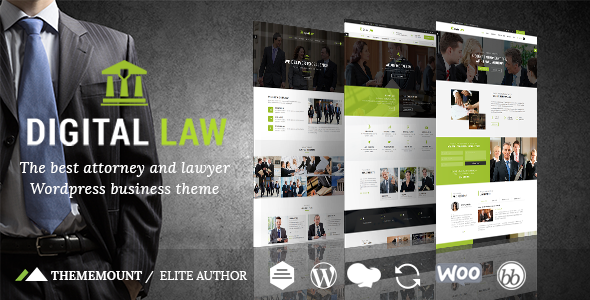
Stuck on your Digital Law WordPress theme? Let's fix it.
No endless back-and-forth. Just send us the details and we'll get it done.
No obligation · Replies within 1 hour · Quote within 1 day
Setup · Customization · Bug fixes · WooCommerce integration
About Digital Law WP Theme
Digital Law is a WordPress theme built by ThemeMount specifically for law firms, solo attorneys, and legal consultants who need a professional online presence. It ships with a clean, authoritative layout designed to build client trust from the first page load.
The theme includes practice area pages, attorney profile templates, a case results section, and a client testimonials block. It works with Elementor, making visual editing straightforward without touching code.
Built on a lightweight framework, Digital Law loads fast and passes Core Web Vitals without heavy configuration. It supports WPForms and Contact Form 7 for client intake forms. Schema markup for legal professionals is included, helping Google understand your firm’s structure. Overall, it is a solid starting point for any legal website.
Get matched with a Digital Law developer in under one day
Tell us about your Digital Law project. Small fixes, Digital Law theme customization, or a full website build, whatever you need, we've got it covered.
We'll connect you to the right Digital Law developers, define the scope, and get everything 100% clear.
You'll get one estimate, hire your preferred developer, and start collaborating.
ThemeMount themes are well-structured, but every law firm has different needs. Getting Digital Law to match your exact brand, comply with bar association website rules, and convert visitors into clients takes more than clicking through the Customizer.
Through Codeable, FoxyConcept connects you with vetted WordPress developers who have worked with legal themes before. You get a free estimate, a clear scope, and work done correctly the first time. No guesswork, no wasted budget. Visit our WordPress development services page to learn more.
Pros
- Purpose-built templates for practice areas, attorney bios, and case results reduce setup time significantly
- Full Elementor compatibility means drag-and-drop editing without needing a developer for basic content updates
- Lightweight framework delivers fast page load times with minimal out-of-the-box optimization required
- Built-in schema markup structured for legal professionals helps search engines display firm details correctly
- Compatible with WPForms and Contact Form 7 so client intake forms can be deployed quickly
Cons
- Design options inside the Customizer are fairly limited compared to theme frameworks like GeneratePress or Kadence
- ThemeMount support response times can be slow, which is a problem when a client-facing site breaks
- No built-in appointment booking or case management integration, requiring third-party plugins for those features
- Heavy reliance on Elementor means switching page builders later involves rebuilding layouts from scratch
- Documentation is thin on advanced use cases like multisite setups or custom post type extensions
Who is Digital Law for?
Solo Criminal Defense Attorney
A solo criminal defense attorney needs a site that communicates trustworthiness and urgency. Digital Law’s hero section works well for a clear call-to-action like a free consultation offer. Attorney bio templates help establish credibility quickly, and the clean layout keeps focus on getting visitors to contact you rather than reading dense content.
Family Law Practice
Family law practices handle sensitive client situations. Digital Law’s calm, professional aesthetic suits this well. Practice area pages can cover divorce, custody, and adoption separately, improving both user navigation and SEO. An intake form with conditional logic, added via WPForms, lets prospective clients describe their situation before the first call.
Corporate Law Firm
Corporate law firms serving business clients need a polished, minimal look that signals competence. Digital Law’s layout supports multiple partner profiles, service area breakdowns, and a news or insights blog. Adding a client portal through a membership plugin allows document sharing, which is a common request from firms moving away from email-based communication.
Immigration Lawyer
Immigration lawyers benefit from multilingual functionality. Digital Law works with WPML so Spanish, Portuguese, or other language versions can mirror the English site structure. Clear practice area pages covering visas, green cards, and deportation defense help visitors self-identify their need fast, reducing time before contact.
Personal Injury Firm
Personal injury firms typically invest heavily in conversion optimization. Digital Law’s template structure supports case results pages, which build credibility with prospective clients. Pairing the theme with a live chat plugin and a click-to-call button on mobile can measurably improve lead capture from organic traffic, especially for local searches.

Customizing Digital Law
Out of the box, Digital Law gives you color controls, font pickers, and header layout options inside the WordPress Customizer. You can swap the logo, adjust the hero section, and rearrange homepage blocks without writing a single line of CSS.
However, most law firms need more than defaults. You might want a custom intake form flow, conditional practice area filtering, a multilingual setup for bilingual clients, or a members-only client portal. That is where a Digital Law expert makes the difference.
A developer familiar with this theme can extend Elementor templates, create custom post types for case studies, integrate scheduling tools like Calendly or Acuity, and fine-tune mobile layouts so the site looks sharp on every device. Small adjustments done properly save hours of troubleshooting later.
Recommended plugins for Digital Law
Digital Law pairs well with several plugins that expand its core functionality. Yoast SEO or Rank Math handle on-page optimization, and you can push further with a dedicated WordPress SEO strategy built around local legal search terms.
For speed, combining Digital Law with a caching plugin like WP Rocket and a CDN brings strong performance scores. A full WordPress performance audit can identify bottlenecks specific to your setup.
WooCommerce can be added for legal document sales or consultation bookings. WPML works if you serve clients in multiple languages. Each added plugin increases complexity, so proper configuration matters.
Not sure which plugins to use? This WordPress plugins directory covers the most popular options with reviews and setup guides.
Digital Law common issues
Digital Law theme header not showing correctly on mobile
Mobile header issues on Digital Law usually trace back to a conflict between the theme’s responsive breakpoints and a custom CSS rule added manually or by a plugin. Open your browser’s inspector tool, check which CSS rule is overriding the header display, and either remove the conflicting rule or add a targeted override inside the Customizer’s Additional CSS field. If a plugin like Elementor Pro’s header builder is active, check whether it is set to replace the theme header globally.
Contact form not sending emails on Digital Law WordPress site
Email delivery failures on WordPress are almost never caused by the form plugin itself. The default PHP mail function is blocked by most hosting providers. Install an SMTP plugin such as WP Mail SMTP, connect it to a transactional email service like Mailgun, SendGrid, or your Google Workspace account, and run a test email. This fix applies regardless of whether you use WPForms or Contact Form 7 with Digital Law. If issues persist, check our WordPress bug fixing service.
Digital Law theme slow to load after adding plugins
Slow load times after adding plugins to Digital Law usually result from unoptimized images, multiple render-blocking scripts, or a lack of caching. Start by running a GTmetrix or PageSpeed Insights test to identify the specific bottleneck. Install WP Rocket or LiteSpeed Cache, enable lazy loading for images, and defer non-critical JavaScript. Also check whether any newly added plugins load scripts site-wide when they only need to run on specific pages. Plugin-specific asset loading can be controlled manually or with a tool like Asset CleanUp.
Elementor layout broken after Digital Law theme update
After a Digital Law theme update, Elementor layouts can break if the update changed template structure or CSS class names the Elementor design relied on. First, check the theme changelog for any noted breaking changes. Then go to Elementor’s Tools panel and run the CSS regeneration. If specific sections are broken, open them in the Elementor editor and reassign any missing styles. For complex layouts, a developer can audit the conflict efficiently. Our WordPress bug fixing service covers exactly this type of post-update repair.
Digital Law FAQ
Yes, for most small to mid-size law firms Digital Law provides a solid foundation. It includes the key page types a legal website needs: practice areas, attorney profiles, case results, and contact forms. The design is professional without being overdone. Larger firms with complex requirements may need custom development on top of the base theme to meet all their needs.
Yes. Digital Law is built with Elementor compatibility in mind. Page templates are editable through the Elementor drag-and-drop builder, and the theme’s sections can be customized visually without code. If you use Elementor Pro, you can also build custom headers, footers, and archive templates that override the theme defaults for greater design control.
Digital Law does not include a booking system natively, but it integrates cleanly with third-party solutions. Calendly or Acuity Scheduling can be embedded via shortcode or widget. For a fully integrated solution, plugins like Amelia or Simply Schedule Appointments work inside WordPress and connect with the theme’s layout without major styling conflicts.
Migrating content from an existing site to Digital Law involves exporting posts and pages, then rebuilding layouts in the new theme since design elements do not transfer between themes. If you are moving between hosting providers at the same time, a proper WordPress migration ensures nothing is lost in the process. A developer can handle both the migration and the layout rebuild simultaneously.
Digital Law is compatible with WPML, the most widely used WordPress multilingual plugin. You can create translated versions of each page and maintain separate content for each language. String translations for theme text are also supported. For a bilingual or multilingual law firm, this setup requires careful configuration to keep URL structures and SEO metadata correct across all language versions.
Hire a Digital Law WordPress Developer
Whether you need a full Digital Law setup, a single feature added, or an existing site fixed, FoxyConcept matches you with the right developer through Codeable. Every developer is vetted, every project starts with a free estimate, and you only pay when you are ready to move forward.
Law firm websites carry real credibility stakes. Work with someone who understands both the theme and the legal industry context. Get your free estimate today and have a scoped plan within 24 hours.
You'll need a free Codeable account so developers can ask questions and send their quotes.