Hara WordPress Theme
by thembay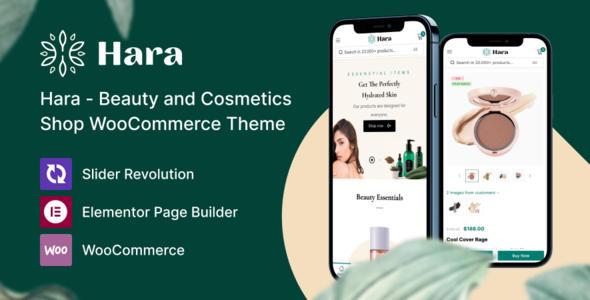
Stuck on your Hara WordPress theme? Let's fix it.
No endless back-and-forth. Just send us the details and we'll get it done.
No obligation · Replies within 1 hour · Quote within 1 day
Setup · Customization · Bug fixes · WooCommerce integration
About Hara WP Theme
Hara is a WordPress theme built by Thembay, designed primarily for online stores and product-focused websites. It ships with a clean, minimal layout that puts product imagery front and center. Built on WooCommerce, Hara supports multiple homepage layouts, a mega menu, quick-view product popups, and Ajax cart functionality out of the box.
Thembay has structured Hara around speed and visual clarity. The theme uses modular sections that can be rearranged without touching code, making it practical for store owners who want control without a developer on call. It includes Elementor compatibility, multiple header styles, and built-in support for product wishlists and comparison tables. If you run a fashion, lifestyle, or general merchandise store, Hara gives you a solid starting point with room to grow.
Get matched with a Hara developer in under one day
Tell us about your Hara project. Small fixes, Hara theme customization, or a full website build, whatever you need, we've got it covered.
We'll connect you to the right Hara developers, define the scope, and get everything 100% clear.
You'll get one estimate, hire your preferred developer, and start collaborating.
Most Hara issues are not theme bugs. They are integration problems between the theme, WooCommerce, and third-party plugins. Getting the right developer matters. Through Codeable, FoxyConcept connects you with vetted WordPress specialists who have hands-on experience with Thembay themes. Every developer on the platform has passed a strict vetting process. You post your project, get an estimate within 24 hours, and only pay if you decide to move forward. No risk, no retainers.
Pros
- Clean, product-first design that works well for fashion and lifestyle stores
- Multiple pre-built demos make initial setup fast without custom work
- Ajax cart, quick view, and wishlist functionality included without extra plugins
- Elementor compatibility gives non-developers control over page layouts
- Mega menu included out of the box, useful for stores with large category trees
Cons
- Limited documentation makes troubleshooting harder without developer help
- Some demo content requires specific plugins that add bloat if not needed
- WooCommerce template overrides can conflict after major WooCommerce updates
- Support from Thembay can be slow during high-volume periods
- Advanced filtering and custom product layouts still require custom PHP work
Who is Hara for?
Fashion and Apparel Stores
Hara’s image-forward layouts and clean product grids make it a natural fit for clothing and accessories stores. The quick-view popup and size variation display work particularly well for apparel, letting shoppers browse without leaving the category page. A developer can extend this further with custom variation swatches and filtered product listings by attribute.
Home Decor and Furniture Shops
Home decor stores benefit from Hara’s large banner sections and flexible homepage blocks. You can build mood-board style landing pages using Elementor without custom templates. For furniture shops needing room-set photography and product bundles, a Hara developer can configure WooCommerce to display grouped products and upsells in a way that fits the theme’s visual structure.
Beauty and Skincare Brands
Beauty brands need clean layouts and strong product imagery, both areas where Hara performs well. The theme supports ingredient lists and tabbed product descriptions out of the box. Integrating loyalty programs, subscription plugins like WooCommerce Subscriptions, or custom review displays with photo uploads are practical extensions a developer can add without replacing the theme.
Multi-Category General Stores
Hara’s mega menu and category-heavy layout structure suit stores selling across multiple product lines. The built-in comparison table helps when shoppers weigh similar products across categories. Developers can extend Hara with AJAX-based filters and custom category landing pages, which improves both usability and organic search performance for broad product catalogs.
Dropshipping and Print-on-Demand Sites
Dropshipping and print-on-demand stores need fast product page setup and clean import workflows. Hara’s WooCommerce base makes it compatible with tools like WooDropship or Printful. A developer can automate product data population, configure dynamic pricing displays, and ensure the checkout flow handles variable products from multiple suppliers without layout issues.

Customizing Hara
Hara’s customization options live inside the WordPress Customizer and Elementor, covering typography, color palettes, header layouts, and footer styles. You can switch between multiple pre-built demos and adjust section order without writing a single line of CSS. That said, deeper changes, like modifying WooCommerce templates, adjusting checkout flow, or building custom product filters, will require developer input.
A Hara expert understands the theme’s file structure, its custom hooks, and where Thembay has extended default WooCommerce behavior. This matters when you need a modification that the Customizer simply cannot reach. Working with someone who knows Hara specifically saves hours of reverse-engineering and avoids breaking core functionality during updates.
Recommended plugins for Hara
Hara works well with a standard WooCommerce plugin stack. Common extensions include YITH WooCommerce Wishlist, WooCommerce Product Filter, and Mailchimp for WooCommerce. For page building, Elementor Pro unlocks additional widgets that pair naturally with Hara’s layout system.
If site speed is a concern, pairing Hara with a caching plugin and a CDN makes a measurable difference. Check our WordPress performance service for details. For stores targeting organic traffic, structured product markup and clean URLs matter, which is covered in our WordPress SEO optimisation service.
Not sure which plugins to use? This WordPress plugins directory covers the most popular options with reviews and setup guides.
Hara common issues
Hara theme not displaying WooCommerce products correctly after update
This usually happens when a WooCommerce update overwrites template compatibility. Hara overrides several core WooCommerce templates, and when WooCommerce releases a major version, those overrides can fall out of sync. Check the WooCommerce system status for outdated templates. If you see red warnings there, a developer needs to update the theme’s template files to match the new WooCommerce structure. Our WordPress bug fixing service covers this type of issue directly.
Hara mega menu not working on mobile devices
Hara’s mega menu relies on custom JavaScript that sometimes conflicts with caching plugins or minification tools. First, disable any CSS or JS minification and test again. If the menu works after that, the issue is a minification conflict with the theme’s menu scripts. A developer can resolve this by excluding the relevant scripts from minification or rewriting the menu trigger to be more conflict-resistant. Mobile-specific menu issues can also stem from theme update changes to the responsive breakpoints.
Hara quick view popup not opening or showing blank
A blank or non-opening quick view popup in Hara is almost always a JavaScript conflict. Open your browser console and look for script errors on the product page. Common culprits are Elementor scripts, YITH plugins, or security plugins blocking AJAX requests. Disabling plugins one by one in a staging environment will identify the conflict. If the popup loads but shows no content, the issue is likely a missing nonce or AJAX handler conflict that a developer should fix properly.
Hara theme slow loading speed on product category pages
Slow category pages in Hara usually come from unoptimized product images, too many simultaneous AJAX requests, or a bloated plugin stack. Start by running the page through GTmetrix to identify the heaviest assets. Lazy loading images and deferring non-critical scripts will help immediately. For deeper gains, look at database query count on category pages and consider server-side caching. See our WordPress performance service for a full audit and fix process.
Hara FAQ
Hara is generally kept updated by Thembay to track major WooCommerce releases, but there is often a lag. After any WooCommerce major version update, check the WooCommerce system status panel for outdated template warnings. If warnings appear, the theme files need manual updates. Running a staging environment before updating WooCommerce on a live Hara store is strongly recommended.
Yes. Hara works without Elementor. The theme includes its own homepage sections and Customizer settings that function independently. However, Elementor gives you more control over page layout and content blocks. Without it, you are limited to the pre-built section structures the theme ships with. For basic stores, the built-in options are often enough to get started.
Hara includes RTL stylesheet support. Arabic, Hebrew, and other right-to-left languages should render correctly with the built-in RTL CSS. That said, RTL support across all theme components, particularly the mega menu and quick view popup, should be tested before going live. Some third-party plugins used alongside Hara may need their own RTL adjustments separately.
Hara’s demo content is installed through the One Click Demo Import plugin or through Thembay’s own import tool bundled with the theme. You import the XML content file, widget file, and customizer settings file separately. The process requires the recommended plugins to be active first. Importing demo content on an existing site will overwrite current settings, so always back up before running the import.
Yes, migrating an existing WooCommerce store to Hara is possible without losing products, orders, or customer data. The migration involves switching themes and reconfiguring your layout to match Hara’s structure. Product data stays in the database and is unaffected by the theme change. However, any custom templates or shortcodes from your previous theme will need to be rebuilt. Our WordPress migration service can handle this cleanly.
Hire a Hara WordPress Developer
Whether you need a custom homepage layout, WooCommerce checkout modifications, or a full Hara setup from scratch, FoxyConcept can match you with the right developer fast. Work is delivered through Codeable, which means every developer is vetted and the process is transparent from day one. Get a free estimate and describe your project. No commitment required. Most clients hear back within a few hours.
You'll need a free Codeable account so developers can ask questions and send their quotes.