MediGreen WordPress Theme
by BoldThemes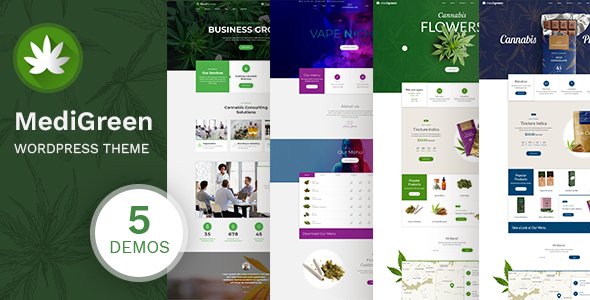
Stuck on your MediGreen WordPress theme? Let's fix it.
No endless back-and-forth. Just send us the details and we'll get it done.
No obligation · Replies within 1 hour · Quote within 1 day
Setup · Customization · Bug fixes · WooCommerce integration
About MediGreen WP Theme
MediGreen is a WordPress theme by BoldThemes built specifically for medical and healthcare websites. It ships with a clean, professional design that works well for clinics, private practices, dental offices, and health-focused businesses. The theme includes pre-built demo pages for different medical niches, a built-in appointment booking section, staff and department layouts, and compatibility with the BoldThemes Elements plugin for extended functionality.
It runs on BoldThemes’ own page builder integration and supports Elementor, making it reasonably flexible for customization. The design leans toward a calm green and white palette, reinforcing a health-focused visual identity. MediGreen is a ThemeForest theme with regular updates and documentation. It is a solid starting point for anyone building a medical site without wanting to start from scratch.
Get matched with a MediGreen developer in under one day
Tell us about your MediGreen project. Small fixes, MediGreen theme customization, or a full website build, whatever you need, we've got it covered.
We'll connect you to the right MediGreen developers, define the scope, and get everything 100% clear.
You'll get one estimate, hire your preferred developer, and start collaborating.
MediGreen has a specific architecture tied to BoldThemes’ plugin ecosystem. If you modify it without understanding how the theme and BoldThemes Elements interact, you risk layout breakage on updates. A developer on Codeable who has worked with MediGreen before knows where those dependencies live. They can customize the theme cleanly, build with a child theme to protect your changes, and integrate third-party booking or practice management tools without creating conflicts. That knowledge saves time and prevents expensive fixes later.
Pros
- Pre-built demo content for multiple medical niches speeds up setup significantly
- Built-in staff profiles, department pages, and service layouts designed for healthcare use
- Compatible with Elementor, giving access to a wide ecosystem of widgets and templates
- Includes an appointment booking section ready to connect with booking plugins
- Clean, accessible design with a calm color palette that fits medical branding without heavy customization
Cons
- Relies on the BoldThemes Elements plugin, which creates a dependency that can complicate theme switches
- Demo import does not always work cleanly on all hosting environments, requiring manual setup
- Some layout options are locked to BoldThemes' own shortcodes, limiting portability if you move away from the theme
- Documentation is functional but sparse on advanced customization scenarios
- Default page speed scores need work before launch, especially on mobile, due to bundled scripts and sliders
Who is MediGreen for?
General Medical Practice
MediGreen’s department and staff profile layouts map directly onto how a GP or family practice presents information. You can list doctors, display opening hours, and add an appointment request form without building any custom structure. The theme’s default color palette and page hierarchy suit a general practice’s need for clear, trustworthy presentation.
Dental Clinic
Dental practices benefit from MediGreen’s service listing layouts and the ability to showcase team members with credentials. The before-and-after image blocks and testimonial sections are useful for cosmetic dental services. Pair it with a booking plugin to let patients request appointments directly from the site without a phone call.
Private Physiotherapy Practice
Physiotherapy sites need to communicate specialisms clearly. MediGreen’s service and department pages work well for listing treatment types, and the staff profiles let practitioners display qualifications and areas of focus. The appointment section gives patients an easy entry point, which reduces friction for first-time bookings.
Mental Health and Therapy Services
Mental health providers need a calm, reassuring design. MediGreen’s soft palette and clean typography work well here without modification. You can adapt the service pages for therapy types, use the team section for therapist profiles, and configure contact forms with appropriate privacy notices for sensitive enquiries.
Health and Wellness Center
Wellness centers offering multiple services like yoga, nutrition, and massage can use MediGreen’s flexible service layouts to present each offering separately. The homepage demo sections allow you to feature classes, practitioners, and testimonials in a structured way that keeps the site readable without requiring custom development from the start.

Customizing MediGreen
Out of the box, MediGreen gives you color controls, font options, and header layout choices through the WordPress Customizer. You can swap in your logo, adjust the color scheme away from the default green palette, and configure your homepage sections using the included demo content as a base.
For more specific work, such as custom appointment flows, integration with medical booking plugins like Amelia or Simply Schedule Appointments, or bespoke layouts for specialist departments, you will need a MediGreen expert who knows BoldThemes’ structure. Things like custom post type adjustments, child theme development, and performance tuning go beyond what the Customizer alone can handle. A developer familiar with MediGreen can save significant time and avoid breaking the theme’s built-in functionality during modifications.
Recommended plugins for MediGreen
MediGreen pairs well with several plugin categories. For appointments, Amelia and BookingPress both integrate cleanly. For patient-facing features, you can add live chat, contact form plugins like WPForms, and GDPR-compliant cookie solutions.
On the technical side, pairing MediGreen with a caching plugin and a CDN makes a noticeable difference in load times. You can also extend it with WooCommerce if you sell health products or consultations. For visibility in search results, structured data and on-page work handled through a dedicated WordPress SEO service helps medical sites rank for local and specialty queries. Site speed improvements are covered through a WordPress performance service.
Not sure which plugins to use? This WordPress plugins directory covers the most popular options with reviews and setup guides.
MediGreen common issues
MediGreen demo import not working
Demo import failures in MediGreen are usually caused by server memory limits or PHP timeouts. The import file includes images and plugin data that exceeds the defaults on many shared hosting plans. Increase max_execution_time, memory_limit, and upload_max_filesize in your PHP configuration before retrying. If the issue persists, a WordPress bug fixing service can handle the import manually or reconstruct the layout from the demo files directly.
MediGreen appointment section not showing correctly
MediGreen’s appointment section depends on the BoldThemes Elements plugin being active. If the section is missing or not rendering, check that the plugin is installed and up to date. Conflicts with caching plugins or security tools that block scripts can also prevent the form from loading. Disable caching temporarily to test. If the section displays incorrectly after a theme update, check for template file conflicts between the theme and any child theme you have active.
MediGreen Elementor layouts broken after update
MediGreen uses custom Elementor widgets provided through BoldThemes Elements. If a theme or plugin update misaligns the versions, Elementor layouts can break or display widget errors. The fix is usually ensuring both the theme and the BoldThemes Elements plugin are on compatible versions as listed in the changelog. Regenerate Elementor’s CSS cache after updating. For persistent issues, a WordPress bug fixing service can audit the version conflicts and restore the layout.
MediGreen slow loading on mobile
MediGreen loads several scripts and a slider library by default, which hurts mobile performance scores. Start by disabling the slider on mobile using Elementor’s responsive visibility settings. Use a caching plugin with CSS and JavaScript minification enabled. Convert images to WebP format and enable lazy loading. If you need deeper gains, a dedicated WordPress performance service can audit the full asset load and implement server-level optimizations that the standard plugin approach does not cover.
MediGreen FAQ
Yes. MediGreen is built with Elementor compatibility in mind. The theme’s demo pages are constructed using Elementor, and BoldThemes provides custom Elementor widgets through the BoldThemes Elements plugin. You can edit pages using the Elementor editor and add standard Elementor widgets alongside the BoldThemes-specific ones. Full Elementor Pro support also works without conflicts.
MediGreen includes a basic appointment request section in its layout, but it is not a full booking system. For real-time scheduling, you would integrate a plugin like Amelia, BookingPress, or Simply Schedule Appointments. These plugins work alongside MediGreen’s pages and can be placed using Elementor or shortcodes. A developer familiar with MediGreen can configure the integration cleanly within your existing layout.
Yes. MediGreen’s color scheme is adjustable through the WordPress Customizer. You can change the primary green to any brand color, update accent colors, and modify button and link colors globally. For more granular changes, such as per-section color overrides or custom CSS for specific elements, a child theme approach is recommended to keep changes safe through future updates.
BoldThemes Elements is not strictly required for the theme to activate, but most of MediGreen’s demo content and specialty layouts depend on it. Without the plugin, shortcodes used in demo pages will not render, and several page sections will appear empty or broken. It is effectively a required dependency if you want to use the theme as designed. Keep it active and updated alongside the theme.
You can migrate your content to a MediGreen-based site, though it involves rebuilding your page layouts in Elementor rather than a direct transfer of designs. Your posts, pages, and media can be moved using WordPress export tools or a WordPress migration service. The design work is separate and requires recreating your existing layout using MediGreen’s templates as a starting point.
Hire a MediGreen Developer
Need help setting up, customizing, or extending MediGreen? FoxyConcept connects you with vetted WordPress developers through Codeable who have hands-on experience with BoldThemes themes. Whether you need a full site build, a specific feature added, or a problem solved, you can get a free estimate with no obligation to hire. Projects are matched within 24 hours, and every developer on the platform has been individually vetted. It is a straightforward, low-risk way to get professional help on your MediGreen site.
You'll need a free Codeable account so developers can ask questions and send their quotes.