Portfolio Awa WordPress Theme
by fox-themes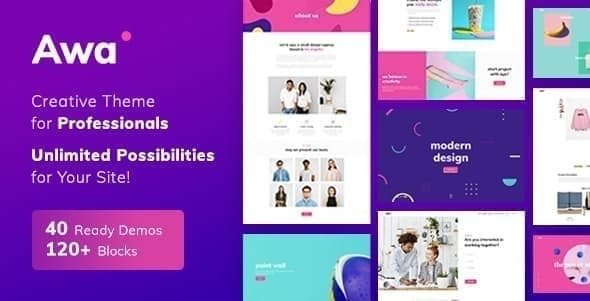
Stuck on your Portfolio Awa WordPress theme? Let's fix it.
No endless back-and-forth. Just send us the details and we'll get it done.
No obligation · Replies within 1 hour · Quote within 1 day
Setup · Customization · Bug fixes · WooCommerce integration
About Portfolio Awa WP Theme
Portfolio Awa is a clean, minimal WordPress theme built by fox-themes specifically for creatives who need to showcase their work without distraction. It ships with a grid-based portfolio layout, smooth page transitions, and a typography-first design that keeps the focus on your projects.
The theme supports custom post types for portfolio items, filterable project galleries, and a single-page layout option that works well for freelancers and small studios. It is lightweight by default, loads fast on shared hosting, and does not bundle unnecessary plugins or demo content you will never use.
Portfolio Awa works with the WordPress block editor and includes a handful of custom blocks for project grids, case study headers, and client testimonials. Setup takes under an hour if you know what you want.
Get matched with a Portfolio Awa developer in under one day
Tell us about your Portfolio Awa project. Small fixes, Portfolio Awa theme customization, or a full website build, whatever you need, we've got it covered.
We'll connect you to the right Portfolio Awa developers, define the scope, and get everything 100% clear.
You'll get one estimate, hire your preferred developer, and start collaborating.
Most WordPress developers know page builders. Fewer know theme-specific customisation at the template level. Portfolio Awa has its own custom post types, block patterns, and hooks that behave differently from generic themes.
Through Codeable, FoxyConcept works exclusively with vetted WordPress specialists. Post your project, get a free estimate within 24 hours, and only proceed if the scope and price make sense. No retainers, no obligation.
Pros
- Minimal, distraction-free design keeps portfolio work front and centre
- Ships with custom portfolio post types and filterable project grid out of the box
- Lightweight codebase with no bloated plugin dependencies bundled in
- Supports full-screen project images and smooth CSS page transitions natively
- Compatible with the WordPress block editor and includes purpose-built custom blocks
Cons
- Limited built-in layout variety means heavy customisation requires child theme work
- No one-click demo import means initial setup requires manual configuration
- WooCommerce compatibility exists but styling requires additional CSS adjustments
- Documentation from fox-themes is sparse compared to larger theme marketplaces
- AJAX portfolio filtering is not included by default and needs a plugin or custom code
Who is Portfolio Awa for?
Freelance Graphic Designers
Portfolio Awa’s grid layout and clean typography suit graphic designers who want case studies and branding work to speak for itself. The minimal chrome means client logos, mockups, and process images get full attention. Custom project meta fields let you list deliverables, tools used, and client name on each project page without extra plugins.
Photographers
Full-width image support and fast page transitions make Portfolio Awa a solid base for photography portfolios. The theme handles large images without layout breakage, and the filterable grid works well for separating editorial, commercial, and personal work. Pair it with a CDN and image compression for best performance on image-heavy galleries.
Web and UI/UX Designers
UI and UX designers need a portfolio that communicates process, not just final screens. Portfolio Awa’s case study layout supports long-form project pages where you can walk through research, wireframes, and outcomes. The block editor integration makes building structured case study pages straightforward without touching code.
Architects and Interior Designers
Architecture and interior design portfolios depend on high-impact visuals and clear project categorisation. Portfolio Awa handles both. The filterable project grid lets visitors sort by project type or scale, and full-screen featured images give renders and photography the space they need to impress prospective clients.
Creative Agencies
Small creative agencies can use Portfolio Awa as a base and extend it with a child theme to match brand guidelines. The clean codebase makes it easier to maintain than a bloated multipurpose theme. Team pages, service listings, and a contact flow can all be added without fighting pre-built template structures.

Customizing Portfolio Awa
Out of the box, Portfolio Awa covers most creative portfolio needs. But client work rarely fits neatly into a theme’s default settings. You might need a custom project layout, a bespoke hover animation, a filtered portfolio with AJAX loading, or a contact form that matches your brand rather than a generic template.
A Portfolio Awa expert can dig into the theme’s template files, extend its custom blocks, and build child theme modifications that survive updates. Whether you need a full site redesign or just want to adjust spacing, typography, and colour across a few key pages, working with someone who knows the theme’s structure saves a lot of trial and error.
FoxyConcept connects you with developers who have built on Portfolio Awa and similar fox-themes products. You get targeted help rather than general WordPress advice.
Recommended plugins for Portfolio Awa
Portfolio Awa pairs well with several additions that expand what the base theme can do. WooCommerce integration lets photographers and designers sell prints or digital files directly. Contact Form 7 or Gravity Forms handle enquiry flows cleanly without clashing with the minimal UI.
For SEO, the theme outputs clean markup that works well with focused on-page work. A fast CDN and image compression plugin keep load times low. If you want to go further, check out our WordPress performance service and WordPress SEO optimisation for structured improvements beyond what the theme provides.
Not sure which plugins to use? This WordPress plugins directory covers the most popular options with reviews and setup guides.
Portfolio Awa common issues
Portfolio Awa mobile menu not working
This usually comes down to a JavaScript conflict with another plugin or a missing script dependency. Open your browser console and check for JS errors on mobile viewport. The most common culprit is a caching plugin serving a minified JS bundle that strips out the theme’s menu toggle handler. Disable JS minification temporarily to confirm. If the conflict persists, our WordPress bug fixing service can isolate and resolve it quickly.
Portfolio Awa project grid not filtering correctly
Portfolio Awa’s filter relies on JavaScript matching category slugs assigned to each project. If filtering stops working, check that your portfolio items have the correct taxonomy terms assigned and that no caching layer is serving stale markup. A mismatch between the filter button slug and the term slug on the post is the most common cause. Clearing all cache layers and re-saving permalinks fixes this in most cases.
Portfolio Awa custom fonts not loading
Custom fonts in Portfolio Awa load via the Customizer’s font settings or through direct enqueue in the child theme. If fonts are not rendering, check whether your browser is blocking mixed content (HTTP font URL on an HTTPS site) or whether a performance plugin is deferring the font stylesheet too aggressively. Switching to a locally hosted font file removes the external request dependency and usually resolves the issue.
Portfolio Awa page transitions broken after plugin update
Page transitions in Portfolio Awa depend on a JavaScript hook that fires on link click before the browser navigates. Plugins that add query strings to internal URLs, modify link behaviour for analytics, or load scripts in the footer can break this. After any plugin update that affects links or scripts, test transitions on a staging copy first. If transitions are broken in production, disabling plugins one by one while testing identifies the conflict.
Portfolio Awa FAQ
Yes. Portfolio Awa supports the WordPress block editor and ships with custom blocks for portfolio grids, case study headers, and testimonials. You can build project pages and the homepage entirely in the block editor. Some advanced layout options still require Customizer settings or child theme CSS, but day-to-day content editing works fully in Gutenberg.
Portfolio Awa is compatible with WooCommerce at a functional level, but the shop, product, and cart pages will need additional CSS to match the theme’s minimal aesthetic. The default WooCommerce templates are unstyled within the theme. A developer can write targeted styles in a child theme to bring the shop pages in line with the rest of your site.
AJAX filtering is not built into Portfolio Awa by default. You can add it using a plugin like Isotope or MixItUp, or through custom JavaScript that intercepts filter clicks and fetches posts via the WP REST API. Either approach works, but custom code gives you more control over animation and URL state. A developer can implement this cleanly without breaking the theme’s existing transitions.
Yes. Portfolio Awa uses a custom taxonomy for portfolio categories, and you can create as many terms as you need. The filter bar on the portfolio grid page displays these categories automatically. If you need hierarchical categories or tag-based filtering, that requires a small amount of custom code to extend the default taxonomy registration in a child theme.
Migrating an existing portfolio to Portfolio Awa means moving your content into the theme’s custom post types and rebuilding project pages in the new layout. If your current site uses standard WordPress posts and pages, most content can be reassigned. Images, SEO metadata, and URL structure need careful handling during the move. Our WordPress migration service covers this end to end.
Hire a Portfolio Awa Developer
If you need custom layouts, faster load times, a new feature, or just want Portfolio Awa to look exactly right, we can help. FoxyConcept delivers WordPress work through Codeable, so every developer is pre-vetted and every project starts with a free estimate.
Get a free estimate and describe what you need. No commitment required. Most clients hear back within a few hours.
You'll need a free Codeable account so developers can ask questions and send their quotes.