Lore WordPress Theme
by LSVRthemes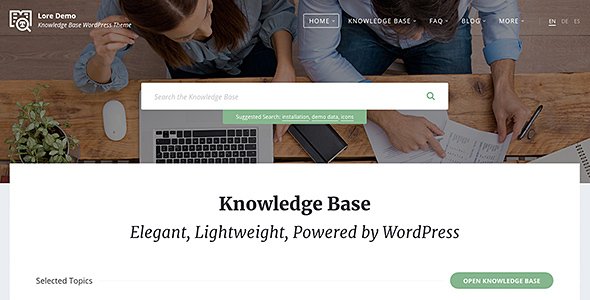
Stuck on your Lore WordPress theme? Let's fix it.
No endless back-and-forth. Just send us the details and we'll get it done.
No obligation · Replies within 1 hour · Quote within 1 day
Setup · Customization · Bug fixes · WooCommerce integration
About Lore WP Theme
Lore is a WordPress theme by LSVRthemes built for knowledge bases, documentation sites, and support portals. It ships with a clean layout, a built-in search bar, and a structured category system that makes large amounts of content easy to browse.
The theme is designed around readability and findability. Visitors can navigate to answers quickly without wading through cluttered menus. It works well for software documentation, internal wikis, and self-service help centres.
Lore integrates with popular page builders and supports custom widgets for recent articles, popular posts, and feedback forms. The codebase is lightweight, which keeps load times reasonable out of the box. It is a practical choice for teams that need a no-nonsense documentation theme without heavy plugin dependencies.
Get matched with a Lore developer in under one day
Tell us about your Lore project. Small fixes, Lore theme customization, or a full website build, whatever you need, we've got it covered.
We'll connect you to the right Lore developers, define the scope, and get everything 100% clear.
You'll get one estimate, hire your preferred developer, and start collaborating.
Lore is straightforward to install but harder to extend correctly. If your documentation site needs custom templates, third-party integrations, or a layout that does not match the default demos, you need a developer who has worked with LSVRthemes’ code structure before.
Through Codeable, you get access to vetted WordPress developers who can scope your project accurately and deliver without back-and-forth guessing. Post your project, get a free estimate, and decide from there. No commitment required.
Pros
- Built specifically for knowledge bases and documentation, not a generic theme adapted to the use case
- Clean category and article structure makes large content libraries easy to navigate
- Lightweight codebase with no heavy framework dependencies keeping load times low
- Built-in search bar prominently placed for immediate use without plugin configuration
- LSVRthemes provides regular updates and responds to support queries reliably
Cons
- Limited design flexibility compared to full page builder themes like Divi or Astra
- Default demo styles require significant CSS work to match a distinct brand identity
- No built-in user feedback or article rating system without adding a third-party plugin
- Multilingual setup needs manual configuration and is not straightforward with WPML out of the box
- Fewer third-party resources, tutorials, and community threads than major multipurpose themes
Who is Lore for?
Software Documentation Sites
Lore suits software product documentation well. The structured category layout handles versioned docs, API references, and getting-started guides cleanly. Developers can add code syntax highlighting and a sticky sidebar navigation to make technical content easier to scan without disrupting the existing template structure.
Customer Support Portals
Teams running customer support portals benefit from Lore’s search-first design. Pairing it with a contact form or helpdesk plugin creates a self-service layer that reduces ticket volume. A developer can wire up a ticketing integration so users move from article to support request without leaving the site.
Internal Company Wikis
Internal wikis for companies need reliable search and clean information architecture. Lore handles both. With role-based access controls added by a developer, you can restrict certain sections to specific teams while keeping the general structure open. It works well on private WordPress installs too.
Online Course Help Centres
Online course platforms often need a separate help centre for student questions. Lore can run alongside LMS plugins like LearnDash or LifterLMS. A developer can match the styling to the main course theme and set up category structures that mirror the course curriculum for intuitive navigation.
SaaS Onboarding Hubs
SaaS products benefit from a dedicated onboarding hub separate from the marketing site. Lore’s article and category system is a natural fit. A developer can connect it to your app via single sign-on so logged-in users get personalised help content based on their account plan or usage stage.

Customizing Lore
Lore gives you a solid starting point, but most sites need adjustments before they are production-ready. Colour schemes, typography, header layouts, and sidebar configurations all require time in the Customizer or direct code edits.
More involved work, such as adding a custom search filter, integrating a ticketing system, or restructuring the category hierarchy, goes beyond standard settings. A Lore expert can handle these changes cleanly without introducing technical debt.
If you need a custom child theme, unique article templates, or a branded login page that matches your documentation portal, a developer who knows Lore’s template structure will get it done faster and with fewer side effects than trial-and-error adjustments.
Recommended plugins for Lore
Lore pairs well with plugins that extend its core documentation features. BetterDocs or Heroic KB can add advanced knowledge base functionality. A feedback or rating plugin lets users vote on article helpfulness directly.
For search, SearchWP improves on the default WordPress search significantly. If you need analytics on what users are searching for, it is worth the setup time.
Performance tuning through caching and image optimisation is worth doing early. SEO structure for documentation sites also needs specific attention to avoid duplicate content issues. See our WordPress performance and SEO optimisation services for both.
Not sure which plugins to use? This WordPress plugins directory covers the most popular options with reviews and setup guides.
Lore common issues
Lore theme search not returning results
The default WordPress search in Lore only indexes post titles and content. If articles are stored as a custom post type, they may be excluded from results. Check that your custom post type is set to public and searchable. Installing SearchWP and configuring it to include all relevant post types usually resolves this. If the issue appeared after a theme or plugin update, a developer can diagnose whether a hook conflict is filtering out results. See our WordPress bug fixing service for persistent issues.
Lore WordPress theme sidebar not showing on article pages
A missing sidebar on article pages is usually caused by a template override in the child theme or a widget area that has no active widgets assigned. Check the Customizer sidebar settings and confirm at least one widget is active. If you are using a page builder on individual articles, it may be stripping the sidebar. Switching to the default editor for those posts often restores it. If the problem is inconsistent across articles, a template file conflict is likely the cause.
Lore theme category page displaying wrong layout
Category page layout issues in Lore usually point to a custom template being applied unintentionally. Check the page attributes for the category or use a plugin like Theme Check to identify which template file is loading. If you have a child theme, an outdated category template there can override the parent theme’s updated layout. Deleting or updating the child theme template file normally fixes it. A developer can audit the full template hierarchy quickly.
Lore theme not compatible with plugin after update
Plugin conflicts with Lore after an update are common when a plugin modifies the same frontend scripts or styles the theme depends on. Start by deactivating plugins one at a time to isolate the conflict. Check the browser console for JavaScript errors pointing to a specific script. If a caching plugin is involved, clear all caches before testing. For conflicts tied to LSVRthemes code changes, check the theme changelog and open a support ticket with the developer. Our WordPress maintenance service covers ongoing compatibility monitoring.
Lore FAQ
Yes. Lore is purpose-built for knowledge bases and documentation. It includes a structured category system, a prominent search bar, and article templates designed for long-form technical content. It is not a generic theme adapted to this use case, which makes it a more reliable starting point than repurposing a blog or business theme.
Lore has basic compatibility with Elementor, but the theme was not built around page builder workflows. Some template areas, particularly the knowledge base article layout, do not integrate cleanly with Elementor’s full-width editing mode. Most developers working with Lore recommend using the block editor or custom PHP templates rather than relying on a page builder for core documentation pages.
Go to Appearance, then Customizer, then Site Identity. Upload your logo file there. Lore supports the standard WordPress logo upload. If the logo size or positioning does not match your design, a small CSS adjustment in the Additional CSS panel or a child theme stylesheet will fix it. Keep the child theme approach if you plan to make multiple styling changes.
Yes, migration is possible. If your content is already in WordPress, restructuring it under Lore’s category system is mainly a content organisation task. If you are migrating from an external platform like Confluence or Notion, the content will need to be imported and formatted. See our WordPress migration service for help moving content cleanly without losing structure or links.
LSVRthemes maintains Lore with periodic updates covering WordPress compatibility, security patches, and occasional feature additions. The update frequency is not as high as some large theme shops, but the theme stays compatible with current WordPress versions. Check the changelog on ThemeForest before purchasing to review how recently it was updated and what was changed.
Hire a Lore WordPress Developer
Whether you need a quick layout fix or a fully customised documentation portal, a Lore developer can scope the work and get it done properly. All work is delivered through Codeable, so you are matched with vetted developers only.
Get a free estimate and describe what you need. There is no obligation to hire, and you will hear back within 24 hours.
You'll need a free Codeable account so developers can ask questions and send their quotes.