Oxpitan WordPress Theme
by gavias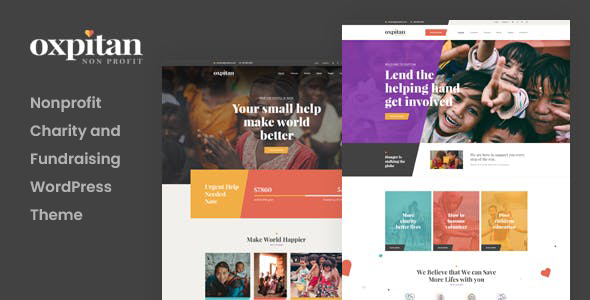
Stuck on your Oxpitan WordPress theme? Let's fix it.
No endless back-and-forth. Just send us the details and we'll get it done.
No obligation · Replies within 1 hour · Quote within 1 day
Setup · Customization · Bug fixes · WooCommerce integration
About Oxpitan WP Theme
Oxpitan is a multipurpose WordPress theme built by gavias, a ThemeForest developer known for clean code and structured layouts. It ships with GaviasCore, gavias’s own page builder plugin, and includes multiple pre-built demo sites covering business, portfolio, and agency use cases.
The theme uses a block-based layout system with drag-and-drop editing, WooCommerce support, and WPML compatibility for multilingual builds. It targets agencies and freelancers who want a starter framework they can adapt without writing everything from scratch.
Oxpitan works with Elementor to some extent, but it is most stable when used with the bundled GaviasCore builder. If you need something outside the demo layouts, expect to spend time in the customizer and possibly in custom CSS. It is a capable theme, but it rewards users who know WordPress well.
Get matched with a Oxpitan developer in under one day
Tell us about your Oxpitan project. Small fixes, Oxpitan theme customization, or a full website build, whatever you need, we've got it covered.
We'll connect you to the right Oxpitan developers, define the scope, and get everything 100% clear.
You'll get one estimate, hire your preferred developer, and start collaborating.
Oxpitan is not a simple theme to customize from scratch. GaviasCore has its own logic, the demo data requires careful importing, and non-standard edits can conflict with theme update cycles.
FoxyConcept connects you with vetted Oxpitan developers through Codeable, a platform built exclusively for WordPress professionals. Every developer on the network has passed a strict vetting process. You get a free estimate before committing to anything, and the work is backed by a satisfaction guarantee. No generalist freelancers, no guesswork.
Pros
- Multiple demo sites cover common niches and reduce setup time significantly
- GaviasCore builder is tightly integrated and avoids the bloat of some third-party builders
- WooCommerce and WPML support included out of the box
- Responsive layouts that hold up well on mobile without heavy customization
- Regular updates from gavias maintain compatibility with current WordPress versions
Cons
- GaviasCore is a proprietary plugin with no community outside gavias themes
- Demo import can be unreliable, often requiring manual cleanup of missing media or broken widgets
- Documentation is thin in places and relies heavily on video tutorials
- Customizing headers beyond the preset layouts requires direct PHP edits or a developer
- Theme options panel can feel cluttered once you have multiple demos imported
Who is Oxpitan for?
Creative Agency
Oxpitan’s agency demo layouts include portfolio grids, team sections, and service pages that work well for digital agencies. The GaviasCore builder lets you rearrange sections without touching code. A developer can strip out unused demo content and rebuild the structure around your actual services in a few hours.
Freelance Portfolio
Freelancers in design, photography, or development can use Oxpitan’s portfolio post type to showcase work cleanly. The masonry grid and filterable categories come included. Pair it with a contact form and a clear services page and you have a functional portfolio without needing a custom theme build from scratch.
Corporate Business Site
The business-focused demos include above-the-fold hero sections, feature blocks, testimonials, and call-to-action rows. These translate well to corporate sites for consultancies, law firms, or finance companies. Custom colors and typography adjustments are straightforward in the theme options panel with some developer help.
WooCommerce Store
Oxpitan’s WooCommerce integration covers product archives, single product pages, and cart and checkout flows. The default shop styling fits the overall theme aesthetic without needing heavy CSS work. Adding custom product filters or a modified checkout layout will require a developer familiar with gavias’s WooCommerce templates.
Startup Landing Page
Single-page landing pages for product launches or app startups work well with Oxpitan. You can build a focused layout using GaviasCore sections stacked vertically with anchor navigation. Keep the scope tight, avoid importing full demos, and the result loads fast and converts well with minimal overhead.

Customizing Oxpitan
Oxpitan gives you a solid starting point, but most real projects need customization beyond the demo content. Header layouts, typography, color schemes, and section spacing all need tuning to match a client’s brand. The GaviasCore builder handles a lot of this visually, but some changes still require CSS or PHP edits.
Working with an Oxpitan expert saves time here. A developer who knows the gavias codebase can modify template files cleanly, add child theme overrides, and integrate third-party plugins without breaking the core layout system.
FoxyConcept works with clients who need specific Oxpitan customizations done properly. Whether you need a custom header, a modified WooCommerce loop, or a bespoke landing page built on top of an Oxpitan demo, the work gets done without leaving technical debt behind.
Recommended plugins for Oxpitan
Oxpitan supports WooCommerce for product listings and shop pages, Contact Form 7 for lead capture, and WPML for multilingual sites. The bundled GaviasCore plugin adds custom post types and shortcode elements specific to this theme.
For better site speed, image optimization and caching plugins like WP Rocket or LiteSpeed Cache pair well with Oxpitan. Learn more about WordPress performance tuning if your Oxpitan site is loading slowly.
If organic search matters to your project, pairing Oxpitan with a proper WordPress SEO setup gives you a real advantage over sites running on default theme settings alone.
Not sure which plugins to use? This WordPress plugins directory covers the most popular options with reviews and setup guides.
Oxpitan common issues
Oxpitan demo import not working
Failed demo imports on Oxpitan are usually caused by server memory limits or PHP timeout settings too low for the import file size. Increase max_execution_time to 300 and memory_limit to 256M in your php.ini or wp-config.php. If the import stalls again, try installing the demo data manually by uploading the XML through WordPress’s built-in importer. A developer can also handle this cleanly. Visit our WordPress bug fixing service if you need hands-on help.
Oxpitan GaviasCore plugin missing or deactivated after update
GaviasCore is a bundled plugin that can lose activation after a WordPress core update or a hosting migration. Go to Appearance > Install Plugins in your dashboard and reinstall GaviasCore from there. If the plugin tab is missing entirely, check that the Oxpitan theme is still set as the active theme. Reinstalling the theme package from ThemeForest and re-uploading it often resolves the issue. Need ongoing help? Our WordPress maintenance service covers exactly this.
Oxpitan layout broken on mobile
Broken mobile layouts in Oxpitan usually come from custom column width settings inside GaviasCore rows that do not have responsive breakpoint overrides applied. Open the affected row in GaviasCore, go to the responsive settings tab, and set specific column stacking behavior for tablet and mobile. If the issue is in custom CSS you added, check for hardcoded pixel widths that override the theme’s responsive styles. A quick audit of your custom styles usually identifies the conflict fast.
Oxpitan slow loading speed
Oxpitan loads several CSS and JS files from GaviasCore and the bundled plugins. Without minification and caching, scores drop fast. Install a caching plugin like WP Rocket or LiteSpeed Cache and enable CSS and JS minification. Also check that you are not loading unused demo assets. Removing demo pages and deregistering unused plugin scripts through a child theme functions file can cut load time significantly. See our full guide to WordPress performance optimization for more steps.
Oxpitan FAQ
Oxpitan has partial Elementor compatibility, but it is built primarily around GaviasCore. You can use Elementor on some pages, but mixing both builders on the same site often causes layout conflicts and duplicate assets loading. For a clean build, stick with one builder. If Elementor is your preference, consider whether Oxpitan is the right theme choice for your project.
Yes. GaviasCore is a required companion plugin for Oxpitan. It registers the custom post types, shortcodes, and layout elements the theme depends on. Without it, the demo layouts will not render correctly and certain theme options will not function. It installs through the Appearance > Install Plugins panel and is included with your ThemeForest purchase.
Always use a child theme for any customizations to Oxpitan. Changes made directly to the parent theme files will be overwritten when gavias releases an update. Keep your custom CSS in the child theme stylesheet and any PHP overrides in the child theme’s functions file. Update the parent theme normally from ThemeForest and your customizations stay intact.
Yes. Oxpitan is WPML-compatible, which means you can translate pages, posts, and theme strings using the WPML plugin. You will need a valid WPML license purchased separately. For a full multilingual setup, a developer can help configure string translation and language switcher placement within the GaviasCore header builder correctly.
Oxpitan handles standard WooCommerce functionality well. Product pages, shop archives, cart, and checkout all match the theme styling. For more complex stores needing custom product filters, subscription products, or heavily modified checkout flows, you will likely need developer help to extend the theme’s WooCommerce templates properly.
Hire an Oxpitan Developer
Need help with your Oxpitan site? Whether it is a layout fix, a full custom build, or a performance issue you cannot track down, FoxyConcept matches you with a developer who knows this theme. Post your project and get a free estimate within 24 hours, no obligation to hire. Get your free estimate here and see exactly what your project needs before spending a penny.
You'll need a free Codeable account so developers can ask questions and send their quotes.