Accio WordPress Theme
by ThemeMakers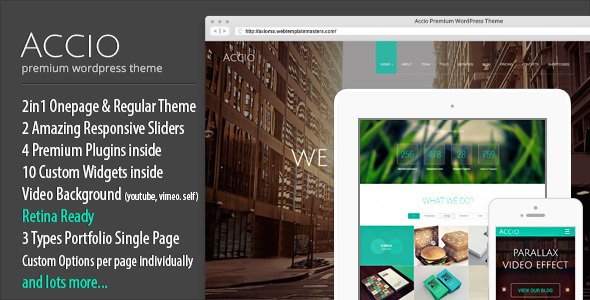
Stuck on your Accio WordPress theme? Let's fix it.
No endless back-and-forth. Just send us the details and we'll get it done.
No obligation · Replies within 1 hour · Quote within 1 day
Setup · Customization · Bug fixes · WooCommerce integration
About Accio WP Theme
Accio is a WordPress theme by ThemeMakers built for creative agencies, portfolios, and businesses that need a visually strong online presence. It ships with a drag-and-drop page builder, multiple pre-built demo layouts, and a focus on bold typography and full-width imagery.
The theme supports WooCommerce, making it a reasonable pick for studios that also sell products or digital services. Header and footer layouts are configurable without touching code, and the built-in shortcode library covers most common layout patterns.
ThemeMakers themes tend to follow a classic premium theme structure, so developers familiar with that ecosystem will recognise the options panel immediately. For site owners without a technical background, the learning curve is moderate. Getting the most out of Accio usually means understanding how its template system and builder interact, which is where hiring an Accio specialist saves real time.
Get matched with a Accio developer in under one day
Tell us about your Accio project. Small fixes, Accio theme customization, or a full website build, whatever you need, we've got it covered.
We'll connect you to the right Accio developers, define the scope, and get everything 100% clear.
You'll get one estimate, hire your preferred developer, and start collaborating.
Most Accio customisation requests go beyond what the options panel can handle alone. A developer who knows the theme’s template hierarchy, builder markup, and ThemeMakers conventions will solve problems faster and avoid the hacks that cause issues later.
FoxyConcept connects you with vetted Accio specialists through Codeable, a platform where every developer is screened before taking projects. You describe the work, get a clear estimate, and only proceed if the scope and price make sense. No retainers, no guesswork.
Pros
- Multiple pre-built demo layouts reduce initial build time significantly
- Built-in WooCommerce support covers standard shop and portfolio-shop hybrid setups
- Visual page builder included, no separate purchase needed
- Header and footer configurator handles most layout variations without custom code
- Active ThemeMakers support channel with documented update history
Cons
- Three overlapping customisation tools (options panel, customizer, builder) can create conflicting settings
- Default script loading is heavy and hurts Core Web Vitals without performance tuning
- Demo content import can be unreliable and sometimes requires manual cleanup
- Documentation is functional but thin on advanced use cases and developer guidance
- Complex WooCommerce setups quickly outgrow what the built-in integration handles
Who is Accio for?
Creative Agency Website
Accio’s bold layout options and grid-based portfolio post type work well for agencies presenting case studies and client work. An Accio developer can configure filtered portfolio archives, set up custom project templates, and connect a contact form flow that feeds directly into a CRM or email pipeline.
Freelance Portfolio
Freelancers building a personal brand get mileage from Accio’s full-width hero sections and typography controls. The theme handles single-page resume-style layouts reasonably well. A specialist can trim unused features, improve load speed, and make sure the design holds up across devices without the default padding and spacing inconsistencies.
Photography Studio
Photography sites need fast-loading galleries and clean presentation. Accio supports full-width imagery and slider integrations that suit this use case. However, default image handling needs tuning. An Accio specialist can configure lazy loading, set correct image sizes, and structure galleries so they do not tank performance on mobile connections.
Digital Product Shop
Accio’s WooCommerce compatibility makes it workable for selling digital downloads, templates, or presets. Standard product pages function without modification. For checkout customisation, product bundles, or licence-based delivery, a developer familiar with both Accio and WooCommerce extensions will save significant time and avoid plugin conflicts.
Corporate Brochure Site
Service companies that need a clean, professional site without complex functionality find Accio a solid starting point. Pre-built inner page templates cover about, services, and contact layouts. An Accio developer can adapt these templates to match brand guidelines precisely, add custom fields, and integrate third-party booking or lead generation tools.

Customizing Accio
Accio gives you a theme options panel, live customizer support, and a visual page builder to control layout and styling. In practice, those three tools can overlap and occasionally conflict, so knowing which one takes priority for a given setting matters.
Custom post type handling, portfolio filtering, and slider configuration all have their own settings screens. If your project needs modifications beyond the built-in controls, like custom archive templates, conditional headers, or tailored WooCommerce checkout flows, you will need PHP and CSS work that goes beyond what the options panel offers.
An Accio expert can map out exactly what is achievable through configuration versus what requires custom development, saving you from hours of trial and error. Whether it is tweaking the homepage layout, setting up a multilingual structure, or building a custom template from scratch, working with an Accio developer means the job gets done correctly the first time.
Recommended plugins for Accio
Accio is compatible with the plugins most WordPress sites depend on. Revolution Slider and Layer Slider integrate directly. WooCommerce works out of the box for basic shop setups, though complex product configurations may need developer attention.
For sites where speed matters, pairing Accio with a caching layer and image optimisation plugin is important. The theme loads several scripts by default, and without proper asset management, page load times suffer. A developer can audit and trim that load significantly. See our WordPress performance optimisation service for details.
On the SEO side, Accio works with Yoast and Rank Math, but theme-level schema and heading structure still need manual review. Our WordPress SEO service covers that audit end to end.
Not sure which plugins to use? This WordPress plugins directory covers the most popular options with reviews and setup guides.
Accio common issues
Accio theme page builder not saving changes
Builder save failures in Accio are usually caused by a PHP memory limit that is too low, a JavaScript conflict with another plugin, or a permissions issue on the uploads directory. Start by increasing memory_limit to at least 256MB in your php.ini or wp-config.php. Then deactivate plugins one at a time to isolate a JS conflict. If the problem persists, a developer can run a proper conflict diagnosis. See our WordPress bug fixing service if you need this resolved quickly.
Accio WordPress theme slow loading on mobile
Accio loads multiple scripts and stylesheets by default, many of which are not needed on every page. Use a plugin like Asset CleanUp to disable unnecessary scripts per page type. Compress and properly size images, and enable a server-side caching layer. If your host does not support object caching, switching hosts may be part of the fix. A full audit will identify the specific bottlenecks on your install. Our WordPress bug fixing service includes performance diagnosis.
Accio portfolio filter not working after update
Portfolio filter breakage after a ThemeMakers update usually points to a JavaScript file not loading correctly or a CSS class change in the updated template. Clear all caches first, including browser cache. Check your browser console for JS errors pointing to the isotope or filter script. If you have a child theme, compare your overridden template files against the updated parent theme files to spot mismatches. Rolling back the update temporarily while you investigate is a safe first step.
Accio theme WooCommerce product page layout broken
WooCommerce layout issues in Accio typically happen when the theme’s WooCommerce template files fall out of sync with the current WooCommerce version. Go to WooCommerce, Status, Tools, and check for outdated templates. If Accio’s templates are flagged, you either need to update the theme or manually update the template files to match WooCommerce’s current markup. Always do this in a child theme to avoid losing changes on the next Accio update.
Accio FAQ
ThemeMakers continues to release updates for themes in their catalogue, including Accio. Before purchasing or building on the theme, check the ThemeForest changelog for update frequency. A theme with no updates in over a year may present compatibility issues with current WordPress and WooCommerce versions. An Accio specialist can assess your specific version against current WordPress core before you commit to a full build.
Accio ships with its own bundled page builder. While technically you can install Elementor alongside it, the two builders are not designed to work together and will conflict on the same pages. Most developers recommend committing to one builder across the site. If you prefer Elementor, an Accio developer can rebuild layouts inside Elementor while keeping the theme’s styles and header or footer system intact.
Accio includes WooCommerce support for standard shop, product, and cart pages. It handles basic setups well. If you need subscriptions, bookings, multi-vendor functionality, or a heavily customised checkout, the built-in WooCommerce integration will need extending. A developer familiar with both Accio and WooCommerce can scope what requires custom work before you start building.
Demo content import works best on a clean WordPress installation with no existing posts or pages. Before importing, ensure your PHP memory limit and max execution time are set high enough. The ThemeMakers importer can time out on slower shared hosting. If you are importing onto an existing site, back everything up first. An Accio developer can handle the import and clean up any orphaned content or broken references left behind.
Yes. Any direct changes to Accio’s theme files will be overwritten when the theme updates. A child theme lets you override templates and add custom CSS or PHP without touching the parent files. This is the only safe way to customise Accio if you intend to keep the theme updated. Setting up a child theme correctly takes about 15 minutes for a developer and protects all your custom work going forward.
Hire an Accio Developer for Your WordPress Project
Whether you need a full Accio build from a starter demo, a set of targeted customisations, or fixes to an existing site, working with a specialist gets you there faster. Every developer on Codeable has been vetted for WordPress expertise, so you are not rolling the dice on quality.
Post your project, get a free estimate, and only hire if the scope fits. Get a Free Estimate and see what an Accio expert can do for your site.
You'll need a free Codeable account so developers can ask questions and send their quotes.