Accounting WordPress Theme
by Anps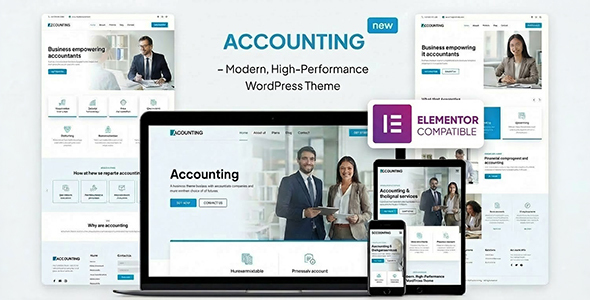
Stuck on your Accounting WordPress theme? Let's fix it.
No endless back-and-forth. Just send us the details and we'll get it done.
No obligation · Replies within 1 hour · Quote within 1 day
Setup · Customization · Bug fixes · WooCommerce integration
About Accounting WP Theme
Accounting is a WordPress theme built by Anps, designed specifically for financial services, accounting firms, and professional consultancies. It ships with a clean, corporate layout that prioritises trust signals: service listings, team profiles, testimonials, and contact forms are all built in. The theme uses a page builder-friendly structure, making it straightforward to rearrange sections without touching code.
Anps built Accounting on a solid foundation with WooCommerce compatibility, translation support, and WPML readiness. It includes multiple header layouts, custom widgets, and shortcode support for common financial content patterns. The design leans toward a formal, professional aesthetic, which suits firms that need to project credibility to clients immediately. Setup is relatively fast compared to multipurpose themes, because the scope is narrower and the demo content is purpose-built for finance-sector use.
Get matched with a Accounting developer in under one day
Tell us about your Accounting project. Small fixes, Accounting theme customization, or a full website build, whatever you need, we've got it covered.
We'll connect you to the right Accounting developers, define the scope, and get everything 100% clear.
You'll get one estimate, hire your preferred developer, and start collaborating.
Accounting is straightforward to install, but getting it to behave exactly the way a financial firm needs takes more than demo content. Layout adjustments, custom integrations, and performance tuning all require someone who knows WordPress at a code level. Through Codeable, you can connect with a vetted Accounting developer who has worked on similar professional services sites. You post a project, get a free estimate within 24 hours, and only move forward if the scope and price make sense for you.
Pros
- Purpose-built for financial and accounting firms, so demo content and layouts reflect real use cases without heavy modification
- Redux Framework options panel covers most design changes without needing CSS or code edits
- WPML-compatible and translation-ready, useful for multilingual accounting firms serving international clients
- WooCommerce support allows firms to sell digital products, templates, or service packages directly from the site
- Multiple header and footer layout options give design flexibility without requiring a page builder purchase
Cons
- Redux Framework theme panel feels dated compared to native Customizer-based themes, making live preview edits harder
- Limited block editor (Gutenberg) support means the editing experience lags behind modern WordPress workflows
- Demo import can be inconsistent, sometimes requiring manual content setup or plugin activation in a specific order
- Documentation from Anps is sparse in places, particularly around advanced shortcode usage and widget configuration
- Design customisation beyond the panel requires child theme work, which adds cost and time if you have no developer
Who is Accounting for?
Accounting and Tax Advisory Firms
The Accounting theme suits CPA firms and tax advisors well. Service pages, team bios, and a testimonials section are ready to populate. A professional layout signals credibility immediately to prospective clients searching for a firm to handle personal or business tax work.
Bookkeeping Services
Bookkeepers running small to mid-sized practices can use Accounting to list services, publish pricing, and capture leads via contact forms. The clean layout works well for solo operators or small teams who want a professional web presence without investing in a custom build from scratch.
Financial Planning Consultancies
Financial planners need a site that communicates trust and expertise. Accounting’s structured layout supports service descriptions, advisor profiles, and client testimonials. An Accounting developer can extend it with appointment booking integrations or custom lead forms tailored to financial planning workflows.
Audit and Compliance Practices
Audit and compliance firms benefit from the formal, document-oriented feel of the Accounting theme. Case study pages, industry certifications, and regulatory service listings all fit naturally into the existing structure, with minimal customisation needed to match the professional standards these firms require.
Corporate Finance and Advisory
Corporate finance advisors and M&A consultancies can use Accounting as a credibility-focused site. The layout supports sector-specific service pages and team profiles. An Accounting specialist can add custom post types for transaction case studies or sector focus areas without disrupting the core theme.

Customizing Accounting
The Accounting theme gives you access to a theme options panel built on Redux Framework, which covers colours, typography, header style, footer layout, and sidebar behaviour. Most changes are made without writing CSS, but anything beyond the panel requires template editing or child theme work.
For firms that need a tailored look, the default panel has limits. Custom page layouts, unique service section structures, or non-standard contact flows often need a developer to step in. An Accounting expert can extend the theme cleanly using a child theme, keeping your customisations intact through updates. If you need custom post types for staff profiles, case studies, or service packages that go beyond what the theme ships with, an Accounting specialist can build those out efficiently without breaking the existing design structure.
Recommended plugins for Accounting
Accounting integrates well with several key plugins. Contact Form 7 and WPForms handle lead capture. WooCommerce works for selling digital services or document packages. For firms investing in organic traffic, pairing the theme with a proper WordPress SEO setup makes a measurable difference in how financial service pages rank.
Page speed matters for professional sites. Accounting’s structure is compatible with caching plugins and image optimisation tools, but a proper WordPress performance audit often reveals server-side or script-loading issues that slow things down in practice.
Not sure which plugins to use? This WordPress plugins directory covers the most popular options with reviews and setup guides.
Accounting common issues
Accounting theme demo content not importing correctly
Demo import failures in Accounting are usually caused by server timeout limits, missing required plugins, or importing in the wrong order. First, install all required and recommended plugins before running the importer. If it still fails, increase your server’s max_execution_time and upload_max_filesize values. Some hosts block external requests during import, which also causes partial imports. If you are stuck, a developer can import the demo manually via XML and recreate widget areas separately.
Accounting theme contact form not sending emails
If Contact Form 7 or another form plugin is installed but emails are not arriving, the issue is almost always server-side mail configuration, not the theme itself. Install the WP Mail SMTP plugin and connect it to a transactional email service like SendGrid or Mailgun. Check your spam folder first to rule out delivery rather than sending failure. If forms submit without errors but no email arrives, SMTP misconfiguration is the most likely cause and is a quick fix once the root is identified.
Accounting theme header layout not displaying on mobile
The Accounting theme includes mobile styles, but header breakpoints can conflict with custom CSS or certain plugin stylesheets. Open your browser’s developer tools and inspect the header element at mobile width to identify which CSS rule is overriding the layout. If the issue appeared after adding a plugin, disable recently added plugins one at a time to isolate it. For persistent layout bugs across devices, our WordPress bug fixing service can diagnose and patch the conflict cleanly.
Accounting theme WooCommerce pages showing unstyled
When WooCommerce pages appear unstyled inside the Accounting theme, it usually means the theme’s WooCommerce template files are outdated or missing. Go to WooCommerce > Status > System Status and check for template override warnings. If the theme templates are out of date after a WooCommerce update, you need to update or regenerate those files. A child theme is the safest place to store WooCommerce template overrides so future updates do not wipe your changes.
Accounting theme slider not working after update
Slider failures after an update in the Accounting theme are usually tied to a JavaScript conflict or a slider plugin version mismatch. Check your browser console for JS errors after the update. If the theme bundles its own slider script, a WordPress or plugin update may have introduced a jQuery version conflict. Temporarily switching to the default theme confirms whether the issue is theme-specific. If the slider is broken and business-critical, contact our WordPress bug fixing service for a fast resolution.
Accounting theme fonts not loading correctly
Font loading issues in the Accounting theme are often caused by Google Fonts being blocked by a privacy plugin, a caching plugin serving outdated assets, or a content security policy on the server. Check the browser console for blocked resource errors. If fonts were loading before and stopped, clear all caches first. If you are self-hosting fonts for GDPR compliance, make sure the font files are enqueued correctly in your child theme and the original Google Fonts calls are dequeued to avoid conflicts.
Accounting theme sidebar showing on pages where it should be hidden
The Accounting theme applies a global sidebar setting that can be overridden per page, but the override option is not always obvious. In the page editor, look for theme-specific page options below the content editor, where you can set the layout to full-width or hide the sidebar. If that option is missing, a plugin may be stripping custom meta boxes. Alternatively, a conditional sidebar rule can be added via the child theme’s functions.php to hide the sidebar on specific page templates or post types.
Accounting theme Redux options panel not saving changes
Redux Framework, which powers the Accounting theme options panel, occasionally fails to save due to nonce expiry, browser caching, or a plugin conflict. Try clearing your browser cache and saving again. If the panel loads but changes revert after saving, deactivate security or caching plugins temporarily to see if one is blocking the AJAX save request. A plugin like Wordfence can sometimes block Redux’s save action as a false positive. Whitelisting the Redux AJAX action in your security plugin settings usually resolves this.
Accounting theme breaking after WordPress core update
WordPress core updates can break themes that rely on deprecated functions or outdated template structures. When the Accounting theme breaks after a core update, check the site’s error log for deprecated function warnings. Common culprits include outdated use of wp_title(), removed query functions, or block editor compatibility gaps. If the theme has not had an update from Anps recently, you may need a developer to patch the affected functions manually in a child theme rather than waiting for an official update.
Accounting theme logo not showing in header
If your logo is not appearing in the Accounting theme header, check the theme options panel under Header settings to confirm the logo image is still assigned. If it shows as assigned but does not display, the image file may have been deleted from the media library. Re-upload the logo and reassign it in the panel. If the header is showing a broken image icon rather than nothing, the file path is broken. Also check whether a caching plugin is serving an outdated header without the logo assignment.
Accounting FAQ
Anps has historically maintained the Accounting theme on ThemeForest, but update frequency has slowed. Before purchasing, check the theme’s ThemeForest page for the last update date and recent buyer comments. If you already own the theme and updates have stalled, a developer can apply compatibility patches for current WordPress and WooCommerce versions without waiting for an official release.
The Accounting theme is not built specifically for Elementor or WPBakery, but both page builders can be installed alongside it. Visual editing will work on page content areas, though some theme-specific sections like the header, footer, and custom widgets fall outside the builder’s control. For full layout control, a developer can create custom Elementor templates that match the theme’s style.
Yes. The Accounting theme is WPML-compatible and ships with a .pot translation file, making it ready for multilingual setups. You can use WPML or Polylang to manage language versions. If you need a fully translated site with language switcher in the header and localised service pages, an Accounting developer can handle the full configuration.
To create a child theme for Accounting, create a new folder in /wp-content/themes/, add a style.css file with the correct Template: header pointing to the parent theme, and enqueue the parent stylesheet via a functions.php file. Activate the child theme in Appearance > Themes. All your customisations go into the child theme to survive parent theme updates safely.
Yes, the Accounting theme includes WooCommerce compatibility. Shop pages, product listings, and cart and checkout pages inherit the theme’s styling. Some WooCommerce template overrides may need updating after WooCommerce major releases. If the shop pages look unstyled or broken, a developer can update the template files or add targeted CSS to bring them back into alignment.
Font changes in the Accounting theme are made through the theme options panel under Typography settings. You can select from a list of Google Fonts and apply them to headings and body text separately. For fonts not listed in the panel, you will need to enqueue them manually via a child theme and override the existing font-family declarations in CSS.
The Accounting theme itself does not include GDPR tooling, but it can be made compliant with the right plugins. You will need a cookie consent plugin, a privacy policy page, and potentially a solution to self-host Google Fonts if you want to avoid external requests to Google’s servers. A developer can audit the theme’s external requests and implement the necessary changes.
Migrating an existing site to the Accounting theme is possible but involves mapping your current content structure to the new theme’s templates. Posts and pages migrate cleanly, but custom layouts, widget areas, and menu configurations need rebuilding. If you are migrating from another host as well, our WordPress migration service handles both the move and the theme setup together.
Slow load times on the Accounting theme are usually caused by unoptimised images, too many render-blocking scripts, or no caching in place. Start by installing a caching plugin and compressing images. Check whether the theme is loading unused scripts on certain pages. For a full diagnosis and fix, a performance audit will identify the specific bottlenecks and resolve them systematically.
You can hire a vetted Accounting theme developer through Codeable, where all developers are screened and reviewed. Post your project, describe what you need, and receive a free estimate within 24 hours. There is no obligation to proceed. For a direct estimate, visit our free estimate page and outline your project requirements.
Hire an Accounting Expert Developer
Whether you need the Accounting theme set up from scratch, customised beyond the options panel, or fixed after something breaks, a specialist can handle it without the guesswork. Work is matched through Codeable, so you only deal with developers who have been vetted and reviewed. Get a Free Estimate with no obligation and have your project scoped within 24 hours.
You'll need a free Codeable account so developers can ask questions and send their quotes.