Aden WordPress Theme
by Infinity-Themes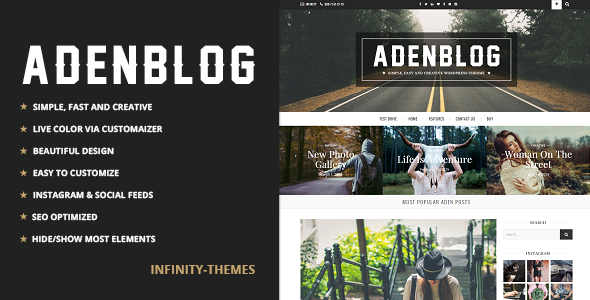
Stuck on your Aden WordPress theme? Let's fix it.
No endless back-and-forth. Just send us the details and we'll get it done.
No obligation · Replies within 1 hour · Quote within 1 day
Setup · Customization · Bug fixes · WooCommerce integration
About Aden WP Theme
Aden is a free WordPress theme developed by Infinity-Themes. It was originally designed with bloggers and food bloggers in mind, featuring a clean, minimal layout that keeps the focus on content and imagery. The theme is built on a widgetized homepage and supports the WordPress Customizer for basic styling changes.
Aden works well for personal blogs, recipe sites, and lifestyle publications. It loads reasonably fast out of the box, ships with a responsive design, and integrates with WooCommerce for simple shop setups. Translation-ready and compatible with popular plugins, it gives smaller sites a polished look without requiring premium investment. That said, customization beyond the defaults often requires custom CSS or child theme development.
Get matched with a Aden developer in under one day
Tell us about your Aden project. Small fixes, Aden theme customization, or a full website build, whatever you need, we've got it covered.
We'll connect you to the right Aden developers, define the scope, and get everything 100% clear.
You'll get one estimate, hire your preferred developer, and start collaborating.
Aden is simple on the surface, but custom work adds up quickly. Modifying templates, fixing plugin conflicts, adjusting the responsive layout, or building new functionality all require real WordPress knowledge. FoxyConcept connects you with vetted Aden developers through Codeable, a platform for professional WordPress work. Every developer on Codeable is pre-screened. You get an honest estimate before committing to anything. No guesswork, no freelancer roulette.
Pros
- Clean, minimal design that suits content-first blogs and food sites
- Free to download with no premium upsell required for core features
- Responsive layout works across mobile, tablet, and desktop without extra setup
- WooCommerce compatible for adding a basic shop to a blog site
- Translation-ready with .pot file included for multilingual builds
Cons
- Limited Customizer options mean most design changes require custom CSS
- No built-in mega menu or advanced navigation options
- Development appears slow, with infrequent updates from Infinity-Themes
- Widget-dependent homepage limits flexibility compared to block-based themes
- Minimal documentation makes troubleshooting harder for non-developers
Who is Aden for?
Food and Recipe Blogs
Aden was built with food blogs in mind. Its large featured images, clean post layout, and readable typography make recipe content easy to navigate. The theme handles category archives well, which is useful when organizing content by meal type or cuisine. Pair it with a recipe plugin like WP Recipe Maker for a functional food site.
Personal Lifestyle Blogs
Personal bloggers benefit from Aden’s distraction-free design. The layout keeps the focus on writing and imagery without heavy visual noise. The widgetized sidebar and homepage area give enough structure to surface popular posts and social links. It is a solid starting point for anyone publishing regularly on a tight budget.
Photography Portfolios
Aden’s image-forward layout works for photographers who want a clean presentation without building a custom theme. Featured images display prominently, and the minimal interface keeps focus on the photos. For galleries, you will need a plugin like Envira Gallery or FooGallery since Aden does not include native gallery templates.
Small Online Shops
Aden’s WooCommerce compatibility makes it usable for small shops attached to a blog or content site. Product pages render cleanly and the cart integrates without major styling conflicts. For stores with more than a handful of products, custom styling will likely be needed to match shop pages to the overall site design.
Travel Journals
Travel bloggers get a lot of value from Aden’s image-heavy post format and clean archive pages. Long-form content reads well with the default typography. The theme handles destination categories and tag archives without issues. Adding a map plugin like WP Google Maps slots in without breaking the layout.

Customizing Aden
Out of the box, Aden gives you control over the header, background colors, fonts (via Google Fonts), and widget areas through the WordPress Customizer. That covers basic branding needs. But if you want a custom homepage layout, modified typography scale, unique post templates, or anything outside the default widget structure, you will need to write custom CSS or edit theme files directly.
Editing core theme files without a child theme means updates will overwrite your changes. An Aden expert can build a proper child theme, implement design changes cleanly, and extend the theme without creating technical debt. Whether you need a custom header, adjusted grid layout, or bespoke post formats, working with an experienced Aden developer saves time and avoids common mistakes.
Recommended plugins for Aden
Aden pairs well with several plugin categories. WooCommerce adds a functional shop layer to food or lifestyle sites. Yoast SEO or Rank Math handles on-page optimization that the theme does not cover natively. For performance, caching plugins like WP Rocket or LiteSpeed Cache reduce load times significantly. Page builders like Elementor can extend layout flexibility, though compatibility should be tested first.
If your site grows, look into WordPress performance optimization and SEO improvements tailored for content-heavy sites built on lightweight themes like Aden.
Not sure which plugins to use? This WordPress plugins directory covers the most popular options with reviews and setup guides.
Aden common issues
Aden theme header not displaying correctly after update
Header display issues after an update usually mean a CSS conflict or a cached version of old styles being served. Start by clearing your caching plugin and server-level cache. If you edited theme files directly rather than using a child theme, the update likely overwrote your changes. Check your browser console for CSS errors. If the layout is still off, inspect the header template file for structural changes introduced in the update.
Aden WordPress theme mobile menu not working
A broken mobile menu on Aden typically comes from a JavaScript conflict with another plugin. Open your browser console on mobile view and look for JS errors. Deactivate plugins one by one to isolate the conflict. Also check that jQuery is loading correctly, since Aden’s menu toggle depends on it. If the issue appeared after adding a caching or optimization plugin, check whether JavaScript files are being minified incorrectly.
Aden theme custom logo not showing in Customizer
If your custom logo is not appearing in Aden, first confirm the theme supports the custom-logo feature. In the Customizer, navigate to Site Identity and re-upload the logo. If it still does not display, clear your cache. Some caching plugins serve a static version of the header that does not reflect Customizer changes until manually purged. If the logo area simply does not exist in the header template, it may need to be added via a child theme.
Aden theme WooCommerce shop page layout broken
WooCommerce layout issues in Aden usually stem from missing or conflicting CSS. After a WooCommerce major version update, shop templates sometimes need updating too. Check WooCommerce’s status page under Tools for any outdated templates flagged for Aden. You may need to copy updated template files into a child theme folder and re-apply any custom styling. For persistent issues, our WordPress bug fixing service can resolve this quickly.
Aden FAQ
Aden from Infinity-Themes has seen infrequent updates in recent years. It still works with current versions of WordPress, but active development appears limited. Before building a new site on it, check the theme’s changelog on WordPress.org and review open support threads. For long-term projects, this is worth factoring into your decision.
Aden is generally compatible with Elementor, but results vary. Elementor will override most of the theme’s default templates on pages you build with it. The global styles, header, and footer remain theme-controlled unless you use Elementor Pro’s full site editing features. Test your specific setup before going live to catch any styling conflicts early.
Create a child theme folder in wp-content/themes, add a style.css file with the correct template header referencing Aden as the parent, and add a functions.php that enqueues the parent stylesheet. Upload it via FTP or the theme installer. Any customizations go into the child theme files so updates to Aden do not overwrite your work.
Aden has a clean, lightweight structure which helps with page speed, a real SEO factor. But the theme itself does not handle meta tags, schema markup, or XML sitemaps. You need a dedicated SEO plugin for that. Install Yoast SEO or Rank Math and configure it properly. The theme will not hurt your SEO, but it will not do the SEO work either.
Yes, switching themes is possible. Your content, media, and plugins all stay intact. What changes is the design and any theme-specific widget configurations. If you used shortcodes from theme-bundled plugins, those may break on the new theme. Plan the migration carefully. A professional WordPress migration service can handle the transition without losing content or settings.
Hire an Aden WordPress Developer
Need changes to your Aden theme that go beyond what the Customizer offers? Whether it is a child theme build, layout adjustments, WooCommerce integration, or fixing a broken page, a specialist gets it done correctly the first time. FoxyConcept works through Codeable, so you only work with developers who have been tested and reviewed. Get a free estimate with no obligation to hire.
You'll need a free Codeable account so developers can ask questions and send their quotes.