Adrenalin WordPress Theme
by commercegurus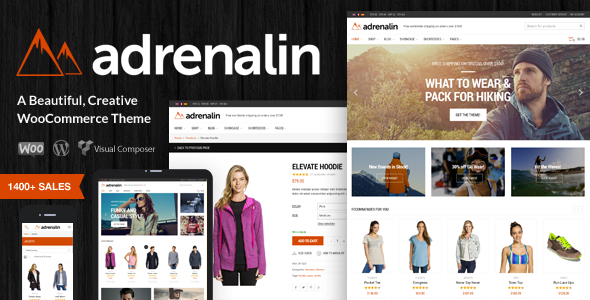
Stuck on your Adrenalin WordPress theme? Let's fix it.
No endless back-and-forth. Just send us the details and we'll get it done.
No obligation · Replies within 1 hour · Quote within 1 day
Setup · Customization · Bug fixes · WooCommerce integration
About Adrenalin WP Theme
Adrenalin is a WooCommerce theme built by CommerceGurus, a developer studio focused exclusively on ecommerce. It was designed to handle large product catalogues without slowing down, and it shows. The theme includes a mega menu, advanced filtering, quick view, and a sticky cart — all built in, no extra plugins needed.
CommerceGurus built Adrenalin with conversion in mind. Product pages are clean and structured to reduce friction. The checkout flow is straightforward. Mobile performance is given proper attention rather than treated as an afterthought.
If you are running a WooCommerce store with hundreds of SKUs, complex categories, or a need for fast filtering, Adrenalin is worth serious consideration. It is a purpose-built theme, not a general-purpose theme that happens to support WooCommerce.
Get matched with a Adrenalin developer in under one day
Tell us about your Adrenalin project. Small fixes, Adrenalin theme customization, or a full website build, whatever you need, we've got it covered.
We'll connect you to the right Adrenalin developers, define the scope, and get everything 100% clear.
You'll get one estimate, hire your preferred developer, and start collaborating.
Adrenalin is a capable theme, but getting it to perform exactly how your store needs takes real configuration work. Small missteps in product page layout or filter setup can hurt conversions more than most people realise.
Through Codeable, you get matched with a vetted Adrenalin developer who has worked on WooCommerce stores before. You post your project, get a free estimate, and only move forward if it makes sense. No guesswork, no generic freelancers.
Pros
- Built exclusively for WooCommerce, not a general theme with WooCommerce support bolted on
- Advanced Ajax product filtering included without needing a third-party filter plugin
- Mega menu handles deep category structures cleanly
- Quick view and sticky cart reduce steps to purchase without additional plugins
- Actively maintained by CommerceGurus with regular WooCommerce compatibility updates
Cons
- Limited use outside of ecommerce — not suitable for blogs, portfolios, or service sites
- The options panel has a learning curve and is not as intuitive as some competing themes
- Some advanced layout changes require editing template files directly
- Child theme setup is necessary for any customisation you want to survive updates
- Support is limited to the CommerceGurus helpdesk — no large community forum like some bigger theme ecosystems
Who is Adrenalin for?
Large Electronics and Tech Stores
Electronics stores need detailed filtering by brand, specs, and price. Adrenalin’s built-in Ajax filter handles this well across large catalogues. Product comparison features and clear specification tables make it easier for customers to make decisions. An Adrenalin specialist can configure filters to match your exact attribute structure without performance issues.
Fashion and Apparel Retailers
Adrenalin supports variable products with multiple attributes — size, colour, and style — which are central to apparel stores. The quick view and clean product grid keep browsing fast. An Adrenalin developer can customise swatch displays and variant selectors to match your brand’s look and improve the buying experience on mobile.
Sports and Outdoor Equipment
Sports equipment stores often carry wide product ranges across distinct categories. Adrenalin’s mega menu and layered filtering let customers navigate to exactly what they need quickly. The theme handles both simple and variable products well. An Adrenalin expert can set up category-specific layouts that highlight key products and seasonal promotions effectively.
Auto Parts and Accessories
Auto parts stores require precise filtering by make, model, and year — a level of complexity that many themes handle poorly. Adrenalin’s filter architecture can be extended to support this with the right configuration. An Adrenalin developer familiar with WooCommerce attribute setup can build out a fitment-style filter that reduces customer returns and support queries.
Home and Garden Stores
Home and garden stores benefit from Adrenalin’s strong category page layouts and flexible product grid options. Large product images and clean descriptions convert well for considered purchases. An Adrenalin specialist can adjust homepage sections and category templates to reflect seasonal ranges and featured collections without breaking the existing structure.

Customizing Adrenalin
Adrenalin gives you a solid starting point, but most stores need adjustments before going live. Layout tweaks, custom colour schemes, typography changes, and product page restructuring all require time and knowledge of how the theme is built.
CommerceGurus has its own options panel, and Adrenalin integrates with the native WordPress Customizer. That said, pushing beyond the built-in settings — custom category templates, bespoke header layouts, or unique product page structures — requires developer work.
An Adrenalin expert can save you hours of trial and error. Whether you need a specific filter behaviour, a custom homepage section, or changes to how product variants are displayed, working with someone who knows the theme’s architecture gets you cleaner results faster.
Recommended plugins for Adrenalin
Adrenalin pairs well with performance and SEO plugins, but how you configure them matters. Heavy plugin stacks can undo the speed advantages the theme offers out of the box.
For site speed, focus on a solid caching layer, image optimisation, and a CDN. See our WordPress performance services for a full breakdown. For search visibility, structured product data, clean URL structures, and optimised category pages all need attention. Our WordPress SEO optimisation service covers these specifically for WooCommerce stores running themes like Adrenalin.
Not sure which plugins to use? This WordPress plugins directory covers the most popular options with reviews and setup guides.
Adrenalin common issues
Adrenalin theme Ajax filter not working after update
Ajax filter issues after an update usually point to a JavaScript conflict or a WooCommerce compatibility break. First, check your browser console for JS errors. Deactivate recently updated plugins one by one to isolate the conflict. If the filter was working before the update, compare the changelog from CommerceGurus for any template changes. Persistent filter problems are best handled through our WordPress bug fixing service to avoid further breakage.
Adrenalin product page layout broken on mobile
Mobile layout breaks in Adrenalin are often caused by custom CSS overriding the theme’s responsive rules, or a plugin injecting elements that disrupt the product page structure. Start by disabling custom CSS and testing on a clean cache. If the issue appeared after a plugin update, check whether that plugin modifies WooCommerce single product templates. For persistent issues, our WordPress bug fixing service can identify and resolve template conflicts properly.
Adrenalin mega menu not displaying correctly
Mega menu display problems in Adrenalin are usually tied to theme settings not being saved correctly, a CSS conflict from another plugin, or a caching layer serving stale markup. Clear all caches first. Then check the theme’s menu settings panel and confirm the correct menu is assigned to the header location. If you have added custom CSS or a third-party menu plugin, those are likely causing the conflict and should be reviewed carefully.
Adrenalin theme slow page load on category pages
Slow category pages in Adrenalin usually come down to unoptimised images, too many active filter attributes being loaded on page, or a lack of server-side caching. Start by profiling the page with a tool like Query Monitor to identify slow database queries. Compress and lazy-load product images. Review how many filter options are being rendered on load. An Adrenalin developer can also audit your hosting configuration to ensure it matches the demands of a large WooCommerce catalogue.
Adrenalin FAQ
Yes. Adrenalin was designed specifically for stores with large catalogues. The built-in Ajax filtering, mega menu, and optimised category templates all contribute to a manageable experience for stores with hundreds or thousands of products. That said, server configuration and image handling still matter significantly at scale.
Adrenalin is not built as an Elementor or block-based theme. It uses its own options panel and the native Customizer. Elementor can be used to build custom content pages within the site, but the core WooCommerce templates — product pages, category pages, cart, checkout — are controlled by the theme itself, not a page builder.
Adrenalin’s filter is configured through the theme settings panel under the Shop section. You assign WooCommerce product attributes to the filter widget and enable Ajax loading. The filter works with the native WooCommerce attribute system. For complex setups — custom taxonomies or multi-level attributes — you will likely need developer assistance to configure it correctly.
CommerceGurus continues to release updates for Adrenalin. Updates typically address WooCommerce compatibility as WooCommerce itself releases new versions. It is worth checking the CommerceGurus changelog regularly and testing updates on a staging environment before applying them to a live store.
Adrenalin’s licensing terms from CommerceGurus determine how many sites you can run the theme on. Standard licences typically cover a single site. If you need to run it across multiple stores, you will need to purchase additional licences. Check the current licensing page on the CommerceGurus website for up-to-date terms.
Hire an Adrenalin Developer
Whether you need a full Adrenalin setup, a specific customisation, or help fixing something that is not working as expected, a dedicated Adrenalin developer can handle it properly. Work is delivered through Codeable, which means every developer is vetted and reviewed by real clients.
Get a Free Estimate and describe what you need. No obligation, no upfront payment.
You'll need a free Codeable account so developers can ask questions and send their quotes.