Agricom WordPress Theme
by Ninetheme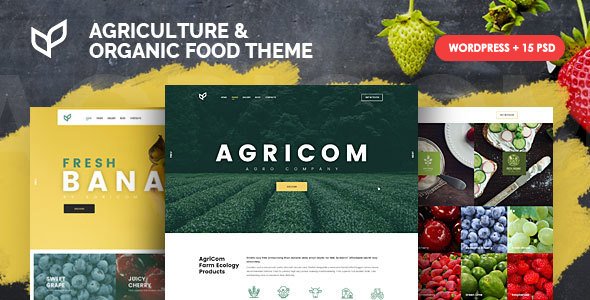
Stuck on your Agricom WordPress theme? Let's fix it.
No endless back-and-forth. Just send us the details and we'll get it done.
No obligation · Replies within 1 hour · Quote within 1 day
Setup · Customization · Bug fixes · WooCommerce integration
About Agricom WP Theme
Agricom is a WordPress theme by Ninetheme built specifically for agriculture, farming, and rural businesses. It ships with multiple homepage demos, a clean visual style, and WooCommerce support — making it practical for farms that sell products directly online.
The theme uses Elementor for page building, so most layout work happens visually without touching code. It also includes custom widgets for farm-related content, a blog layout suited to agricultural news, and WPML compatibility for multilingual sites.
Agricom suits small to mid-size farming operations, agricultural suppliers, and rural cooperatives. It is not a general-purpose theme stretched to fit farming — it was designed with this niche in mind from the start, which shows in the demo content and included section types.
Get matched with a Agricom developer in under one day
Tell us about your Agricom project. Small fixes, Agricom theme customization, or a full website build, whatever you need, we've got it covered.
We'll connect you to the right Agricom developers, define the scope, and get everything 100% clear.
You'll get one estimate, hire your preferred developer, and start collaborating.
Agricom has enough flexibility to build a polished farm or agricultural business site, but getting there cleanly takes more than reading documentation. Layout edge cases, WooCommerce configuration for physical products, and performance tuning under real traffic all need hands-on work.
FoxyConcept connects you with vetted Agricom developers through Codeable, the specialist WordPress network. Every developer is screened — no bidding wars, no guesswork. You get someone who has worked with the theme and knows where the common problems are before they become your problems.
Pros
- Built specifically for agriculture — demo content and section types reflect real farming business needs
- Elementor integration means most layout work is visual and does not require custom code
- WooCommerce ready out of the box, including product layouts suited to farm shop use cases
- WPML compatible, which matters for farms and cooperatives operating across language regions
- Multiple homepage demo imports available, reducing the time needed to get a working starting point
Cons
- Elementor dependency means switching page builders later requires rebuilding all page layouts
- Demo content import can be slow or incomplete depending on server configuration
- Limited built-in booking functionality — farm tour or CSA sign-up features need additional plugins
- Theme updates from Ninetheme are infrequent, which can create compatibility issues with newer WordPress versions
- Documentation is basic and does not cover advanced WooCommerce or multilingual configuration in detail
Who is Agricom for?
Farm Shop and Direct Sales
Agricom’s WooCommerce integration makes it a practical base for farms selling produce, meat, dairy, or value-added products directly to customers. Product pages, a checkout flow, and category filtering all work without heavy plugin customization. Adding seasonal product collections or a pickup scheduling option is straightforward with the right plugin pairing.
Agricultural Supplier Website
Companies supplying seeds, equipment, fertilizers, or feed can use Agricom’s structured layout to organize a large product catalog. The theme handles category pages and product detail layouts well at scale. Pairing it with WooCommerce and a product filter plugin gives buyers a clean browsing experience without custom development from scratch.
CSA and Subscription Box Service
Farms running weekly vegetable boxes or subscription produce programs can use Agricom alongside a WooCommerce subscription plugin. The theme’s content sections handle plan comparisons, pickup locations, and seasonal highlights clearly. Signup forms and member-only pages can be added through compatible plugins without modifying the theme structure significantly.
Rural Tourism and Farm Stays
Agritourism businesses — farm stays, glamping sites, working farm experiences, and guided tours — need a site that communicates atmosphere while handling bookings. Agricom’s visual layout sections support photo-heavy content well. A booking plugin like MotoPress Hotel Booking or WooCommerce Bookings connects to the theme without major conflicts.
Agricultural Cooperative or Association
Cooperatives and agricultural associations need a site that communicates membership value, publishes news and updates, and handles event listings. Agricom’s blog layout and custom section types cover most of this. Member portals or gated content can be added through membership plugins. The theme’s multilingual support also helps associations serving diverse member bases.

Customizing Agricom
Customizing Agricom typically starts in the WordPress Customizer, where you can adjust colors, typography, header layout, and footer options without writing code. Elementor handles most page-level work, giving you drag-and-drop control over sections, spacing, and content blocks.
Where things get more involved — custom post types, WooCommerce store configuration, child theme setup, or integrating a booking system for farm tours — that is where working with an Agricom expert makes a real difference. Ninetheme provides documentation, but the theme has enough moving parts that a specialist can save significant time.
Common customization requests include modifying the product catalog layout for farm shops, adjusting the header to include a phone number or location, and building custom landing pages for seasonal produce or CSA subscriptions.
Recommended plugins for Agricom
Agricom works well with several key plugins. WooCommerce turns it into a functional farm shop with product pages, cart, and checkout. WPML adds multilingual support for operations serving more than one language region. Contact Form 7 or WPForms handles inquiries and order forms.
For performance, pairing Agricom with a caching plugin and a CDN matters more than it might seem — agricultural image content is heavy. See our WordPress performance service for that work.
If organic search traffic matters to your farm business, structured plugin-level SEO work helps. Our WordPress SEO service covers that alongside the theme.
Not sure which plugins to use? This WordPress plugins directory covers the most popular options with reviews and setup guides.
Agricom common issues
Agricom homepage demo not importing correctly
Demo import failures in Agricom usually come down to server timeout limits or missing required plugins. Before importing, install and activate Elementor, WooCommerce, and any other plugins listed in the theme requirements. Increase your server’s max_execution_time and memory_limit values if possible. If the import still fails partway through, try importing XML content and widgets separately rather than using a one-click import. A developer can also handle this manually by migrating the demo files directly. See our bug fixing service if the issue persists.
Agricom WooCommerce product page layout broken
WooCommerce product page layout problems in Agricom often appear after a WooCommerce update changes template hooks or file structure. Check whether the theme includes overridden WooCommerce templates in a /woocommerce/ folder — if it does, those files may be outdated. Comparing them against the current WooCommerce template versions and updating them resolves most layout issues. Avoid editing core theme files directly; use a child theme for any template overrides to prevent the same problem after future updates.
Agricom Elementor sections not loading or showing blank
Blank Elementor sections in Agricom are usually caused by a plugin conflict, an outdated version of Elementor, or missing Elementor Pro features being called by theme widgets. Start by updating Elementor to the latest version. Then deactivate other plugins one at a time to identify conflicts. If sections show in the editor but not on the frontend, a caching plugin is likely serving a stale version of the page. Clear all cache layers — plugin cache, server cache, and CDN cache — and reload.
Agricom theme slow page load on mobile
Agricom pages can load slowly on mobile primarily because of large unoptimized images in Elementor sections and unminified scripts. Start by compressing all images using a plugin like ShortPixel or Imagify. Enable lazy loading for images below the fold. Minify CSS and JavaScript through a caching plugin such as WP Rocket or LiteSpeed Cache. Also check whether any Elementor widgets are loading external fonts or scripts that are not actually used on the page. Our WordPress performance service covers full audits of this type.
Agricom FAQ
Agricom is generally compatible with current WordPress versions, but Ninetheme releases updates infrequently. After major WordPress releases, check the theme’s changelog and test on a staging site before updating your live site. If you notice broken layouts or PHP warnings after a WordPress update, an outdated theme template file is usually the cause. Keeping a staging environment makes catching these issues before they affect visitors much easier.
Yes, Agricom includes WooCommerce support. Product pages, shop archives, cart, and checkout all work with the theme’s styling applied. Some WooCommerce template files are overridden by the theme, which means you may need to update those files manually when WooCommerce releases major updates. For anything beyond a basic shop setup — subscriptions, wholesale pricing, product bundles — additional plugins and some configuration work are needed.
Agricom is built around Elementor, and the demo layouts rely on it. You can technically use the theme with the standard WordPress block editor for basic posts and pages, but you will lose access to the pre-built section layouts and custom widgets that make the theme useful. Rebuilding those layouts in another page builder would require significant effort. If you prefer not to use Elementor, a different theme is likely a better starting point.
Create a child theme by making a new folder in wp-content/themes/, adding a style.css file with a header that references Agricom as the parent theme, and a functions.php file that enqueues the parent stylesheet. Activate the child theme from the WordPress dashboard. All customizations go into the child theme files, so they are not overwritten when Agricom updates. This is the correct approach for any code-level changes to the theme.
Agricom is one of the more focused agriculture-specific themes available for WordPress. It works well for farms selling products, agricultural suppliers, and rural businesses that need a professional site without building from scratch. The main limitations are infrequent updates and a dependency on Elementor. For a straightforward farm website with a shop, blog, and contact sections, it is a practical and cost-effective choice compared to a custom build.
Hire an Agricom Expert Developer
Need help with Agricom? Whether it is setting up a farm shop, customizing layouts, fixing a broken section, or building something new on top of the theme — a specialist gets it done faster and cleaner than trial and error.
Post your project and get matched with a vetted Agricom developer within 24 hours. No obligation to hire, no upfront cost. Get a free estimate today and see exactly what your project will cost before committing.
You'll need a free Codeable account so developers can ask questions and send their quotes.