Agro WordPress Theme
by Ninetheme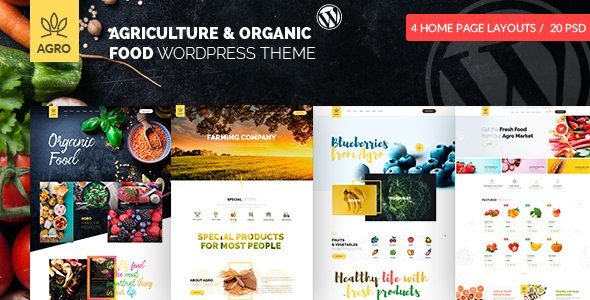
Stuck on your Agro WordPress theme? Let's fix it.
No endless back-and-forth. Just send us the details and we'll get it done.
No obligation · Replies within 1 hour · Quote within 1 day
Setup · Customization · Bug fixes · WooCommerce integration
About Agro WP Theme
Agro is a WordPress theme built by Ninetheme, designed specifically for farms, agriculture businesses, organic food producers, and rural services. It ships with a visual page builder, pre-built demo pages, and a layout system suited to product-based and service-based agricultural sites.
The theme supports WooCommerce, making it practical for selling seeds, produce, or farm supplies directly from your site. Header and footer layouts are flexible, and the theme includes custom post types for services and team members. Typography and color controls give you enough room to match your brand without touching code.
Agro works well for small farms, cooperatives, agribusiness companies, and anyone in the food supply chain who needs a clean, content-focused WordPress site that does not require a developer to get started.
Get matched with a Agro developer in under one day
Tell us about your Agro project. Small fixes, Agro theme customization, or a full website build, whatever you need, we've got it covered.
We'll connect you to the right Agro developers, define the scope, and get everything 100% clear.
You'll get one estimate, hire your preferred developer, and start collaborating.
Getting Agro to do exactly what your business needs takes more than installing demo content. A developer who knows the theme can configure it correctly the first time, build custom functionality, and avoid technical debt that slows you down later.
Through Codeable, you get matched with vetted WordPress developers who have real project experience. No agencies, no bidding wars. Post your project, get an estimate, and decide from there. It is straightforward and low-risk. Learn more about our WordPress development services and how we work.
Pros
- Purpose-built for agriculture and food businesses with relevant demo content and layouts
- WooCommerce integration is included, making it practical for farm stores and product catalogs
- Pre-built page templates speed up initial setup significantly
- Flexible header and footer builder without needing custom code
- Compatible with major page builders, giving non-developers control over layout
Cons
- Demo import can leave placeholder content that requires significant cleanup before going live
- Advanced WooCommerce configurations like subscriptions or variable farm products need developer involvement
- Limited out-of-box options for booking or appointment scheduling common in agri-tourism
- Theme updates occasionally break customizations made outside a child theme
- Support quality from Ninetheme can be slow for complex or theme-specific technical issues
Who is Agro for?
Farm and Produce Stores
Agro suits farm shops that need to list and sell produce, seeds, or packaged goods online. WooCommerce integration handles inventory, pricing, and checkout. A developer can set up product categories by season or crop type, add local delivery or pickup options, and configure payment gateways appropriate for your market.
Organic Food Brands
Organic food brands benefit from Agro’s clean layouts and content-first design. You can showcase sourcing stories, certifications, and product lines without a cluttered interface. A developer can connect the site to fulfillment or subscription tools and ensure product pages are structured correctly for search visibility.
Agricultural Services Companies
Companies offering soil testing, irrigation, pest control, or equipment hire need a service-focused layout with clear calls to action. Agro’s service post type and flexible page templates handle this well. Adding a quote request form or CRM integration is straightforward for a developer familiar with the theme.
CSA and Farm Box Subscriptions
Community-supported agriculture businesses need subscription management, recurring billing, and customer portals. Agro provides the front-end foundation. A developer can integrate WooCommerce Subscriptions, set up delivery schedule options, and build member account pages that match the rest of your site’s design.
Agri-Tourism and Farm Experiences
Farms offering tours, stays, or events need booking functionality alongside standard content pages. Agro handles the content and branding side cleanly. A developer can integrate a booking plugin, set up availability calendars, and configure automated confirmation emails to reduce manual admin work.

Customizing Agro
Agro gives you a solid starting point, but most serious projects will need work beyond the defaults. The Customizer controls cover colors, fonts, and layout options, but custom header designs, unique landing pages, or advanced WooCommerce setups will require additional development.
An Agro expert can help you move faster and avoid common mistakes. That means setting up child themes to protect your changes, building out custom page templates, integrating booking or contact forms, and connecting third-party tools like CRMs or payment gateways.
If you need WooCommerce configured for farm subscriptions or a custom product catalog with filtering by crop type or season, a developer who knows the Agro theme structure will handle that far more efficiently than a generalist.
Recommended plugins for Agro
Agro pairs well with several plugin categories. WooCommerce handles product sales, and plugins like WooCommerce Subscriptions work for farm box or CSA delivery models. WPML adds multilingual support if you serve multiple regions.
For performance, caching plugins and image optimization tools matter, especially if you run a product-heavy store. You can read more about WordPress performance options that apply directly to Agro builds.
For search visibility, pairing Agro with an SEO plugin is standard. See our WordPress SEO service if you want that handled properly from the start.
Not sure which plugins to use? This WordPress plugins directory covers the most popular options with reviews and setup guides.
Agro common issues
Agro theme demo import not working
Demo import failures in Agro usually come down to server memory limits or a missing required plugin. First, check that all required plugins listed in the theme documentation are installed and activated. Then increase your PHP memory limit to at least 256MB in your wp-config.php file. If the import still stalls, try importing the XML file manually through WordPress Tools. A developer can resolve this quickly if the server environment is the underlying cause. See our WordPress bug fixing service for hands-on help.
Agro WooCommerce product layout broken
Broken WooCommerce layouts in Agro are often caused by a plugin conflict or a missing WooCommerce template override. Start by temporarily deactivating other plugins to isolate the conflict. Check whether the theme has a WooCommerce folder with custom template files that may be outdated compared to your WooCommerce version. Updating or replacing those templates usually resolves the issue. If you are not comfortable editing template files directly, a WordPress developer can fix this without disrupting your store. Visit our bug fixing service for fast support.
Agro theme header not displaying correctly on mobile
Mobile header issues in Agro typically involve conflicting CSS from a child theme or customization, or a misconfigured header builder setting. Open your browser’s developer tools and inspect the header element on mobile to identify what styles are being applied. Check the Customizer header settings for mobile-specific breakpoints. If you have added custom CSS, a conflicting rule may be overriding the responsive behavior. A developer can diagnose and fix this in under an hour in most cases.
Agro theme slow page load speed
Slow load times on Agro sites are usually caused by unoptimized images, too many third-party scripts, or no caching configured. Start by running the site through PageSpeed Insights to identify the biggest issues. Install a caching plugin and an image optimization plugin as immediate steps. Disable unused plugins that load scripts on every page. For deeper performance work including database optimization and server configuration, see our WordPress performance service.
Agro FAQ
Yes, Agro is one of the more suitable agriculture-focused WordPress themes available. It includes demo content for farms, food producers, and rural service businesses. The layouts are clean, WooCommerce is supported, and there is enough customization flexibility for most small to mid-size agricultural sites. It works best when set up by someone familiar with the theme structure.
Agro includes WooCommerce compatibility and ships with styled product pages, cart, and checkout layouts. You can sell physical products, digital downloads, or configure subscriptions with additional plugins. For more complex store setups like variable products, local delivery zones, or membership access, a developer familiar with both Agro and WooCommerce will save you significant setup time.
To install Agro demo content, first install and activate all required plugins listed in the theme setup documentation. Then go to Appearance, Import Demo Data, and select the demo that matches your use case. Make sure your server has adequate PHP memory and execution time before starting. If the import times out or fails partway through, a manual XML import via WordPress Tools is the fallback option.
Most of Agro’s pre-built layouts rely on a page builder like Elementor or WPBakery. You can edit basic content without the builder, but recreating or significantly changing layouts without it is difficult. If you prefer a block-based workflow, a developer can help migrate the templates to the WordPress block editor, though this requires some rebuild work.
Setup costs depend on what you need. A basic demo install and configuration typically starts around a few hundred dollars. Custom development, WooCommerce setup, or bespoke page designs cost more. The best way to get an accurate number for your specific project is to submit a free estimate request and describe what you need. You will hear back within 24 hours.
Hire an Agro WordPress Developer
Whether you need a full Agro build from scratch, a specific feature added, or a bug fixed, working with a specialist saves time and avoids costly mistakes. Post your project and get a free estimate within 24 hours through our free estimate process. No obligation to hire, no upfront payment. You describe what you need, we match you with a developer who knows Agro and WordPress inside out, and you decide whether to move forward.
You'll need a free Codeable account so developers can ask questions and send their quotes.