Akea WordPress Theme
by GoodLayers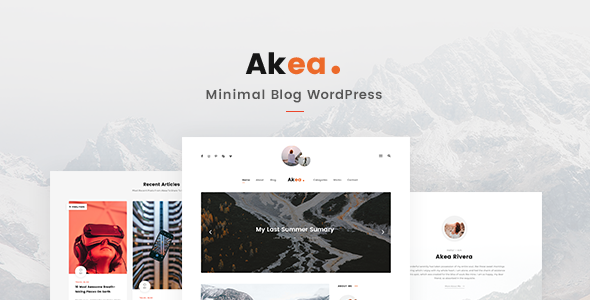
Stuck on your Akea WordPress theme? Let's fix it.
No endless back-and-forth. Just send us the details and we'll get it done.
No obligation · Replies within 1 hour · Quote within 1 day
Setup · Customization · Bug fixes · WooCommerce integration
About Akea WP Theme
Akea is a multipurpose WordPress theme built by GoodLayers, the same team behind the popular Goodlayers Core plugin. It ships with a drag-and-drop page builder, a solid set of pre-built demo sites, and a clean visual editor that makes layout control straightforward without writing code.
The theme targets businesses, agencies, and creatives who want a polished site without starting from scratch. It includes header and footer builders, WooCommerce support, and a library of section templates. GoodLayers has been around since 2012, so the codebase has matured through years of real-world use.
Akea works well when you need a flexible layout system without committing to a heavy third-party builder. Everything stays within the GoodLayers ecosystem, which keeps things consistent but also means you depend on one developer for updates and compatibility.
Get matched with a Akea developer in under one day
Tell us about your Akea project. Small fixes, Akea theme customization, or a full website build, whatever you need, we've got it covered.
We'll connect you to the right Akea developers, define the scope, and get everything 100% clear.
You'll get one estimate, hire your preferred developer, and start collaborating.
Akea looks straightforward until you need something outside the default options. At that point, knowing where GoodLayers stores its settings, how the builder outputs markup, and which filters are available saves hours of trial and error.
Through Codeable, you get access to vetted WordPress developers who have worked with GoodLayers themes before. You post your project, get a fixed estimate, and only move forward if the price works for you. No guesswork, no cold hiring from a forum post.
Pros
- Built-in page builder with real-time visual editing, no third-party builder licence required
- Header and footer builder included, with sticky, transparent, and mobile layout options
- Multiple pre-built demo sites covering business, agency, portfolio, and shop use cases
- WooCommerce templates included and styled to match the theme design system
- GoodLayers has a long release history, meaning the theme has been tested across many WordPress versions
Cons
- Heavily tied to the GoodLayers Core plugin, so removing it breaks most of the layout
- Builder outputs shortcode-based markup, which makes moving content to another theme difficult
- Documentation is functional but thin on advanced use cases and developer hooks
- Update frequency can lag behind major WordPress or WooCommerce releases
- Support is ticket-based with no live chat, and response times vary outside business hours
Who is Akea for?
Creative Agency
Akea suits agencies that want a visually flexible site without a heavy build process. The pre-built agency demo covers services, team, and case study pages. A developer can extend this with custom portfolio post types and filterable project grids that match the agency’s brand without rebuilding from scratch.
Online Store
The WooCommerce integration in Akea includes product page templates and shop archive layouts. For stores that need custom product builders, upsell sections, or checkout modifications, an Akea developer can work inside the GoodLayers template structure rather than fighting against it with overrides.
Portfolio Site
Akea includes grid and masonry layout options suited to photography, design, or illustration portfolios. You can filter by category and control thumbnail ratios through the builder. A developer can add lightbox customisation, AJAX filtering, and custom taxonomy structures to organise work by client or medium.
Corporate Business Site
Corporate sites need a reliable header, clear service pages, and a contact flow that works. Akea covers all of this through its demo content and builder. A developer can tighten the layout, wire up a CRM-connected form, and configure the site so non-technical staff can update content without breaking the design.
Freelancer or Consultant
A single-person business needs a site that loads fast, looks professional, and is easy to update. Akea provides a starting point without requiring a full custom build. With a short engagement from an Akea expert, you can get a finished site tailored to your services, with a simple editing workflow set up for ongoing use.

Customizing Akea
Akea gives you a visual page builder built directly into the theme, so layout changes happen in real time. You can adjust column structures, section padding, typography, and colour schemes without touching code. The header builder supports multiple rows, sticky behaviour, and mobile-specific layouts.
That said, deeper customisation quickly requires knowledge of how the GoodLayers Core plugin structures its shortcodes and settings. If you want custom post type layouts, advanced WooCommerce templates, or pixel-precise design work, you need someone who knows the theme inside out.
An Akea expert can build custom section templates, modify the PHP template hierarchy, and extend the builder with functionality that the default options do not cover. Working with a developer familiar with GoodLayers means faster results and fewer workarounds that break on the next update.
Recommended plugins for Akea
Akea integrates with WooCommerce for product pages and shop layouts, Contact Form 7 for forms, and WPML for multilingual sites. The GoodLayers Core plugin adds extra page builder elements like sliders, counters, and portfolio grids.
For performance, the theme supports popular caching plugins and outputs reasonably clean HTML. You can also pair it with an SEO plugin setup to handle meta and schema properly. If the site is growing, a performance audit helps identify which builder elements are adding unnecessary load time.
Not sure which plugins to use? This WordPress plugins directory covers the most popular options with reviews and setup guides.
Akea common issues
Akea page builder not loading in WordPress editor
This usually points to a JavaScript conflict or a PHP error preventing the builder scripts from loading. Start by checking the browser console for errors and the WordPress debug log. Deactivate other plugins one at a time to isolate the conflict. If the issue appeared after a WordPress core update, check whether GoodLayers Core is on its latest version. A bug fixing specialist can trace the conflict quickly without manual trial and error.
GoodLayers Core plugin conflict after WordPress update
GoodLayers Core is tightly coupled to Akea’s layout output. After a WordPress update, conflicts often show up as missing page builder elements, broken admin panels, or white screens on the front end. Roll back the update on a staging site first, then check the GoodLayers changelog for a compatible release. If no update is available yet, a developer can apply a targeted patch to restore function without waiting for an official fix.
Akea theme header not showing on mobile
Akea’s header builder has separate settings for desktop, tablet, and mobile. If the mobile header is missing or displaying incorrectly, check the mobile layout settings inside the header builder panel. A common cause is that a mobile menu or hamburger element was not added to the mobile row. CSS specificity issues can also override the mobile display rules. Check the theme options under the responsive settings tab before editing any custom CSS.
Akea WooCommerce product page layout broken
Broken WooCommerce layouts in Akea usually follow a WooCommerce major version update that changes template file structures. Akea includes custom WooCommerce templates in a dedicated folder. If those templates are out of date, the shop can display incorrectly. Go to WooCommerce > Status > Tools and check for outdated templates. A developer can update the Akea templates to match the current WooCommerce version without losing the existing design.
Akea FAQ
Akea is manageable for beginners when using the pre-built demo content as a starting point. The visual builder is intuitive for simple layout edits. However, tasks like custom headers, advanced WooCommerce setups, or fixing plugin conflicts require more WordPress knowledge. Beginners often benefit from an initial setup session with a developer to get the site configured correctly from the start.
Akea uses its own GoodLayers page builder rather than Elementor or Gutenberg. It does not officially integrate with Elementor. Gutenberg blocks can be placed inside the builder in some contexts, but the two systems are largely separate. If you want to use Elementor, it is worth considering whether Akea is the right theme choice or whether a different theme would be a better fit.
Theme updates in Akea do not overwrite your page builder content, which is stored in the database. However, if you have made changes to theme template files directly, those will be overwritten. Always use a child theme for template and CSS modifications. Back up the site before updating and test on a staging environment if the site is live. A maintenance plan can handle this process regularly.
Yes. GoodLayers Core is required for Akea to function properly. It provides the page builder elements, shortcodes, and custom post type support the theme depends on. Deactivating it will break most page layouts. The plugin is available through the GoodLayers licence and should always be kept on the version recommended for your installed version of Akea.
Akea is compatible with WPML, the most widely used multilingual plugin for WordPress. You can translate pages, theme strings, and custom content through the WPML interface. Some builder elements require manual string registration in WPML before they become translatable. A developer familiar with both Akea and WPML can set up the translation workflow and test it across the site before launch.
Hire an Akea Developer
Whether you need a custom layout built in Akea, a bug fixed, or a full site built from one of the demo templates, a specialist saves time. Post your project and get a free estimate from a vetted Akea developer through Codeable. No obligation to hire, no upfront cost. Get your free estimate here and hear back within 24 hours.
You'll need a free Codeable account so developers can ask questions and send their quotes.