Alloggio WordPress Theme
by Edge-Themes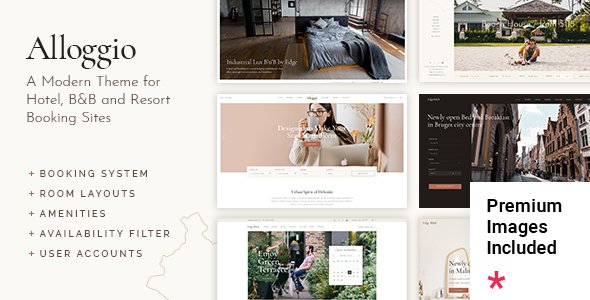
Stuck on your Alloggio WordPress theme? Let's fix it.
No endless back-and-forth. Just send us the details and we'll get it done.
No obligation · Replies within 1 hour · Quote within 1 day
Setup · Customization · Bug fixes · WooCommerce integration
About Alloggio WP Theme
Alloggio is a WordPress theme by Edge-Themes built specifically for rental and accommodation businesses. It ships with pre-built demos for hotels, apartments, vacation rentals, and bed and breakfasts. The theme integrates tightly with WP Hotel Booking or similar reservation plugins, giving property owners a working booking flow without needing a separate page builder setup from scratch.
Design-wise, Alloggio leans into large imagery, room listing grids, and availability calendars. It uses Edge-Themes’ own Qode Interactive plugin ecosystem, which adds shortcodes and widgets specific to hospitality layouts. The theme is Elementor-compatible and responsive across devices. For any accommodation business that wants a polished site without a fully custom build, Alloggio is a practical starting point.
Get matched with a Alloggio developer in under one day
Tell us about your Alloggio project. Small fixes, Alloggio theme customization, or a full website build, whatever you need, we've got it covered.
We'll connect you to the right Alloggio developers, define the scope, and get everything 100% clear.
You'll get one estimate, hire your preferred developer, and start collaborating.
Alloggio has enough moving parts, booking integrations, room templates, availability logic, that generic WordPress help rarely cuts it. You need someone who knows the theme’s structure and the hospitality plugin stack around it.
Codeable connects you with vetted WordPress developers who have hands-on experience with Edge-Themes builds. Post your project, get matched within 24 hours, and receive a free estimate before committing to anything. No risk, no obligation.
Pros
- Pre-built demos cover hotels, apartments, and vacation rentals with minimal setup needed
- Native WP Hotel Booking plugin integration with availability calendar and room detail pages
- Edge-Themes' Qode Interactive plugin adds hospitality-specific widgets and shortcodes
- Elementor compatibility allows visual layout editing without overriding the booking functionality
- Clean room listing grid with filter options for amenities, capacity, and price range
Cons
- Heavily tied to the Qode plugin ecosystem, making it harder to switch page builders later
- Demo import can be slow and occasionally stalls on shared hosting environments
- Booking plugin compatibility is limited; works best with WP Hotel Booking, not all reservation tools
- Theme updates sometimes break custom CSS added outside the child theme
- Documentation assumes basic familiarity with Edge-Themes' other products, which can confuse new users
Who is Alloggio for?
Boutique Hotels
Alloggio’s hotel demo includes room type pages, amenity icons, photo galleries, and a booking widget in the header. A boutique hotel gets a professional presentation without a custom build. An Alloggio developer can extend this with restaurant menus, event listings, or concierge request forms specific to the property.
Vacation Rental Properties
The theme handles single-property and multi-property layouts well. Vacation rental owners can list individual units with their own availability calendars, photo galleries, and pricing tables. An Alloggio specialist can connect this to channel management tools or sync with Airbnb listings using third-party plugins.
Bed and Breakfast Websites
B&B sites need warmth in the design and simplicity in the booking flow. Alloggio’s typography options and full-width imagery sections support that tone. Room listings can be simplified to just two or three room types, and an Alloggio expert can strip back unnecessary template complexity to keep the site fast and easy to manage.
Apartment Rental Listings
Apartment rental businesses with multiple units benefit from Alloggio’s room grid and filter system. Listings can display floor plans, availability status, and lease terms. An experienced Alloggio developer can modify the custom post types to support long-term rental data fields that the default theme doesn’t include out of the box.
Hostel and Budget Accommodation
Hostels need dormitory-style room listings, shared facility descriptions, and often a younger visual tone. Alloggio’s layout is flexible enough to support this with some customization. An Alloggio specialist can rework the room template to show bed counts, mixed or single-gender options, and per-bed pricing rather than per-room rates.

Customizing Alloggio
Alloggio’s admin panel gives you control over typography, color schemes, header styles, and footer layouts without touching code. But the defaults only go so far. Matching the theme to a specific brand, adjusting room listing templates, or wiring up a custom booking flow typically requires PHP and CSS work.
An Alloggio expert can handle modifications like custom post type structures for room categories, conditional pricing displays, multi-language setup with WPML, or bespoke availability widgets. If you need changes that go beyond the theme options panel, working with an experienced Alloggio developer saves time and avoids breaking the template structure that Edge-Themes has built around the hospitality use case.
Recommended plugins for Alloggio
Alloggio works alongside several plugins that extend what the base theme does. WP Hotel Booking handles reservations, WooCommerce covers direct payment processing, and WPML manages multilingual content for international property listings.
Performance tuning matters here because accommodation sites carry heavy image loads. A caching layer, image optimization, and a CDN make a real difference. See our WordPress performance service for specifics. If you’re running a property business that depends on organic search, structured data for listings and review schema need proper setup. Our WordPress SEO service covers that ground.
Not sure which plugins to use? This WordPress plugins directory covers the most popular options with reviews and setup guides.
Alloggio common issues
Alloggio booking calendar not showing availability correctly
Availability display issues in Alloggio usually trace back to a conflict between the WP Hotel Booking plugin and a caching plugin writing stale data. Start by clearing all cache layers and testing without a caching plugin active. If the calendar still misfires, check that the booking plugin’s date format matches your WordPress general settings. A persistent conflict often means the theme’s booking scripts are loading out of order. Our WordPress bug fixing service can isolate and resolve this quickly.
Alloggio demo import failing or incomplete
Alloggio demo imports fail most often due to PHP memory limits or execution time limits set too low on shared hosting. Increase max_execution_time to 300 and memory_limit to at least 256M in your php.ini or wp-config.php. If the import stalls mid-way, deactivate all non-essential plugins before retrying. On some hosts, importing via the WordPress importer tool manually, rather than the one-click option, completes more reliably. Our bug fixing team can handle a clean demo setup if the issue persists.
Alloggio room page layout broken after update
Layout breaks after an Alloggio update typically happen when custom CSS is added to the parent theme’s stylesheet rather than a child theme. After an update, those changes get overwritten. Check the changelog for any template file changes to single-room.php or related templates. If you’ve overridden those files in a child theme, compare them with the updated parent versions and merge the changes. Going forward, always use a child theme for any custom template work.
Alloggio contact form not sending emails
Email delivery failures in Alloggio’s contact forms are almost never a theme problem. WordPress’s default wp_mail() function relies on your server’s mail configuration, which many hosts disable or restrict. Install an SMTP plugin such as WP Mail SMTP and connect it to a transactional email service like Mailgun, SendGrid, or your Google Workspace account. Test the connection using the plugin’s built-in diagnostic tool. This fixes the vast majority of contact form email issues regardless of which form plugin Alloggio is using.
Alloggio FAQ
Yes, Alloggio supports Elementor for general page building. However, the core room listing and booking templates are built using Edge-Themes’ own Qode Interactive plugin and shortcode system. You can use Elementor for standard pages like the homepage and contact page, but the booking-specific templates are best edited through the theme’s built-in tools or with custom PHP.
Alloggio is built to work with the WP Hotel Booking plugin by ThimPress. This handles room creation, availability calendars, booking rules, and payment gateways. Some users connect WooCommerce for payment processing alongside it. Other reservation plugins can work but may require custom integration. An Alloggio developer can wire up alternative booking systems if needed.
Technically yes, but it’s not the most efficient choice. Alloggio’s structure, custom post types, booking widgets, and room templates are all built around accommodation use cases. Using it for an unrelated business means working around a lot of hospitality-specific features. A more general Edge-Themes theme would be a cleaner starting point for non-accommodation projects.
Alloggio is WPML-compatible, which is the most reliable way to run a multilingual accommodation site. You can translate room descriptions, booking labels, amenity names, and static page content through WPML’s interface. Polylang is also an option for simpler setups. An Alloggio specialist can configure the full translation workflow including right-to-left language support if needed.
After installing and activating Alloggio along with the required plugins, go to Appearance > Import Demo in your WordPress dashboard. Select the demo you want, check the boxes to import widgets and settings, then click import. The process takes a few minutes. Make sure your server’s PHP memory limit is at least 256M and execution time is above 180 seconds before starting to avoid incomplete imports.
Hire an Alloggio Expert Developer
Whether you need a full Alloggio setup, a booking plugin integration, or specific template changes, working with a specialist gets it done without the back-and-forth of trial and error. Our developers know Edge-Themes’ codebase and the accommodation plugin ecosystem that surrounds it.
Get a Free Estimate and describe what you need. You’ll hear back within 24 hours with a clear scope and price, no obligation to proceed.
You'll need a free Codeable account so developers can ask questions and send their quotes.