Altair WordPress Theme
by ThemeGoods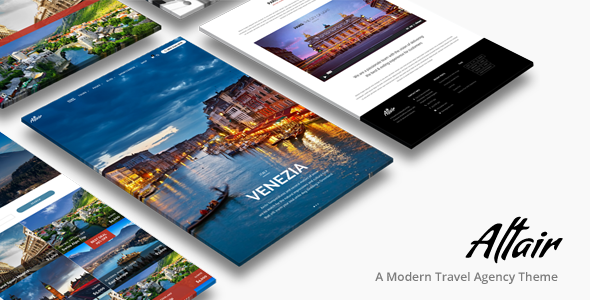
Stuck on your Altair WordPress theme? Let's fix it.
No endless back-and-forth. Just send us the details and we'll get it done.
No obligation · Replies within 1 hour · Quote within 1 day
Setup · Customization · Bug fixes · WooCommerce integration
About Altair WP Theme
Altair is a multipurpose WordPress theme by ThemeGoods, built around a visual drag-and-drop page builder and a flexible portfolio system. It ships with over 20 pre-built demo sites covering creative agencies, photographers, freelancers, and small businesses. The theme uses a custom-built composer rather than relying on a third-party plugin, which keeps the output relatively clean. It supports full-width layouts, sticky headers, mega menus, and a built-in slider. WooCommerce integration is included for basic shop setups. Altair targets design-focused users who want control over layout without writing code. The demos are genuinely distinct from each other, not just color swaps. Performance depends heavily on how many sections you stack per page, but the base is workable with proper optimization.
Get matched with a Altair developer in under one day
Tell us about your Altair project. Small fixes, Altair theme customization, or a full website build, whatever you need, we've got it covered.
We'll connect you to the right Altair developers, define the scope, and get everything 100% clear.
You'll get one estimate, hire your preferred developer, and start collaborating.
Altair’s visual composer looks simple until you need something specific. The theme has its own logic for layouts, sliders, and portfolio grids, and that means generic WordPress advice doesn’t always apply. Developers on Codeable who have worked with Altair understand the theme’s structure and can get to the solution faster. Whether it’s a layout that won’t behave, a demo import that came out broken, or a feature the composer doesn’t support natively, a vetted Altair developer on Codeable has seen it before and knows where to look.
Pros
- Ships with 20+ genuinely varied demo sites that cover different niches
- Built-in visual composer avoids dependency on a separate page builder plugin
- Portfolio system supports multiple grid layouts and AJAX filtering
- WooCommerce integration included without needing an extra child theme
- One-click demo import works reliably for most demo variations
Cons
- The custom composer is less flexible than Elementor or Gutenberg for complex layouts
- Updates have slowed significantly, raising long-term support concerns
- Heavy demo pages load slowly without additional performance optimization
- Limited documentation for advanced customization or developer use
- Switching away from Altair later means rebuilding content outside the composer
Who is Altair for?
Creative Agency
Altair’s agency demos come with multi-column service sections, team grids, and case study portfolio layouts. An Altair developer can adapt these to match specific branding, add client logo carousels, or wire up a contact flow with a CRM. The visual composer handles most layout work, but custom animations or scroll effects usually need additional CSS or JavaScript from a specialist.
Photographer Portfolio
The theme’s full-screen image and gallery layouts suit photographers well. Portfolio filtering by category, lightbox support, and full-width image sections are all built in. An Altair specialist can extend this with password-protected client galleries, lazy loading for large image sets, or a custom proofing workflow that fits how you deliver work to clients.
Freelance Designer
Freelancers using Altair typically want a clean single-page or minimal multi-page site that loads fast and presents work clearly. The theme handles that baseline well. A developer can help trim unused demo assets, set up a contact form connected to your inbox or scheduler, and make sure the mobile layout matches the desktop design without manual fixes.
Small Business
Small businesses using Altair for a local or service-based site benefit from the pre-built sections for testimonials, pricing tables, and team bios. An Altair developer can add Google Maps integration, booking plugin support, or a custom FAQ section that matches the existing layout style without breaking the composer structure already in place.
WooCommerce Store
Altair’s WooCommerce support covers standard product grids, cart, and checkout pages. It handles a basic shop setup without requiring extra plugins. An Altair expert can customize product page layouts, add custom shop filters, or connect a payment gateway that isn’t configured by default. For stores with a larger catalog, performance work alongside the WooCommerce setup is usually necessary.

Customizing Altair
Altair gives you a lot to work with visually, but pushing beyond the built-in options usually requires someone who knows the theme well. An Altair expert can modify the composer output, add custom post type support, build non-standard header layouts, or adapt a demo to match a specific brand without leaving behind the visual editor structure. Common customization requests include custom portfolio filtering, animated section builds, and integrating third-party forms or booking plugins cleanly into the layout. The theme’s CSS structure is layered, so changes need to be made carefully to avoid breakage across responsive breakpoints. If you need a custom child theme, specific font pairings, or a layout the demos don’t cover, working with an Altair specialist saves significant trial-and-error time.
Recommended plugins for Altair
Altair works alongside most major WordPress plugins without conflicts, but some combinations need attention. WooCommerce, WPML, and Contact Form 7 all integrate without major issues. For better search visibility, pairing Altair with Yoast or Rank Math and getting the schema markup right is straightforward with some configuration. Our WordPress SEO service covers that end-to-end. On the speed side, Altair pages can get heavy with multiple composer sections. Combining a caching plugin, image optimization, and CDN setup makes a real difference. If load time is a problem, our WordPress performance service tackles Altair-specific bottlenecks directly.
Not sure which plugins to use? This WordPress plugins directory covers the most popular options with reviews and setup guides.
Altair common issues
Altair demo import not working
Demo import failures in Altair are usually caused by a PHP memory limit, upload size restriction, or a timeout during the XML import. Start by setting memory_limit to at least 256MB and max_execution_time to 300 in your php.ini or via your host’s control panel. Also confirm the required plugins listed in the demo are all activated before importing. If the import completes but looks wrong, check whether the Revolution Slider or custom widgets imported properly. If the issue persists, our WordPress bug fixing service can diagnose and resolve it.
Altair page builder not showing in WordPress editor
If the Altair visual composer isn’t appearing in the editor, the most common cause is a plugin conflict or a failed theme activation. First, confirm the theme is the active theme and not a child theme without a proper parent connection. Check whether any security or page builder plugins are blocking the composer scripts. Temporarily deactivating all plugins and testing can isolate the conflict. Also verify the user role has the correct capabilities, as some configurations hide the composer from non-admin accounts.
Altair portfolio grid not displaying correctly
Portfolio grid issues in Altair usually come down to incorrect image sizes, a missing isotope script, or a category filter that isn’t set up correctly in the composer settings. Regenerate thumbnails using a plugin like Regenerate Thumbnails to fix image sizing. If the AJAX filter is broken, check the browser console for JavaScript errors. A conflict with a caching plugin can also cause the grid to render incorrectly on cached pages. Clear all caches after any layout changes.
Altair slider not working on mobile
Altair’s built-in slider often has mobile display issues tied to aspect ratio settings or touch script conflicts with other jQuery-dependent plugins. In the slider settings, switch to a fixed height for mobile or enable the responsive ratio option if available. Check whether a lazy load plugin is deferring the slider images incorrectly, which causes them to appear blank on first load. Test on a staging copy before changing production settings, and check the browser console for any script errors specific to mobile viewports.
Altair theme update broke my layout
After an Altair update, layout breaks are most often caused by CSS changes in the theme that override custom styles in your child theme, or deprecated composer row and column classes. Open the affected pages in the composer and resave them to refresh the output. If you added custom CSS directly to the parent theme, that would have been overwritten. Check your child theme’s stylesheet for any selectors that may need updating to match the new class names. Our WordPress bug fixing service handles post-update repairs.
Altair mega menu not opening on click
Mega menu issues in Altair are often caused by a JavaScript conflict, an incorrect menu item configuration, or a z-index problem where the dropdown is hidden behind another element. Open the browser console and check for script errors on page load. In the menu settings within the Altair theme options, confirm the mega menu is enabled at the correct menu item level. If z-index is the issue, adding a CSS rule targeting the mega menu container with a higher z-index value usually resolves it without touching core files.
Altair WooCommerce pages not styled correctly
When WooCommerce pages in Altair look unstyled, it typically means the theme’s WooCommerce stylesheet isn’t loading or a plugin is overriding it. Check whether the woocommerce folder exists inside your active theme or child theme directory. Altair declares WooCommerce support in its functions file, so if you’re using a child theme, that declaration may need to be mirrored. Also test with all non-essential plugins disabled to check whether a styling conflict from a WooCommerce extension is the cause.
Altair site loading very slowly
Slow Altair sites are usually the result of heavy composer pages with multiple background videos, sliders, and unoptimized images loading all at once. Start by running the page through GTmetrix or PageSpeed Insights to identify the largest assets. Compress images using WebP format, enable browser caching, and set up a CDN for static files. Defer non-critical JavaScript and remove unused Google Fonts loaded by the theme options. For deeper optimization, our WordPress bug fixing service can audit and fix specific bottlenecks.
Altair header overlapping page content
Header overlap in Altair is caused by the sticky or transparent header option adding negative margin or offset that doesn’t account for the actual header height on the content below it. Go to Altair’s theme options and check the header offset or top padding settings. Many Altair demos include a custom top padding value set at the page level in the composer. Adding matching padding to the first section of each affected page usually resolves it. For dynamic header heights, a small CSS fix targeting the main content wrapper is more reliable.
Altair custom CSS not applying
Custom CSS not applying in Altair is usually a specificity issue or a caching problem. Altair loads its own stylesheet with high-specificity selectors, so you may need to increase the specificity of your custom rules or use the correct class names from the rendered output. Always inspect the element in the browser dev tools to confirm which styles are active and which are being overridden. Add custom CSS through the child theme’s stylesheet or the WordPress Customizer’s Additional CSS field, and clear all caches after saving changes.
Altair FAQ
ThemeGoods still sells Altair on ThemeForest, but update frequency has dropped over the years. Core functionality works on current WordPress versions, but some features may not be tested against the latest PHP or WooCommerce releases. If you’re running a production site on Altair, testing updates on a staging environment first is recommended. Long-term, evaluate whether the theme still fits your needs given the slower development pace.
Altair uses its own custom visual composer, not Gutenberg or Elementor. You can technically use Gutenberg for basic post editing, but the theme’s layouts are built around its own composer. Elementor can be added as a plugin, but it will conflict with the built-in composer on the same pages. Most Altair users stick with the theme’s native builder for consistency and avoid mixing editors.
Yes, Altair includes WooCommerce support. Product grids, single product pages, cart, and checkout all carry the theme’s styling. It works for straightforward stores. For complex WooCommerce builds with custom product types, subscription plugins, or advanced filtering, additional customization from an Altair developer is usually needed to keep the styling consistent.
From the WordPress dashboard, go to Appearance, then the Altair theme options panel, and look for the One-Click Demo Import section. Select the demo you want, confirm the required plugins are installed, and run the import. The process takes a few minutes. If it fails, increasing PHP memory and upload limits before retrying usually resolves the issue. Always import to a clean WordPress install for best results.
Altair is built to be responsive and includes mobile-specific layout controls in the composer. Most demo layouts hold up well on tablets and phones. However, complex sections with overlapping elements, custom sliders, or background videos sometimes need manual adjustments for smaller screens. Testing on real devices or using browser dev tools after customizing a layout is always a good step.
Altair is WPML compatible. The theme’s text strings can be registered and translated through WPML’s String Translation module. Portfolio items, pages, and custom post types created in Altair can all be duplicated and translated. Some composer elements may need manual string registration if they don’t appear automatically in WPML’s scanner. A developer familiar with both Altair and WPML can set this up cleanly.
Always use a child theme for any customizations. If your changes are in the parent theme files, they will be overwritten on update. Before updating, back up the site, check the changelog for breaking changes, and test on staging first. If you added custom CSS directly to the parent theme’s stylesheet, copy those rules to your child theme’s CSS file before running the update.
Altair uses a proprietary visual composer built by ThemeGoods. It’s not WPBakery, Elementor, or Divi. The composer is bundled inside the theme and doesn’t exist as a standalone plugin. This keeps things self-contained but also means you can’t use the same composer on a different theme. All page layouts built in Altair are stored as shortcodes in the database tied to the theme’s structure.
Post your project on Codeable to get matched with a vetted Altair developer. Codeable screens all developers before they join, so you’re not sorting through unknown freelancers. Describe what you need, get a clear estimate, and only pay if you decide to move forward. It’s a straightforward way to find someone who has worked with Altair before rather than a generalist figuring it out as they go.
Yes, Altair sites can be migrated without breaking layouts. The composer data is stored in the database, so a proper database and files migration will carry everything across. Use a migration plugin like Duplicator or All-in-One WP Migration, and update the site URL in the database after moving. Check the theme options and slider data after migration, as some paths may reference the old domain. Our WordPress migration service handles this end to end.
Hire an Altair Expert Developer
If your Altair site needs customization, a bug fixed, or a full build from one of the demos, working with a specialist is the fastest route. Post your project and get matched with a vetted Altair developer within 24 hours. No commitment required. Get a Free Estimate and see exactly what your project involves before you decide to hire.
You'll need a free Codeable account so developers can ask questions and send their quotes.