Ambient WordPress Theme
by Elated-Themes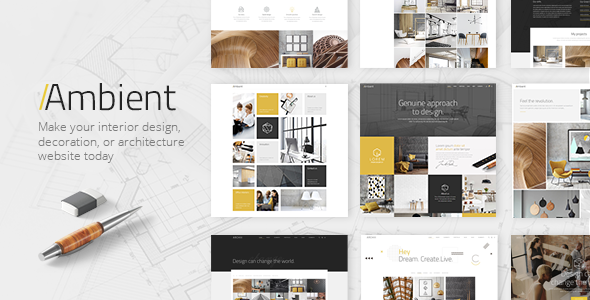
Stuck on your Ambient WordPress theme? Let's fix it.
No endless back-and-forth. Just send us the details and we'll get it done.
No obligation · Replies within 1 hour · Quote within 1 day
Setup · Customization · Bug fixes · WooCommerce integration
About Ambient WP Theme
Ambient is a WordPress theme by Elated-Themes built for creative agencies, photographers, and portfolio-focused businesses. It ships with a visual, full-screen layout style that puts imagery front and center. The theme includes multiple homepage demos, smooth page transitions, and a heavy reliance on visual storytelling over text.
Built on Elated’s proprietary framework, Ambient gives you control over typography, color schemes, header styles, and page layouts through a dedicated options panel. It supports WooCommerce, contact forms, and custom post types for portfolios and blogs. The theme is regularly updated and includes documentation that covers most setup scenarios. It works best when you want a dark, atmospheric aesthetic rather than a standard corporate look.
Get matched with a Ambient developer in under one day
Tell us about your Ambient project. Small fixes, Ambient theme customization, or a full website build, whatever you need, we've got it covered.
We'll connect you to the right Ambient developers, define the scope, and get everything 100% clear.
You'll get one estimate, hire your preferred developer, and start collaborating.
Ambient looks polished out of the box, but getting it to match a specific creative vision often takes more than the options panel can handle. Elated’s framework has its own logic, and working around it cleanly requires experience with the theme’s structure.
Through Codeable, you can connect with vetted WordPress developers who have hands-on experience with Elated themes. Post your project, get an estimate within 24 hours, and only move forward if the scope and price make sense. There’s no obligation, and the process is straightforward.
Pros
- Full-screen visual layouts make it ideal for image-heavy creative portfolios
- Multiple pre-built homepage demos reduce initial setup time
- Smooth page transitions and animations are built in without extra plugins
- WooCommerce support is included with styled product and shop pages
- Bundled WPBakery and Revolution Slider add layout flexibility without extra cost
Cons
- Options panel can be overwhelming for beginners unfamiliar with Elated's framework
- Page load times are slow without performance optimization due to full-screen media
- Heavy reliance on WPBakery shortcodes makes switching themes later difficult
- Dark atmospheric aesthetic limits versatility for light or corporate brand styles
- Customer support from Elated-Themes is ticket-based and response times vary
Who is Ambient for?
Photography Portfolio
Ambient’s full-screen image grids and portfolio post types are a natural fit for photographers. You can organize work by category, enable lightbox galleries, and control how thumbnails display in the grid. The visual-first layout keeps the focus on the work itself rather than navigation or copy.
Creative Agency Website
Creative agencies can use Ambient’s multi-section homepage layouts to present services, case studies, and team members in a structured visual flow. The dark, high-contrast aesthetic projects a professional creative identity. Custom header styles and sticky navigation keep the experience clean across desktop and mobile.
Videography Studio
Videographers benefit from Ambient’s support for video backgrounds and embedded media sections. Full-screen video headers on the homepage create an immediate impression. Pairing this with portfolio post types lets you organize client work by type or industry without custom development.
Interior Design Showcase
Interior designers can build project galleries with before-and-after layouts, detailed portfolio entries, and service pages that highlight specialisms. Ambient’s spacing and typography controls make editorial-style project pages straightforward to build without writing custom CSS for every section.
Independent Artist or Musician
Musicians and artists benefit from Ambient’s atmospheric design and strong visual presence. You can embed SoundCloud or Spotify players, build event or tour date pages, and maintain a blog for updates. The theme’s overall mood suits artists who want a site that reflects their work aesthetically.

Customizing Ambient
Ambient’s options panel covers the basics well: fonts via Google Fonts, color pickers, header variations, and layout toggles. For anything beyond that, you’ll need to dig into child themes or custom CSS. The built-in page builder support helps with layout, but complex custom sections often require developer input.
Hiring an Ambient expert makes sense when you need custom portfolio filtering, unique animation behavior, or WooCommerce styling that deviates from the defaults. An Ambient expert can also restructure the homepage template to match a specific brand direction without breaking future theme updates. Custom post type tweaks, advanced menu behavior, and plugin integration all benefit from hands-on developer work rather than relying solely on theme settings.
Recommended plugins for Ambient
Ambient works with standard WordPress plugins without major conflicts. WooCommerce integration is built in, covering basic shop layouts. Revolution Slider and WPBakery Page Builder are bundled with most Elated themes, giving you drag-and-drop control over content sections.
For better results, pair Ambient with performance optimization to reduce load times caused by full-screen images and scripts. An WordPress performance audit can make a significant difference. If you run a portfolio business, adding WordPress SEO work on top of Ambient’s structure helps ensure your pages rank properly despite the image-heavy design.
Not sure which plugins to use? This WordPress plugins directory covers the most popular options with reviews and setup guides.
Ambient common issues
Ambient theme portfolio not displaying correctly after update
Portfolio display issues after an update usually come from a conflict between the theme’s custom post type settings and cached data. Start by clearing your site cache and any server-side caching. If the issue persists, check whether the portfolio category taxonomy is still assigned correctly in the theme options. Re-saving the permalink structure under Settings > Permalinks often resolves display failures after updates. If you need more targeted help, a WordPress bug fixing service can diagnose the exact cause quickly.
Ambient WordPress theme slow loading on mobile
Ambient’s full-screen images and bundled scripts add significant page weight. On mobile, this often results in slow first paint and layout shift. Start by enabling lazy loading for images, compressing large hero images to WebP format, and deferring non-critical JavaScript. Review which Revolution Slider scripts load on every page, not just where the slider appears. A targeted WordPress performance review will identify exactly where the bottlenecks are and what to fix.
WPBakery page builder not working with Ambient theme
WPBakery conflicts in Ambient typically appear after a WPBakery update that outpaces the theme’s bundled version. The bundled version and the standalone plugin version can clash if both are active. Deactivate the standalone WPBakery plugin and rely on the version bundled with Ambient, or update the bundled version manually through Elated’s theme panel. If the visual editor is missing or broken, regenerating the WPBakery CSS cache under WPBakery > Settings usually fixes it.
Ambient theme header logo not showing or misaligned
Logo display issues in Ambient are most often tied to the logo upload field in the theme options panel being overridden by a customizer setting, or the header style being set to a transparent variant where the dark logo version is needed. Check both the Elated Options panel and the WordPress Customizer for conflicting logo entries. Also verify the header height setting, as very small values can clip the logo. Clearing cache after any change is essential before assuming the fix didn’t work.
Ambient FAQ
Ambient is built with standard HTML5 markup, which provides a basic SEO foundation. However, the image-heavy, JavaScript-reliant structure can hurt Core Web Vitals scores if not optimized. Schema markup is not built in, and page titles require a separate SEO plugin like Yoast or Rank Math. Pairing Ambient with proper WordPress SEO work is recommended for sites targeting organic traffic.
Ambient is built around WPBakery Page Builder, not Elementor. While you can technically install Elementor alongside it, the two builders will conflict on the same pages. Most Ambient demos and layouts are WPBakery-dependent, so switching to Elementor requires rebuilding those sections. If you want an Elementor-native theme, Ambient is not the right starting point.
Yes. Ambient includes WooCommerce support with styled product pages, shop grids, and cart and checkout layouts. The dark visual theme translates reasonably well to product presentation, particularly for premium or lifestyle products. Custom shop modifications beyond the built-in styles will require developer input, but the base WooCommerce integration is functional out of the box.
Always use a child theme for any code-level customizations. If you’ve been editing the parent theme directly, an update will overwrite those changes. Before updating, back up your site fully. Settings saved in the Elated Options panel are stored in the database, so those survive updates. If you’re unsure about your setup, a WordPress maintenance plan that includes safe updates is worth considering.
Ambient includes responsive CSS and adapts to mobile screen sizes. However, full-screen layouts and large media sections do not always translate perfectly to small screens without additional adjustments. Navigation on mobile uses a standard hamburger menu. Performance on mobile is a separate concern from responsiveness, and Ambient’s page weight often requires optimization to pass Core Web Vitals on mobile devices.
Hire an Ambient WordPress Expert
Whether you need a full Ambient build, specific customizations, or fixes to an existing site, a dedicated WordPress developer can handle it properly. Work is delivered through Codeable, where all developers are vetted and client satisfaction is taken seriously.
Get a free estimate with no commitment. Describe your project, get matched with an Ambient-experienced developer, and decide from there. Fast turnaround, transparent pricing, and no risk.
You'll need a free Codeable account so developers can ask questions and send their quotes.