Anchor Inn WordPress Theme
by ProgressionStudios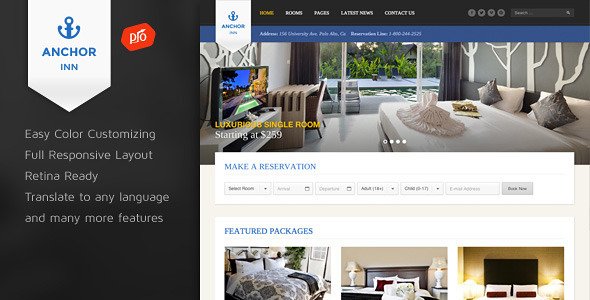
Stuck on your Anchor Inn WordPress theme? Let's fix it.
No endless back-and-forth. Just send us the details and we'll get it done.
No obligation · Replies within 1 hour · Quote within 1 day
Setup · Customization · Bug fixes · WooCommerce integration
About Anchor Inn WP Theme
Anchor Inn is a WordPress theme built by ProgressionStudios, designed for hospitality businesses that need a clean, conversion-focused website without unnecessary complexity. It targets hotels, bed and breakfasts, inns, and boutique lodges that want a professional online presence with built-in booking functionality.
The theme ships with a room listing system, availability search, and gallery layouts suited to showcase accommodation. It integrates with popular booking plugins and supports WooCommerce for taking direct payments. Page templates are well-structured for single-property sites, making it a practical choice for small to mid-size hospitality operators who want full control without hiring a developer for every change.
ProgressionStudios has a focused catalogue of hospitality themes, so Anchor Inn benefits from a developer who understands the specific needs of accommodation businesses rather than a generic theme shop.
Get matched with a Anchor Inn developer in under one day
Tell us about your Anchor Inn project. Small fixes, Anchor Inn theme customization, or a full website build, whatever you need, we've got it covered.
We'll connect you to the right Anchor Inn developers, define the scope, and get everything 100% clear.
You'll get one estimate, hire your preferred developer, and start collaborating.
Anchor Inn is a niche hospitality theme, and getting it set up properly takes more than reading the documentation. ProgressionStudios themes have their own architecture, and working around it without knowing the codebase leads to conflicts and brittle customizations.
Through Codeable, you get matched with a vetted WordPress developer who has worked with themes like Anchor Inn before. No agencies, no bidding wars. You post your project, get a clear estimate within 24 hours, and only proceed if you’re happy. That’s the standard our developers work to every time.
Pros
- Built specifically for hospitality, so room and availability layouts are already structured correctly
- Integrates cleanly with MotoPress Hotel Booking for real reservation management
- ProgressionStudios provides theme-specific documentation and support for their hospitality products
- Includes gallery and room detail templates that work well on mobile without heavy customization
- Lighter and more focused than multipurpose themes trying to cover every industry
Cons
- Smaller developer community than Astra or Divi, so fewer third-party tutorials and resources
- Customizer options are limited compared to full page builder themes, so code edits are often needed for deeper changes
- Advanced booking features require a separate plugin, which adds cost and maintenance overhead
- Updates are less frequent than major theme shops, which can be a concern for long-term compatibility
- Not ideal for multi-property hotel chains or complex reservation systems that need enterprise-level functionality
Who is Anchor Inn for?
Bed and Breakfast
Anchor Inn suits bed and breakfast operators well. The room listing templates handle a small number of room types cleanly, and the booking integration lets guests check availability without leaving the site. It’s simple enough to manage without ongoing developer support once set up correctly.
Boutique Inn
Boutique inns benefit from the gallery-forward layouts and the ability to highlight unique room features. The theme’s hospitality focus means you’re not fighting against generic portfolio or business templates. Paired with a quality booking plugin, it handles the full guest journey from browse to reservation.
Holiday Cottage Rental
For single or small groups of holiday cottages, Anchor Inn provides a clear property showcase structure. You can list each cottage individually with photos, amenities, and pricing. Direct booking through WooCommerce or MotoPress keeps commission costs down compared to listing platforms.
Small Hotel
Small hotels with multiple room categories can use Anchor Inn’s room taxonomy to separate standard, superior, and suite options. Availability search on the homepage helps convert visitors quickly. It scales reasonably well up to around 20 to 30 room types before more custom development becomes necessary.
Hostel or Budget Accommodation
Budget accommodation and hostels need a functional site more than a luxury aesthetic. Anchor Inn’s clean structure works for dormitory and private room listings. The theme doesn’t add bloat that slows page load, which matters when guests are comparing options quickly on mobile devices.

Customizing Anchor Inn
Anchor Inn gives you a solid starting point, but most hospitality businesses need customization to match their brand and booking workflow. The theme uses the WordPress Customizer for basic settings like colors, fonts, and logo placement, which is straightforward for minor adjustments.
Where things get more involved is custom room types, pricing display, local area guides, or modifications to the booking form layout. An Anchor Inn expert can restructure page templates, connect the theme cleanly to a booking engine like MotoPress or HBook, and add functionality that generic tutorials won’t cover.
Custom homepage sections, seasonal promotion banners, multilingual setup, and mobile layout tweaks are all common requests that benefit from someone who knows how ProgressionStudios built the theme under the hood, rather than working around it.
Recommended plugins for Anchor Inn
Anchor Inn pairs well with several plugins that extend its core functionality. MotoPress Hotel Booking is the most commonly used companion, handling reservations, seasonal pricing, and availability calendars. WooCommerce can handle direct payments if you want to sell gift vouchers or packages.
For performance, caching plugins like WP Rocket work cleanly with the theme, and image optimization is worth setting up early given the gallery-heavy nature of hospitality sites. See our WordPress performance service for help with that.
If you want your rooms to rank in local search, structured data and on-page SEO setup matters. Our WordPress SEO service covers schema markup for hospitality pages specifically.
Not sure which plugins to use? This WordPress plugins directory covers the most popular options with reviews and setup guides.
Anchor Inn common issues
Anchor Inn theme booking form not showing availability
This usually comes down to a misconfigured connection between the theme and your booking plugin. Check that MotoPress or your chosen booking plugin is active and that the availability widget is placed in the correct widget area. If the form loads but shows no results, verify that room dates and minimum stay settings are configured inside the plugin, not just the theme. If the issue appeared after a plugin update, check the changelog for template changes. Our WordPress bug fixing service can diagnose and resolve this quickly.
Anchor Inn room images not displaying correctly on mobile
Room image display problems on mobile are most often caused by incorrect image dimensions set during upload or CSS breakpoint issues in the theme. Regenerate thumbnails using a plugin like Regenerate Thumbnails to ensure all images match the sizes the theme expects. If layout is breaking at specific screen widths, a targeted CSS fix in the child theme stylesheet usually resolves it without touching core theme files. Avoid editing theme files directly as updates will overwrite changes.
Anchor Inn theme not compatible with latest WordPress update
After a major WordPress update, theme incompatibilities typically show up as visual layout breaks, PHP warnings, or white screen errors. First, check if ProgressionStudios has released a theme update in the same period. Update to the latest theme version and test in a staging environment before applying to live. If the issue persists, a developer can audit the theme’s PHP functions for deprecated calls that newer WordPress versions no longer support. Our WordPress maintenance service handles this proactively.
Anchor Inn MotoPress Hotel Booking plugin conflict
Conflicts between Anchor Inn and MotoPress Hotel Booking usually surface as broken booking forms, missing shortcodes, or pricing not displaying. Start by deactivating other plugins one by one to isolate whether a third plugin is interfering. Check that you’re running compatible versions of both the theme and MotoPress. If the conflict is between those two specifically, a developer needs to review the template files to see where output is clashing. Avoid adding custom code to theme files directly.
Anchor Inn FAQ
Yes, Anchor Inn is designed to work alongside MotoPress Hotel Booking. The combination handles room listings, availability calendars, and direct reservations. You’ll need to configure MotoPress settings separately from the theme, as the theme provides the visual structure while MotoPress manages the booking logic. Some layout tweaking may be needed depending on your setup.
Anchor Inn was not built with Elementor as the primary editor, so support is partial. Basic pages can be edited using Elementor, but theme-specific templates like room listings and booking layouts may not behave as expected inside the Elementor canvas. A developer can bridge the gap, but out of the box the experience is inconsistent compared to using the theme’s native templates.
ProgressionStudios continues to maintain their hospitality theme catalogue, including Anchor Inn. Update frequency is lower than larger theme shops, but security and compatibility patches are released. It’s worth monitoring your WordPress dashboard for available updates and testing them on staging before applying to a live site.
Anchor Inn includes a search availability widget that can be placed on the homepage using the Customizer or a widget area. If you’re using MotoPress Hotel Booking, you can also drop the availability search shortcode into a homepage section. The exact placement depends on which homepage template you’re using and whether you’ve modified the default layout.
Yes, migrating content from an existing hotel site to Anchor Inn is possible. The complexity depends on your current theme and how your rooms and content are structured. If you’re using custom post types from another hospitality theme, data migration will need careful handling. Our WordPress migration service covers this kind of structured content move.
Hire an Anchor Inn WordPress Developer
Whether you need a full Anchor Inn setup, a booking plugin integration, or a fix for something that’s broken, we can match you with a developer who knows this theme. Work is handled through Codeable, so you get a vetted professional, a clear scope, and no obligation to hire until you’re satisfied with the estimate.
Get a free estimate and describe what you need. Most projects get matched within 24 hours.
You'll need a free Codeable account so developers can ask questions and send their quotes.