Aora WordPress Theme
by thembay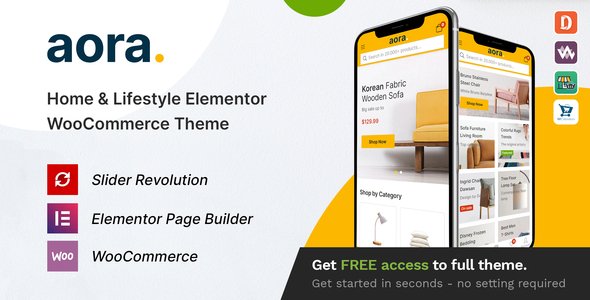
Stuck on your Aora WordPress theme? Let's fix it.
No endless back-and-forth. Just send us the details and we'll get it done.
No obligation · Replies within 1 hour · Quote within 1 day
Setup · Customization · Bug fixes · WooCommerce integration
About Aora WP Theme
Aora is a multipurpose WordPress theme developed by Thembay. It targets agencies, portfolios, and business websites that need a polished look without heavy custom development. The theme ships with multiple pre-built demo layouts, Elementor page builder support, and a header builder that covers most typical site structures out of the box.
It uses clean markup and supports WooCommerce, making it a reasonable pick for small shops or service businesses. Performance-wise, Aora is lighter than some competing multipurpose themes, though it still depends on Elementor for most of its visual flexibility. Thembay maintains the theme with regular updates, and documentation covers core setup tasks clearly enough for intermediate WordPress users to get started independently.
Get matched with a Aora developer in under one day
Tell us about your Aora project. Small fixes, Aora theme customization, or a full website build, whatever you need, we've got it covered.
We'll connect you to the right Aora developers, define the scope, and get everything 100% clear.
You'll get one estimate, hire your preferred developer, and start collaborating.
Aora handles the visual side well, but getting it to perform exactly as a client needs takes real WordPress knowledge. FoxyConcept connects you with developers who have worked across Thembay themes and understand how Aora handles its template hierarchy, custom post types, and Elementor dependencies.
Work is delivered through Codeable, a vetted network of WordPress specialists. Every developer is screened, and projects are scoped before any work starts. No guesswork, no wasted budget.
Pros
- Multiple demo layouts ship with the theme, reducing initial build time for common site types
- Native Elementor support means drag-and-drop editing works as expected without extra configuration
- Built-in WooCommerce compatibility handles product pages and cart styling without a separate WooCommerce child theme
- Header and footer builder covers multi-column layouts, sticky headers, and mobile menus without a plugin
- Thembay releases consistent updates, keeping the theme compatible with current WordPress and Elementor versions
Cons
- Almost all layout flexibility depends on Elementor, so sites without Elementor Pro are noticeably limited
- Demo import can overwrite existing settings and does not always match the preview exactly without the same plugins installed
- Documentation is adequate but thin on advanced customization, particularly for WooCommerce template overrides
- Mega menu configuration is functional but has limited styling options compared to dedicated menu plugins
- Page speed scores drop significantly when multiple Elementor sections with animations are stacked on a single page
Who is Aora for?
Creative Agency
Aora suits agency sites that need a clean portfolio grid, service pages, and a multi-section homepage. The Elementor-based layout means team members can update case studies and content without touching any code. The demo layouts give a strong starting point that agencies can adapt to their brand quickly.
Freelance Portfolio
Freelancers building a portfolio on Aora benefit from the work grid layouts and project single-page templates. The theme handles project categories well and connects to contact forms cleanly. For designers or developers who want a professional presence without a long build, Aora covers the essentials.
Small Business Services
Service businesses like consultancies, cleaning companies, or marketing firms can use Aora’s pre-built service page layouts. Pricing tables, testimonials, and call-to-action sections are all available as Elementor widgets within the theme. Setup is faster than building equivalent pages from scratch.
Online Store
Aora’s WooCommerce integration handles standard product listing and single product pages with consistent styling. Small stores selling physical or digital products will find the defaults usable. Larger catalogs or stores needing advanced filtering will want additional plugins or custom work on top of the theme.
Startup Landing Page
Startups launching with a single product or service can use Aora’s one-page demo layouts effectively. The theme supports anchor-based navigation, hero sections with video backgrounds, and feature highlight rows. It is faster to configure than a fully custom build and still presents a credible product.

Customizing Aora
Aora ships with a solid baseline, but most sites need work beyond the demo import. The Customizer controls cover typography, colors, header layout, and footer columns. For anything more specific, you will need Elementor skills or custom CSS.
Common customization tasks include adjusting the mega menu behavior, modifying the blog archive layout, and connecting WooCommerce product pages to match the overall site design. These are not difficult jobs, but they take time and knowledge of how Aora structures its template files.
Hiring an Aora expert through FoxyConcept saves that time. A developer familiar with Thembay themes knows where the theme overrides live, which Elementor widgets Aora extends, and how to make changes that survive updates cleanly without patching core files.
Recommended plugins for Aora
Aora works well with the standard WordPress plugin stack. WooCommerce integration is built in. Elementor and Elementor Pro unlock the majority of the layout options the theme is designed around. For contact forms, WPForms and Contact Form 7 both work without conflicts.
If you plan to extend the site further, pairing Aora with a caching plugin and an image optimization tool is worth doing early. Poorly configured Elementor pages can slow load times noticeably. See our WordPress performance service for help there. For sites targeting organic traffic, structured SEO work on top of Aora’s clean markup is a practical next step. Our WordPress SEO service covers that.
Not sure which plugins to use? This WordPress plugins directory covers the most popular options with reviews and setup guides.
Aora common issues
Aora theme header not showing correctly on mobile
Mobile header problems in Aora usually come from a conflict between the theme’s built-in header builder and custom CSS applied to desktop breakpoints. Check the header builder settings in the Customizer and confirm the mobile menu toggle is assigned to the correct header row. If a custom header was built in Elementor Pro’s Theme Builder, it may override Aora’s native header and need its own mobile breakpoint settings adjusted separately.
Aora demo import not working or missing content
Failed demo imports on Aora are typically caused by server memory limits or missing required plugins. Before importing, install and activate Elementor, Elementor Pro (if the demo uses it), and any plugins listed in the theme’s requirements. Increase max_execution_time and memory_limit in your php.ini or wp-config.php. If the import still fails partially, try importing XML content separately from widgets and Customizer settings. Our bug fixing service can resolve persistent import issues quickly.
Aora theme slow loading with Elementor
Aora pages built heavily in Elementor can produce large DOM sizes and render-blocking assets. Start by enabling Elementor’s built-in asset loading optimization under Elementor > Settings > Performance. Then add a caching plugin and configure CSS/JS minification. Avoid stacking animated sections on the same page. If scores are still poor after those steps, a developer review of the page structure will identify what is actually adding weight. See our performance service for a full audit.
Aora WooCommerce product page layout broken
Aora’s WooCommerce styles depend on the theme’s stylesheet loading in the correct order. A broken product page layout usually means a plugin is loading a conflicting stylesheet, or a child theme override is incomplete. Check whether the issue appears without plugins active. If Elementor’s Theme Builder is being used for the product template, confirm the template conditions are set to apply only to single product pages and not globally. Rebuilding the single product template with Aora’s default first confirms whether the issue is theme-side or plugin-side.
Aora FAQ
Yes. Aora is built around Elementor and works with Elementor Pro. The free version of Elementor handles basic layouts. Elementor Pro unlocks Theme Builder, which lets you control headers, footers, and WooCommerce templates visually. Most of Thembay’s Aora demos assume Elementor Pro is active, so some demo sections will appear empty without it.
Aora includes WooCommerce support out of the box. Product archive pages, single product layouts, cart, and checkout all inherit the theme’s styling. The integration covers standard WooCommerce functionality well. For advanced features like custom product builders or subscription products, additional plugins will be needed on top of the theme.
Create an Aora child theme by making a new folder in wp-content/themes/, adding a style.css with the correct Template: aora header, and a functions.php that enqueues the parent stylesheet. Activate the child theme in Appearance > Themes. All custom CSS and PHP overrides go in the child theme to survive future Aora updates without being lost.
Technically yes, but the experience is limited. Aora’s demo content and most of its layout options are built with Elementor. Without it, you get the theme’s basic typography, header, footer, and a standard block editor experience. For simple sites or blogs where Elementor is not needed, this works fine. For anything matching the demos, Elementor is required.
Aora uses semantic HTML and outputs reasonably clean markup, which gives a decent SEO baseline. For meaningful SEO results, pair it with a plugin like Yoast or Rank Math to handle meta tags, schema, and sitemaps. Page speed also affects SEO scores, and Elementor-heavy pages need optimization work. Clean markup alone does not determine rankings.
Hire an Aora Developer
Whether you need a full site built on Aora, a specific feature added, or a layout problem fixed, FoxyConcept matches you with a developer who knows the theme. Work is handled through Codeable, so you get a clear scope and price before committing to anything.
Get a free estimate and describe your project. A qualified Aora developer will review it and come back with a realistic plan, usually within 24 hours. No obligation to proceed.
You'll need a free Codeable account so developers can ask questions and send their quotes.