ApexClinic WordPress Theme
by radiantthemes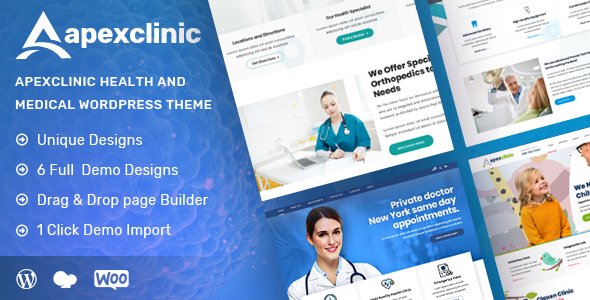
Stuck on your ApexClinic WordPress theme? Let's fix it.
No endless back-and-forth. Just send us the details and we'll get it done.
No obligation · Replies within 1 hour · Quote within 1 day
Setup · Customization · Bug fixes · WooCommerce integration
About ApexClinic WP Theme
ApexClinic is a medical WordPress theme built by Radiant Themes, designed specifically for clinics, hospitals, and private healthcare practices. It ships with a clean, professional layout that communicates trust quickly — important when patients are deciding whether to book an appointment.
The theme includes department pages, doctor profile templates, appointment booking support, and multiple homepage layouts. It works with popular page builders, so you can rearrange sections without touching code. Radiant Themes built ApexClinic to cover a wide range of healthcare niches out of the box, from dental and dental clinics to physiotherapy and general practice. If you need a medical site up quickly with a solid visual foundation, it is a practical starting point.
Get matched with a ApexClinic developer in under one day
Tell us about your ApexClinic project. Small fixes, ApexClinic theme customization, or a full website build, whatever you need, we've got it covered.
We'll connect you to the right ApexClinic developers, define the scope, and get everything 100% clear.
You'll get one estimate, hire your preferred developer, and start collaborating.
ApexClinic is approachable for non-developers, but healthcare sites often need more than a theme can deliver alone. Custom booking flows, patient inquiry forms with GDPR compliance, plugin conflicts, or speed problems all require hands-on WordPress knowledge. The developers available through FoxyConcept’s WordPress development services are vetted via Codeable, a platform that screens developers before they take on client work. You get someone who knows what they are doing, not a gamble on a freelance marketplace.
Pros
- Dedicated doctor profile and department templates save significant build time for medical sites
- Multiple homepage layout options included, so you can match the tone of different clinic types
- Compatible with major appointment booking plugins like Amelia and Bookly
- Clean, minimal design that reads as professional and trustworthy to patients
- Responsive layout works consistently across mobile, tablet, and desktop
Cons
- Customizer options are limited compared to themes with full visual builder support like Divi or Elementor-native themes
- Some bundled demo content is difficult to fully replace without leaving orphaned shortcodes
- Documentation from Radiant Themes is sparse on advanced customisation scenarios
- Not ideal if you need a highly bespoke booking system without developer involvement
- Theme update frequency from Radiant Themes is inconsistent, which can create compatibility concerns over time
Who is ApexClinic for?
General Medical Clinic
ApexClinic’s department and doctor profile templates make it straightforward to list services, introduce your team, and give patients a clear path to book an appointment. General practices benefit from the clean layout that works equally well for a single-GP surgery or a multi-doctor clinic with several specialties listed.
Dental Practice
Dental sites need strong before-and-after gallery support and clear service pages for treatments like implants, whitening, and orthodontics. ApexClinic’s service page templates handle this well. Pair it with a booking plugin and a strong contact section, and a dental practice site can be live quickly with minimal configuration.
Physiotherapy Centre
Physiotherapy centres often need to explain treatment approaches and build trust before a first appointment. ApexClinic’s staff profile and service description layouts are well suited to this. You can add testimonial sections and a booking calendar plugin without the theme getting in the way of the user flow.
Private Hospital
Larger private hospitals need multiple department pages, a full team directory, and potentially multilingual support for diverse patient groups. ApexClinic covers the structural side of this well. A developer will usually be needed to extend the booking logic and integrate any patient management tools the hospital already uses.
Specialist Consultant Practice
Consultants working privately — cardiologists, dermatologists, orthopaedic surgeons — need a focused single-practitioner site that communicates expertise clearly. ApexClinic’s individual doctor profile template works well here. The layout keeps the focus on credentials, specialties, and consultation availability without unnecessary clutter.

Customizing ApexClinic
ApexClinic gives you a reasonable set of options through the WordPress Customizer and its bundled page builder support. You can change colors, fonts, header styles, and layout widths without writing code. Doctor profiles, department sections, and service pages all have dedicated templates you can fill in.
Where things get more specific — custom appointment workflows, third-party EHR integrations, or bespoke booking logic — the default options run out fast. That is where an ApexClinic expert becomes valuable. A developer familiar with the theme knows exactly which hooks and templates to work with, saving you hours of trial and error. For anything beyond the basics, hiring help is usually the faster and safer path.
Recommended plugins for ApexClinic
ApexClinic pairs well with several plugin categories. WooCommerce lets you sell products or paid consultations directly. WPML handles multilingual clinics serving diverse patient populations. Contact Form 7 or WPForms cover basic appointment requests, while Amelia or Bookly add real scheduling capability with calendar management.
Adding too many plugins without performance review can slow your site. A fast-loading medical site builds more patient trust and ranks better. You can explore WordPress performance optimisation and WordPress SEO services to make sure your extensions do not work against you.
Not sure which plugins to use? This WordPress plugins directory covers the most popular options with reviews and setup guides.
ApexClinic common issues
ApexClinic appointment form not sending emails
This is almost always a mail delivery issue, not a form problem. WordPress’s default mail function is unreliable on most hosts. Install an SMTP plugin like WP Mail SMTP and connect it to a transactional mail service such as Mailgun, SendGrid, or your host’s SMTP. Test the connection within the plugin dashboard. If the form itself is misconfigured, check that the recipient email field is correctly set and not filtered by a spam rule on your mail server. See our WordPress bug fixing service if the problem persists.
ApexClinic demo content not importing correctly
Demo import failures with ApexClinic usually come down to server memory limits or missing required plugins. First, confirm all plugins listed in the theme’s setup wizard are activated. Then increase your PHP memory limit to at least 256MB via wp-config.php or by asking your host. If the import times out, try importing in sections rather than all at once. Some demo images may fail to import due to licensing restrictions on stock photos — replace placeholders manually after the core content imports successfully.
ApexClinic site slow to load on mobile
ApexClinic loads several scripts and stylesheets that are not always dequeued on pages where they are not needed. Use a performance plugin like WP Rocket or Asset CleanUp to remove unused CSS and JS per page template. Compress images before uploading and serve them in WebP format. Enable caching and a CDN. If the theme’s slider on the homepage is the bottleneck, consider replacing it with a lighter static header image. Visit our WordPress performance service for a full audit.
ApexClinic layout broken after WordPress update
Layout breaks after a WordPress core update usually point to a JavaScript conflict or a deprecated function in the theme or a plugin. Open your browser’s developer console and look for JS errors — these identify the conflicting file. Deactivate plugins one by one to isolate the source. If the issue is in the theme files directly, check whether Radiant Themes has released a patch update. If the theme has not been updated recently, a developer may need to apply a manual fix. Our WordPress bug fixing service handles exactly this.
ApexClinic FAQ
ApexClinic has basic Elementor compatibility but was not built as an Elementor-native theme. Most sections can be edited using Elementor’s front-end builder, but some theme-specific templates may override the builder in places. For full Elementor control across every template, a developer may need to convert certain pages. Testing on a staging site before going live is strongly recommended.
The templates and terminology are clearly built around healthcare. Using it for an unrelated business means reworking doctor profiles into team profiles, renaming department sections, and replacing medical iconography throughout. It is possible but adds unnecessary work. If your business is not health-related, a more general professional services theme would be a more efficient starting point.
ApexClinic does not include a built-in booking system. It provides a basic appointment request form, but for real scheduling with calendar management, time slots, and confirmations you need a dedicated plugin. Amelia, Bookly, and Simply Schedule Appointments all integrate well with ApexClinic and add the full booking functionality most clinics need.
Migrating to ApexClinic involves moving your existing content into the new theme’s templates and rebuilding page layouts to match ApexClinic’s structure. Posts and pages transfer with a standard content export, but design work needs to be redone manually. For a smooth transition without losing SEO rankings or breaking links, consider using our WordPress migration service.
ApexClinic itself does not handle GDPR compliance — the theme is just a layout layer. Compliance depends on how you collect, store, and process visitor data across your entire site. You need a cookie consent plugin, a clear privacy policy, and GDPR-compliant forms. If your site collects patient information, additional measures around data storage and access controls are required. A developer can audit and configure this properly.
Hire an ApexClinic Developer
Whether you need ApexClinic set up from scratch, customised for your clinic’s specific workflow, or fixed after something broke, a specialist developer will get it done correctly. FoxyConcept works through Codeable, so every developer is pre-vetted. Get a free estimate — no obligation, no upfront cost, and you will have a clear scope before any work begins.
You'll need a free Codeable account so developers can ask questions and send their quotes.