Archicon WordPress Theme
by Edge-Themes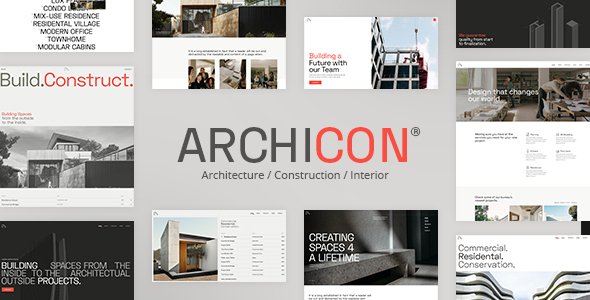
Stuck on your Archicon WordPress theme? Let's fix it.
No endless back-and-forth. Just send us the details and we'll get it done.
No obligation · Replies within 1 hour · Quote within 1 day
Setup · Customization · Bug fixes · WooCommerce integration
About Archicon WP Theme
Archicon is a WordPress theme built by Edge-Themes, designed specifically for architecture firms, interior designers, and construction companies. It ships with a clean grid-based layout, portfolio post types, and full compatibility with the WPBakery page builder included in the package.
The theme comes with over 20 demo sites covering different architecture and design niches. Each demo is importable in one click. Typography is handled through Google Fonts with solid pairing defaults. The codebase follows Edge-Themes’ standard structure, which is stable and well-maintained across their catalogue.
Archicon works well for studios that want a polished visual presentation without starting from scratch. It supports custom project pages, team member profiles, and service sections out of the box. WooCommerce compatibility is included if you plan to sell digital deliverables or products alongside your portfolio.
Get matched with a Archicon developer in under one day
Tell us about your Archicon project. Small fixes, Archicon theme customization, or a full website build, whatever you need, we've got it covered.
We'll connect you to the right Archicon developers, define the scope, and get everything 100% clear.
You'll get one estimate, hire your preferred developer, and start collaborating.
Edge-Themes builds solid products, but Archicon is not a beginner theme. The options panel is deep, WPBakery has a learning curve, and the demo import does not always account for your actual hosting environment. A developer who knows the theme’s structure will get your site production-ready faster and with fewer workarounds.
FoxyConcept works through Codeable, a network of vetted WordPress specialists. You post your project, get a clear estimate, and only proceed if the scope and price make sense. No pressure, no guessing.
Pros
- Includes 20+ architecture and design demo sites importable in one click
- Built-in portfolio post type with filterable grid and single project templates
- Revolution Slider bundled at no extra cost
- WooCommerce compatible for selling digital products or services
- Active Edge-Themes support and regular compatibility updates
Cons
- Heavily tied to WPBakery, making a switch to Gutenberg or Elementor time-consuming
- Theme options panel is large and can be confusing for non-technical users
- Demo import can fail or produce layout errors on some shared hosting environments
- Page load times need manual optimization — theme ships with several unoptimized assets
- Portfolio customization beyond the built-in layouts requires custom PHP or shortcode work
Who is Archicon for?
Architecture Firms
Archicon was built with architecture practices in mind. The portfolio grid displays project photography cleanly, and single project pages support full-width image galleries, project details sidebars, and related project linking. Firms with a large back catalogue can organize work by category, location, or project type using the built-in taxonomy system.
Interior Design Studios
Interior design studios benefit from Archicon’s high-image layouts and clean typography defaults. The theme handles before-and-after presentations well when combined with a slider element. Service pages and team profiles are easy to build using the included WPBakery modules, giving studios a complete presentation without needing a custom theme build.
Construction Companies
Construction companies need a site that communicates scale and credibility. Archicon’s full-width hero sections, project case study templates, and testimonial blocks support that. The WooCommerce integration also covers companies that sell materials or offer paid consultation packages alongside their core contracting work.
Landscape Design Practices
Landscape designers work with seasonal projects and location-based portfolios. Archicon’s filterable portfolio grid lets visitors sort work by garden type, region, or scale. Combined with a contact form and project inquiry workflow, the theme covers the full client acquisition process from first visit to initial brief submission.
Real Estate Developers
Real estate developers can use Archicon to showcase completed and upcoming projects. The theme supports large image headers, project specification tables, and location-based categorization. For developers managing multiple properties, the portfolio post type works as a lightweight property listing system without needing a dedicated real estate plugin.

Customizing Archicon
Archicon includes a theme options panel built on the Edge-Themes framework. You can control colors, fonts, header styles, footer layout, and portfolio settings without touching code. However, more specific changes — custom project filters, animated section transitions, or modified portfolio grid behavior — will require PHP or CSS work.
WPBakery is the bundled page builder. If your team prefers Elementor or Gutenberg, you will need migration work done before the site is fully editable by non-developers.
An Archicon expert can help you adapt demo content to match your actual brand, restructure the header for sticky behavior, or build out custom post type templates that go beyond what the default theme options allow. Getting that setup right from the start saves hours of trial and error later.
Recommended plugins for Archicon
Archicon pairs well with several plugins that extend what the theme does by default. Contact Form 7 or WPForms handle project inquiry forms. WPML adds multilingual support if you serve international clients. Revolution Slider is bundled and handles full-screen hero sections.
For studios that need better load times, pairing Archicon with a caching layer and image optimization plugin makes a real difference. You can read more about that on our WordPress performance page. If organic search matters to your firm, structured data and meta control through Yoast or Rank Math are worth setting up properly — see our WordPress SEO service for details.
Not sure which plugins to use? This WordPress plugins directory covers the most popular options with reviews and setup guides.
Archicon common issues
Archicon demo import not working
Demo import failures in Archicon are usually caused by PHP memory limits or upload size restrictions on the hosting server. Set memory_limit to at least 256MB and upload_max_filesize to 64MB before running the import again. If the import stalls mid-way, check the server error log rather than retrying immediately. Some hosts also block the XML import process — switching to a managed host or importing via WP-CLI resolves this. If the problem persists, our bug fixing service can handle it directly.
Archicon portfolio grid not displaying correctly
Portfolio grid issues in Archicon are often caused by a missing or conflicting CSS file after a plugin update. First, clear all caches and check whether the issue appears in a private browsing window. If the grid still breaks, inspect the element in browser dev tools and look for a failed stylesheet request. WPBakery version conflicts with the theme’s bundled version are a common cause. Updating both WPBakery and the theme together, then rechecking the layout, resolves this in most cases.
Archicon header not sticking on scroll
Archicon’s sticky header is controlled through the theme options panel under Header settings. If the option is enabled but the header still scrolls away, a CSS conflict with a caching plugin or custom CSS override is likely the cause. Check whether the issue disappears when you disable caching temporarily. If the header works in the theme customizer preview but not on the live site, a minification setting in your performance plugin is stripping the required JavaScript. Disable JS minification and test again.
Archicon site loading slowly after setup
Archicon ships with several large asset files including Revolution Slider scripts and unoptimized demo images. After setup, audit what is loading using browser dev tools or GTmetrix. Disable Revolution Slider on pages where it is not used — it loads globally by default. Compress all imported demo images through ShortPixel or Imagify. Enable lazy loading for the portfolio grid. These four steps typically cut initial load time by 40 to 60 percent. For a full performance audit, see our WordPress performance service.
Archicon FAQ
Archicon is built around WPBakery, not Elementor. The theme’s demo layouts and shortcodes depend on WPBakery to render correctly. You can install Elementor alongside it, but the demo content will not translate across. Migrating an Archicon build to Elementor means rebuilding page layouts from scratch. It is doable, but it is a proper migration project rather than a simple plugin swap.
Technically yes, but practically it is limiting. The demo content is entirely built with WPBakery shortcodes. If you deactivate WPBakery, those pages display raw shortcode text instead of formatted content. You can rebuild pages using the Gutenberg editor, but you lose all the demo layouts. For new builds where you want Gutenberg control, it is worth starting with a different base or having a developer scaffold a clean Archicon setup without relying on demo imports.
Yes, Archicon is listed as WPML compatible by Edge-Themes. The portfolio post type, custom fields, and theme options work with WPML’s string translation and post translation modules. You will need WPML installed and configured separately — it is not included with the theme. Initial WPML setup on an Archicon site usually takes a few hours to get all strings registered and translated correctly.
Archicon updates are delivered through ThemeForest. Download the updated theme zip from your ThemeForest account under Downloads. Install it via Appearance > Themes > Add New > Upload, then activate it. Do not delete the old theme first if you have child theme customizations — check your setup beforehand. Alternatively, the Envato Market plugin automates update delivery directly inside WordPress. Always back up before updating.
Archicon uses semantic HTML and supports popular SEO plugins like Yoast and Rank Math without conflicts. That gives you a reasonable technical foundation. However, the theme ships with no structured data for portfolio items, and page speed needs manual work after setup. Both factors affect search performance. For architecture firms competing on local search, pairing Archicon with proper SEO configuration is worth doing properly from day one.
Hire an Archicon Expert Developer
Whether you need a full Archicon setup from a demo import, a customized portfolio grid, or fixes to an existing build that is not behaving as expected, we can help. Work is scoped clearly before anything starts.
Get a free estimate and describe what you need. You will hear back within 24 hours with a realistic breakdown of what is involved and what it will cost. No obligation to proceed.
You'll need a free Codeable account so developers can ask questions and send their quotes.