Arki WordPress Theme
by GoodLayers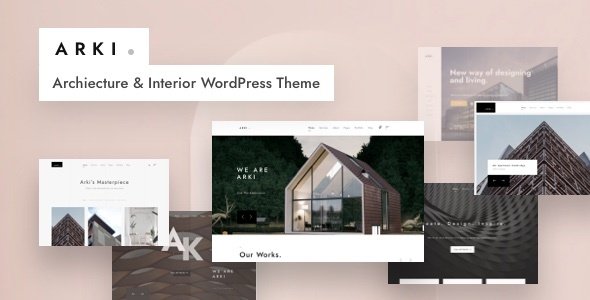
Stuck on your Arki WordPress theme? Let's fix it.
No endless back-and-forth. Just send us the details and we'll get it done.
No obligation · Replies within 1 hour · Quote within 1 day
Setup · Customization · Bug fixes · WooCommerce integration
About Arki WP Theme
Arki is a WordPress theme built by GoodLayers, designed specifically for architecture firms, interior designers, and creative studios. It ships with the GDLR Core plugin and GoodLayers’ own page builder, giving you a structured way to build portfolio-heavy sites without writing code.
The theme includes over 20 demo layouts, covering everything from single-architect practices to full design agencies. Each demo is importable in one click. Typography is clean, grid layouts are precise, and the focus is firmly on letting visual work take centre stage.
Arki supports WooCommerce for selling prints or design services, and it integrates with standard contact and booking plugins. It’s a well-supported theme with regular updates from GoodLayers, who have been building WordPress themes since 2012.
Get matched with a Arki developer in under one day
Tell us about your Arki project. Small fixes, Arki theme customization, or a full website build, whatever you need, we've got it covered.
We'll connect you to the right Arki developers, define the scope, and get everything 100% clear.
You'll get one estimate, hire your preferred developer, and start collaborating.
Arki is approachable for designers but can get complicated fast when clients want custom functionality, speed improvements, or multi-language support. Working with a vetted developer through Codeable means you get someone who knows GoodLayers themes well. No junior developers, no guesswork. Just a specific fix or build, scoped properly, with a clear estimate before any work starts. Explore WordPress development services from developers who have worked with Arki before.
Pros
- One-click demo import makes starting a new site fast and predictable
- Portfolio grid options are flexible with masonry, boxed, and fullwidth layouts built in
- GoodLayers page builder is tailored to Arki so shortcodes work reliably within the theme
- Regular updates from GoodLayers maintain compatibility with current WordPress versions
- WooCommerce support is built in, useful for studios selling services or prints online
Cons
- Relies heavily on the GoodLayers page builder, making it harder to switch themes later
- Page builder adds shortcode bloat to content that becomes messy if you ever migrate
- Default demo images are placeholders and need replacing before a site looks professional
- Performance needs attention out of the box as the theme loads multiple scripts on every page
- Support is limited to the GoodLayers forum and does not include hands-on customization help
Who is Arki for?
Architecture Firms
Arki was built with architecture in mind. The project portfolio layouts display floor plans, renders, and photography in clean grid or fullwidth formats. Filterable categories let visitors browse by project type or scale. The minimal typography keeps focus on the work rather than decorative elements.
Interior Design Studios
Interior design studios benefit from Arki’s large image areas and before/after slider support. You can separate residential and commercial project categories easily. The theme’s neutral color palette works without modification for most studio branding, though a developer can align it exactly to brand guidelines.
Landscape Designers
Landscape designers often combine portfolio work with service descriptions and contact forms. Arki handles this combination well using its page builder columns. Full-width image banners suit outdoor photography, and the blog layout works for publishing project case studies or seasonal planting guides.
Photography Portfolios
Photographers use Arki because the portfolio grids handle large images without layout breaking. The masonry option works well for mixed portrait and landscape shots. Lightbox support comes built in. Galleries can be organized by client, location, or project type using the built-in filtering system.
Creative Agencies
Small creative agencies use Arki to present multi-discipline work across branding, spatial design, and digital projects. The team section, service pages, and testimonial blocks cover the typical agency page structure. Adding a WooCommerce shop for branded merchandise or digital downloads is straightforward with the theme’s integration.

Customizing Arki
Arki’s customization centres on the GoodLayers page builder and a theme options panel built on Redux Framework. You can adjust typography, color schemes, header layouts, and portfolio grid styles without touching code. The page builder uses row and column blocks, with shortcodes handling sliders, counters, and testimonials.
That said, deeper changes, like custom post type structures, modified archive templates, or integrating a third-party booking system, usually require PHP work inside the theme’s template files. An Arki expert can extend the child theme properly so your changes survive updates. Custom CSS through the theme panel has limits, and some layout tweaks need direct template edits to behave correctly across screen sizes.
Recommended plugins for Arki
Arki works well with plugins that complement portfolio and agency workflows. WooCommerce adds e-commerce. WPML handles multilingual sites. Contact Form 7 and WPForms both integrate cleanly. For performance, pairing Arki with a caching plugin and image optimization tool is important given its image-heavy nature. Learn more about WordPress performance optimization.
For studios wanting better search visibility, structured data and technical SEO work well alongside Arki’s clean markup. See how WordPress SEO optimization applies to architecture and design sites.
Not sure which plugins to use? This WordPress plugins directory covers the most popular options with reviews and setup guides.
Arki common issues
Arki theme portfolio not displaying correctly after update
This usually happens when the GDLR Core plugin version does not match the updated theme. Go to Plugins and check if GDLR Core has a pending update. If the portfolio layout is broken after updating both, clear your caching plugin and check for CSS conflicts with any custom styles added to the theme panel. If the issue persists, a WordPress bug fixing service can diagnose template conflicts quickly.
Arki page builder shortcodes showing as plain text on frontend
Shortcodes appearing as raw text on the frontend means the GDLR Core plugin is either deactivated or missing. Arki requires it to render page builder output. Navigate to Plugins, confirm GDLR Core is active, and reload the page. If it’s active and shortcodes still show, there may be a plugin conflict with another page builder or shortcode processor running on the same installation.
Arki theme slow loading speed on mobile
Arki loads large image files and multiple scripts by default. Start by running the site through PageSpeed Insights to identify the specific bottlenecks. Common fixes include enabling lazy loading for portfolio images, minifying CSS and JS with a caching plugin, and serving images in WebP format. If the site uses video backgrounds in sliders, those alone can significantly impact mobile load times. See WordPress performance optimization for a structured approach.
Arki one-click demo import failing or incomplete
Demo import failures in Arki are usually caused by a low PHP memory limit or a timeout setting on the server. The import needs to pull images from an external server and create multiple post types at once. Ask your host to temporarily raise the PHP memory limit to 256MB and set max execution time to 300 seconds. If the import completes but images are missing, re-run it once more or import the XML content file separately.
Arki FAQ
GoodLayers updates Arki regularly to maintain compatibility. Always check the theme changelog on ThemeForest before updating WordPress core to confirm Arki supports the new version. Running updates on a staging copy first is a safe habit. If compatibility issues appear after a WordPress update, GoodLayers typically releases a patch within a few weeks.
Arki is built around the GoodLayers page builder and is not designed to run alongside Elementor. You can technically install both, but conflicts between the two builders are common and lead to layout issues. If you prefer Elementor, it’s better to use a theme built for it rather than trying to replace Arki’s builder mid-project.
Yes, Arki includes WooCommerce support. The shop, product, and cart pages are styled to match the theme’s aesthetic. You can sell services, prints, or digital downloads. More complex shop configurations, like custom product types or booking integrations, may need developer input to work correctly within Arki’s templates.
Create a folder in your wp-content/themes directory named arki-child. Add a style.css file with the correct Theme Name and Template headers pointing to arki, then add a functions.php file that enqueues the parent theme’s stylesheet. All customizations go into the child theme to avoid being overwritten by Arki updates. GoodLayers also provides a starter child theme in their documentation.
Migrating away from Arki is possible but involves work. Your content will transfer, but layouts built with the GoodLayers page builder will leave behind shortcode strings in your posts and pages. These need to be rebuilt in the new theme. Portfolio items and custom post types may also need remapping. A WordPress migration service can handle this cleanly without losing content.
Hire an Arki WordPress Developer
Whether you need a full Arki site built from a demo, a custom portfolio layout, or a fix that’s been sitting in your backlog, a specialist developer gets it done faster than trial and error. All work is scoped upfront with a free estimate, no obligation to proceed. Get your free estimate today and have an Arki developer matched to your project within 24 hours through Codeable’s vetted network.
You'll need a free Codeable account so developers can ask questions and send their quotes.