ART WordPress Theme
by SeaTheme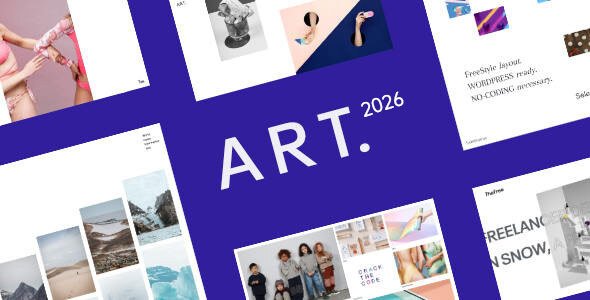
Stuck on your ART WordPress theme? Let's fix it.
No endless back-and-forth. Just send us the details and we'll get it done.
No obligation · Replies within 1 hour · Quote within 1 day
Setup · Customization · Bug fixes · WooCommerce integration
About ART WP Theme
ART is a WordPress theme by SeaTheme built for creative professionals who need a clean, visual-first layout without bloat. It ships with portfolio-style templates, smooth gallery support, and a minimal design that keeps the focus on the work itself.
The theme is compatible with the WordPress block editor and works well with popular page builders. Typography options are solid, and the layout responds cleanly across screen sizes. SeaTheme has kept the codebase relatively light, which helps with load times compared to heavier multipurpose themes.
ART suits photographers, illustrators, designers, and artists who want a professional online presence without hiring a custom developer. That said, deeper customisation beyond the theme options panel will require someone with real WordPress and CSS knowledge to get right.
Get matched with a ART developer in under one day
Tell us about your ART project. Small fixes, ART theme customization, or a full website build, whatever you need, we've got it covered.
We'll connect you to the right ART developers, define the scope, and get everything 100% clear.
You'll get one estimate, hire your preferred developer, and start collaborating.
Finding a reliable ART theme developer takes time. Codeable removes that problem. It’s a vetted network of WordPress specialists where you post your project, get matched with experienced developers, and receive a free estimate before committing to anything.
Every developer on Codeable has passed a technical screening process. For ART theme work specifically, you get someone who knows SeaTheme’s structure, understands portfolio site requirements, and can deliver without trial and error.
Pros
- Minimal, image-focused design that puts portfolio work front and centre
- Light codebase compared to multipurpose themes, which supports faster page loads
- Clean block editor compatibility with no major conflicts reported
- Responsive layouts that hold up well on mobile without extra configuration
- Straightforward Customizer options suitable for non-technical site owners
Cons
- Limited built-in layout variety means custom work is needed for anything outside the default templates
- Portfolio filtering requires third-party plugins or custom code to implement properly
- Documentation from SeaTheme is sparse, which slows down troubleshooting
- No dedicated demo importer, so initial setup takes longer than themes with one-click demos
- Advanced WooCommerce styling requires manual CSS work as the theme lacks a shop template
Who is ART for?
Photographers
ART’s full-width image layouts and clean white space make it a natural fit for photography portfolios. An ART developer can add category filtering by shoot type, integrate a contact form tied to booking enquiries, and set up password-protected client galleries so delivered work stays private until reviewed.
Illustrators and Digital Artists
Illustrators need a theme that gets out of the way and lets the artwork speak. ART does that. A specialist can extend it with lightbox functionality, grid layout customisation, and Behance or Instagram feed integration so your portfolio stays current without manual updates every time you post new work.
Graphic Designers
Designers often need case study pages alongside a traditional portfolio grid. An ART expert can build custom page templates for detailed project breakdowns, add testimonial sections, and connect a services page with a clear enquiry workflow that moves potential clients from interest to contact without friction.
Art Galleries and Studios
Galleries and studios need event listings, artist profiles, and exhibition archives alongside their main portfolio. With ART as the base, a WordPress developer can build custom post types for each of these, keeping the admin experience clean for staff who aren’t technically confident but need to update content regularly.
Print and Product Sellers
Artists selling prints or digital downloads can add WooCommerce to ART and have a functional shop without switching themes. An ART specialist handles the styling gap between SeaTheme’s defaults and a polished shop experience, including product pages, cart styling, and checkout flow that matches the rest of the site visually.

Customizing ART
Out of the box, ART gives you colour controls, font selection, and layout toggles inside the WordPress Customizer. That covers basic branding. But if you want custom portfolio filters, unique section layouts, or anything that departs from the default templates, you’ll need to edit theme files or add targeted CSS.
An ART expert can restructure the theme templates, add custom post types for portfolio pieces, and wire up ACF fields to give clients full editorial control without touching code. Things like custom hover effects, lightbox integration, or a client gallery with password protection are all achievable with the right ART specialist handling the build.
Working with a developer also avoids the common mistake of modifying theme files directly, which breaks on every update.
Recommended plugins for ART
ART pairs well with WooCommerce if you want to sell prints or digital downloads directly from your portfolio site. Yoast SEO or Rank Math both integrate cleanly for metadata control. For caching and image optimisation, plugins like WP Rocket and Imagify work without conflicts.
If your site is image-heavy, which it likely is with ART, proper performance tuning matters. An experienced ART developer can configure WordPress performance optimisation to keep load times fast even with large galleries. For artists building search visibility, pairing ART with solid WordPress SEO setup gives you a real edge over competitors using default configurations.
Not sure which plugins to use? This WordPress plugins directory covers the most popular options with reviews and setup guides.
ART common issues
ART theme portfolio grid not displaying correctly after WordPress update
Portfolio grid layout breaks after a WordPress update are usually caused by a conflict between the theme’s CSS and changes to the block editor output. Check whether the issue appeared immediately after the update. If yes, disable recently updated plugins one by one to isolate the conflict. If the grid uses a shortcode-based layout, the plugin generating those shortcodes may need updating too. For persistent layout problems, our WordPress bug fixing service can identify the root cause and restore the grid without losing your content.
ART theme images blurry or wrong size on high-resolution screens
Blurry images in ART are almost always a thumbnail size mismatch. WordPress generates multiple image sizes on upload, and if the theme expects a specific dimension that doesn’t match what’s registered, it serves a scaled-up smaller file. Run a thumbnail regeneration using a plugin like Regenerate Thumbnails after confirming the correct image sizes are registered in the theme. Also check that your original uploads are high enough resolution. Our WordPress bug fixing service can audit your media settings and fix this properly.
ART theme menu not working on mobile devices
A broken mobile menu in ART usually points to a JavaScript conflict. Open your browser’s developer console on mobile or using responsive mode and look for JS errors. Common culprits are caching plugins serving outdated scripts or other plugins loading conflicting jQuery versions. Clear all caches, disable JS minification temporarily, and test again. If the menu works with plugins disabled but not with them active, isolate the conflict by reactivating plugins one at a time until the break reappears.
ART theme custom fonts not loading or reverting to default
Custom fonts reverting in ART typically happen when a caching plugin is serving an old version of the stylesheet, or when a child theme CSS rule is being overridden. First clear all caches, including server-side cache if your host provides one. Check the Customizer font settings are still saved. If you loaded fonts via Google Fonts manually in functions.php, confirm the enqueue hook is firing correctly. A child theme handles this more reliably than editing parent theme files directly.
ART FAQ
SeaTheme continues to release updates for ART, but support response times can vary. If you’re running into issues and not getting timely help through official channels, working with an independent ART specialist is a practical alternative. They can troubleshoot, apply fixes, and handle ongoing WordPress maintenance without relying on the theme author’s support queue.
ART is compatible with Elementor and WPBakery, but the level of integration varies. Basic drag-and-drop editing works without issues. Where you’ll notice friction is when theme-specific templates and builder templates overlap, causing styling conflicts. An ART developer can resolve these conflicts and set up a consistent editing experience using whichever builder fits your workflow.
Yes, WooCommerce runs on ART, but the theme has no dedicated shop template. Product pages, cart, and checkout pages will use WooCommerce’s default styling, which won’t match ART’s design. A developer needs to write custom CSS and potentially override WooCommerce templates to bring the shop in line visually. It’s doable, but it requires hands-on work rather than a plugin toggle.
ART does not include portfolio filtering natively. The most reliable way to add it is with a plugin like Filter Everything or by using Isotope JS with custom code. An ART expert can implement filtering by category, tag, or custom taxonomy so visitors can sort your work without a page reload, which is the standard expected on professional portfolio sites.
ART’s lightweight codebase is a positive starting point for SEO. Faster load times help with Core Web Vitals scores. That said, the theme alone doesn’t handle technical SEO. You’ll need an SEO plugin for meta control and structured data. Pair ART with proper WordPress SEO configuration and performance tuning to get the most out of the theme’s speed advantage.
Hire an ART Theme Developer for Your WordPress Project
Whether you need a full ART theme setup, custom portfolio functionality, or fixes to an existing site, working with a specialist saves time and avoids costly mistakes. Our ART developers have handled everything from gallery customisation to full WooCommerce integrations built on top of SeaTheme’s framework.
No guesswork, no generic freelancers. Get a Free Estimate and describe exactly what you need. You’ll hear back with a clear scope and price before any work begins.
You'll need a free Codeable account so developers can ask questions and send their quotes.