Artday WordPress Theme
by WossThemes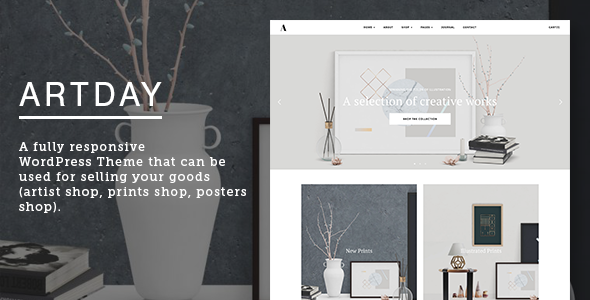
Stuck on your Artday WordPress theme? Let's fix it.
No endless back-and-forth. Just send us the details and we'll get it done.
No obligation · Replies within 1 hour · Quote within 1 day
Setup · Customization · Bug fixes · WooCommerce integration
About Artday WP Theme
Artday is a WordPress theme by WossThemes built for artists, photographers, illustrators, and creative studios. It puts visual content first, with a clean grid-based layout that keeps the focus on your work rather than the interface around it.
The theme ships with multiple portfolio layouts, fullscreen gallery options, and a minimal aesthetic that works equally well for a solo photographer or a small design agency. It supports Elementor and includes several pre-built demo templates you can import and modify without touching code.
WossThemes has kept the codebase relatively light, which helps with page speed out of the box. If you need something specific that the default settings do not cover, the theme is customizable through the WordPress Customizer and custom CSS fields without requiring a child theme for most changes.
Get matched with a Artday developer in under one day
Tell us about your Artday project. Small fixes, Artday theme customization, or a full website build, whatever you need, we've got it covered.
We'll connect you to the right Artday developers, define the scope, and get everything 100% clear.
You'll get one estimate, hire your preferred developer, and start collaborating.
Most Artday setup issues come from trying to replicate demo designs without matching the exact plugin versions or settings the demo used. A developer who has worked with WossThemes themes knows where those gaps are and can close them quickly.
Through Codeable, you get matched with vetted WordPress developers who can handle everything from initial setup to custom feature builds. No bidding, no guesswork. Post your project and get a clear estimate within 24 hours. Visit our WordPress development services page to see what is covered.
Pros
- Clean, minimal design that keeps portfolio work front and center
- Multiple pre-built portfolio grid layouts included out of the box
- Elementor compatibility makes layout editing visual and straightforward
- Relatively lightweight codebase compared to feature-heavy multipurpose themes
- One-click demo import gets you close to a finished look quickly
Cons
- Demo import requires specific plugins active or the layout will not match
- Header customization options are limited without editing template files directly
- No built-in client proofing or password-protected gallery features
- Documentation is sparse and does not cover advanced customization scenarios
- Update frequency from WossThemes is inconsistent, which can create compatibility gaps over time
Who is Artday for?
Photography Portfolio
Photographers get fullscreen image display, clean grid galleries, and fast load times when images are properly optimised. Artday’s minimal chrome means nothing competes with the photos themselves. Lightbox support works out of the box, and category filtering lets visitors sort by project type without leaving the page.
Illustration and Digital Art
Illustrators and digital artists benefit from the large visual canvas Artday provides. Portfolio items display well at high resolution, and the grid layouts handle mixed aspect ratios better than many niche themes. Adding a shop page with WooCommerce lets you sell prints or files alongside your portfolio without a separate site.
Creative Agency
Small creative agencies can use Artday’s case study layout to walk visitors through project work. The theme handles multiple team members through standard author archives, and the service page templates are clean enough to adapt without heavy customization. It suits studios with a strong visual identity rather than complex service hierarchies.
Fine Art and Print Sales
Artists selling original work or prints can combine Artday’s portfolio display with WooCommerce product pages. The visual-first layout makes products feel like gallery pieces rather than standard e-commerce listings. You will want a developer to align the shop styling with the portfolio aesthetic, but the foundation is solid.
Graphic Design Studio
Graphic designers working on branding, print, or digital projects get a theme that presents work professionally without looking like every other agency site. Portfolio filters help visitors navigate by project type, and the typography settings give enough control to reflect your own design sensibility without custom font plugins.

Customizing Artday
Artday gives you control over typography, colors, layout widths, and portfolio grid styles through the WordPress Customizer. Most visual changes are straightforward to make without any coding knowledge.
Where things get more involved is custom post layouts, header modifications, or anything that steps outside the built-in options. That is where working with an Artday expert saves real time. A developer who knows the theme structure can modify templates cleanly, set up a child theme to protect your changes from updates, and integrate plugins without breaking the existing design.
Custom work like unique gallery filters, AJAX loading for portfolio items, or client-proofing galleries typically requires PHP and JavaScript knowledge. Getting that wrong can break the portfolio display entirely, so it is worth having someone experienced handle it.
Recommended plugins for Artday
Artday pairs naturally with WooCommerce if you want to sell prints or digital downloads directly from your portfolio site. Contact Form 7 or WPForms handle inquiry forms without conflicts.
For galleries, Envira Gallery or FooGallery extend what the theme provides natively. If SEO matters to your visibility, Yoast or Rank Math both work cleanly with Artday. You can also improve load times significantly by adding a caching layer and optimising your images. See our WordPress performance service and SEO optimisation service for more detail on both.
Not sure which plugins to use? This WordPress plugins directory covers the most popular options with reviews and setup guides.
Artday common issues
Artday demo import not working or layout looks wrong after import
Demo import failures in Artday usually come down to missing required plugins or importing over an existing configuration. Before importing, install and activate all plugins listed on the demo page, then reset the theme options to default. If the import stalls, try importing the XML file manually through Tools > Import rather than using the built-in one-click importer. Placeholder images sometimes fail due to server timeout limits, which your host can increase temporarily.
Artday portfolio grid not displaying correctly or showing blank spaces
Portfolio grid gaps or broken layouts in Artday are often caused by missing featured images on portfolio posts, or a JavaScript conflict with another plugin. Open your browser console and check for JS errors first. If images are missing, adding them usually resolves the layout. If a conflict is the cause, deactivate plugins one at a time to isolate which one is interfering. Our bug fixing service can handle this if you need faster resolution.
Artday theme not updating or update breaking site layout
Artday updates can overwrite custom changes made directly to theme files, which is why a child theme is essential before any modifications. If an update has already broken your layout, restoring a backup is the safest first step. Going forward, move any CSS overrides into the child theme stylesheet and any template modifications into matching files in the child theme folder. This keeps your customizations safe through future updates.
Artday Elementor templates not loading or showing errors
Elementor template errors in Artday typically point to a version mismatch between Elementor, Elementor Pro, and the theme itself. Check that all three are on their latest versions. If templates show as corrupt or fail to load, try regenerating the CSS from Elementor’s tools menu. Switching to the default WordPress theme temporarily confirms whether the issue is theme-specific. A developer can resolve persistent conflicts without data loss.
Artday FAQ
Yes, Artday supports Elementor and includes templates designed for use with the page builder. Some pre-built sections are Elementor-specific. That said, mixing Elementor with the theme’s native portfolio post types can cause layout inconsistencies that need minor CSS fixes to resolve cleanly.
Artday works with WooCommerce, but the shop pages use WooCommerce’s default styling rather than a custom design matched to the theme. You will likely need some CSS work to make product pages feel consistent with the rest of your portfolio. A developer can align the two without major structural changes to either.
Create a new folder in your themes directory named artday-child, add a style.css file with the correct header referencing Artday as the template, and create a functions.php file to enqueue the parent stylesheet. Activate the child theme from Appearance > Themes. All custom CSS and template overrides go into the child theme from that point forward.
Yes, migrating an existing portfolio to Artday is straightforward for content but requires rebuilding the visual layout from scratch using Artday’s templates. Portfolio posts need to be recategorized to match the theme’s custom post type structure. Our WordPress migration service can handle the technical side of moving the site safely.
WossThemes releases updates irregularly. Artday receives patches when WordPress core changes require it, but active feature development is limited. Before committing to the theme for a new project, check the changelog for how recently it was updated and test it against the current WordPress version on a staging site.
Hire an Artday Developer
Whether you need a full Artday setup, a specific customization, or something broken fixed, we can match you with a developer who knows the theme. Work is handled through Codeable, so you get a vetted professional, a clear scope, and a fixed estimate before anything starts.
There is no obligation after the estimate. Get a free estimate and describe what you need. Most clients hear back within a few hours.
You'll need a free Codeable account so developers can ask questions and send their quotes.