Arter WordPress Theme
by bslthemes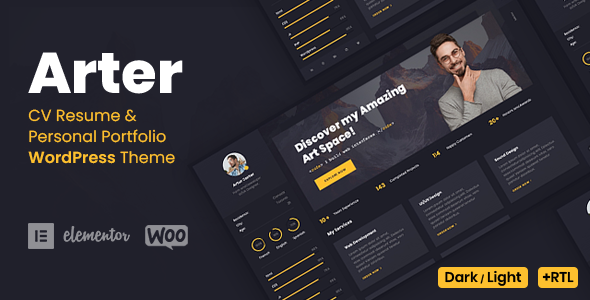
Stuck on your Arter WordPress theme? Let's fix it.
No endless back-and-forth. Just send us the details and we'll get it done.
No obligation · Replies within 1 hour · Quote within 1 day
Setup · Customization · Bug fixes · WooCommerce integration
About Arter WP Theme
Arter is a portfolio and agency WordPress theme built by bslthemes. It targets creatives, freelancers, and digital agencies who want a clean, minimal design with strong visual impact. The theme ships with multiple pre-built demo layouts, a drag-and-drop page builder, and smooth scroll animations built in.
Arter is built on Elementor, which makes layout editing straightforward without touching code. It includes portfolio post types, project filtering, team sections, testimonials, and contact forms out of the box. The theme is regularly updated and has a solid reputation on ThemeForest with thousands of active installs.
If you need a professional-looking site fast, Arter gives you a solid starting point. But getting it to look exactly like the demo, or customising it beyond the default options, often requires developer input.
Get matched with a Arter developer in under one day
Tell us about your Arter project. Small fixes, Arter theme customization, or a full website build, whatever you need, we've got it covered.
We'll connect you to the right Arter developers, define the scope, and get everything 100% clear.
You'll get one estimate, hire your preferred developer, and start collaborating.
Arter is well-documented, but documentation only takes you so far. If you are dealing with a layout that will not behave, a demo import that did not come through cleanly, or a feature the theme does not support out of the box, you need someone who has worked with Arter before.
FoxyConcept connects you with vetted WordPress developers through Codeable. Every developer on the platform has been screened for quality. You get a clear estimate before any work starts, and there is no obligation to proceed.
Pros
- Built on Elementor, so layout editing is visual and accessible without coding skills
- Multiple polished demo sites covering agency, freelancer, and creative portfolio niches
- Smooth scroll animations and transition effects built in without extra plugins
- Custom portfolio post type with filterable grid and masonry layouts included
- Regular updates from bslthemes with active ThemeForest support forum
Cons
- Heavy reliance on Elementor means switching page builders later is difficult
- Demo import can fail or import incompletely depending on hosting environment
- Some advanced layout options are only accessible by editing CSS directly
- Animation and scroll effects can hurt Lighthouse performance scores without tuning
- Support is limited to the ThemeForest comments section, with no live chat or ticket system
Who is Arter for?
Freelance Designer Portfolio
Arter’s minimal layout and strong typography make it a good fit for freelance designers. The portfolio grid handles case studies well, and the single project page gives enough space to walk through your process. You can strip the demo back to just the sections you need without much effort.
Digital Creative Agency
Agencies with three to fifteen people often use Arter to present services, team members, and recent work in one clean package. The theme includes team and testimonial sections, and the Elementor foundation means your team can make content updates without developer help on an ongoing basis.
Photography Studio
Arter’s full-width image support and masonry grid work well for photography portfolios. The lightbox functionality is included, and gallery pages can be built without plugins. For studios selling prints or session bookings, WooCommerce drops in without major conflicts.
Web Development Studio
Web development studios use Arter to show off project work and list services clearly. The theme handles technical content without looking cluttered. Adding a blog for publishing articles alongside a portfolio is straightforward with the built-in post layouts.
Motion Designer or Animator
Motion designers and animators benefit from Arter’s video embed support and full-screen hero sections. You can embed Vimeo or YouTube showreels in the header or within project pages. The overall aesthetic suits high-production creative work without the theme competing with the content.

Customizing Arter
Arter gives you a reasonable set of options through the WordPress Customizer and Elementor controls. You can adjust typography, colors, header styles, and layout settings without writing any code. The theme also supports custom CSS if you need to push further.
Where things get harder is when you want layouts that differ significantly from the demos, custom portfolio filtering logic, animated transitions on specific elements, or integrations with third-party tools. That is where an Arter expert becomes valuable.
An experienced Arter developer knows which settings interact with each other, where the theme’s CSS specificity causes conflicts, and how to extend functionality without breaking updates. If you have spent time tweaking settings and still cannot get the result you want, working with an Arter expert is the faster path forward.
Recommended plugins for Arter
Arter works well with a standard WordPress plugin stack. WooCommerce can be added for selling services or digital products. Contact Form 7 and WPForms both work without conflicts. For SEO, Yoast and Rank Math integrate cleanly. You can also pair Arter with a WordPress SEO service to get more out of the theme’s clean markup.
Performance-wise, Arter is reasonably lightweight, but adding multiple Elementor widgets and animation libraries can slow things down. If page speed is a priority, a dedicated WordPress performance optimisation pass is worth considering after the site is built.
Not sure which plugins to use? This WordPress plugins directory covers the most popular options with reviews and setup guides.
Arter common issues
Arter demo import not working
Failed demo imports in Arter are usually caused by PHP memory limits, execution time limits, or missing required plugins like Elementor and Starter Templates. Check that your host allows at least 256MB of memory and a 300-second max execution time. Install all required plugins before importing. If the import still fails, try importing XML content manually through Tools > Import, then import widgets separately. A developer can also replicate the demo layout without a one-click import if needed. See our WordPress bug fixing service if this is blocking your launch.
Arter portfolio filter not working after update
Portfolio filtering issues in Arter after updates are often caused by a JavaScript conflict with a caching plugin, or a missing isotope library that the theme depends on. First, clear all caches including server-side cache. Then check the browser console for JavaScript errors. If you see an isotope or jQuery error, the issue is likely a plugin conflict. Deactivate plugins one by one to isolate the cause. If the filter was working before a theme update, roll back to the previous version while you investigate.
Arter header menu not showing on mobile
When Arter’s mobile menu fails to appear, the most common cause is a JavaScript error stopping the menu toggle script from firing. Open the browser console on mobile view and look for errors. CSS conflicts from child theme styles or third-party plugins can also hide the hamburger icon. Check that the mobile breakpoint in the Customizer matches your expected device width. If you have added custom header code or a header plugin, temporarily disable it to see if the default Arter header restores correctly.
Arter animations causing slow page speed
Arter’s built-in animations use CSS transitions and JavaScript scroll libraries that add render-blocking weight. To improve page speed without removing all animations, start by enabling lazy loading on images and deferring non-critical scripts. Use a caching plugin with CSS and JS minification. Consider disabling entrance animations on sections below the fold using Elementor’s motion effects settings. For a deeper fix, a WordPress performance optimisation service can audit exactly which assets are slowing the score down.
Arter FAQ
Arter works well for portfolio sites, particularly for creatives and small agencies. It has a built-in portfolio post type, filterable grids, and single project layouts. The demos are polished and the Elementor foundation makes editing approachable. The main limitation is that heavy customisation beyond the demo style requires CSS knowledge or developer help.
Arter’s core demo layouts work with Elementor Free. However, some advanced widgets used in certain demos, such as forms, sliders, and popup elements, require Elementor Pro. If you want to replicate a demo exactly, check which widgets it uses before purchasing. Most essential portfolio and agency features work without the Pro version.
WooCommerce is compatible with Arter and installs without major conflicts. The theme does not include dedicated WooCommerce templates, so product pages and cart layouts will use WooCommerce defaults with the Arter base styling applied. For a heavily customised shop, you would need to add CSS or build custom templates. Arter suits simple product listings better than complex stores.
Arter updates through ThemeForest. Before updating, back up your site. If you have made changes directly to theme files, those will be overwritten. Always use a child theme for code customisations. Elementor page content and Customizer settings are stored in the database and will survive a theme file update. Check the changelog before updating to know what changed. Our WordPress maintenance service handles safe updates.
Migrating an existing site to the Arter theme is possible but takes planning. Your content, posts, and media transfer without issue. The main work is rebuilding page layouts in Elementor to match Arter’s structure, since layout data is theme-specific. If your current site uses a different page builder, layouts will need to be rebuilt manually. A WordPress migration service can handle the technical transfer while a developer rebuilds the design.
Hire an Arter WordPress Expert
Whether you need a full Arter site built from scratch, a specific section customised, or a problem fixed, FoxyConcept can match you with a developer who knows the theme. Work is delivered through Codeable, so you get a vetted developer, a fixed estimate, and no surprises.
Get a free estimate and describe what you need. You will hear back within 24 hours.
You'll need a free Codeable account so developers can ask questions and send their quotes.